XLoot
Cleaner, more configurable loot frames for World of Warcraft







Originally created by Xuerian, who maintained it for years, and now continued by Wheelbarrel00 with his blessing. All credit for the original work is his.
XLoot is tested and in active use on retail Midnight, every current Classic flavor, and WoW Forever. Found a problem? Please check the issue tracker and open an issue if it is not already reported.
Supported versions
- Retail: Midnight (12.1)
- Mists of Pandaria Classic (5.5.x)
- Burning Crusade Classic (2.5.6)
- Classic Era (1.15.9)
- WoW Forever (1.60)
About
XLoot is a set of modules that improve looting in World of Warcraft by replacing the default loot frames with cleaner, more informative, and far more configurable ones. Use all of them or only the ones you want. Each module can be enabled or disabled like any other addon.
Modules
XLoot Frame: the loot window
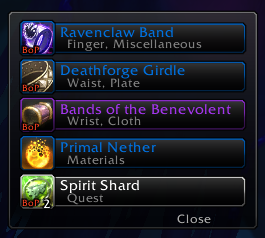
- Replaces the default Loot Frame with a compact, skinnable window showing quality borders, item level, and more.
- Rule-based auto-looting. Automatically loot only what you want:
- by category: currency, quest items, trade goods
- by rarity: everything at or above a quality you choose (e.g. greens and up)
- by gear: minimum quality and minimum item level
- by value: minimum total vendor price
- by a custom item list, or simply everything
- each rule can apply Solo, in Groups, Always, or Never
- Speedy auto-loot. Instantly vacuum a corpse the moment its loot is available, one item per server tick and without opening the loot window. The steady pacing dodges the "looting too fast" disconnect on big AoE pulls. Off by default.
- Optionally limit it to only your filtered items (the rules above), leaving everything else in the loot window.
- Flip it on or off on the fly with /xlspeedy, a key binding, or Shift-click on the minimap icon. Each toggle confirms ON or OFF in chat.
- Optionally leave fishing catches alone, so fishing tracker addons can still read every fish.
- Hold your auto-loot key (Shift by default) to skip it for a single corpse. It never runs under master loot.
- "New look" and "Upgrade" tags. Mark loot rows for gear whose transmog appearance you haven't collected yet (a cyan (new look) tag) or whose item level beats what you have equipped (a green (upgrade) tag), so you never vendor or disenchant something worth keeping. Off by default.
- Color quest items. Give quest items their own name and border color, or use your class color, so they stand out the moment the window opens. It covers both quest-type items and the ordinary drops your active quests ask you to collect. Off by default.
- Link an entire loot drop to chat with one click, or have XLoot announce it automatically the moment the loot window opens, using the same quality threshold. Each corpse is announced only once, so reopening it never repeats.
- Show each item's vendor sell price on the loot row, as plain text or as gold/silver/copper coin icons. The same Coin icons switch also shows looted coins as icons, in the loot window and the Loot Monitor.
- On the Classic flavors, also add the vendor sell price to item tooltips (with a full stack's value), which the base game doesn't show there. Off by default, under /xloot → Global options. Retail shows sell price natively, so the option is hidden there.
- Extensive appearance options: colors, sizes, fonts (including an outline for item names), anchoring, and Masque skin support.
XLoot Monitor: the loot feed
- A "toaster" that pops a clean notification for each item looted, yours and/or others', similar to Guild Wars 2.
- Great for watching what's dropping at a glance, or for moving loot spam out of your chat box entirely.
- Shows item level on gear, stack counts, quality coloring, and optionally how many of an item you already own.
- Color quest items the same way the loot window does: name, row border, and icon border. Quest items show even when they fall below your quality thresholds. Off by default.
- Show gold from system messages. Surface gold the game only reports as a system message, such as world-quest rewards and gold purses (Sky Racer's Purse). Off by default.
- Track reputation, experience, honor, and skill-ups in the same feed: "+250 Silvermoon Court", "+1,350 XP". Repeat gains add up on one row, reputation losses show in red, and each kind has its own switch. Off by default.
- Currency cap warning. Tag a currency with "(capped)" or "(weekly cap)" once you hit its limit, so you know further gains are going to waste. Off by default.
- Match your class colors. Color rows by item quality, or switch to your own row border color and optionally extend it to coin and currency rows too.
- Hide Blizzard's default loot pop-ups so the built-in toasts don't pile up next to the Monitor.
- Right-click a row to dismiss it, and keep loot on screen as long as you like with adjustable fade times.
XLoot Toast: loot pop-up alerts
- A Blizzard-style pop-up toast that highlights notable loot the moment you receive it: item icon, quality-colored name, and a counting-up quantity, with a subtle glow-and-shine flourish.
- Loot several of the same item and they coalesce onto one toast with a "+N" blink, so a run of drops never buries your screen in toasts.
- Configurable to taste: a quality threshold (only toast rares and up, for example), quest items, item level, how many show at once, time on screen, spawn animation, sound, quality coloring, font, and a movable anchor with growth direction.
- Mouse behavior your way. Keep toasts fully clickable (right-click to dismiss, Shift-click to link in chat), make them click-through so they never eat a click meant for the UI behind them, or click-through until you hold Shift.
- When enabled, Toast also hides Blizzard's own duplicate loot toast so you see only one, and sits above other interface widgets instead of being covered by them.
- Off by default. Type /xltd to preview it. XLoot Toast shares the Monitor's loot detection, so keep the Monitor module enabled for toasts to appear.
XLoot Group: group loot rolls
- Need / Greed / Pass roll frames (plus Transmog on retail and Disenchant where the game supports it), with a countdown timer, item level, bind, and quality shown at a glance.
- Item names are marked when you can equip the item, or with a + when Pawn rates it an upgrade for you.
- See who rolled and who won (retail). As your group rolls, the counts build up on the Need, Greed, and Transmog buttons, then the window names the winner in their class color with the winning roll type's icon, or shows Pass: All when nobody wanted it. Retail closes your own roll the instant you choose but doesn't decide the item until everyone has rolled, so the window waits for the result and shows the current leader in the meantime. Off by default. The Classic flavors have always shown this. /xlgd previews it.
- Roll-frame highlight. Recolor the roll window border to show why a drop matters at a glance: green for an item-level upgrade, blue for an appearance you haven't collected yet. Off by default.
- Per-item auto-roll. Shift-click Need, Greed, or Pass on a roll window to save a rule for that item, and matching drops then roll for you automatically, including auto-confirming bind-on-pickup prompts. Auto-Need is behind its own opt-in, so a rule can never Need for you without your say-so. Off by default.
- Urgent roll timer. The countdown can ramp the whole row border to red as time runs out, so a roll about to expire is easy to catch. Off by default.
- A movable anchor (/xlg) plus the usual color, size, font, and expiration options.
XLoot Master: master loot
- A configurable master-looter interface: assign loot from a clean right-click menu, with class submenus, special recipients (banker, disenchanter, self), raid rolls, and award announcements to chat.
- Fully supported on the Classic flavors (Classic Era, Burning Crusade, Mists of Pandaria), where master loot has always existed.
- Retail note: experimental and unverified. Blizzard brought master loot back in patch 12.0.5, but only on Chinese (CN) realms. XLoot includes a retail master-loot interface built against Blizzard's current code, and the menu and detection are validated, but we can't log into a CN realm to test the actual loot assignment. If you play on a CN realm, please let us know whether it works. Feedback either way is a huge help. Off CN it simply stays inactive.
- Open its options with /xlml.
Minimap icon and broker support
- An optional minimap button using XLoot's coin icon. Left-click opens the options, right-click opens the What's New summary, Shift-click toggles Speedy auto-loot, and you can drag it anywhere around the minimap edge.
- Turn it on under /xloot → Minimap icon. Off by default, so an update never adds a button to your minimap uninvited.
- Prefer a bar? XLoot is also offered to data broker displays such as Titan Panel, ChocolateBar, and ElvUI's datatexts, with the same click actions. This works whether or not the minimap button itself is shown, so you can keep your minimap clean and still reach XLoot from a bar.
Update notices
After an update, XLoot can show a short What's New summary of what changed. Pick how you want it under /xloot → After an update:
- Popup window. A tidy summary opens shortly after you log in.
- Chat link. A quiet, clickable link in chat you can open whenever you like.
- None. No popup and no chat message.
Skipped a few versions? The summary rolls everything you missed into one. And because every new feature ships off by default, an update never changes how your looting behaves until you choose to turn something on.
How to use
- Type /xloot (or go to Game Menu → Options → AddOns → XLoot) to configure everything.
- /xlm toggles the Monitor's anchor so you can drag the loot feed where you want it.
- /xlg toggles the Group anchor so you can position the roll frames.
- /xltd previews a few toasts so you can position the Toast anchor and try the settings.
- /xlgd previews sample roll frames so you can position the Group anchor and see the roll-results display.
- /xlml opens the Master Loot options (Classic flavors, experimental on retail CN).
- Turn on the minimap icon under /xloot → Minimap icon for one-click access, or add XLoot to Titan Panel, ChocolateBar, or an ElvUI datatext instead.
- Every option has a mouseover tooltip explaining exactly what it does.
- Don't want a module? Disable XLoot Frame, Monitor, Toast, Group, or Master individually in the AddOns list, like any other addon.
Auto-loot quick start
- Open /xloot → Loot Frame → Auto-looting.
- XLoot's auto-loot rules run when its loot window opens, so leave WoW's own blanket auto-loot off if you want XLoot to do the filtering.
- Set each rule to Never / Solo / Group / Always. For gear and value, also set the minimum quality, item level, or price.
- Want it instant with no loot window? Turn on Speedy auto-loot at the top of that page. Add "Only speedy-loot filtered items" if you'd rather Speedy respect the rules above than grab everything.
Masque skins
Not all Masque skins will work without adjustment. See the comments at the top of skins.lua for how to add a tweak for a specific skin.
Support
Join the community Discord for help, feedback, and update news.
If you'd like to support the project, there's a Donate button on the WoWAce page.
We welcome your feedback!

-

Xuerian Owner
-

MrFIXlT Maintainer
-

Wheelbarrel00 Maintainer