SpeakinSpell
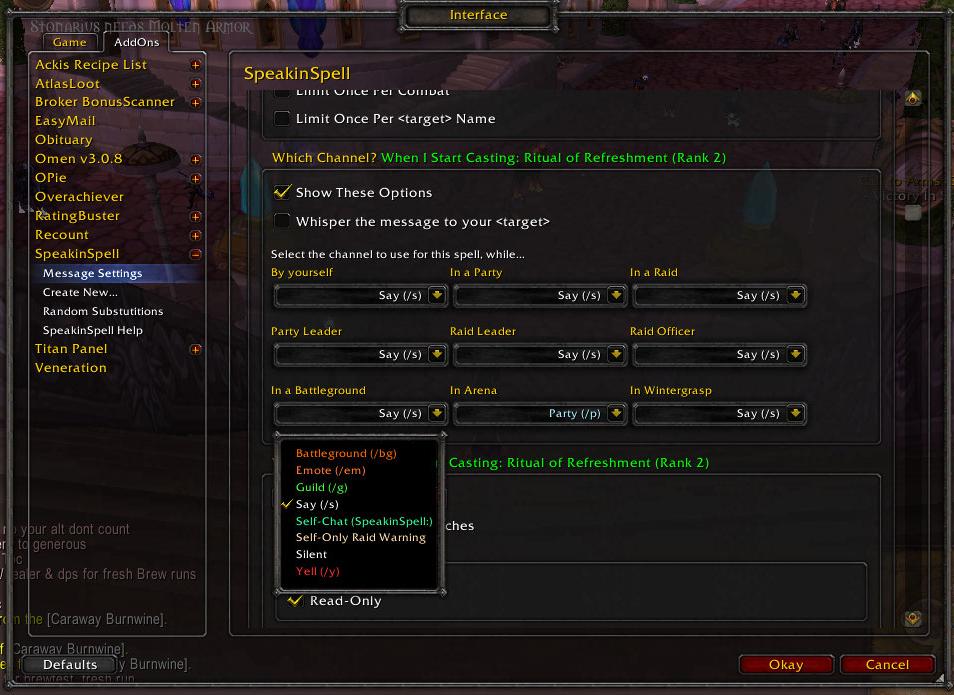
Funny and/or Useful, SpeakinSpell will use random speeches in chat to announce when you use spells and other abilities, as well as items, procced effects, other events, and user-defined macros. Works with all classes. Configurable for many different situations.
Possible Uses
- Entertain yourself, your guild, and your PuGs
- Roleplay
- Tell your raid that you got an important debuff
- Tell your arena team that you're CC'd
- Whisper your target about a short term buff
- Congratulate your guild members on achievements
- Randomize your battle cries
- More
Main Features
- Can detect over 5000 "Events" and automatically announce them in the chat using a random selection from a list of user-defined speeches, including:
- Spells you cast
- All other abilities for any class (a warrior's Heroic Strike is also technically considered a "spell")
- Anything you can equip in your action bar
- Items
- Procced effects (buffs that you receive from yourself)
- Combat events (enter/exit combat, scored a crit, killing blow, etc)
- Talking to NPCs and other game objects like mailboxes
- Achievements
- Other events (Login, Changed Zone, etc)
- whenever you type "/ss macro something" (create your own event)
- Records more event hooks as it discovers more spells, buffs, and debuffs, etc the longer you use it.
- Each spells' random speeches can be directed to any chat channel you choose
- Supports different channel options (or silent) in different scenarios: solo, party, party leader, raid, raid leader, raid officer, BG, arena, and Wintergrasp.
- Also supports built-in emotes and most other slash commands (/cheer, /script, etc)
- Fully configurable through the interface options panel. (type "/ss" to get started)
- Includes some default example speeches for at least a few spells for all classes.
- These are only meant to serve as examples. In general, very few default speeches are available for most classes, so you may not see it do anything for you right away. You should look at the list of possible event hooks under "/ss create" and write your own speeches.
F.A.Q.
How do I make a backup copy of my SpeakinSpell data?
I recommend making a backup of your SpeakinSpell data frequently. All of your speeches for all characters are stored here: C:\Users\Public\Games\World of Warcraft\WTF\Account\<your name>\SavedVariables\SpeakinSpell.lua
How do I erase all the defaults and start from a clean slate?
Type "/ss eraseall" to erase all your data. This includes any defaults as well as any custom speeches you've written.
How do I find the spell or other event that I want to change in this huge list?
Cast the spell, or trigger the event, then type "/ss recent" then use the click-able links in your chat frame to [Edit Speeches] or [Setup New Event].
How do I stop it from announcing this spell or other event?
Cast the spell, or trigger the event, then type "/ss recent" then use the click-able links in your chat frame to [Edit Speeches] for that event... then click the button that says "Delete this event"
OMG this is so complicated!
Hey! That's not a question! It's a common complaint though, and I'm open to specific suggestions about what you find is too complicated, or confusing, or could be made easier, more intuitive, or more user-friendly. With great power comes great complexity. Everything is labeled with detailed tooltips, and there's a detailed user manual built-in (/ss help) and online to help you out. I also usually answer questions within 24 hours.
Aetharan has also written some nice guides here: http://tinyurl.com/a64sst4
Usage Instructions
How to setup SpeakinSpell in a few easy steps:
- Login and play your toon for a few minutes.
- Activate any abilities, trigger any procced effects, and encounter any other detectable events that you would like SpeakinSpell to announce.
- Type "/ss" to access the interface options panel
- Click on "Create New..." or type "/ss create" to create settings for a new spell or other event
- Select the desired spell or event from the list and click the Create button. You will be taken to the settings page for that spell or event.
- Change the settings to your tastes and write as many speeches as you want. Now whenever you cast that spell or encounter that event, SpeakinSpell will say one of your random messages for that event, using the channels and other rules that you defined.
- Repeat until you run out of ideas for new announcements to write.
Spammy Setup Guides Method
- Type "/ss guides" to enable Setup Guides (there's also a checkbox for it under "/ss options")
- Do stuff with your toon
- Observe that the spammy Setup Guides are reporting all 5k+ of every event that SpeakinSpell detects and could possibly announce
- Click on the clickable links in your chat frame to [Setup New Event] announcements (equivalent to using "/ss create") or [Edit Speeches] for event hooks you already configured (equivalent to using "/ss messages")
- Type "/ss guides" again to turn the Setup Guides back off
- At any time you wish you had the Setup Guides enabled to catch a special proc effect or something, type "/ss recent" to see Setup Guides for the last 5 events detected, and last 5 events announced.
Type "/ss help" for the in-game user's manual for complete, thorough instructions for how to make the most of every feature SpeakinSpell has to offer. It's designed for maximum flexibility.
Additional Features
- Supports over 50 substitutions in your speeches, such as <caster>, <target>, <zone>, <spellname>, <party2pettarget> and many more.
- <spelllink> will create a clickable link to the spell or achievement (for applicable events)
- All of these substitutions also support first person pronoun forms (to say "me" instead of my own name), gender forms, and possessive forms, to make your automated macros sound less like macros and more like natural speech
- Also includes random substitutions like <randomfaction> (like Mad Libs™) and you can create your own random substitution word lists.
- Up to 100 speeches can be entered per spell.
- Never says the same message for a given spell twice in a row (unless you only have 1 message defined for that spell)
- Can be configured to limit your chat spam in several ways
- based on a cooldown between automated speeches in chat
- based on a random chance to speak or not
- optionally limited to once per combat
- optionally limited to once per target name
- based on a global cooldown
- Can whisper messages to the target of your spell (This can be useful for resurrect style spells, innervate, power infusion, etc.)
- When you get compliments on your "macros" use "/ss ad" to tell your friends about SpeakinSpell. Some of the random ads are funny. Yes, it's an addon that spams random text in chat, and it has a feature to spam random text to advertise it's ability to spam random text. "/ss help" in game for more advanced options for using /ss ad.
- Detection of "other events" such as Login, entering combat, changed zone, and more. Type "/ss help" in game for the complete list.
- Custom Defined User Macros. Type "/ss macro something" to make SpeakinSpell detect a pseudo spell event called "When I type: /ss macro something" which you can setup to be announced with random speeches like a spell. This can be used for randomized battlecries (/ss macro battlecry), greetings (/ss macro hi), farewells (/ss macro bye), or anything you want to define (/ss macro _blank_).
- Share your speeches with your friends through the Data Sharing system
- type "/ss import" to browse the shared content you collected from others and add it to your settings (works for copying from your alts too)
- type "/ss network" for options
- type "/ss help" for help.
- Easter Egg ... there's a mildly amusing little story hidden away somewhere in an obvious place where you will never look for it ... yes, I do actually have a lot of time on my hands ...
More Information
SpeakinSpell has many more features than those listed above.
Click here for the Complete User's Manual, or type "/ss help" in-game for the same info. NOTE: If "/ss help" doesn't work, you may have an installation error, or you may have too many addons installed. Try right-clicking the minimap button, or hitting: Escape > Interface > Addons > SpeakinSpell.
Please submit a ticket for any problems, bug reports, or feature requests, or feel free to post in the comments below (but tickets are easier for me to remember to fix).
Submissions Welcome. To submit content including the witty random speeches you wrote, please read this. If you are a translator with better translations, please use this localization tool.
More Technical Information: If you're a programmer interested in understanding more about how SpeakinSpell works, read the SDD.doc in the SpeakinSpell addon folder. It's a software design document in the (compatible) MS Word 97 file format with details about the system architecture.
Aetharan's Tutorials for advanced tips and tricks: http://tinyurl.com/4ptc2xg
Petit tutoriel en Français http://abz.progp.net/wow/Tutoriel_SpeakinSpell.pdf
en Français a Youtube http://www.youtube.com/watch?v=f62eE6rzAFA
The official SpeakinSpell Forum http://www.rismisner.com/forum/viewforum.php?f=3 - Unfortunately, the SpeakinSpell forum is currently disabled because it received an excessive amount of spam advertisements (about 80 per day and only about 1 real post per month for 2 months). I will need help or time to learn how to adequately block advertisers before re-opening it.
Credits
SpeakinSpell was created by...
- Stonarius of Antonidas
Additional coding by...
- Duerma
Primary Beta Testing, Arena Team Pwnage, Key Grip...
- Meneldill
Translators...
- German: leXin (inactive)
- Korean: troth75 (inactive)
- French: contrebasse, An_Braz
Many of the default speeches were blatantly stolen from...
- Cryolysis2
- Necrosis
- LunarSphere
- Ultimate Warcraft Battlecry Generator
- RPHelper2
Thanks for the open license guys! I hope you like what I did with it.
Additional Content Packs Written by...
- Stonarius
- Meneldill
- leXin
- troth75
- Folji
- Dire Lemming
- Duerma
Special thanks to the authors of these addons that I used for copy-paste... *Ahem* I mean example code...
- Titan
- Omen
- Recount
- Healbot
- Mountiful
- WinterTime
- the WowAce libs
- RPHelper2
Additional thanks to...
- Blizzard Entertainment for this great game! ... hire me??
- The community on the wowace forums
- curse.com
- Microsoft Visual Studio, SubVersioN, and TortoiseSVN
- Texas Instruments for enabling E.T. to phone home
- The Order of the Stick
- Mom and Dad
- YOU!!
SpeakinSpell is made from 83% Recycled Materials.
No animals were harmed in the making of this addon.
... Well, the hunter popped a sheep with his aoe, but I resheeped with my /cast [target=focus] macro, and automatically said "Baaah! sheeped again <target>?!" and it was all good...
Comments


-

rismisner Owner
-

_ForgeUser12889595 Author
-
_ForgeUser228323 Author
-
_ForgeUser2730284 Translator
-

Akarficus Author
-
Forge_User_57782851 Translator
-

meneldil_duskwood Tester
-
View User Profile
-
Send Message
Posted Apr 18, 2021Hey peeps! I have forked my own version of this project that can be found here - https://www.curseforge.com/wow/addons/speakinspell-reforged/ I tried to contact the owner to continue the project but got no reply. So, I have made my own fork of this project so that people can still have fun with this without bugs. Thanks to all the authors who made this possible. 🙂
-
View User Profile
-
Send Message
Posted Jul 4, 2021In reply to Akarficus:
You are my hero.
-
View User Profile
-
Send Message
Posted Jul 31, 2021In reply to mooklepticon:
Hey, thanks. Glad you are enjoying the forked mod version. 😃 However, I don’t really feel like a “hero” to be honest. I just wanted people to experience the mod as I did back when it was in active development. The true heroes, imo, are the developers who made this possible before I came in on the scene here. 😁 Cheers and happy adventuring!
-
View User Profile
-
Send Message
Posted Dec 25, 2020Hey guys! Y/S not working outside dungeons D: In description of RSA addon I have read that's because of Blizzard changed something in 8.2.5. Anyone of you may be know some way to avoid that? Writing warcries via /emote I think not a good idea really.. Why Blizzard ruined that I have no idea =\
-
View User Profile
-
Send Message
Posted Jan 12, 2021In reply to WildWhiteWolfy:
The function was being abused by spammers and bots. Any way to bypass the change would likely either see the bypass removed, or action against the user.
Just going to have to deal with it.
-
View User Profile
-
Send Message
Posted Oct 16, 2020So, with patch 9.0, I found myself no longer able to open the interface for Speakinspell, getting an error message:
SpeakinSpell\Libs\AceGUI-3.0\widgets\AceGUIContainer-Frame.lua:189: attempt to call method ‘SetBackdrop’ (a nil value)
Everything else seemed to be working as normal from before the patch dropped. If this is the case for you as well,
go download the package at:https://www.wowace.com/projects/ace3
And replace any files and folders in the Speakinspell folder in your addons with the appropriate files and folders from that package. That should freshen up the Duct Tape and Prayers that have been holding this beloved mod together so far and let you open up the interface again. With any luck, one day some brave soul will take up the mantle to maintain this mod properly, but for now, we'll do what we can.
Thanks to Fizzlemizz of Azjol'Nerub on WoW's UI & Macros forum for helping me get this back up and running.
EDIT: Small addendum, make sure you're using the version of Speakinspell linked to by MofSeth below me, not the version available here through curseforge.
-
View User Profile
-
Send Message
Posted Nov 5, 2020In reply to BlazetheSage:
heya, thank you for those infomations <3
-
View User Profile
-
Send Message
Posted Apr 18, 2021In reply to BlazetheSage:
Thank you!
-
View User Profile
-
Send Message
Posted Sep 18, 2020Hello there,
After some hours to search for, i found the most recent SpeakingSpell version (forked from the rismisner's one):
=> https://github.com/Nodd/SpeakinSpell/tree/retail
it works perfectly with my French WoW 8.3.7 Retail without any errors.
hope the author would update the addon because it's really useful.
Enjoy :3
[EDIT]: still work well with my WoW Retail 9.0.1.36492 (after the latest patch this week)
Happy RolePlay y'all :3
-
View User Profile
-
Send Message
Posted Apr 18, 2021In reply to MofSeth:
Thank you!
-
View User Profile
-
Send Message
Posted Sep 13, 2020I just found this addon to fulfill something i was trying to do. I wanted a macro that would /s FROST SHAWK! when i was solo leveling, but not when i was in a group. SS is a bit overkill for the one thing, and i have to go through and change a lot of my current macros, but its worth it. From what I can tell, its a solid addon with few instabilities and lots of potential for much of the roleplaying flavor I enjoy.
So im just now learning it, and I like how you just play the game, and then go back and find the event you want to customize, but it takes up a lot of real estate in the chat window. QUESTION: Is there a way to move /ss guides to its own tab in the chat window so i can have it running all the time, without having it clog up my main chat window while im playing the game?
-
View User Profile
-
Send Message
Posted Jul 9, 2020I don't know if the author still reads this stuff, but I just wanted to say "thanks" once again.
I'm still using SpeakinSpell on live. Not 'this' version, but the one linked by someone in the comments below.
It still works wonderfully, and I use it on all my rerolls to create some kind of dynamic ambience in dungeons with a TON of macros.
I have a /ss macro to say Hello, Bye, I like this place / I don't like this place (in dungeon depending on if the place is creepy or relatively nice), Wait here a sec (if I'm a tank and want to pull a pack to us), Focus this enemy (with skull mark), Well done, Thanks, Let's go there, Polymorph him (with moon mark), Thank-you healer, Yup, Nope, gg for your level-up, Follow me...
All of these with about a dozen SpeakinSpell variations depending on the character and the role I'm playing.
I've had a LOT of fun with my Dark Iron Destro Lock going around yelling about burning stuff up like a pyromaniac, and I'm now playing a Zandalari tank who praises the Loas.
I used to play a lot more around giving lines to specific skills/spells before, but now, I tend to put all of my offensive SS lines in the "1% chance if I do a critical strike" to avoid talking too much during combat. All the other lines are manually ran via macros.
In general, people seem to have a positive attitude towards this, when people are ready to take their time. People who are there to speedrun a dungeon generally are as responsive a rocks.
-
View User Profile
-
Send Message
Posted Nov 29, 20198.2.5 has broken Speakinspell and many other chat addons intentionally. /say and /yell will no longer be able to be read outside of specific situations, and instead will freeze and queue your enter button to then spam chat all at once with everything your Speakinspell has procced.
Use the suggestion tool and the World of Warcraft forums to suggest against this. It was done to combat efficient farming of places like Mechagon, but it's made a miserable experience out of roleplaying in the open world with this addon, and I don't know if borderline fun policing was ever worth that cost.
-
View User Profile
-
Send Message
Posted Nov 29, 2019In reply to Ninth_Belief:
#FunDected
Complaining probably won't result in any change. People have complained about other add-on breaking changes they made, the most recent was what they did to Census+.
#NoChanges
-
View User Profile
-
Send Message
Posted Nov 22, 2019For Classic WoW I keep getting errors about it not being able to find LibResInfo-1.0.lua and this is because the "fixed" program at: SpiritiaMaster/SpeakinSpell-Classic version does not contain it. BUT you can find the missing library at: https://github.com/phanx-wow/LibResInfo
-
View User Profile
-
Send Message
Posted Nov 22, 2019For BFA, I found this link to make SpeakingSpell supposedly work: https://github.com/Kresx/SpeakInSpellBFA
NOTE: THE AUTHOR STATES THIS MAY WIPE OUT ALL OF YOUR SETTINGS INCLUDING ANY "SAYINGS" YOU HAVE INPUT TO THE ADD-ON.
-
View User Profile
-
Send Message
Posted Sep 14, 2019So, I get that this is a long shot, considering how utterly abandoned this is, and how the creator hasn't been seen in almost a year and a half, but does anyone suppose there's any hope of getting a working version of this for Classic? I miss it. It just isn't the same without my in-character combat chatter.
-
View User Profile
-
Send Message
Posted Sep 27, 2019In reply to BlazetheSage:
After quite a bit of search I did find this in GitHub.... it seems to be working ok as far as I can see
https://github.com/SpiritiaMaster/SpeakinSpell-Classic
-
View User Profile
-
Send Message
Posted Sep 27, 2019In reply to Forge_User_30619808:
You sir, are my hero. I'm about to leave for work, and can't test this now, but tonight, we shall see...
-
View User Profile
-
Send Message
Posted May 18, 2019Have to say, I don't enjoy playing WoW without SpeakinSpell anymore. :3
Thanks for those who managed to have it work again.