Rarity
PLEASE READ THIS COMMENT BEFORE REPORTING ANY 12.0/MIDNIGHT ERRORS!
NEW:
- Rarity now has a Discord server!
If you're interested in following the development process or contributing, you should also check out the official GitHub repository. We're always in need of more hands to help us make the addon better!
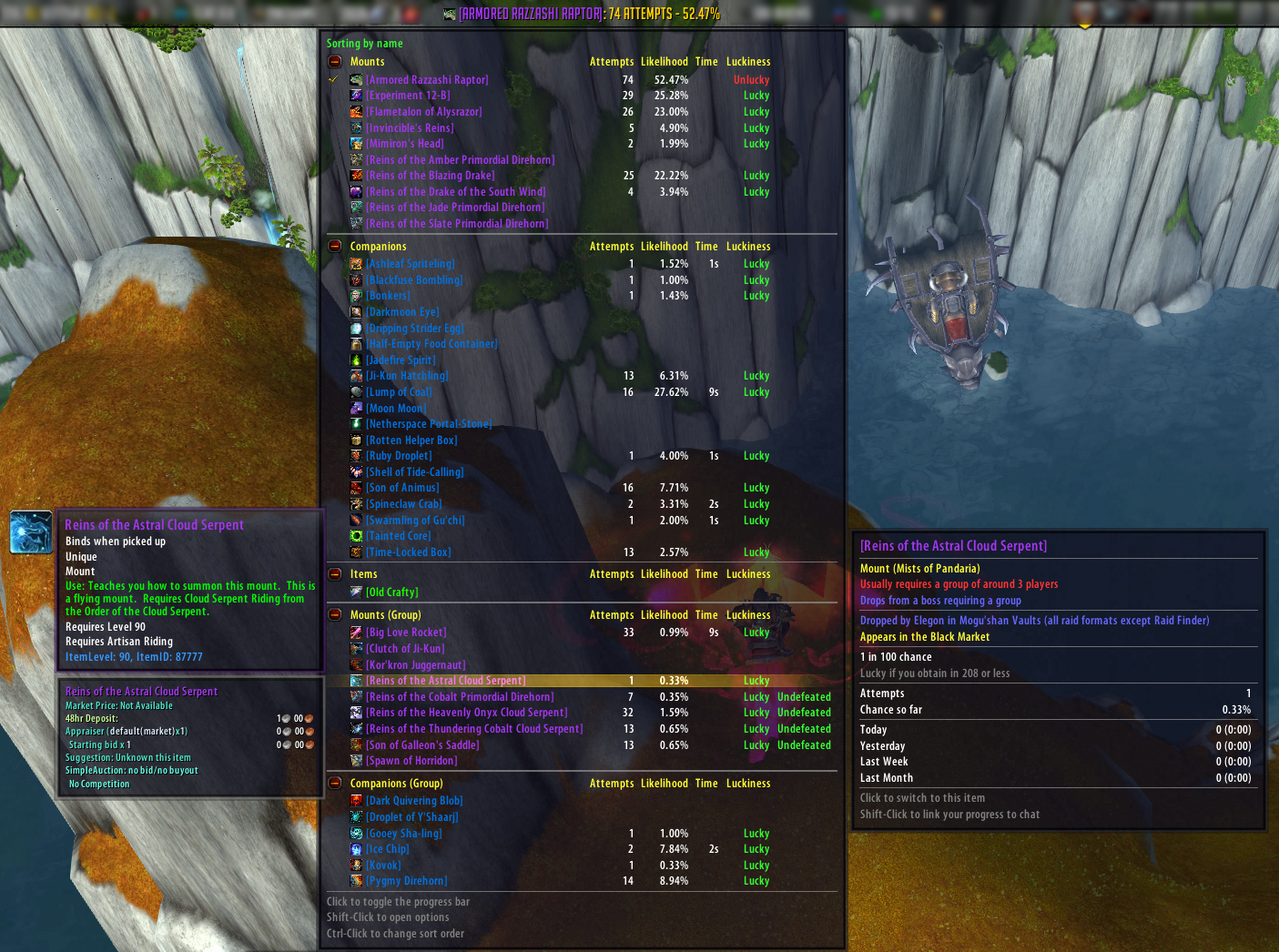
Rarity tracks how many times you've tried to obtain various rare items like mounts, battle pets, and toys. It will tell you how likely you are to obtain the item, track how long you've been farming for it, and tell you how lucky you've been so far. Although it's mostly used for mounts, battle pets, and toys, it supports pretty much any item, including profession patterns, archaeology projects, and more.
Looking for Rarity Item Packs? Click here.
Out of the box, Rarity includes support for every single mount, battle pet, and toy in the game which require some time to farm. It also includes support for some mount-related items like Skyshard, Primal Egg, and Giant Dinosaur Bone. It'll even notice if you mouseover a Mysterious Camel Figurine, plus lots of other stuff. Rarity factors in the size of a typical group when determining probabilities, and can also tell you if you've killed various bosses this week (or day). Holiday just started, and you didn't notice? Rarity will give you a helpful reminder to run those holiday dungeons or daily quests if you still need an item from them.
If Rarity doesn't track something you want to track, you can add it yourself! Just about everything is user configurable.
Curious what math is going on behind the scenes? The author of Bunny Hunter created the original algorithms. He wrote an article about it here. Your chance to obtain an item doesn't increase as you farm it; Rarity is just telling you how lucky you've been so far. It can be remarkably cathartic to see a progress bar move up as you spend hours upon hours trying for that Disgusting Oozeling.
Main features
- Rarity is primarily an LDB feed with a large tooltip. It can function as either a mini-map icon (you have to turn this on in the options), or as a standard LDB feed (use a display like Fortress, Button Bin, Titan Panel, or Chocolate Bar).
- Provides a progress bar, which you can toggle by clicking the icon or feed label.
- Adds info to NPC and item tooltips, showing you if it drops or contains something that Rarity tracks. Rare mobs with a guaranteed drop show which item they drop and if you've defeated them yet.
- Includes full source info, telling you how to obtain everything Rarity tracks.
Other features
- Share packs of items with other users
- Can automatically add waypoints to TomTom for certain items
- Uses statistics whenever possible to keep track of attempts
- Breaks your farming down by session, day, week, and month
- Looks at your instance locks to see if you've defeated various bosses recently
- Reminds you if you need to farm a holiday dungeon or daily quest, and hides holiday items that aren't available right now
- Supports bonus coin rolls
- Automatically screenshots when you obtain an item
- Keeps track of rare achievements like Frostbitten and Glorious
- You can add your own items to track
- Lets you modify your attempt count without having to edit saved variables
- Automatically imports data from Bunny Hunter if you're switching
Slash Commands
Simply typing /rarity should open the options menu (unless disabled).
For troubleshooting issues:
- /rarity dump displays the most recent debug log entries (even if the debug mode is disabled)
- /rarity validate checks the consistency of your item database, including custom items (experimental)
Comments & bug reports
Help translate Rarity
Click here to help translate Rarity into your language.
Frequently Asked Questions
Click here to read the Frequently Asked Questions. Please read this before requesting support.
Comments


-

RDW Owner
-

AllaraStarmist Author
-

Ananhaid Translator
-

bjfr123 Translator
-

freimensch Translator
-

gershuun Contributor
-

ImNotACatTrustMe Translator
-

mantis3d Translator
-

milotic03 Translator
-

Roding Translator
-
Urtgard Contributor
-
Zakhai Translator
-
View User Profile
-
Send Message
Posted Aug 26, 2026I don't know if I'm dumb or something, but I installed the addon opened the game typed /rarity and nothing happens? Addon is not disabled it's freshly installed and enabled.
-
View User Profile
-
Send Message
Posted Aug 27, 2026@ModdedTurtle this addon isn't supported anymore.
Use https://www.curseforge.com/wow/addons/rarity-collectors-edition instead.
-
View User Profile
-
Send Message
Posted Aug 26, 20267x Rarity/Core/Detection.lua:73: attempt to compare field 'calendarType' (a secret string value, while execution tainted by 'Rarity')
[Rarity/Core/Detection.lua]:73: in function 'ScanCalendar'
[Rarity/Core.lua]:428: in function 'DelayedInit'
[Rarity/Core.lua]:345: in function 'func'
[Krowi_AchievementFilter/Libs/AceTimer-3.0/AceTimer-3.0.lua]:57: in function <...AchievementFilter/Libs/AceTimer-3.0/AceTimer-3.0.lua:50>
-
View User Profile
-
Send Message
Posted Aug 27, 2026@KomsBoult this addon isn't supported anymore.
Use https://www.curseforge.com/wow/addons/rarity-collectors-edition instead.
-
View User Profile
-
Send Message
Posted Aug 25, 20263x Rarity/Core/Detection.lua:71: attempt to compare field 'calendarType' (a secret string value, while execution tainted by 'Rarity')
[Rarity/Core/Detection.lua]:71: in function 'ScanCalendar'
[Rarity/Core.lua]:401: in function 'DelayedInit'
[Rarity/Core.lua]:330: in function 'func'
[PublicOrdersReagentsColumn/libs/AceTimer-3.0/AceTimer-3.0.lua]:57: in function <...ersReagentsColumn/libs/AceTimer-3.0/AceTimer-3.0.lua:50>
Locals:
self=<table>{
lockouts_detailed=<table>
modules=<table>
string_methods=<table>
Testing=<table>
AuctionDB=<table>
bagitems=<table>
advancedSettingsFrame=Frame <AceGUIContainer-BlizOptionsGroup.lua:102>
HolidayEvents=<table>
itemInfoCache=<table>
foundTarget=false
tempbagitems=<table>
db=<table>
guids=<table>
modulesEnabled=<table>
itemsToPrime=<table>
toysScanned=true
lastStatCount=42
bar=Frame <LibBars-1.0.lua:265>
Utils=<table>
EventHandlers=<table>
architems=<table>
itemsMasterList=<table>
defaults=<table>
catIcons=<table>
relevantSpells=<table>
isOpening=false
string_types=<table>
npcs_to_items=<table>
npcs=<table>
items_with_stats=<table>
optionsFrame=Frame <AceGUIContainer-BlizOptionsGroup.lua:102>
isFishing=false
name="Rarity"
ItemDB=<table>
used=<table>
Statistics=<table>
isPool=false
isTradeskillOpen=false
DatabaseSchema=<table>
GUI=<table>
lockouts_holiday=<table>
optionsCategoryID=127
string_archraces=<table>
Announcements=<table>
isTradeWindowOpen=false
Database=<table>
isGuildBankOpen=false
Caching=<table>
zones=<table>
baseName="Rarity"
pet_sources=<table>
lockouts=<table>
activeHolidayEvents=<table>
mount_sources=<table>
profileOptions=<table>
CONSTANTS=<table>
items=<table>
defaultModuleState=true
MapInfo=<table>
CopyPastePopup=<table>
Waypoints=<table>
Validation=<table>
opennodes=<table>
encounters=<table>
Tracking=<table>
enabledState=true
tooltipOpenDelay=false
stats_to_scan=<table>
Profiling=<table>
profileFrame=Frame <AceGUIContainer-BlizOptionsGroup.lua:102>
isAuctionHouseOpen=false
ScrollingDebugMessageFrame=<table>
fishnodes=<table>
Debugging=<table>
items_to_items=<table>
isMailboxOpen=false
Item=<table>
defaultModuleLibraries=<table>
Serialization=<table>
Output=<table>
fishzones=<table>
orderedModules=<table>
isBankOpen=false
Enum=<table>
Tooltips=<table>
coins=<table>
MINOR_VERSION=752
AddonCompartment=<table>
AreaPOIs=<table>
barGroup=Frame <LibBars-1.0.lua:345>
collection_items=<table>
Collections=<table>
miningnodes=<table>
Session=<table>
}
reason="DELAYED INIT"
today=<table>{
monthDay=26
weekday=4
month=8
minute=47
hour=12
year=2026
}
month=8
day=26
year=2026
monthInfo=<table>{
firstWeekday=7
numDays=31
year=2026
month=8
}
curMonth=8
curYear=2026
monthOffset=0
numEvents=3
numLoaded=0
(for index)=1
(for limit)=3
(for step)=1
i=1
calendarEvent=<table>{
clubID=<secret number>
numSequenceDays=<secret number>
eventID=<secret number>
eventType=<secret number>
sequenceType=<secret string>
isCustomTitle=<secret boolean>
startTime=<table>
difficultyName=<secret string>
endTime=<table>
invitedBy=<secret string>
inviteStatus=<secret number>
dontDisplayEnd=<secret boolean>
difficulty=<secret number>
isLocked=<secret boolean>
title=<secret string>
calendarType=<secret string>
inviteType=<secret number>
sequenceIndex=<secret number>
dontDisplayBanner=<secret boolean>
modStatus=<secret string>
}
(*temporary)=<secret string>
(*temporary)=<secret number>
(*temporary)="Calendar event IDs should now be available in all WOW product lines"
(*temporary)="attempt to compare field 'calendarType' (a secret string value, while execution tainted by 'Rarity')"
table=<table>
C_Calendar=<table>
-
View User Profile
-
Send Message
Posted Aug 27, 2026@Alextend this addon isn't supported anymore.
Use https://www.curseforge.com/wow/addons/rarity-collectors-edition instead.
-
View User Profile
-
Send Message
Posted Aug 16, 2026Rarity isn't working will not load in too many Lua error tried many game install version
-
View User Profile
-
Send Message
Posted Aug 16, 2026@harleyangel212 Please head over to https://www.curseforge.com/wow/addons/rarity-collectors-edition for the newest supported version of Rarity.
(And delete your comment if you can, so the message below doesn't flood)
-
View User Profile
-
Send Message
Posted Aug 6, 2026Please head over to https://www.curseforge.com/wow/addons/rarity-collectors-edition for the newest supported version of Rarity. I'm sorry for the inconvenience this may cause.
All your attempts will transfer over to the new addon.
-
View User Profile
-
Send Message
Posted Aug 15, 2026@Roguinaa Thank you so much!!!
-
View User Profile
-
Send Message
Posted Aug 16, 2026@Kittywulfe <3 Thank Napu instead, he's the goat leading this project!
-
View User Profile
-
Send Message
Posted Aug 16, 2026@Roguinaa I have done so! However, I was thanking you for pointing everyone to the new one :D So, thanks again!!
-
View User Profile
-
Send Message
Posted Aug 15, 2026@Roguinaa THANK YOU! Rarity has been getting worse and worse for years with updates months behind, if ever. RDW stopped caring several expansions ago. Thrilled to see someone finally stepped up to make a reliable version.
-
View User Profile
-
Send Message
Posted Aug 16, 2026@MystbornGames I'll defend that - RDW didn't stop caring. He simply lost interest in the game itself and tried his best to maintain the addon for as long as he did using contributions from people that still played. Unfortunately, that just wasn't always enough, and secret values defo did not make things easier. One of his last commits was changing everything to use Encounter ID instead of NPC ID, which made sure atleast the Alpha would function, albeit barely.
Eitherway; don't thank me, thank Napu for leading this project. We would be nothing without his experience. Thanks to him we can do this addon justice and not turn it into vibecoded slop.
-
View User Profile
-
Send Message
Posted Aug 6, 2026PSA for everyone! PLEASE DO NOT COMMENT FURTHER ON THIS ADDON PAGE.
This addon has been without support for half a year due to the head dev disappearing.
Napu, the MoP Classic Rarity Dev has worked together with volunteers from the Lord of the Reins and Achievements communities to make a new functioning version of Rarity.
Rarity: Collector's Edition will be the ONLY supported version until RDW comes back.
https://www.curseforge.com/wow/addons/rarity-collectors-edition
-
View User Profile
-
Send Message
Posted Aug 9, 2026In reply to Roguinaa:
I created an account just to say: did it track the number of attempts that have been made to contact them?
-
View User Profile
-
Send Message
Posted Aug 13, 2026@Wombatt_ZGZ Yep.
-
View User Profile
-
Send Message
Posted Jul 29, 2026This is, or was, one of my favorite addons.
I'm asking because I'm completely ignorant, but why was a final version never released and why did it only remain in alpha?
Will it no longer be updated and will it be abandoned?
-
View User Profile
-
Send Message
Posted Aug 6, 2026@Romanv The dev disappeared almost half a year ago. There is a new, updated fork that will be maintained for the foreseeable future by active players.
https://www.curseforge.com/wow/addons/rarity-collectors-edition
-
View User Profile
-
Send Message
Posted Jul 17, 2026if anyone was like me and didn't like that Tremora and Hardin Steellock weren't tracking for Augmented Stormray and Sanguine Harrower, and Sundereth was counting 2 attempts, an easy fix is to update their respective npc lists and on midnight.lua to show npcs = {
241443,
257199,
244272,
instead of npcs = {
244272,
244272,