Deus Vox Encounters
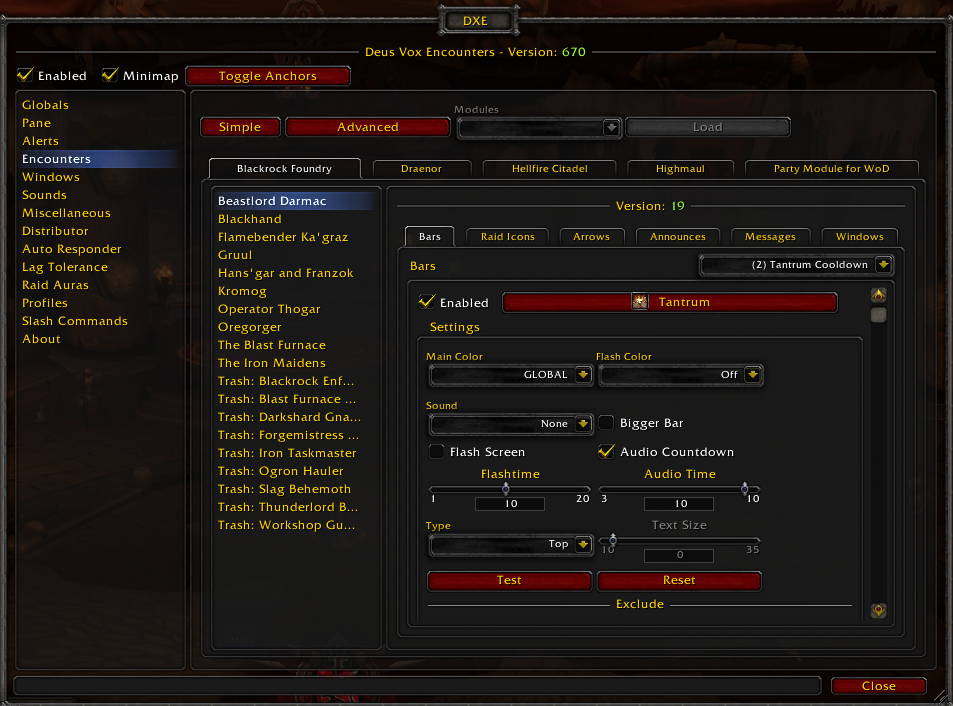
Deus Vox Encounters (DXE) is a boss mod inspired by RDX. It is designed to be functional, efficient, and customizable, so you can change what you want and how you see this addon.
I would like to donate
Click here to donate to Deus Vox Encounters (DXE) your contribution will really help developing the addon.
Features
- Automated: Activation, starting, and stopping of encounters is automatic
- Flexible alert system:
- Customizable timer bars
- Color
- Texture
- Font
- Width
- Spell icons
- And more...!
- Customizable full screen flashes
- Duration
- Transparency
- Oscillations
- Color
- Customizable sounds: Packaged with 18 distinct ones
- All alerts can be adjusted for all encounters
- Audio countdowns can be activated for certain encounter alerts
- Customizable timer bars
- Raid Icons: Marking on important events with an icon of your choosing
- 3D Arrow: Directional arrows tells you where to go on important events
- Two types:
- Away: Directs you to run from a player or a location
- Toward: Directs you to run to a player or a location
- Ability to play a sound when shown
- Displays your distance, to a player or location, in game yards
- Two types:
- Encounter Pane
- Boss health tracking gives you more awareness of fights
- Engage timer tells you how long you've been fighting
- Shortcut buttons provides easier access to common commands
- Conditions to show the pane only when you want to
- Version Check: View addon and encounter versions of raid members
- Distribution System: Allows you to send encounters to the raid or individual players
- Profile System: Switch settings between your characters
- Modular Design: Encounters are loaded in appropriate zones
- SharedMedia support
Getting Started
When you first login with this AddOn you will see a black transparent rectangle with a blue bar labeled 'Default', called the encounter pane, in the center of your screen. Shift+Click on it to move it. From left to right you will see:
- Stop Icon: Halts the current encounter (you should rarely have to do this)
- Menu Icon: Opens the configuration dialog
- Lock Icon: Toggles frame anchors
- Windows Icon: Opens a drop down menu to show interface windows
Also, if you ever hide the pane and can't get it to show, type /dxe to open the configuration dialog. There is also a minimap icon.
Warlords of Draenor Update
- Encounters: Highmaul, BlackRock Foundry and Hellfire Citadel have been implemented.
- Party Module: Party support has been added.
- World Boss Module: World Bosses support has been added.
- Features: More new Alert Options and Spell descriptions on Options.
Implemented Encounters
- Highmaul: All bosses
- BlackRock Foundry: All bosses
- Hellfire Citadel: All bosses
- Warlords of Draenor Party: All bosses
- World Boss: All bosses
Localizations
Please visit the localization page to translate in-game phrases. It is open to anyone with an account. The most important phrases are the chat triggers for bosses, because they start encounters. However, not all encounters are started by chat triggers. The rest of the phrases are for display purposes. The following languages need a maintainer:
- Korean (koKR)
- Russian (ruRU)
- Simplified Chinese (zhCN)
- Spanish (esES)
- Traditional Chinese (zhTW)
- Brazilian Portuguese (ptBR)
- Latin American Spanish (esMX)
Credits
- Code/Inspiration - RDX, BigWigs, DBM
- Coding and Testing - Mäev
- Pane Buttons - Kassay
- Translations - Pettigrow (frFR), Junkie/Fearendon (deDE), horws (ruRU), and everyone else
Links
Comments


-

kollektiv Owner
-

_ForgeUser111873 Maintainer
-
_ForgeUser1811429 Translator
-
_ForgeUser5552059 Author
-
_ForgeUser6799991 Maintainer
-
_ForgeUser6911608 Maintainer
-
Forge_User_60785399 Translator
-

shefkin Author
-
View User Profile
-
Send Message
Posted Sep 29, 2024Still use these sounds for my WA's all these years later. Remember hearing them for the first time in Wrath and falling in love. Miss you.
-
View User Profile
-
Send Message
Posted Dec 7, 2020I think it's dead for good.
-
View User Profile
-
Send Message
Posted Oct 27, 2018Hey is the addon shut down or is an update for bfa in planning?
-
View User Profile
-
Send Message
Posted Sep 2, 2017Hi, is still to be expected with an update for legion or the future addon?
DXE is the best boss mod addon what I had up to.
Translated with Google
-
View User Profile
-
Send Message
Posted Nov 23, 2016Any news about the update for Legion ?
-
View User Profile
-
Send Message
Posted Sep 24, 2016/push I spent 20€ too, when i see an legion Update!
-
View User Profile
-
Send Message
Posted Sep 14, 2016I really hope DXE comes for Legion, I miss it from MoP and early WoD when I last raided! I sent a donation of €20, first time ever I do anything like that, that is how much I want DXE to continue on!
Really hope @Maev81 sees this and considers this!
-
View User Profile
-
Send Message
Posted Jul 25, 2016Hey! Are you going to update DXE for Legion? I was raiding with in WOTLK and absolutely loved it :) Cheers, barnej
-
View User Profile
-
Send Message
Posted Apr 12, 2016Может кто нибудь подсказать, как поставить русскую локализацию?
Please tell me how to change the language ?
-
View User Profile
-
Send Message
Posted Mar 12, 2016Does DXE have a forum that we can follow up on with bugs/tweaks? At the moment im having a bugg on Archimonde LFR. DXE starts when the boss is pulled but after a couple of seconds/a min or two. DXE stops working. And after a few more seconds DXE starts all over again. Is this something you are familiar with?
-
View User Profile
-
Send Message
Posted Dec 17, 2015@Maev81
Yeah, he's using normal break timer. I get it when I tried to install DBM, and everyone else in the raid gets it as well. It's not very important, but it annoys me :/
-
View User Profile
-
Send Message
Posted Dec 12, 2015Hi all
sorry for the lack of updates, being off the game and many stuff duo to personal stuff
also since i started coding it I've yet to receive a 1$ or 1€ from it, not even one donation since mop Throne of Thunder so this gets the lowest of priority, also i dont play since about 4 months. The link is on top of description below "I would like to donate" if you want :)
but oh well just to finish the expansion and to give the loyal users a good DXE experience i will fix the issues and update the bosses, lets see if i can pull it off before Christmas
also will try to update Timewalking to include Cataclysm
@Exorchist
I dont see any problem with it, it even has a backup from the code that DBM pull timer does, are you sure that he's using /break time text instead of /lbreak time text ? the /lbreak is a local break bar, nothing more (and i probably should remove that, not much sense anymore)
@Vevelonel42
thank you for you kind words, great you like it like i do
@Tom65789
sorry for late reply Tom, thank you to bring up the issues and your time to give the solutions, i will fix them up
-
View User Profile
-
Send Message
Posted Dec 9, 2015When my raidleader starts a break, I only get a raidwarning, nothing from DXE at all. And to make things worse, he is using DXE as well. Anyone got any tip on how to make it work?
-
View User Profile
-
Send Message
Posted Dec 4, 2015I can't get Gorefiend's Shadow of Death debuff to make a sound and/or flash my screen no matter how hard I try. Bug?
-
View User Profile
-
Send Message
Posted Nov 24, 2015Thank you so much for updating this - I've been REALLY missing this bossmod.
-
View User Profile
-
Send Message
Posted Sep 15, 2015Hey, forgot to mention this a while ago. Tyrant Velhari has 2 spell ID's for Edict of Condemnation because of the slow effect on the ability in mythic. So you want to add 185241 to the id's in a build for mythic otherwise the cooldown timer won't come up after the first one has gone out.
Also the Nether Banish say on Archimonde for tanks has <EdictOfCondemnationSay> for some reason. I accidentally came across this when searching for edict in the entire folder instead of the velhari file.
Finally a suggestion for the Hellfire Assault default settings, having an audio cue and screenflash for the "Incinerate: INTERRUPT boss!" alert from the Fel Casters gets a little spammy at times. I forgot I had disabled this but a guildy had installed DXE after I told him too and he said his boss mod wouldn't shut up saying "BEWARE!", which was funny for us.
Thanks for the hard work you do on this btw :)
-
View User Profile
-
Send Message
Posted Jul 18, 2015Is there a voice pack available/planned for DXE?
-
View User Profile
-
Send Message
Posted Jul 18, 2015its planned :)
for now it has been all about getting the encounters the best possible and releasing updates the fastest possible (i'm the only one coding dxe)
but now that the stuff are somewhat settling (mostly will be mythic fixes and lfr) will resume the code of my todo list and voice pack support is one of them
-
View User Profile
-
Send Message
Posted Jul 17, 2015So happy to see DXE back :)
I was curious to see how many times I fought with a boss but couldnt find any statistics.
Isnt that included in DXE?
thanks alot
-
View User Profile
-
Send Message
Posted Jul 18, 2015right now only a message in chat when you kill or wipe in a boss
but its on my todo list to show them in the dialog