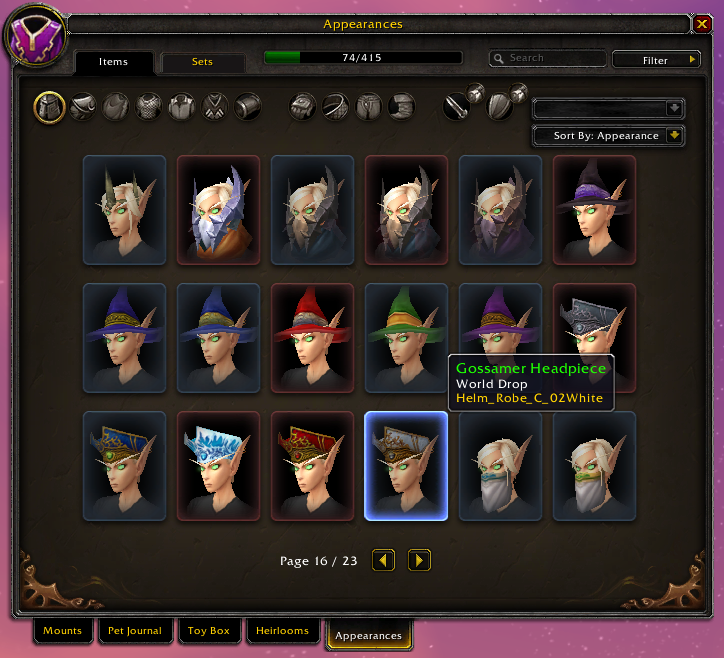
WardrobeSort
Sorts the Wardrobe
Ever looking for that specific transmog but scrolling through it is a mess?
- This can group appearances together by model, it can also sort by color, source, item level or alphabetically
- Reverse sorting is supported by pressing any of the ctrl/alt/shift modifier keys while selecting an option


Comments

-

Ketho17 Owner
-
View User Profile
-
Send Message
Posted May 14, 2020Yes I'm using WoW's own data to generate the file for this addon, see https://github.com/ketho-wow/WardrobeSort/wiki/Data-workflow
As for the sorting, when sorting by appearance it actually just sorts by filename, so appearances with similar file names get grouped together. While for sorting by color it tries to look for any color names in the filename
This is not a perfect way to do this and yes you could try to edit the names in the FileData manually to change the order but you'd have to keep a backup for when there are new updates
-
View User Profile
-
Send Message
Posted Nov 27, 2019-
View User Profile
-
Send Message
Posted Nov 28, 2019In reply to Midoki24:
Right, sorry for the delay. I made a script now to automatically generate the data
https://github.com/Ketho/WoWtoolsParser/blob/master/examples/ItemAppearance.lua
-
View User Profile
-
Send Message
Posted Oct 2, 2019Hello!
This is a fantastic addon! Helpful to find items.
My only problem with it that when I set sort by appearance (maybe other "sort by" have it also, but I only use this sorting) and I learned a new transmog item then it show wrong on list, as it show on the default place. Could you fix this issue or it not possible?
Thanks
-
View User Profile
-
Send Message
Posted Oct 2, 2019In reply to erunosta:
You mean new transmog items from patch 8.2.0 and 8.2.5 where it would only show numbers instead of a name?
I would have to update the addon to support sorting them but I will need to find some time :S
-
View User Profile
-
Send Message
Posted Oct 2, 2019In reply to Ketho17:
No. The problem was always there since I use this addon. Donno how I describe it. :s
I try with an example: Like if in default mode the unlocked item in line 2 and the 3rd item. When I sort by Appearance mode the little "NEW" messeage go exactly on line 2 and 3rd item, no matter if in apperance sorting that item in another place. This problem only there if it on Appearance mode while I get a new transmog item. I hope you get what im try to tell you. :P I will try to do a screenshot later, maybe.
-
View User Profile
-
Send Message
Posted Oct 2, 2019In reply to erunosta:
Oh, "NEW" transmog items? I have to admit I never tested that scenario while developing this addon <.<
-
View User Profile
-
Send Message
Posted Oct 2, 2019In reply to Ketho17:
Thanks for answering. With this little problem I have to set to default the sorting before I close it. If you willing to fix it that would be a QoL improvement. :)
Cheers
-
View User Profile
-
Send Message
Posted Jul 5, 2019Could the Heirlooms be sorted when class and spec is selected?
as for the expansion data, maybe "All The Things" addon could help?
-
View User Profile
-
Send Message
Posted Jul 5, 2019In reply to Jetah:
There are no plans to support sorting heirlooms since it would take a lot of work and there isn't really a big amount of heirlooms where sorting
The new expansion data will be added, I've just been kinda lazy updating my addons for 8.2.0
-
View User Profile
-
Send Message
Posted Nov 24, 2018hi,
can you create a secondary filter on the option "Source", so that we can select by expansion transmog.
tks
-
View User Profile
-
Send Message
Posted Nov 24, 2018Secondary filters (for "Source") would be possible but would add more dropdown levels
I could try to check where the IDs are that cut off each expansion and add that guess into the tooltip for the "Source" option
-
View User Profile
-
Send Message
Posted Mar 17, 2019In reply to Ketho:
Hi any news about the new sorting from expantion source
-
View User Profile
-
Send Message
Posted Apr 24, 2019In reply to ncplus:
Hey, sorry. I couldn't add that feature, it was too difficult after all. The closest functionality would be sorting by "ID"
-
View User Profile
-
Send Message
Posted Jul 26, 2018Hey, It doesn't seem to activate. It says on addon control panel it's only loadable on demand or am I missing somthing?
-
View User Profile
-
Send Message
Posted Jul 26, 2018In reply to Forge_User_49077384:
-
View User Profile
-
Send Message
Posted Jul 22, 2018Hello!
Any plans to update this for BfA?
-
View User Profile
-
Send Message
Posted Jul 22, 2018In reply to Demonarch83:
-
View User Profile
-
Send Message
Posted Jul 22, 2018In reply to Ketho:
-
View User Profile
-
Send Message
Posted Sep 2, 2017Hello,
When I click the filter dropdown, it gives the following two errors:
1)
Message: [string "*:OnClick"]:2: Usage: PlaySound(soundKitID, optional["SFX","Music","Ambience", "Dialog" or "Master"], [forceNoDuplicates, runFinishCallback])
Time: 09/02/17 10:25:08
Count: 8
Stack: [string "*:OnClick"]:2: Usage: PlaySound(soundKitID, optional["SFX","Music","Ambience", "Dialog" or "Master"], [forceNoDuplicates, runFinishCallback])
[C]: ?
[C]: in function `PlaySound'
[string "*:OnClick"]:2: in function <[string "*:OnClick"]:1>
Locals:
2)
Message: ...obeSort\Libs\LibUIDropDownMenu\LibUIDropDownMenu.lua:820: Usage: PlaySound(soundKitID, optional["SFX","Music","Ambience", "Dialog" or "Master"], [forceNoDuplicates, runFinishCallback])
Time: 09/02/17 10:21:12
Count: 2
Stack: ...obeSort\Libs\LibUIDropDownMenu\LibUIDropDownMenu.lua:820: Usage: PlaySound(soundKitID, optional["SFX","Music","Ambience", "Dialog" or "Master"], [forceNoDuplicates, runFinishCallback])
[C]: ?
[C]: ?
...obeSort\Libs\LibUIDropDownMenu\LibUIDropDownMenu.lua:820: in function `L_UIDropDownMenuButton_OnClick'
[string "*:OnClick"]:1: in function <[string "*:OnClick"]:1>
Locals: