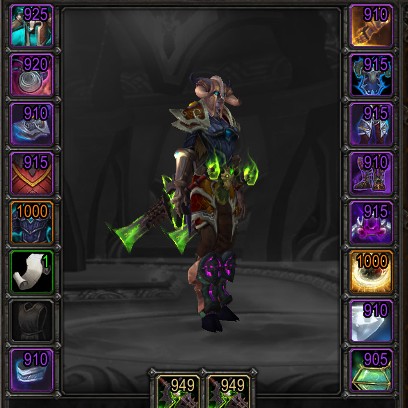
Simple Item Levels
Show item levels on:
- The character panel
- The inspect panel
- Loot windows
- The equipment-picker flyout
- Weapons, armor, and artifact relics in bags (built in, bagnon, baggins, inventorian)
- Tooltips (in classic)
I'm open to adding them in more places.
Also shows:
- An upgrade arrow on items in your bags which you can use whose item level is higher than whatever you currently have equipped.
- A soulbound indicator, so you can see whether something is soulbound, bind-on-equip, or warbound-until-equipped
- Missing enchants and gems
Simple configuration
For a summary of settings:
/simpleilvl
To toggle a place to display item levels:
/simpleilvl [type]
…where type is bags, character, or inspect.
To disable the upgrade arrow:
/simpleilvl upgrades
To change whether the text is colored by item quality or just left white:
/simpleilvl color
Comments

-

Kemayo Owner
-
View User Profile
-
Send Message
Posted Jan 25, 2026It breaks the bag tooltips for me. It doesnt show it, only my current equipped gear
Also wrong ilvl for people.
-
View User Profile
-
Send Message
Posted Jan 25, 2026In reply to Damigos: could you double-check that you have the latest version installed?
-
View User Profile
-
Send Message
Posted Jan 25, 2026In reply to Damigos:
Fix is going up now for the average item level for inspecting people. For bags, what are you using?
-
View User Profile
-
Send Message
Posted Jan 22, 2026doesnt seems to work properly with the item level stat squish in midnight
-
View User Profile
-
Send Message
Posted Jan 22, 2026In reply to vitalou_:
How so?
-
View User Profile
-
Send Message
Posted Jan 22, 2026Just installed, and I'm inspecting a handful of people and seeing their average ilvl reported to be in the 190s, even though all their items are displayed correctly around 160
-
View User Profile
-
Send Message
Posted Jan 24, 2026In reply to shugokick: Same for me, shows to high item levels on people
-
View User Profile
-
Send Message
Posted Jan 24, 2026In reply to Zeblar: Version? I made some changes since that last comment.
-
View User Profile
-
Send Message
Posted Jan 25, 2026In reply to vitalou_: New version is going up that should specifically fix the average when you've got some very specific items equipped. (Unfortunately the Reshii Wraps are one, and almost everyone is wearing it.)
-
View User Profile
-
Send Message
Posted Jan 22, 2026For the character panel specifically, would it be possible to add the ability to shift all item levels and other indicators to the inside of the panel (in the area where the character avatar is)? Just to the left/right of the item icons. They would be much easier to read against the black background as opposed to on top of visually busy item icons.
-
View User Profile
-
Send Message
Posted Jan 22, 2026In reply to Fibusx: That's a good idea. I'm putting up a new version now that will do that. You'll need to turn it on from the settings for now.
-
View User Profile
-
Send Message
Posted Jan 21, 2026I am not sure if there will be embellishment on crafted gear next expansion, but would you be willing to add that as an option under "display" like Upgrade and Enchants?
-
View User Profile
-
Send Message
Posted Jan 22, 2026In reply to Nickyjean01: Possibly. I would need to do a bit of looking into how you detect them, and also work out whether they'll be in midnight at all. I think they could be treated as sort of a special-case of enchantments, if nothing else, with a bit of logic to handle the "at most 2" thing.
-
View User Profile
-
Send Message
Posted Feb 3, 2026In reply to Kemayo: Thank you for the interest.. Currently I used "Where’s The Flair?" but as I pair down my addons looking to see what might be combined.
-
View User Profile
-
Send Message
Posted Nov 13, 2025Is this addon going to be updated for Beta? I really like it.
-
View User Profile
-
Send Message
Posted Sep 25, 2025I was able to fix this to not showing missing enchants for MoP helms and MoP characters that are not Enchanters. This required a simple version string check, and to simply check the characters professions.
I also fixed the player doll frame average item level display to include upgrades, but I cannot fix the inspect doll frame average item level. There is a bug with created item links where they don't include any upgrade info, and this is what is needed to manually parse upgrade levels. There is a player only "GetAverageItemLevel" API that I used to fix the character screen.
in addon.lua
add a new variable at the top, around line 5
> `local isMoP = WOW_PROJECT_ID == WOW_PROJECT_MISTS_CLASSIC`
then find this line lower in the file
> ` local enchantable = isClassic and {`
and just under it, change `INVTYPE_HEAD = true` to be `INVTYPE_HEAD = not isMoP`
-
View User Profile
-
Send Message
Posted Dec 18, 2025In reply to siegester03: you are god
-
View User Profile
-
Send Message
Posted Jan 21, 2026In reply to mythct: I lost these changes after an auto update, so I posted them to github! https://github.com/siegester03/wow-simpleitemlevel-mop
-
View User Profile
-
Send Message
Posted Jan 22, 2026In reply to siegester03:
This should be fixed in the new release just going out.
-
View User Profile
-
Send Message
Posted Jan 22, 2026In reply to Kemayo: It is, thanks! I will delete my fork of MoP hacks!