RepairBroker
Features
- Auto-repair
- Using you own money
- or your guild banks
- or a dialog
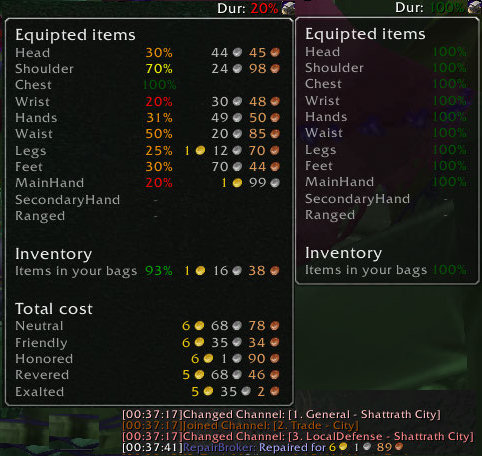
- Displays durability and cost for
- Equipped items
- Inventory items
- No graphical configuration
How to make use of this add-on
You need a LDB/Broker-compatible display add-on, such as Titan Panel, Bazooka, or any others.
Input
- Left Mouse Button: Force tooltip update
- Right Mouse Button: Toggle auto-repair
- Middle Mouse Button: Toggle guild repair
If you do not have a middle mouse button, you can use the following code:
/script RepairBrokerDB.useGuildBank = nil
Replace nil with 1 if you want to enable it.


-
View User Profile
-
Send Message
Posted Sep 23, 2010-
View User Profile
-
Send Message
Posted Jan 16, 2010-
View User Profile
-
Send Message
Posted Jan 2, 20101) Go to to your RepairBroker folder in your addons folder.
2) Open RepairBroker.lua (this can be done with any standard text editor like Notepad)
3) Go to line 9 or search for
local Repair = {
4) Insert a line below that (should be above the line that says icon = ....)
5) Type
type = "data source",
6) Save
7) ?
8) Profit!
Enjoy
-
View User Profile
-
Send Message
Posted Oct 30, 2009-
View User Profile
-
Send Message
Posted Sep 19, 2009-
View User Profile
-
Send Message
Posted Aug 23, 2009ZeroCool: Yeh, I'll fix it and submit :)
-
View User Profile
-
Send Message
Posted Aug 15, 2009-
View User Profile
-
Send Message
Posted Jul 22, 2009It was very confusing that "Repair Broker" showed up as "Dur". I was about to abandon your addon because I couldn't get it to display.
Perhaps, for consistency, you would change this.
Thank you very much for your work.
-
View User Profile
-
Send Message
Posted Jul 20, 2009-
View User Profile
-
Send Message
Posted Jun 13, 2009-
View User Profile
-
Send Message
Posted Jun 13, 2009-
View User Profile
-
Send Message
Posted Jun 14, 2009-
View User Profile
-
Send Message
Posted Jul 13, 2009if RepairBrokerDB.guildRepair == 1 and (CanGuildBankRepair() and (GetGuildBankWithdrawMoney() >= cost)) then
-
View User Profile
-
Send Message
Posted Aug 23, 2009-
View User Profile
-
Send Message
Posted Aug 23, 2009-
View User Profile
-
Send Message
Posted May 28, 2009Confirmed, does not work with dockingstation 0.3.2.
-
View User Profile
-
Send Message
Posted May 26, 2009This has stopped showing with the most recent version of DockingStation. It still works in the background but does not show up in the DS plugin selection & cannot be displayed.
Apparently it needs to register a "type" field.
-
View User Profile
-
Send Message
Posted May 17, 2009Is there a way to make this load after CowTip so all my tooltips have the same look and feel?
-
View User Profile
-
Send Message
Posted May 16, 2009-
View User Profile
-
Send Message
Posted May 16, 2009I'll most lightly move the colors to a table accessible from outside the add-on, making them easier to modify.