
Prat 3.0
In loving memory of Jon Akthar (Sylvanaar)
Hello WoW community, I'm LuciferCatnip, Sylvanaar was my coworker and my mentor. It goes without saying that Jon was an amazingly talented individual. He always seemed to know everything… but he once said to me "It's not about knowing the answers, it's about asking the right questions", he always challenged me to ask me the right questions until I would arrive at the answer on my own terms. Jon was also a champion of the open source movement, and so with special thanks to Gil from Curseforge as well as Sylvanaar's family, there's no better way to honor Sylvanaar's legacy than to keep his project going strong in the community.
If you'd like to help maintain Prat, please reach out to MysticalOS or LuciferCatnip directly. Thank you so much.
About
Prat-3.0 is a chat enhancement addon for World of Warcraft.
It is made up of 30+ smaller "modules" which each provide additional functionality, and can be enabled or disabled individually.
In game, type /prat for a menu. Or use the icon on one of the many data broker hosts.
Prat has just about every feature you can think of, and then some. Really. When I get some more time, I'll try and put together a full list (Even I have lost count)
(Thanks to Dreamsight for this partial list)
- Sync your chat settings across your account (Beta)
- Machine learning powered spam filter (Beta)
- Change arrows, buttons, mouse scroll for chat scroll, scroll speed
- you can add player color per channel, color per level, color per class
- timestamps (styled)
- Whether to show timestamp (what format the timestamp should be in)
- Whether to show players level
- You can select the option for channel "stickys" (last channel you used you auto use when hitting enter, that sort of thing – or last thing someone said)
- Change the looks of the chat's editbox - as well as where it appears (you can even undock it and move it to where you'd like it to be)
- Chat fading, fading delay
- You can change the font to a list of fonts, add an outline to it, monochrome it (if you don’t mind messing with files a bit you could probably even add other fonts to that list)
- Change the chat frame/chat box appearance
- Keep chat history between game sessions
- Set channel abbreviations
- Set brackets and color(or something instead of brackets)round player/lvl
- Alt invite option (press keyboard “alt” button and click on the player’s name to auto inv them)
- Raid icon
- Invite links - click them to invite the person
- URL copying
- Full chat copying + copy button
- Click timestamp to copy line
- Configurable alerts when your name or other word is mentioned
- Enables tell target /tt which whispers your target
- Alias options - make macros into short commands
- See names of players Alt characters
- Change chat sounds (incoming and outgoing as well as per channel)
- Achievements info and grats
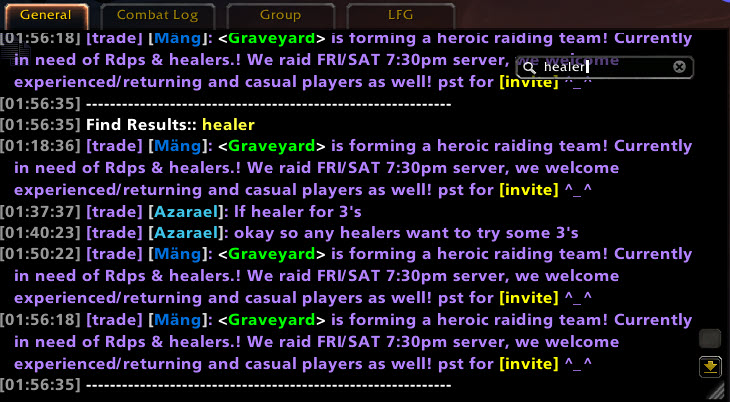
- Full chat search and search box
- Customizable filters for advanced users
- Show item icon next to item links and player class icon next to player names
- Icon-only options for newcomers chat
- Optional flashing or font color change for chat tabs when a new message comes in.
You can enable/disable all Prat modules - don't have to have the ones you don't use running
While trying to reduce resource utilization, it is also important to note that some people prefer the features, and don't care that an addon uses 500k more.
Comments

-

lucifercatnip Owner
-

humfras Former Author
-

MrFIXlT Former Author
-

MysticalOS Author
-

pompachomp Former Author
-

QTartemis Author
-

SunnySunflow Translator
-

sylvanaar Former Author
-
View User Profile
-
Send Message
Posted Jun 9, 2020In reply to spunkygg:
I am not sure. I would need to capture some information so I can fix it - but how many messages would you say there are?
One culprit may be the PlayerNames: Color Names Everywhere option.
Can you try toggling it off - and reloading your UI. Let me know if that solves the issue
If you can give me enough details that I can repeat the problem myself that would be great too.
-
View User Profile
-
Send Message
Posted Jun 8, 2020something in this addon is preventing the return of chat tab names i think,havea simple addon that send ah messages to a chat tab named "AH" and surpresses it for allothers,with prat enabled it surpresses but does not send to "AH" tab
-
View User Profile
-
Send Message
Posted Jun 8, 2020In reply to Nirran00:
How does it work? Maybe some source showing how you filter and redirect the messages
-
View User Profile
-
Send Message
Posted Jun 8, 2020In reply to sylvanaar:
simple code,here si the entire addon
-- This file is loaded from "AuctionHouseMessages.toc" -- this addon will redirect auction system messages to a temporary -- chat tab named "AH" local tabName = "AH" -- name for temporary tab -- fill auctionStrings with pattern matches for auction events auctionStrings = {} for k,v in pairs({ -- delete any lines here you don't want redirected ERR_AUCTION_EXPIRED_S, -- "Your auction of %s has expired." ERR_AUCTION_OUTBID_S, -- "You have been outbid on %s." ERR_AUCTION_REMOVED_S, -- "Your auction of %s has been cancelled by the seller." ERR_AUCTION_SOLD_S, -- "A buyer has been found for your auction of %s." ERR_AUCTION_WON_S, -- "You won an auction for %s" ERR_AUCTION_BID_PLACED, -- "Bid accepted." ERR_AUCTION_REMOVED, -- "Auction cancelled." ERR_AUCTION_STARTED, -- "Auction created." }) do v = v:gsub("%.","%%."):gsub("%%s",".-") tinsert(auctionStrings,v) end -- returns the Auctions temporary chat tab if it exists -- if create is true, creates one if needed local function getAuctionTab(create) -- look for existing tab with "Auctions" as a name for _,name in pairs(CHAT_FRAMES) do local frame = _G[name] if frame.name == tabName then return frame end end -- none found if create then local frame = FCF_OpenTemporaryWindow("SYSTEM") FCF_SetWindowName(frame,tabName) return frame,true end end -- returns true if msg matches any of the known auctionStrings local function hasAuctionText(msg) for i=1,#auctionStrings do if msg:match(auctionStrings[i]) then return true end end end -- this chat filter only runs for CHAT_MSG_SYSTEM local function filter(self, event, msg, ...) if hasAuctionText(msg) then local auctionTab,justCreated = getAuctionTab(true) if self==auctionTab then return false,msg,... -- pass auction chats to auction tab else -- auction chat going to non-auction tab if justCreated then -- if just created an auction tab, manually add the creating auction message local color = ChatTypeInfo["SYSTEM"] auctionTab:AddMessage(msg,color.r,color.g,color.b) end return true -- suppress auction chats to non-auction tabs end elseif self==getAuctionTab() then return true -- suppress non-auction chats to auction tab end -- everything else pass as if nothing happened return false,msg,... end -- create filter ChatFrame_AddMessageEventFilter("CHAT_MSG_SYSTEM",filter)-
View User Profile
-
Send Message
Posted Jun 8, 2020In reply to Nirran00:
In reply to Nirran00:
In your code where you test self == getAuctionTab()
Instead write self:GetName() == getAuctionTab():GetName()
That will solve your problem. Don't compare the frames directly - use the names. Prat has a proxy frame that it passes in that is breaking your object equality/
-
View User Profile
-
Send Message
Posted Jun 8, 2020In reply to sylvanaar:
tyvm for the help and also for the awesome addon prat,did as u said and it works :)
-
View User Profile
-
Send Message
Posted Jun 8, 2020CopyChat doesnt work for me at all. Cause that LUA error:
3x Prat-3.0-3.8.14\modules\CopyChat.lua:749: attempt to call method 'gsub' (a nil value)
Prat-3.0-3.8.14\modules\CopyChat.lua:749: in function <Prat-3.0\modules\CopyChat.lua:748>
Prat-3.0-3.8.14\modules\CopyChat.lua:789: in function `DoCopyChat'
Prat-3.0-3.8.14\modules\CopyChat.lua:737: in function `ScrapeChatFrame'
Prat-3.0-3.8.14\modules\CopyChat.lua:846: in function <Prat-3.0\modules\CopyChat.lua:836>
Locals:
text = <table> {
message = "|cff33ff99Postal|r: Collected 15|TMoneyFrame\UI-SilverIcon:0:0:2:0|t 82|TMoneyFrame\UI-CopperIcon:0:0:2:0|t"
timestamp = 26385.658000
}
(*temporary) = nil
(*temporary) = <table> {
message = "|cff33ff99Postal|r: Collected 15|TMoneyFrame\UI-SilverIcon:0:0:2:0|t 82|TMoneyFrame\UI-CopperIcon:0:0:2:0|t"
timestamp = 26385.658000
}
(*temporary) = "|K[^|]-|k"
(*temporary) = "<BNET REMOVED>"
(*temporary) = "attempt to call method 'gsub' (a nil value)"
-
View User Profile
-
Send Message
Posted Jun 8, 2020In reply to GregoryWW:
Thanks - don't know how this was missed.
It is fixed in the next release. Until then - just CTRL-CLICK on the copy button as a workaround.
-
View User Profile
-
Send Message
Posted Jun 9, 2020In reply to sylvanaar:
No problem, you doing a great job! Using Prat since vanilla :) Only those who do nothing make no mistakes.
-
View User Profile
-
Send Message
Posted Jun 7, 2020>Click timestamp to copy line
Is there an option to disable this behaviour?
Otherwise a good job on addon
-
View User Profile
-
Send Message
Posted Jun 7, 2020In reply to Forge_User_56894188:
Not at the moment - you would have to set the copychat module to "Don't Load"
I will include it in the next release
-
View User Profile
-
Send Message
Posted Jun 5, 2020quick settings question, which I somehow really can't seem find on my own: when I type something and I leave the chat frame, the text I typed is saved and is hanging there. how do I stop this? If I leave the chat frame text input field I want whatever I was typing to be gone. how do I do this? thanks in advance! (:
-
View User Profile
-
Send Message
Posted Jun 5, 2020In reply to b9ty:
I think \you want the "IM" style edit box:
Blizzard Interface Options / Social / Chat Style = "IM"
-
View User Profile
-
Send Message
Posted Jun 6, 2020In reply to sylvanaar:
been using classic style since forever, that's really not it. (tried though, didn't change)
I think I may have explained it badly. so here I go again:
I type something. I stop typing and click at something in the game world, like a flight master. the stuff I typed is still in the edit box. that's the problem.
-
View User Profile
-
Send Message
Posted Jun 8, 2020In reply to b9ty:
This behavior was introduced into the game in 8.3. There is no workaround - I would have to add a feature to restore it.
-
View User Profile
-
Send Message
Posted Jun 8, 2020In reply to sylvanaar:
fml. this feels so terrible... ^_^
let's hope shadowlands will have an option for that (not keeping my fingers crossed though) thanks for your reply!
-
View User Profile
-
Send Message
Posted Jun 4, 2020Hello, thank you for all your work with this addon. Question, I noticed recently a small World of Warcraft icon to the left of what appear to be the names of those that whisper me. What setting is this associated with?
-
View User Profile
-
Send Message
Posted Jun 4, 2020In reply to eightflat:
Oh right. Those are the Battle.NET client icons (which game are you playing, or which app are you using). Showing those is an option in the playernames modules.
Have a moment to get used to it being there, and let me know your thoughts on it. I have some thought about making other icons available as well, so I need some way of making people aware that the option is there.
-
View User Profile
-
Send Message
Posted Jun 5, 2020In reply to sylvanaar:
Thank you for the reply! Hmm... I'm not sure if it's because of my font settings, but the thing that bothered me the most is that the icon wasn't aligned with the name: https://imgur.com/a/TwOYnRV.
-
View User Profile
-
Send Message
Posted Jun 5, 2020In reply to eightflat:
Hey, thanks for the screenshot. Hmmm, I will see if I can adjust it a little - It may be that it isn't possible to align it so that it works with every custom font out there without a custom adjustment too