This site works best with JavaScript enabled. Please enable JavaScript to get the best experience from this site.
What version of Grid2 are you using (Version is displayed in General/About Tab) ?v3.3.17
What game client version, classic or retail, windows or mac and language are you using ?Retail
What steps will reproduce the problem?1. Create a text indicator.2. Layout --> Font Border --> Soft,Thin3. ReloadChanging the Font Border back to "Default" and reloading fixes the issue.
Did you try having Grid2 as the only enabled addon and everything else disabled?No
Was it working in a previous version? If yes, which was the last good one?Yes. v3.3.15
Do you have an error log of what happened? If you don't see any errors, make sure that error reporting is enabled (`/console scriptErrors 1`) or install [BugSack](https://mods.curse.com/addons/wow/BugSack).
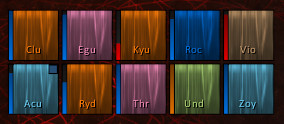
Please provide any additional information below.Pre-fix frames
I cannot reproduce this issue, but i know blizzard changed something and there are problems with fonts in this patch for different addons.
Maybe is related to some specific fonts.Can you post which fonts are you using and which game client language ?Or can you send me your profile (General/Profiles/Export&Import to export the profile to text format).
This could be related to some incorrect setting stored in your profile.
1. To fix this, goto General /Indicators
2. Change the "Default font border" setting (you can change the setting for a moment and then revert back the change).
3. After changing this setting, new text indicators should work correctly.
Report back if this fixed the issue.
You can try updating to version 3.3.18 too.
I'm experiencing the same issue. Switching border to Thin + Shadow causes my frames to turn into white squares.I've tried changing fonts and languages to no result. I'm running 3.3.18 on russian client with Gilroy Bold font rn.The only workaround for me is to change the borders of all my text indicators to something different from Thin + Shadow.upd: This issue also persists on new profiles.
Try out version 3.3.20
Looks fine to me, I can't force the bug now. I think its fixed
To post a comment, please login or register a new account.