This site works best with JavaScript enabled. Please enable JavaScript to get the best experience from this site.
What version of Grid2 are you using (Version is displayed in General/About Tab) ?
3.0.11
What game client version, classic or retail, windows or mac and language are you using ?
Retail, english client
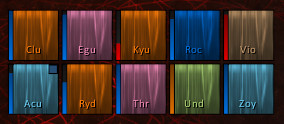
I don't know how to describe the issue really good, but it looks like the frames are not symmetrical.
If I choose a 1 pixel border style and mouse over (with mouse over highlight enabled) a frame, it looks like there is 2 pixel border on the top and left side + a 1 pixel border on the right and bottom side of the frame.
If I look really closely I can even see these extra line of pixels to the top / left side while no border indicator is active.
So I don't really know if this a bug, a design choice (to give it some depth I guess) or just bad setup on my part?
This depends of the UI Scale configuration, You must assign a pixel perfect UI scale in the game settings, and de scale to configure depends of the monitor resolution.
You can search in google something like "world of warcraft pixel perfect scale howto"
Oh yeah, you are right. Now I remember. Had a similar issue before and found the same answer.
Playing with the scale and frame width / height fixes this stuff.
Thank you very much!
To post a comment, please login or register a new account.