This site works best with JavaScript enabled. Please enable JavaScript to get the best experience from this site.
What version of Grid2 are you using (Version is displayed in General/About Tab) ?3.0.9
What game client version, classic or retail, windows or mac and language are you using ?
12.0.0.65512
What steps will reproduce the problem?None - just import my profile https://wago.io/fwwV0JWpm
Did you try having Grid2 as the only enabled addon and everything else disabled?
No
Was it working in a previous version? If yes, which was the last good one?Yes, pre midnight prepatch there were solid colored frames
Do you have an error log of what happened? If you don't see any errors, make sure that error reporting is enabled (`/console scriptErrors 1`) or install [BugSack](https://mods.curse.com/addons/wow/BugSack).No
Please provide any additional information below.
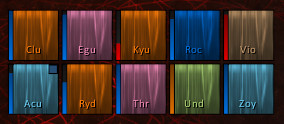
With midnight prepach my raidframes changed texture from solid color to some sort of default shaded and I cant change it back.screenshot - https://imgur.com/a/1T9vXoJ
grid2 party/raid frames looked like player frame on the screenshot
Is it a bug or some sort of restriction from blizzard or some new options I do not see?
Your profile is using a texture called "Clean" that is not available in your system. Probably because the addon providing the texture is not installed/enabled in your computer.
You have to go to the configuration of each health bar in your profile, and select a different texture: you can Use the "Default" or "Grid2 Flat" texture for example.
For example to change the health bar texture:
Goto indicators -> health -> Layout Tab -> Scroll down to Frame Texture option and select the desired texture.
Do the same with all bars indicators in your profile.
Thank you! Although colors are a little too bright it far better now - https://imgur.com/a/8S7Ff3X
To post a comment, please login or register a new account.