Baggins
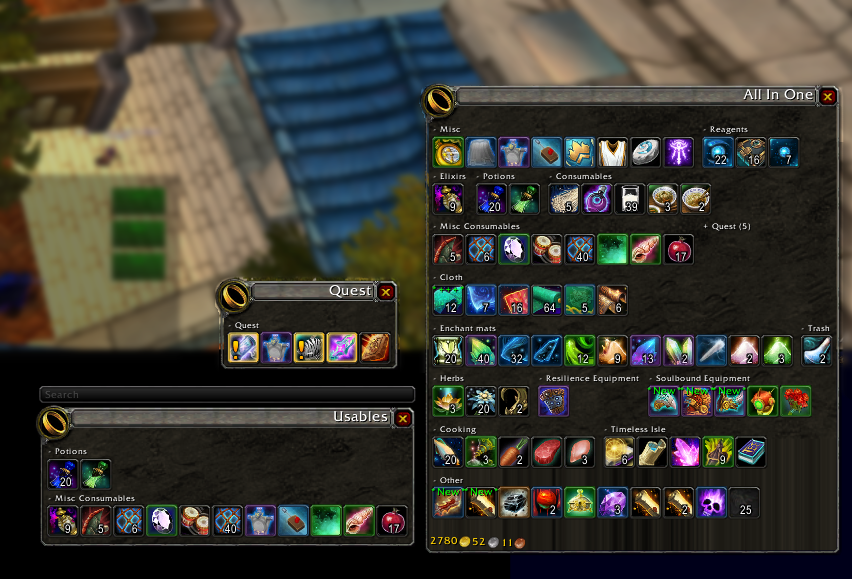
Inventory Management with virtual view divided into sections.
Now with baggins you can not only separate your bags into virtual view of your inventory but organize the items in your virtual view by item type! Bag options with endless possibilities. Add/remove/create categories, change skin of the view baggins does it all! Customize your bags to show items exactly how you like! No more looking for items and not being able to find them, look and know exactly where they should be!
For example one bag with profession items, one bag with gear, and so much more! You can even make your own categories!
You can use the minimap icon or /baggins to open the options window.
Comments

-

Doadin Owner
-

Forge_User_96189362 Author
-

wolfcon Contributor
-
View User Profile
-
Send Message
Posted Dec 26, 2010-
View User Profile
-
Send Message
Posted Dec 20, 2010-
View User Profile
-
Send Message
Posted Dec 20, 2010-
View User Profile
-
Send Message
Posted Dec 20, 2010another thing, how do i set certain items to split stacks.For eg im crafting green rings as a jc and they all get diff "Of the" but i am unable to see all the rings stats i have
-
View User Profile
-
Send Message
Posted Dec 17, 2010-
View User Profile
-
Send Message
Posted Dec 16, 2010-
View User Profile
-
Send Message
Posted Dec 16, 2010-
View User Profile
-
Send Message
Posted Dec 16, 2010Message: Interface\AddOns\Baggins\Baggins.lua:1926: attempt to index global 'BagginsGoldIcon' (a nil value)
Time: 12/16/10 13:04:50
Count: 1
Stack: ...nterface\AddOns\Baggins\libs\AceDB-2.0\AceDB-2.0.lua:1863: in function `?'
...ddOns\Baggins\libs\AceConsole-2.0\AceConsole-2.0.lua:1897: in function <...ddOns\Baggins\libs\AceConsole-2.0\AceConsole-2.0.lua:1564>
...ddOns\Baggins\libs\AceConsole-2.0\AceConsole-2.0.lua:2402: in function `?'
Interface\FrameXML\ChatFrame.lua:4126: in function `ChatEdit_ParseText'
Interface\FrameXML\ChatFrame.lua:3737: in function `ChatEdit_SendText'
Interface\FrameXML\ChatFrame.lua:3775: in function `ChatEdit_OnEnterPressed'
[string "*:OnEnterPressed"]:1: in function <[string "*:OnEnterPressed"]:1>
Locals: <none>
-
View User Profile
-
Send Message
Posted Dec 14, 2010-
View User Profile
-
Send Message
Posted Dec 14, 2010-
View User Profile
-
Send Message
Posted Dec 13, 2010-
View User Profile
-
Send Message
Posted Dec 14, 2010-
View User Profile
-
Send Message
Posted Dec 22, 2010-
View User Profile
-
Send Message
Posted Dec 13, 2010-
View User Profile
-
Send Message
Posted Dec 12, 2010-
View User Profile
-
Send Message
Posted Dec 12, 2010-
View User Profile
-
Send Message
Posted Dec 11, 2010Thanks for this mod! Every time I hear someone mention other bag mods I always tout this as the best!
-
View User Profile
-
Send Message
Posted Dec 14, 2010I can only humbly ask for this perhaps to be fixed, or to be told how i can fix it myself :o
-
View User Profile
-
Send Message
Posted Dec 17, 2010This will be corrected when we get a new version.
Would appreciate tips from more experienced users or the author as to how we could fix this short-term in the current version.
-
View User Profile
-
Send Message
Posted Dec 8, 2010