Restores access to hidden interface options and provides a way to browse every CVar setting in the game!
General
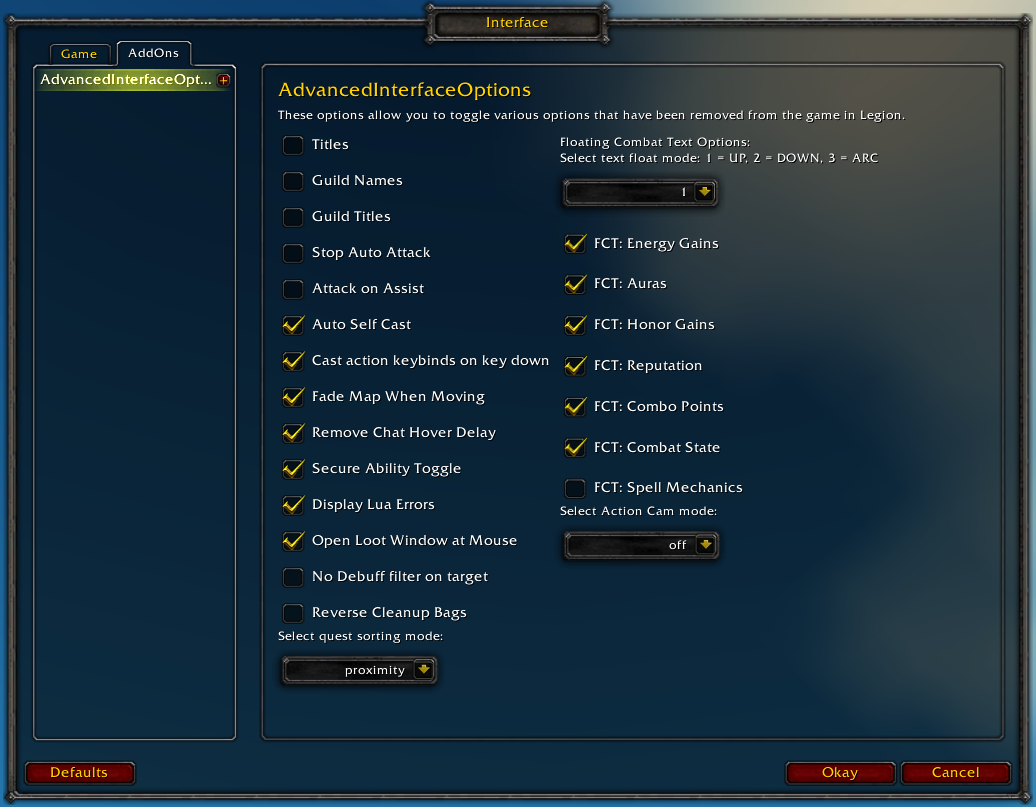
Player Titles
Guild Names
Guild Titles
Stop Auto Attack
Attack on Assist
Cast action keybinds on key down
Fade Map when Moving
Secure Ability Toggle
Display Lua Errors
No Debuff Filter on Target
Reverse Cleanup Bags
Quest sorting mode (top vs proximity)
Select Action Cam mode
Chat
Remove Chat Hover Delay
Enable Mouse Wheel Scrolling
Floating Combat Text
Float mode (up/down/arc)
Energy Gains
Auras
Honor Gains
Reputation
Combo Points
Combat State (Entering/Leaving Combat)
Spell Mechanics
Healing
Absorb (Self and Target)
Directional Scale (brings back the classic, only upwards moving text)
Low HP/Mana
Plus many other options available through the built-in CVar browser, including some that have never been exposed by Blizzard, such as "violence level" and "nameplate distance"!
Type /aio for the main menu or /cvar to open the CVar browser directly
1x ...aceAdvancedInterfaceOptions\basicOptions.lua:468: attempt to index local 'lootLeftmostBag' (a nil value) ...aceAdvancedInterfaceOptions\basicOptions.lua:468: in main chunk
Locals: addonName = "AdvancedInterfaceOptions" addon = <table> { SetCVar = <function> defined @AdvancedInterfaceOptions\basicOptions.lua:161 combatProtected = <table> { } DontRecordCVar = <function> defined @AdvancedInterfaceOptions\basicOptions.lua:142 CreateListFrame = <function> defined @AdvancedInterfaceOptions\semlib\widgets.lua:192 CreateString = <function> defined @AdvancedInterfaceOptions\semlib\widgets.lua:3 CreateDropdown = <function> defined @AdvancedInterfaceOptions\semlib\widgets.lua:483 Eve = <table> { } CreateInput = <function> defined @AdvancedInterfaceOptions\semlib\widgets.lua:403 hiddenOptions = <table> {
I keep changing nameplateShowFriendlyNPCs to enabled in AIO, but it keeps getting reset and AIO isn't able to inform me what made the change (like it does with other settings). Is there anything I can do to stop it from being reset?
The Cvar Browser has been crashing the game lately. it didn't happen in the past. Not sure if that's on my end or if it came with an update. Just a heads up.
Not exactly sure why this happened - and whether it was affecting any other addon or not - but when having this addon and DejaCharacterStats going, when I'd try and scroll down on the menu for DejaCharacterStats options, the tooltip text would change/scroll through text related to the advanced section of this addon.
Now, I have several other addons as well going; the biggest UI changing one being ElvUI. if you need any further info let me know. Just giving others a heads up.
Is it possible to disable the purple floating xp text that shows up whenever you gain experience with this addon? I tried disabling everything under "Floating Combat Text" but the xp text still shows up. Thanks.
All of the screenshots for this show floating combat text options for Classic WoW including healing. However, these are not available in the current version of this addon. Was this removed by Blizzard (and consequently from the addon)? Or should I still be seeing this?
There any chance of getting back the pre-8.3 option for the chat window that if you have your chat bar open, be it with a message on it or not and click anywhere on the screen that it closes out your chat window, instead of this simply de-highlighting it as the main focus of what your typing is going to?


-
View User Profile
-
Send Message
Posted May 19, 2021The latest version shows as outdated for TBC Classic
-
View User Profile
-
Send Message
Posted May 20, 2021In reply to Bogdanov89:
Get the current version from the github:
https://github.com/Stanzilla/AdvancedInterfaceOptions/releases/download/1.5.0/AdvancedInterfaceOptions-1.5.0-bcc.zip
-
View User Profile
-
Send Message
Posted Apr 15, 2021Classic, latest version get errors on login
1x ...aceAdvancedInterfaceOptions\basicOptions.lua:468: attempt to index local 'lootLeftmostBag' (a nil value)
...aceAdvancedInterfaceOptions\basicOptions.lua:468: in main chunk
Locals:
addonName = "AdvancedInterfaceOptions"
addon = <table> {
SetCVar = <function> defined @AdvancedInterfaceOptions\basicOptions.lua:161
combatProtected = <table> {
}
DontRecordCVar = <function> defined @AdvancedInterfaceOptions\basicOptions.lua:142
CreateListFrame = <function> defined @AdvancedInterfaceOptions\semlib\widgets.lua:192
CreateString = <function> defined @AdvancedInterfaceOptions\semlib\widgets.lua:3
CreateDropdown = <function> defined @AdvancedInterfaceOptions\semlib\widgets.lua:483
Eve = <table> {
}
CreateInput = <function> defined @AdvancedInterfaceOptions\semlib\widgets.lua:403
hiddenOptions = <table> {
-
View User Profile
-
Send Message
Posted Dec 5, 2020Hey hi, first i love your addon thanks for all the work!
Cast action keybinds on key down is not working for me at all, i tried disabling all other addons but still the same.
-
View User Profile
-
Send Message
Posted Feb 13, 2021In reply to nambi_atai:
Hey Nambi did you ever get this fixed? I am having same issue.
-
View User Profile
-
Send Message
Posted Nov 28, 2020I keep changing nameplateShowFriendlyNPCs to enabled in AIO, but it keeps getting reset and AIO isn't able to inform me what made the change (like it does with other settings). Is there anything I can do to stop it from being reset?
-edit-
Nevermind, it was another addon and I found it.
-
View User Profile
-
Send Message
Posted Nov 1, 2020Is there an option to hide RaidBossEmoteFrames? I couldn't find anything like that.
DBM/BW do that for PvE, but I also want this gone for PvP.
-
View User Profile
-
Send Message
Posted Oct 24, 2020Only for me, changing the parameters in CVar browser dont work?
-
View User Profile
-
Send Message
Posted Jul 23, 2020for Beta work around : in basicOptions.lua Line 277 replace
local valueBox = CreateFrame('editbox', nil, slider)
With
local valueBox = CreateFrame('editbox', nil, slider, BackdropTemplateMixin and "BackdropTemplate")
-
View User Profile
-
Send Message
Posted Jul 19, 2020Hello!
The Cvar Browser has been crashing the game lately. it didn't happen in the past. Not sure if that's on my end or if it came with an update. Just a heads up.
-
View User Profile
-
Send Message
Posted Aug 3, 2020Hey!
Is there a way to disable the slight screen shake on some attacks with this?
I've tried since Legion to find a way, here's my post on EU forums about it: https://eu.forums.blizzard.com/en/wow/t/screen-shake-on-certain-abilites-since-legion-video-that-explains-it/166082
Video if you cba to read:
-
View User Profile
-
Send Message
Posted Jul 7, 2020Hi,
thanks for the great addon.
Is there a way to turn off floating text on me, when I am out of combat or flying. Would appreciate it as I seem to have a lot of
characters that heal out of combat.
Cheers Leo
-
View User Profile
-
Send Message
Posted Apr 27, 2020Cvar settings "cameraPitchMoveSpeed" & "cameraYawMoveSpeed do not save after reloading UI, even with "Enforce Settings on Startup" checked.
-
View User Profile
-
Send Message
Posted Apr 3, 2020Not exactly sure why this happened - and whether it was affecting any other addon or not - but when having this addon and DejaCharacterStats going, when I'd try and scroll down on the menu for DejaCharacterStats options, the tooltip text would change/scroll through text related to the advanced section of this addon.
Now, I have several other addons as well going; the biggest UI changing one being ElvUI. if you need any further info let me know. Just giving others a heads up.
-
View User Profile
-
Send Message
Posted Mar 13, 2020Reiterating that save between sessions does not work, at least for camera max follow distance, with 'enforce settings on startup' checked.
Suggest using this instead until a fix is applied --> https://wago.io/Max-Camera
-
View User Profile
-
Send Message
Posted Feb 6, 2020Is it possible to disable the purple floating xp text that shows up whenever you gain experience with this addon? I tried disabling everything under "Floating Combat Text" but the xp text still shows up. Thanks.
-
View User Profile
-
Send Message
Posted Feb 5, 2020All of the screenshots for this show floating combat text options for Classic WoW including healing. However, these are not available in the current version of this addon. Was this removed by Blizzard (and consequently from the addon)? Or should I still be seeing this?
-
View User Profile
-
Send Message
Posted Feb 26, 2020In reply to Tielc:
I wanted to know the same thing.
-
View User Profile
-
Send Message
Posted Jan 24, 2020There any chance of getting back the pre-8.3 option for the chat window that if you have your chat bar open, be it with a message on it or not and click anywhere on the screen that it closes out your chat window, instead of this simply de-highlighting it as the main focus of what your typing is going to?
-
View User Profile
-
Send Message
Posted Dec 25, 2019Classic installs over Retail.
EVERYDAY i have to reinstall to get Retail to work correct.
Please Fix!!!