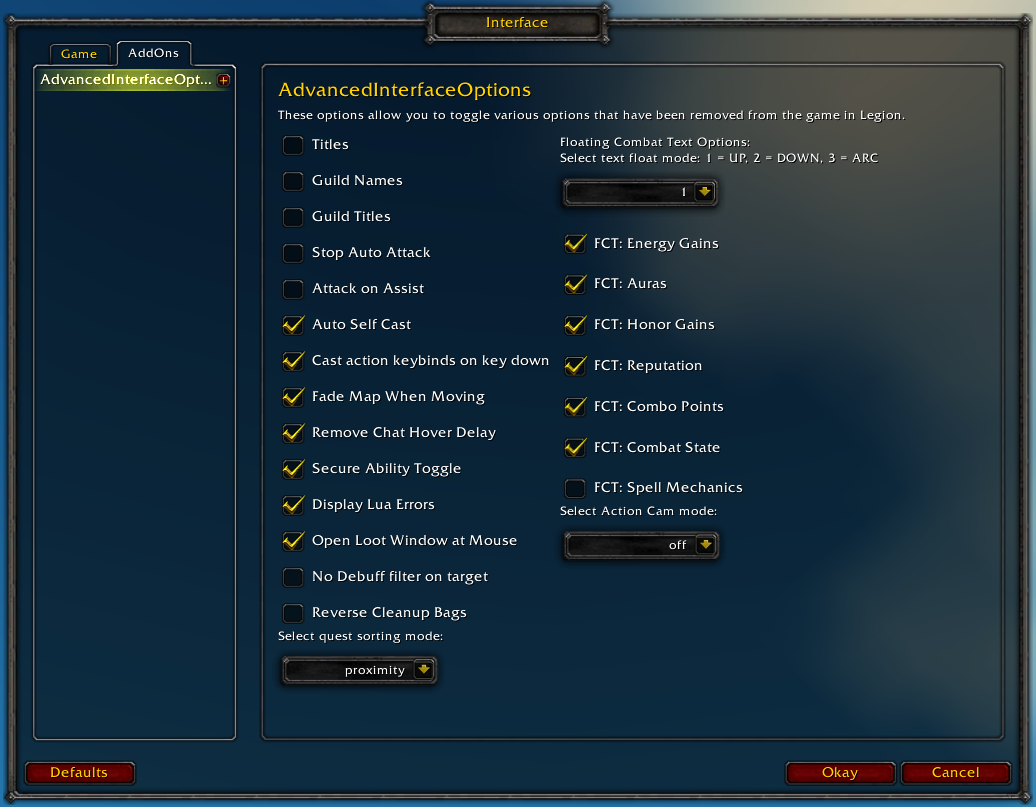
Restores access to hidden interface options and provides a way to browse every CVar setting in the game!
General
Player Titles
Guild Names
Guild Titles
Stop Auto Attack
Attack on Assist
Cast action keybinds on key down
Fade Map when Moving
Secure Ability Toggle
Display Lua Errors
No Debuff Filter on Target
Reverse Cleanup Bags
Quest sorting mode (top vs proximity)
Select Action Cam mode
Chat
Remove Chat Hover Delay
Enable Mouse Wheel Scrolling
Floating Combat Text
Float mode (up/down/arc)
Energy Gains
Auras
Honor Gains
Reputation
Combo Points
Combat State (Entering/Leaving Combat)
Spell Mechanics
Healing
Absorb (Self and Target)
Directional Scale (brings back the classic, only upwards moving text)
Low HP/Mana
Plus many other options available through the built-in CVar browser, including some that have never been exposed by Blizzard, such as "violence level" and "nameplate distance"!
Type /aio for the main menu or /cvar to open the CVar browser directly
Hello, the combo point floating combat text does not show the combo points that are gained by http://www.wowhead.com/spell=202028/brutal-slash spell, its main burst spell of ferals atm so its kind of important.
Thanks a lot for your efforts. I just went through the new options and I'm glad you added options to customize floating combat text, however, I'm having an issue since some time ago, can't remember if it was on prepatch day where scrolling combat text is a little too small.
Even white damage is barely visible and yellow damage is bigger, but not as much as on WoD or previous expansions and gets hidden behind nameplates.
I've searched for this and some other people have the same issueut none of the threads seem to have an answer regarding the size of the SCT. Do you know if there's a way to fix it or if it can be added to this addon?
Try setting "floatingCombatTextCombatDamageDirectionalScale" to 0. It will make it so the numbers no longer fly off to the sides, but I think it also affects their size.
The larger the number, the more forcefully your damage text flies off of the target, it's actually quite funny on higher settings (like 10).
0 will make it appear above their heads, fractional numbers will show near their body, and negative numbers make the text move down.
Sorry for the late reply and thanks a lot for your response. I tried that and it doesn't fix the size of FCT, white text is still barely visible, though it actually helped with the text that gets covered by nameplates so thatt's a workaround and I sure had fun trying different numbers.
At least I can see most numbers now, which is nice.
Your addon is great, so much so that I felt the need to make my first comment ever to let you know and to express a few interests for consideration.
One thing that I'm missing is a save feature or profile feature that will keep settings between characters. Maybe I'm doing something wrong, but when I change a setting on one character (noBuffDebuffFilterOnTarget set to 1), it doesn't change for other characters. I would love to change all kinds of settings and save them across characters or to save them as a profile and be able to call up profiles for different characters or circumstances.
Also, I love that you're creating menus that match the old interface menus! I can't wait to see more checkboxes and fewer 0/1 values that I have to edit! Thanks guys!
I am with you 100% on that. There are so many setting I would like saved per character. Aside that, this addon is amazing. Sure hope the author stays up with it as time goes on.
Your addon is great, so much so that I felt the need to make my first comment ever to let you know and to express a few interests for consideration.
One thing that I'm missing is a save feature or profile feature that will keep settings between characters. Maybe I'm doing something wrong, but when I change a setting on one character (noBuffDebuffFilterOnTarget set to 1), it doesn't change for other characters. I would love to change all kinds of settings and save them across characters or to save them as a profile and be able to call up profiles for different characters or circumstances.
Also, I love that you're creating menus that match the old interface menus! I can't wait to see more checkboxes and fewer 0/1 values that I have to edit! Thanks guys!
We hear you, we'll look into doing that in the future. First we need to move to a different place than the Blizzard Interface options though, since that is still buggy as hell and overwrites settings sometimes even if you hit "ok".
Your addon is great, so much so that I felt the need to make my first comment ever to let you know and to express a few interests for consideration.
One thing that I'm missing is a save feature or profile feature that will keep settings between characters. Maybe I'm doing something wrong, but when I change a setting on one character (noBuffDebuffFilterOnTarget set to 1), it doesn't change for other characters. I would love to change all kinds of settings and save them across characters or to save them as a profile and be able to call up profiles for different characters or circumstances.
Also, I love that you're creating menus that match the old interface menus! I can't wait to see more checkboxes and fewer 0/1 values that I have to edit! Thanks guys!
We hear you, we'll look into doing that in the future. First we need to move to a different place than the Blizzard Interface options though, since that is still buggy as hell and overwrites settings sometimes even if you hit "ok".
Love the addon! You've made my UI pack and will definitely be a part of it for the remainder of legion at least. As you apparently know, the game seems to write over this addon (I've stopped trying to turn on titles, but I'm determined to get them to display from log in) Anyway, when people import my addon pack, they use profiles to get my settings, so I hope you get around to profiles soon! For the time being, I've listed the individual settings in my UI guide.
Good luck working out the kinks and getting the profiles up and running! Love the concept for this one!
I downloaded this add-on because of a comment in a forum that said it would bring back the "sort on proximity" of quests that was removed with the Legion pre-patch. Although I set the field to "proximity" in the add-on, the sorting is still being down by the order in which I received the quests.
Is there any console command to enable all the extra action bars that will save upon logging out and in? I'd like to make a macro that I can click to enable all of them that won't reset on reload/relog. I know that it's available in the settings but I'm specifically trying to create a macro for it and some other settings for whenever I create new characters. I'm using:
/run MultiBarBottomRight:Show()
but that's not really a setting so it resets. If there's another macro that can force it to save(that's not an addon), that would be great. Any helps is appreciated.
"lootLeftmostBag" is a fake cvar in AdvancedInterfaceOptions (used for simplicity), since it indeed requires those getter and setter funtions you mentioned
Rollback Post to RevisionRollBack
To post a comment, please login or register a new account.


-
View User Profile
-
Send Message
Posted Aug 3, 2016I realy miss my "show arena frame" in "unit frame"...
Any plan for adding it ? =D
-
View User Profile
-
Send Message
Posted Aug 2, 2016Hello, the combo point floating combat text does not show the combo points that are gained by http://www.wowhead.com/spell=202028/brutal-slash spell, its main burst spell of ferals atm so its kind of important.
-
View User Profile
-
Send Message
Posted Aug 2, 2016Is it showing combo points for your other skills and not working for this one specific ability?
-
View User Profile
-
Send Message
Posted Aug 2, 2016Yes, exactly that.
Edit: It shows the combo point gained by brutal slash if it crits, but doesn't show if its a non-crit.
-
View User Profile
-
Send Message
Posted Aug 12, 2016/run SetCVar("floatingCombatTextComboPoints", 1) ReloadUI()-
View User Profile
-
Send Message
Posted Aug 1, 2016Hello Stanzilla and Semlar.
Thanks a lot for your efforts. I just went through the new options and I'm glad you added options to customize floating combat text, however, I'm having an issue since some time ago, can't remember if it was on prepatch day where scrolling combat text is a little too small.
Even white damage is barely visible and yellow damage is bigger, but not as much as on WoD or previous expansions and gets hidden behind nameplates.
I've searched for this and some other people have the same issueut none of the threads seem to have an answer regarding the size of the SCT. Do you know if there's a way to fix it or if it can be added to this addon?
-
View User Profile
-
Send Message
Posted Aug 2, 2016Try setting "floatingCombatTextCombatDamageDirectionalScale" to 0. It will make it so the numbers no longer fly off to the sides, but I think it also affects their size.
The larger the number, the more forcefully your damage text flies off of the target, it's actually quite funny on higher settings (like 10).
0 will make it appear above their heads, fractional numbers will show near their body, and negative numbers make the text move down.
-
View User Profile
-
Send Message
Posted Aug 8, 2016Sorry for the late reply and thanks a lot for your response. I tried that and it doesn't fix the size of FCT, white text is still barely visible, though it actually helped with the text that gets covered by nameplates so thatt's a workaround and I sure had fun trying different numbers.
At least I can see most numbers now, which is nice.
Thanks again!
-
View User Profile
-
Send Message
Posted Jul 31, 2016Hi Stanzilla and Co.
Your addon is great, so much so that I felt the need to make my first comment ever to let you know and to express a few interests for consideration.
One thing that I'm missing is a save feature or profile feature that will keep settings between characters. Maybe I'm doing something wrong, but when I change a setting on one character (noBuffDebuffFilterOnTarget set to 1), it doesn't change for other characters. I would love to change all kinds of settings and save them across characters or to save them as a profile and be able to call up profiles for different characters or circumstances.
Also, I love that you're creating menus that match the old interface menus! I can't wait to see more checkboxes and fewer 0/1 values that I have to edit! Thanks guys!
-
View User Profile
-
Send Message
Posted Jul 31, 2016I am with you 100% on that. There are so many setting I would like saved per character. Aside that, this addon is amazing. Sure hope the author stays up with it as time goes on.
-
View User Profile
-
Send Message
Posted Jul 31, 2016-
View User Profile
-
Send Message
Posted Aug 1, 2016-
View User Profile
-
Send Message
Posted Jul 31, 2016-
View User Profile
-
Send Message
Posted Jul 31, 2016I downloaded this add-on because of a comment in a forum that said it would bring back the "sort on proximity" of quests that was removed with the Legion pre-patch. Although I set the field to "proximity" in the add-on, the sorting is still being down by the order in which I received the quests.
-
View User Profile
-
Send Message
Posted Jul 31, 2016They appear to have disabled or unintentionally broken the function "SortQuestWatches", which normally would sort your watch list.
The interface still calls the function, it just doesn't seem to do anything at the moment, so it doesn't matter what you set the cvar to.
-
View User Profile
-
Send Message
Posted Jul 31, 2016One would hope it was accidental because that was a very nice feature.
-
View User Profile
-
Send Message
Posted Jul 31, 2016TargetNearestUseOld
TargetPriorityAnyAllowOnScreen
TargetPriorityIncludeBehind
These values keep resetting to default for me, extremely annoying.
-
View User Profile
-
Send Message
Posted Jul 31, 2016Is there any console command to enable all the extra action bars that will save upon logging out and in? I'd like to make a macro that I can click to enable all of them that won't reset on reload/relog. I know that it's available in the settings but I'm specifically trying to create a macro for it and some other settings for whenever I create new characters. I'm using:
/run MultiBarBottomRight:Show()
but that's not really a setting so it resets. If there's another macro that can force it to save(that's not an addon), that would be great. Any helps is appreciated.
-
View User Profile
-
Send Message
Posted Jul 30, 2016the CVar "lootLeftmostBag" is not working anymore, but the
SetInsertItemsLeftToRight(true)
seems to work
-
View User Profile
-
Send Message
Posted Jul 31, 2016"lootLeftmostBag" is a fake cvar in AdvancedInterfaceOptions (used for simplicity), since it indeed requires those getter and setter funtions you mentioned