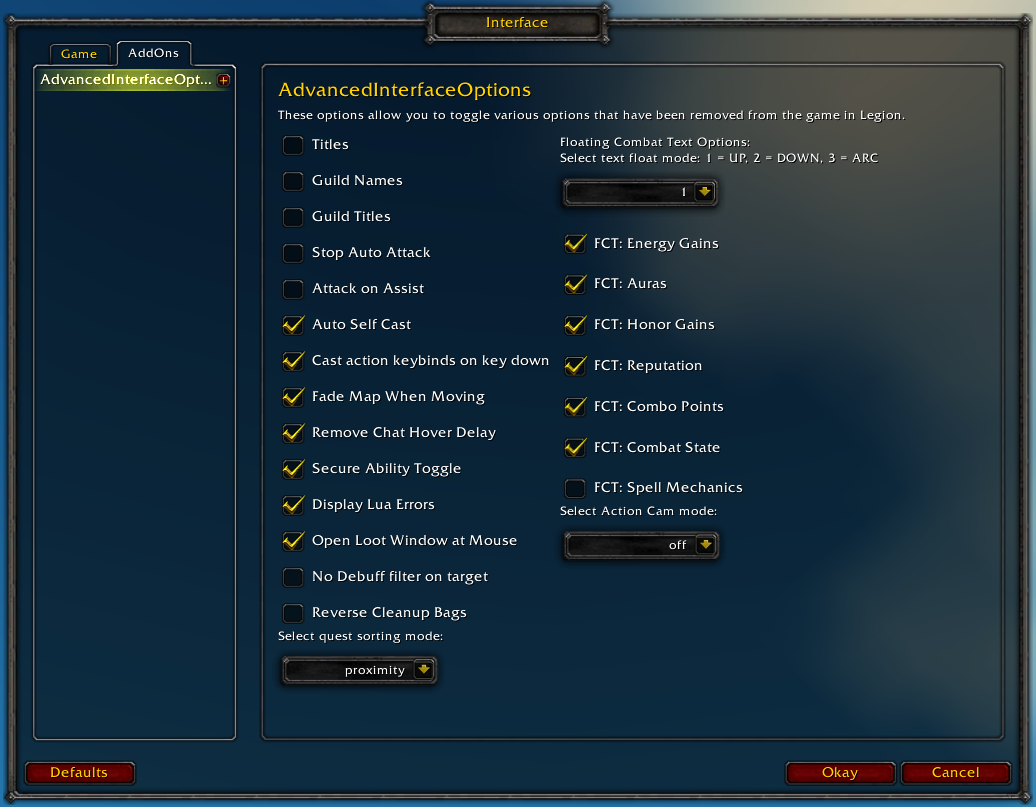
Restores access to hidden interface options and provides a way to browse every CVar setting in the game!
General
Player Titles
Guild Names
Guild Titles
Stop Auto Attack
Attack on Assist
Cast action keybinds on key down
Fade Map when Moving
Secure Ability Toggle
Display Lua Errors
No Debuff Filter on Target
Reverse Cleanup Bags
Quest sorting mode (top vs proximity)
Select Action Cam mode
Chat
Remove Chat Hover Delay
Enable Mouse Wheel Scrolling
Floating Combat Text
Float mode (up/down/arc)
Energy Gains
Auras
Honor Gains
Reputation
Combo Points
Combat State (Entering/Leaving Combat)
Spell Mechanics
Healing
Absorb (Self and Target)
Directional Scale (brings back the classic, only upwards moving text)
Low HP/Mana
Plus many other options available through the built-in CVar browser, including some that have never been exposed by Blizzard, such as "violence level" and "nameplate distance"!
Type /aio for the main menu or /cvar to open the CVar browser directly
Can this addon save all interface options (so, also the ones in Blizzards ui) and apply them to all characters or does it do this by default? Like profiles?
Busted for me as well. Not sure if it'[s related, but yesterday I had several cVars that I had set to something OTHER than default got reset to default values. Was very annoying to say the least.
Message: ...ace\AddOns\AdvancedInterfaceOptions\basicOptions.lua:599: bad argument #1 to 'pairs' (table expected, got nil) Time: Sun Jun 16 11:39:24 2019 Count: 1 Stack: ...ace\AddOns\AdvancedInterfaceOptions\basicOptions.lua:599: bad argument #1 to 'pairs' (table expected, got nil) [C]: in function `pairs' ...ace\AddOns\AdvancedInterfaceOptions\basicOptions.lua:599: in main chunk
Hi , i got a problem with Snare Effects and show for other player targets i did uncheck both and still see the TXT , i did reload after uncheck them same things ,
i turn off all addon same thing i did enforce setting on startup same as will . i reinstall the addon ,noting happen
only when i change the world text scale work fine ,
i use other addon Easy frames and Threat plates
if any one know how i can turn off this effects will be greet
1x ...aceAdvancedInterfaceOptions\basicOptions.lua:451: attempt to index global 'reverseCleanupBags' (a nil value) ...aceAdvancedInterfaceOptions\basicOptions.lua:451: in main chunk
Locals: addonName = "AdvancedInterfaceOptions" addon = <table> { SetCVar = <function> defined @AdvancedInterfaceOptions\basicOptions.lua:157 combatProtected = <table> { } DontRecordCVar = <function> defined @AdvancedInterfaceOptions\basicOptions.lua:138 CreateListFrame = <function> defined @AdvancedInterfaceOptions\semlib\widgets.lua:192 CreateString = <function> defined @AdvancedInterfaceOptions\semlib\widgets.lua:3 CreateDropdown = <function> defined @AdvancedInterfaceOptions\semlib\widgets.lua:483 Eve = <table> {3x (null)
This is quite frustrating... I absolutely cannot get Action Cam setting to save across WoW restarts. It remembers it if I log into different characters, but once I close the game, it's back to off - this is the case no matter whether I have the enforce setting checkbox checked or not. All of my other settings save and load appropriately, but I've been using AIO since legion, and Action Cam has never saved across game restarts.
It may be a clue that after you close the AdvancedInterfaceOptions panel and reopen it, Action Cam says its set to "off" again - even though it's clearly on. But I don't know what this might mean, or if it even matters. I just want my action cam on all the time. :(
Found a workaround for getting basic to save between full game restarts. Please note: I had to use a fresh install, may need to reset the AIO settings with the command to get it to work. It only worked when I did it in exactly this order.
In the CVAR browser, search "actioncam". Change "test_cameraDynamicPitch" to 1. Return to base window, click "enforce settings on startup". /reload
I'm guessing it does have something to do with the "select action cam mode:" dropdown. Even if you don't close the window, if you select "basic" then hit the dropdown again, you can see it's already defaulting to "off" even though you still have "basic" selected.


-
View User Profile
-
Send Message
Posted Jul 20, 2019Can this addon save all interface options (so, also the ones in Blizzards ui) and apply them to all characters or does it do this by default? Like profiles?
-
View User Profile
-
Send Message
Posted Jun 25, 2019Thanks for the quick fix :)
-
View User Profile
-
Send Message
Posted Jun 25, 2019As of 8.2:
Date: 2019-06-25 14:46:51
ID: 1
Error occured in: Global
Count: 1
Message: ...ace\AddOns\AdvancedInterfaceOptions\basicOptions.lua line 599:
bad argument #1 to 'pairs' (table expected, got nil)
Debug:
[C]: pairs()
...ace\AddOns\AdvancedInterfaceOptions\basicOptions.lua:599: in main chunk
Locals:
(*temporary) = nil
(*temporary) = "table expected, got nil"
= <function> defined =[C]:-1
AddOns:
AdvancedInterfaceOptions, v1.2.12
(truncated)
-
View User Profile
-
Send Message
Posted Jun 25, 2019In reply to matt0717:
UVARINFO seems to be missing, think it's an internal blizzard list of UI settings. Maybe got removed or made inaccessible?
-
View User Profile
-
Send Message
Posted Jun 25, 20198.2 seems to have broken this addon. Is anyone else having an issue?
-
View User Profile
-
Send Message
Posted Jun 25, 2019In reply to Enigma_TL:
Yes, it's broken for me too.
-
View User Profile
-
Send Message
Posted Jun 25, 2019In reply to Enigma_TL:
Yeah its not showing up at all for me. It's busted at the moment.
-
View User Profile
-
Send Message
Posted Jun 25, 2019In reply to Enigma_TL:
Busted for me as well. Not sure if it'[s related, but yesterday I had several cVars that I had set to something OTHER than default got reset to default values. Was very annoying to say the least.
-
View User Profile
-
Send Message
Posted Jun 17, 2019does this addon change any server side cvars? if so, can they be reset again?
-
View User Profile
-
Send Message
Posted Jun 16, 2019Getting the following error on the current PTR.
Message: ...ace\AddOns\AdvancedInterfaceOptions\basicOptions.lua:599: bad argument #1 to 'pairs' (table expected, got nil)
Time: Sun Jun 16 11:39:24 2019
Count: 1
Stack: ...ace\AddOns\AdvancedInterfaceOptions\basicOptions.lua:599: bad argument #1 to 'pairs' (table expected, got nil)
[C]: in function `pairs'
...ace\AddOns\AdvancedInterfaceOptions\basicOptions.lua:599: in main chunk
Locals: (*temporary) = nil
(*temporary) = "table expected, got nil"
= <function> defined =[C]:-1
-
View User Profile
-
Send Message
Posted May 25, 2019Hi , i got a problem with Snare Effects and show for other player targets i did uncheck both and still see the TXT , i did reload after uncheck them same things ,
i turn off all addon same thing i did enforce setting on startup same as will . i reinstall the addon ,noting happen
only when i change the world text scale work fine ,
i use other addon Easy frames and Threat plates
if any one know how i can turn off this effects will be greet
thanks you
https://imgur.com/ko2BZ2C
-
View User Profile
-
Send Message
Posted May 24, 2019Getting this error with the latest update 1.2.10
1x ...aceAdvancedInterfaceOptions\basicOptions.lua:451: attempt to index global 'reverseCleanupBags' (a nil value)
...aceAdvancedInterfaceOptions\basicOptions.lua:451: in main chunk
Locals:
addonName = "AdvancedInterfaceOptions"
addon = <table> {
SetCVar = <function> defined @AdvancedInterfaceOptions\basicOptions.lua:157
combatProtected = <table> {
}
DontRecordCVar = <function> defined @AdvancedInterfaceOptions\basicOptions.lua:138
CreateListFrame = <function> defined @AdvancedInterfaceOptions\semlib\widgets.lua:192
CreateString = <function> defined @AdvancedInterfaceOptions\semlib\widgets.lua:3
CreateDropdown = <function> defined @AdvancedInterfaceOptions\semlib\widgets.lua:483
Eve = <table> {3x (null)
-
View User Profile
-
Send Message
Posted May 24, 2019In reply to 25six:
Just chiming in to confirm this; I am getting the same error as well from the latest update.
Thanks!
-
View User Profile
-
Send Message
Posted Mar 16, 2019This is quite frustrating... I absolutely cannot get Action Cam setting to save across WoW restarts. It remembers it if I log into different characters, but once I close the game, it's back to off - this is the case no matter whether I have the enforce setting checkbox checked or not. All of my other settings save and load appropriately, but I've been using AIO since legion, and Action Cam has never saved across game restarts.
It may be a clue that after you close the AdvancedInterfaceOptions panel and reopen it, Action Cam says its set to "off" again - even though it's clearly on. But I don't know what this might mean, or if it even matters. I just want my action cam on all the time. :(
-
View User Profile
-
Send Message
Posted Jun 26, 2019Found a workaround for getting basic to save between full game restarts. Please note: I had to use a fresh install, may need to reset the AIO settings with the command to get it to work. It only worked when I did it in exactly this order.
In the CVAR browser, search "actioncam".
Change "test_cameraDynamicPitch" to 1.
Return to base window, click "enforce settings on startup".
/reload
I'm guessing it does have something to do with the "select action cam mode:" dropdown. Even if you don't close the window, if you select "basic" then hit the dropdown again, you can see it's already defaulting to "off" even though you still have "basic" selected.
-
View User Profile
-
Send Message
Posted Mar 15, 2019Is there a way to show only Combat State (Entering/Leaving Combat) on Floating Combat Text, without showing damage taken and such?
-
View User Profile
-
Send Message
Posted Mar 14, 2019The option "reduce input lag" is gone since 8.1.5.
Is there a possibility to restore it with an upcoming version of aio?
-
View User Profile
-
Send Message
Posted Mar 13, 2019Same here, since 8.1.5, nameplate related cvars keep resetting, like nameplateLargerScale, nameplateOverlapH etc...
Edit: it seems like its game related, without addons the game resets nameplate stacking/overlap option
-
View User Profile
-
Send Message
Posted Mar 12, 2019After new patch (8.1.5) the nameplate distance setting keeps resting to default.
Also all other settings are resting as well such as nameplate scales.
-
View User Profile
-
Send Message
Posted Mar 13, 2019In reply to Diablolock7:
There was a bug introduced with the patch yesterday that is causing some cvars to reset, Blizzard is aware of it and is working on a fix.
In the meantime, if you don't already have it enabled, you can try checking the "enforce cvars" option in AIO to see if it helps keep your cvars set.