
Prat 3.0
In loving memory of Jon Akthar (Sylvanaar)
Hello WoW community, I'm LuciferCatnip, Sylvanaar was my coworker and my mentor. It goes without saying that Jon was an amazingly talented individual. He always seemed to know everything… but he once said to me "It's not about knowing the answers, it's about asking the right questions", he always challenged me to ask me the right questions until I would arrive at the answer on my own terms. Jon was also a champion of the open source movement, and so with special thanks to Gil from Curseforge as well as Sylvanaar's family, there's no better way to honor Sylvanaar's legacy than to keep his project going strong in the community.
If you'd like to help maintain Prat, please reach out to MysticalOS or LuciferCatnip directly. Thank you so much.
About
Prat-3.0 is a chat enhancement addon for World of Warcraft.
It is made up of 30+ smaller "modules" which each provide additional functionality, and can be enabled or disabled individually.
In game, type /prat for a menu. Or use the icon on one of the many data broker hosts.
Prat has just about every feature you can think of, and then some. Really. When I get some more time, I'll try and put together a full list (Even I have lost count)
(Thanks to Dreamsight for this partial list)
- Sync your chat settings across your account (Beta)
- Machine learning powered spam filter (Beta)
- Change arrows, buttons, mouse scroll for chat scroll, scroll speed
- you can add player color per channel, color per level, color per class
- timestamps (styled)
- Whether to show timestamp (what format the timestamp should be in)
- Whether to show players level
- You can select the option for channel "stickys" (last channel you used you auto use when hitting enter, that sort of thing – or last thing someone said)
- Change the looks of the chat's editbox - as well as where it appears (you can even undock it and move it to where you'd like it to be)
- Chat fading, fading delay
- You can change the font to a list of fonts, add an outline to it, monochrome it (if you don’t mind messing with files a bit you could probably even add other fonts to that list)
- Change the chat frame/chat box appearance
- Keep chat history between game sessions
- Set channel abbreviations
- Set brackets and color(or something instead of brackets)round player/lvl
- Alt invite option (press keyboard “alt” button and click on the player’s name to auto inv them)
- Raid icon
- Invite links - click them to invite the person
- URL copying
- Full chat copying + copy button
- Click timestamp to copy line
- Configurable alerts when your name or other word is mentioned
- Enables tell target /tt which whispers your target
- Alias options - make macros into short commands
- See names of players Alt characters
- Change chat sounds (incoming and outgoing as well as per channel)
- Achievements info and grats
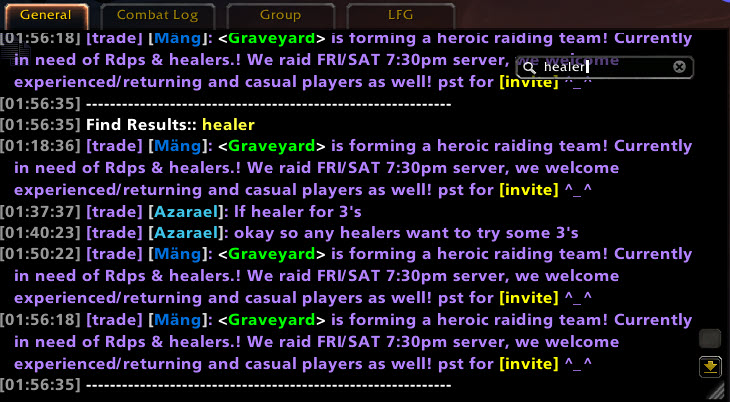
- Full chat search and search box
- Customizable filters for advanced users
- Show item icon next to item links and player class icon next to player names
- Icon-only options for newcomers chat
- Optional flashing or font color change for chat tabs when a new message comes in.
You can enable/disable all Prat modules - don't have to have the ones you don't use running
While trying to reduce resource utilization, it is also important to note that some people prefer the features, and don't care that an addon uses 500k more.
Comments

-

QTartemis Owner
-

humfras Former Author
-

lucifercatnip Author
-

MrFIXlT Former Author
-

MysticalOS Author
-

pompachomp Former Author
-

SunnySunflow Translator
-

sylvanaar Former Author
-
View User Profile
-
Send Message
Posted Oct 21, 2026Could you add the ability to hide secondary names in Forever? Ideally separately for own player and others. I can code it myself if you don't have the time, and make a pull request.
-
View User Profile
-
Send Message
Posted Oct 15, 2026have issue with whisper can not see it?!
-
View User Profile
-
Send Message
Posted Oct 8, 2026can i export profile?
-
View User Profile
-
Send Message
Posted Oct 7, 2026update and delete, wrong report.All is OK.
-
View User Profile
-
Send Message
Posted Oct 3, 2026Im unable to see most player levels and it appears to be random as to whether or not it can be seen like in this screenshot. I was not sure if Active query needed to be checked to pull player levels in order to show them. I have toggled it on and off a few times but I dont know if its doing anything. Its not gamebreaking concern but its a nice feature to have and I just cant seem to get it to work for levels specifically.
My settings and Chat - https://imgur.com/a/FdT0whQ
-
View User Profile
-
Send Message
Posted Oct 1, 2026Hi, after today's update, it's reporting a Lua error: Buttons.Lua318 attempt to index local 'upButton' (a nil value)
-
View User Profile
-
Send Message
Posted Sep 28, 2026"Prat is hiding trp3 NPC emotes entirely, only showing the player name and not the emote itself. Happens to me when I post and others when they post." - me
"There's a fix going into TRP for this shortly." - @QTartemis
Does this mean it's a trp3 issue? Or a prat issue?
Because prat updated and the issue still persists, so I just want to know who to contact about the ongoing problem, you or trp3 devs?
I promise I'm not trying to be annoying, I just want to figure out what's going on and then make sure it's dealt with, that is all :D
Have a lovely day!
-
View User Profile
-
Send Message
Posted Sep 28, 2026@Sanguiness130 There's a fix in TRP's github. However, they're waiting to push a release with it in :)
-
View User Profile
-
Send Message
Posted Sep 29, 2026@Sanguiness130 Their last release is approx 3 weeks ago. You'll have to contact them to see when they plan on doing their next release :) There's nothing left from our side we can do for this.
-
View User Profile
-
Send Message
Posted Sep 27, 2026Prat causes WoWF client to crash in an unrecoverable state if it is enabled at the same time as the Gamepad UI. A bug pops up, and then if you try and select either "ignore" or "disable" the entire wow client will freeze up.
Note that this is an issue with Prat specifically, as if I disable prat before logging in, I have no issues.
-
View User Profile
-
Send Message
Posted Sep 26, 2026Is there no way to remove combat log using this addon?
-
View User Profile
-
Send Message
Posted Sep 26, 2026@user_wu1kvy64qpopa9x2 i see that option in leatrix plus, havn't used it so no idea how reliable it is.
-
View User Profile
-
Send Message
Posted Sep 25, 2026If you have issues with Prat, please use the issue tracker located at https://github.com/Legacy-of-Sylvanaar/prat-3-0/issues.
Comments on CurseForge may not be actively monitored for handling errors reported.
-
View User Profile
-
Send Message
Posted Sep 25, 2026alt click doesnt work for invite in Forever. love your work ♥
-
View User Profile
-
Send Message
Posted Sep 25, 2026@lazylion4 This is now resolved in the latest alpha :)
-
View User Profile
-
Send Message
Posted Sep 25, 2026Hi, have activated in Player Names the option "Show Level" but doesn't seem to be working in WoW Forever, please fix, thank you
-
View User Profile
-
Send Message
Posted Sep 25, 2026@user_68s5x4pdljnlao37 This appears to not be an issue I can replicate.
-
View User Profile
-
Send Message
Posted Sep 26, 2026@QTartemis with these settings shouldn't I get the level before the name of the character? https://i.ibb.co/q3rBXTpr/Screenshot-2026-09-26-at-10-20-11.png
-
View User Profile
-
Send Message
Posted Sep 25, 2026Thank you for the amazing work, this addon is insane :) Just noticed something small with whispers on WoW Forever, even if I have whispers set to open in a new tab, I still get whispers inline in the main chat instead.
-
View User Profile
-
Send Message
Posted Sep 25, 2026Noticed an issue with trying to whisper people in Forever. Prat doesn't like clicking on a name to whisper, and tries to include the first word you type after their second name as if it is part of the name.