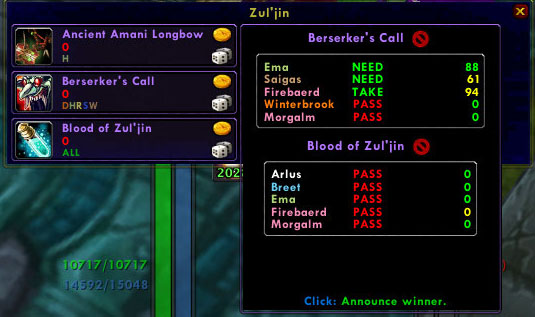
MorgDKP2
MorgDKP2 is a full featured mod that allows the master looter (ML) to control the loot distribution process. Only one member is required to have this mod. MorgDKP2 is also capable of tracking DKP and outputting the DKP string for import into eqDKP using a custom php import script.
Please help localize here.
LDB shortcuts:
- L-click => MorgBid2 query
- Shift-L-click => Invite list
- Ctrl-L-click => Raidtracker
- R-click => Options
- L-click itemlink => Add manual item for query
- Shift-L-click Itemlink => Insert link into open chatframe message
- Ctrl-L-click Itemlink => Add item to ignore list
- Hover over itemlink => Show item tooltip
- Shift-hover over itemlink => Show bid history for the item
Bag shortcut - Shift-Alt-L-click any item in your bug to add a manual query (ie a BOE item)
Video Tutorial
BlueWarlord has created a video tutorial for setting up and using the MorgDKP2 system to run a raid. Find it here.
BlueWarlord created another video tutorial for setting up and using MorgDKP2 with eqdkp/eqdkp+. Find it here.
Thanks BlueWarlord!
phpRaid Integration
If you use eqdkp+ for setting up raids you can export the raid attendees (choose lua format) and save the file to the MorgDKP2 folder. When you open the invite list (shift-click) the day of a scheduled raid the phpRaid data will pop open in its own frame.
ClassLoot Integration
If you have ClassLoot (r98 or higher) running as well as MorgDKP2 when a new item drops the classes/altclasses allowed to bid for the item will automatically be filled in if the item is in ClassLoot's database. Only if the classes are NOT already set. Thanks Pneumatis for allowing me to hook your DB:)
Importable item database
There is now and item DB included in the ImportItemDB folder of MorgDKP2. It has as many Northrend raid items I have seen so far with classes set. To import it copy the file to the main MorgDKP2 directory and load WoW. Once imported delete the file from the main directory. Note it will not overwrite any items you already have set.
Using MorgDKP2:
Basic use is identical to MorgDKP. Documentation for setting up the web scripts etc still applies. Will post more information when I have time.
Suggested to start:
- Install the webscripts to the plugins folder of your eqdkp install and install it through the admin plugin menu
- Export your DKP from the website save in MorgDKP2 folder (even if your database currently has no members!)
- Enter WoW and make sure there are no errors
- Track your raid etc
- Click export raid(s) and copy the string
- Click Import raids on the admin panel of edkp and paste the string into the window
- Win!
Webscript help
Export standings
Used to export member DKP, events, aliases, and database information (needed for proper import) to the in game mod. Access through the eqdkp admin menu (after installing plugin)
- Select your game timezone (may not match your actual timezone)
- Select if you want to export member ranks
- Ignore ranks - do not export ranks and hence do not use rank sorting for item rolls
- Use all ranks - export all ranks for all members and use rank sorting for item rolls (only way to activate rank sorting)
- Only export [rank] - only export the selected rank from the website. Caution will only export members of that rank so any unranked members or members of different rank will not be in the file.
- Enter the directory and in game name for up to 5 eqdkp installs (ie if your website is http://sodalityoftheconstant.com/aqdkp/listmembers.php? then you would enter aqdkp and whatever name you want it called in game.)
- For eqdkp+ multiple pool install only enter the main directory name the pool names will be your actual pool names
- For installs in base directory (ie http://eqdkptest.sodalityoftheconstant.com) enter - for the directory name
- Click export
- Right click the link and choose save as .. save in WOW/Interface/Addons/MorgDKP2 directory.
- Load into WoW or reloadui if already in game.
Import raids
Used to import raids recorded with the MorgDKP2 in game mod. Click export raids in the LDB tooltip or export raid in the raidtracker for a single raid. Copy the DKP string (Ctrl-C) and paste it into the editbox. When editing names or adding people you do not need to capitalize them.
- Click parse DKP string
- Check the data and make sure the import looks correct:
- If you have any aliases to import they will be shown with ADD beside them. To not import the alias simply erase the editbox.
- If you have any DKP changes they will be listed. As above erase the value or the names to not import. Can add/remove names as well.
- For each event the name, note, value, attendees, and any items will be shown. Edit them if necessary. To not import a whole event (including items) erase it's name. Erase and item or item value to not import the item.
- If you are using zerosum or skall with zerosum check the use zerosum checkbox.
- Click enter final data:)
Note: - Ranks will only be used in sorting if you export all ranks and set the weight of each rank in the in game options (database options) Higher values should be higher ranks. Also rank sorting is ONLY used on the lootframe rolling window. It is not used anywhere else such as the MorgBid2 check or raid invite tab. This means that the MorgBid2 results frame may show a different winner.
Loot window help:
Here is how the loot window is designed to work for those having trouble understanding it. When you loot a corpse if any items are above the loot threshold the mod will:
- Check each item and if any have not had their classes set (who gets to roll for the item) it will automatically open the item edit page to that item. This takes priority over all other possibilites. ie You edit this item and start the roll for it. The mod checks again and there is still another item with its classes unset so it opens the item edit page for that 2nd item NOT the roll window for the auction you started. If you want to see the roll window simply right click on the 1st item again.
- If no items have unset classes the mod next checks if any items are currently in auction. If so it opens: roll summary window if more than 1 item being rolled for or the single item roll window if only 1 item.
- If none of above conditions apply no window automatically opens (ie not roll window or item edit window) and you can right click any item to open edit window (or roll window if auction started) or alt-right click any item to start ALL queries which will cause the roll summary window to open.
Note: - If you want to use MorgDKP2 with fubar you need to have Broker2Fubar installed or it will only show a minimap icon.
Whisper commands: - whispered to someone running morgdkp2.
Waitlist
mbid wait[+/-] [main] => main only necessary if you are whispering from an unknown alt
Bidding
mbid itemid/itemlink [need/take/pass/offspec] [bid] => itemid/link must be included - bid only for BidWar
Dkp queries
dkplist [pool/s] [class/all] [class] ... => pools only if you want to see what pools are available. pool to get the dkp for that pool (leave out for default pool). all for all members in the raid (if person running morgdkp2 is in a raid), guild otherwise. You own class is automatically included so a pally whispering dkplist rogue will get paladin and rogue.
Webscript note: - The MorgDKP2 webscript requires:PHP 5.2.3 or greater and MySQL 5.0.7 or greater. If you are having issues with special characters make sure your MYSQL database is in UTF-8.
Supported DKP modules:
- Fixed DKP
- Zerosum DKP
- Percent DKP
- Relational DKP
- Random
- SKall
- TakeBid
- BidWar
Syncing:
Options
- Broadcast - enable to send sync messages out during a raid to registered listeners. Usually one person will probably broadcast to the backup people in the raid but you can have more than one broadcaster.
- Receive - enable so your mod will act as a listener and receive syncing events from MorgDKP2 installs which are broadcasting.
- Overwrite raid - enable to overwrite the current raid with the new raid info (in the initial sync) if you have already started a raid. Useful when you zone in to the instance late after raid is already in progress to get the raidlog from the whole run. If you haven't started a raid overwrite is done by default.
- Manual Syncs - ie Sync options/members/items/all/initial sync. Click one of these buttons to manually sync to the current raid.
Sync Details
- Syncing will not be enabled until a raid has started and then the mod will check for sync necessity every 60s.
- When the raid starts or someone joins the raid with receive enabled the broadcaster will send out his eqdkp data (boss events/values, aliases, current pool, certain options, current raid data, and current member DKP) Current member DKP will only be updated in the listener client if it has a newer timestamp or if they are members of your current raid. The broadcasters current raid will overwrite the receivers current raid unless Overwrite raid is off.
- When you make changes to important values the mod will schedule a sync and send those changes to the listeners throughout the raid.
What is synced?
- item database changes (value/classes)
- raid tracker changes to items (value/winner/event)
- custom events
- event changes (value/name/note/deletion)
- alias additions
- BOE items (ie hand out through your inventory and manually trade)
- DKP change events
- item costs different from actual DB cost (ie TakeBid or offspec auctions)
- items incorrectly assigned to ML/DE in listener client
- full current raid sync
- initial waitlist and waitlist changes
NOTE: - There is generally no need for the manual syncs unless you specifically want to transfer the complete itemDB or the listener wants ALL of your MorgDKP2 options. The complete member DKP and necessary options are transferred when the initial sync is sent at the start of the raid (if you have Broadcast enabled and there are listeners present in the raid)
MorgDKP2 Features:
- Allows ML to query raid for interest in loot.
- Tracks DKP including raid attendees, start bonus, and all drops.
- DKP systems supported include zero-sum, relational, random, fixed, percent, and skall.
- Options to award DKP/unit of time, include a start bonus, and include custom events such as boss attempts.
- BidWar mode for item auctions.
- Custom php scripts to export/import/change DKP and add aliases to eqDKP/eqdkp+ website. (can import multiple raids/pools in one string)
- Allows a ML and disenchanter (DE) to be set so that they are not charged for items. (Toggle)
- Remembers what raid members have equipped and will not send a query to them for loot they already have. (Exceptions for some non-unique items included.)
- Sends query results to MorgBid2 (for players in that auction)
- Displays top 5 DKP members for the moused over item in the tooltip.
- Automatically hands out items to the winning player if the loot window is still open. Note: It asks with the standard blizzard confirmation dialogue.
- Allows ML to easily set which classes are eligible and DKP value. Also remembers these values.
- Scans for base installs of MorgBid in the current raid. Automatically outputs a link to MorgBid site on click.
- Allows ML to record BOE items before trading them to member. (Alt-shift click item in your inventory)
- Can load up to 5 separate DKP pools. Ie. MC1, MC2, BWL, AQ40, NAXX. These raids can be named whatever you wish.
- multiPool feature allows up to 5 DKP pools to be used in one raid. (ie separate pool for class items)
- Can change loot threshold on the fly.
- Item history for easy recall of current raid item winners.
- Allows raid members to whisper ML for current DKP for own class or specified classes in all 5 DKP pools. (sent to MorgBid2)
- Lets you know it is working by displaying boss kills, raid changes, and looting events.
- Automatically links items to raid chat.
- Edit item values from item history (Allow you to track DKP without being ML)
- Whisper system for those crazy people who hate mods:P
- Fubar/LDB support
- Main and offspec DKP rolling
- Waitlist including DKP awarding and alt whispering.
- ListDKP - shows guild members online and in/out of group and allows 1 click inviting
- Custom item ignore list
- Automatic loot method switching for certain encounters. (Vashj/MH)
- Boss attempt mode asks if you want to record a boss attempt after dying
- Custom loot frame with buttons for self-loot/random rolling items (loot frame can be used with mod in standby mode)
- Importable item database
- Built in xloot like loot frame which can be used with mod on standby
- New itemframe/rollframe built into loot window
- Customisable font/frame options
- Modular so can disable what you don't need
- Web script can handle offbase/eqdkp installs in main directory
- Imports MorgDKP database data (be sure to run both at same time if you want to mport your database the first time)
- Fully eqdkp/eqdkp+ compatible
- In game raid browser
Comments

-

morgalm Owner
-

_ForgeUser1615602 Maintainer
-
_ForgeUser986517 Documenter
-
View User Profile
-
Send Message
Posted Apr 28, 2013A video tutorial on how to use the add-on can be found at:
-
View User Profile
-
Send Message
Posted Mar 7, 2013A quick fix to make the add-on work in WoW 5.2 is to change the function mdkp.modulePrototype:GetDifficulty() in the basePrototype.lua file to:
function mdkp.modulePrototype:GetDifficulty()
local bla = GetInstanceInfo()
if bla["instanceType"] == "raid" then
local difficulty = bla["difficultyIndex"]
difficulty = difficulty+1
if difficulty > 3 and difficulty < 8 then
return difficulty - 3
else
return GetRaidDifficultyID()
end
else
return GetRaidDifficultyID()
end
end
-
View User Profile
-
Send Message
Posted Sep 3, 2012@nosscire
Thanks lol. Hope it works.
-
View User Profile
-
Send Message
Posted Sep 3, 2012Wohoo! An update! Love you Mr Morg :)
-
View User Profile
-
Send Message
Posted Sep 2, 2012Morgalm is working on an update of the add-on to make it work with MoP.
-
View User Profile
-
Send Message
Posted Sep 1, 2012Should be working now. I am unable to test if instance detection has changed at all as I don't really raid much (ie will it detect saved instances etc properly) So any help you guys can give with that is appreciated:)
-
View User Profile
-
Send Message
Posted Aug 22, 2012@jdaniel
Yeah once the new patch is live I will get to some coding to make things work properly. Testing feedback is always welcome.
-
View User Profile
-
Send Message
Posted Aug 22, 2012We are using atm WebDKP. If you want and ofc if we choose this addon we will be glad to help testing. New patch comes in exactly one week from now so... we have one month till leveling and Pandaria opens.
-
View User Profile
-
Send Message
Posted Aug 22, 2012@jdaniel
I plan to update it but I am not actively raiding/playing much anymore so I won't be able to test raid environment as well. What were you using?
-
View User Profile
-
Send Message
Posted Aug 22, 2012@kk006
Far as I remember the only way to assign bosskill DKP is to have separate boss events.
-
View User Profile
-
Send Message
Posted Aug 21, 2012Hello, The DKP addon we use atm will not be updated for MoP. Searching for other addons I found this one. My question is simple, will this addon be maintained, developed, supported, compatible in/with MoP ?
Thanks.
-
View User Profile
-
Send Message
Posted Aug 21, 2012Thanks.
We use time DKP too. ^^
I hoped there's a way to adjustment bosskill DKP like time DKP on import to eqdkp+, or another trick.
The problem starts when we kill more than 1 boss. E.g. we kill 6 bosses. Man who goes offline after 3rd boss, or come online on 6th, get bosskill DKP same like others (full or 0).
-
View User Profile
-
Send Message
Posted Aug 20, 2012@kk006
If you want to have a single run event you would have to add the DKP you want people to get to the Dragon Soul (25H) Run event or use DKP/time to add DKP at set intervals (ie 10 DKP/hour) Hope that helps.
-
View User Profile
-
Send Message
Posted Aug 20, 2012Hi.
I have one question.
I use eqdkp+, and single run event, because I want to have attendence per raid, not per boss kill.
And I have problem with boss kill dkp. Meybe Im doing something wrong, but my Morg is creating only one event for entire raid (like option said), so everyone gets 0 boss kill dkp.
Next I tested creating events (for boss names) and import data to Morg. Ok now I can see events in list of possible events in RT, but still have something like:
name: Dragon Soul (25H) Run
note: boss1, boss2, etc.
value: 0 DKP.
How I can fix it?
-
View User Profile
-
Send Message
Posted Jan 27, 2012@anudawn
Well you as the person running morgdkp can see the attendance by shift clicking the broker icon (using the invite tablet) and each players attendance % is shown in morgbid as well on the bidtip. I have thought of adding a minimum % to roll need etc but never got around to it.
-
View User Profile
-
Send Message
Posted Jan 26, 2012Is there any way to see attendance percentages?
I'm trying to use the weighted roll system with a minimum attendance to roll "need" so I'd like to be able to show people where they stand.
-
View User Profile
-
Send Message
Posted May 26, 2011That was what I missed. Swapping broadcast/listener. Doh! Right. Thanks. :)
-
View User Profile
-
Send Message
Posted May 25, 2011Well the way I envisioned it was as a backup in case of the worst. Couple ways I usually handle it.
When you come back online make sure the other person is the masterlooter. Assuming your mod is on automatic it should sync his data to you (which you previously synced to him) Then comes the choice:
I tested syncing as best I could but there could easily be some bugs. Let me know if you find any. Quite often I will just let the raid end up being 2 separate logs (ie one from backup person and one from when you reconnected) and upload them both and delete (or not upload) duplicate events using eqdkp import.
-
View User Profile
-
Send Message
Posted May 25, 2011I'm still trying to figure out this whole 'syncing' thing. :)
In theory, if the master looter's computer crashes mid-raid, say while he's trying to tank heroic maloriak to pick a totally random hypothetical example, what should we do to sync the raid data back up with the master looter, who just lost it all, and started a brand new raid when reconnecting (and looking up from his corpse at the base of maloriak's tail.... ew!)
I don't think there's a bug here, just that we didn't do whatever should be done to fully recover, and I wanna make sure I know what you think should recover everything.
-
View User Profile
-
Send Message
Posted May 19, 2011Ok thanks for the heads up saves me trying to find the problem:)
And thanks glad you find it useful.