ZOMGBuffs

Filters

KeyEnglishContextNamespace
Broadcast

ZOMGBlessingsManager
Broadcast these templates to all paladins (Simply a refresh)

ZOMGBlessingsManager
Caster DPS

ZOMGBlessingsManager
Change how many groups are included in template generation and Paladin inclusion

ZOMGBlessingsManager
CHATHELP help

ZOMGBlessingsManager
CHATHELPRESPONSE1 Usage: '!zomg +buff -buff', where +buff is the buff you want (ie: +bom) and -buff is the buff you want replace with it (ie: -bow). Various synonyms will work for the + and - buff names, ie: BOW bow wisdom.

ZOMGBlessingsManager
CHATHELPRESPONSE2 Who does the buffs is not important for you to know (but you can query this with just '!zomg')

ZOMGBlessingsManager
CHATHELPRESPONSE3 Example: '!zomg -bow +bok' - Will request that you get Kings instead of Wisdom

ZOMGBlessingsManager
CHATHELPRESPONSE4 Example: '!zomg -kings +light' - Will request that you get Light instead of Kings

ZOMGBlessingsManager
Chat Interface

ZOMGBlessingsManager
Chat interface configuration

ZOMGBlessingsManager
Cleaned %d players from the stored sub-class list

ZOMGBlessingsManager
Cleanup

ZOMGBlessingsManager
Cleanup options

ZOMGBlessingsManager
Clear

ZOMGBlessingsManager
Clear All

ZOMGBlessingsManager
Clear all single buff exceptions

ZOMGBlessingsManager
Click to scale window

ZOMGBlessingsManager
Configure

ZOMGBlessingsManager
Configure the automatic template generation

ZOMGBlessingsManager
Default

ZOMGBlessingsManager
%d Group

ZOMGBlessingsManager
%d Groups

ZOMGBlessingsManager
Display

ZOMGBlessingsManager
Display configuration

ZOMGBlessingsManager
Exceptions

ZOMGBlessingsManager
Finish

ZOMGBlessingsManager
Finish configuring template

ZOMGBlessingsManager
Generate

ZOMGBlessingsManager
Generate automatic templates from manager's main template. This will broadcast new templates to all paladins, so only use at start of raid to set initial configuration. Changes made later by individual paladins will be reflected in the blessings grid.

ZOMGBlessingsManager
Generating Blessing Assignments for groups 1 to %d

ZOMGBlessingsManager
Grey out invalid Drag'n'Drop target cells

ZOMGBlessingsManager
Greyouts

ZOMGBlessingsManager
Healer

ZOMGBlessingsManager
Help

ZOMGBlessingsManager
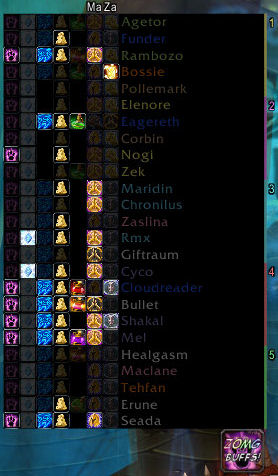
HELP_TEXT The Blessings Manager has two modes. The default mode simple shows the current blessings configuration for each paladin in the raid. The configure mode allows you to setup the default blessings per class, regardless of paladins present. These defaults can then be auto assigned by the 'Generate' button when in normal mode.

The list of paladins shows their name along with some relevant information such as available blessings (as icons), talent spec, and ZOMGBuffs version

|cFFFF8080Red Icons|r indicate a conflicting buff.
|cFF8080FFBlue Icons|r indicate exceptions for this cell.

|cFFFFFFFFNormal Mode|r
|cFFFFFF80Left Click|r an icon to cycle through the blessings for that paladin and that class.
|cFFFFFF80Right Click|r an icon to set an exception for a single player. That is to say, after the druids have been buffed with Greater Blessing of Wisdom for example, you may have a feral druid that requires Blessing of Might instead.

|cFFFFFFFFConfigure Mode|r
It is important to realise that the order of the blessings in this mode represents how many paladins you may have present in any given raid. Setup correctly you should rarely need to change this configuration. So, assuming you had one paladin in a raid, the auto assigned blessings would be taken from row 1. Two paladins would take from rows 1 and 2 and so on.

|cFFFFFF80Left Click|r an icon to cycle through the blessings for that line and that class.

Mousing over a class with sub-classes defined will expand that class to show the sub-classes. Set these classes up in the same way. Note that the sub-class split window will also open to allow you to move players into their correct sub-classes.

|cFFFFFFFFConfigure Button|r
This will toggle between the two modes (normal and configure).

|cFFFFFFFFGenerate Button|r
This will assign paladins present with blessings based on the configured global template, taking into account talents so that paladins with Improved Blessing of Might, for example, will be favored to buff this blessing.

|cFFFFFFFFBroadcast Button|r
This will simply re-broadcast the current blessing layout, should anyone need this after a WoW crash for example.

ZOMGBlessingsManager
HELP_TITLE Blessing Manager Help

ZOMGBlessingsManager
Highlights

ZOMGBlessingsManager
Highlight the selected row and column in the manager

ZOMGBlessingsManager
Holy

ZOMGBlessingsManager