YorsahjAnnounce
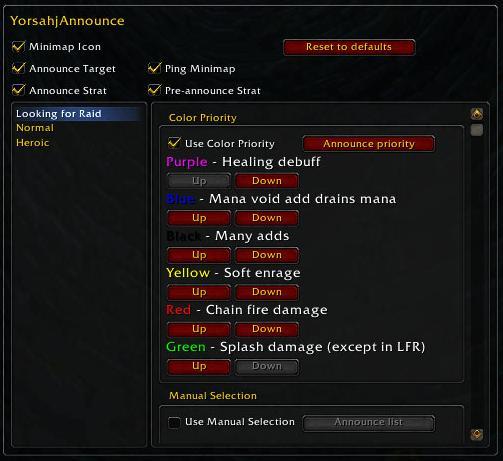
YorsahjAnnounce automates the decision and announcement of which ooze to attack in the Yor'sajh encounter in Dragon Soul. Highly customizable with numerous helpful features.
Main Features:
- Announces which ooze to attack, and optionally the follow-up strategy
- Pings the minimap for the ooze to attack
- Shows a directional arrow for raid members running Deadly Boss Mods and DBM-Cataclysm
- Easy and simple configuration allows you to select a color priority OR tweak each possible combination
- Separate configuration for each difficulty level, correct one automatically applied
- Intelligent default settings, exhaustively tested on LFR, reg and heroic modes
- Lets you easily output the current settings for the raid to see
- Very efficient - automatically enables/disables when you enter/leave the boss room
- International language support - Apply translations HERE
Comments


-

_ForgeUser405586 Owner
-
View User Profile
-
Send Message
Posted Sep 4, 2012It's not announcing which to kill or giving an arrow on Heroic. It only shows which oozes are spawned. Us-Farstriders.
-
View User Profile
-
Send Message
Posted Sep 4, 2012I've used it successfully for three heroic kills now.
Make sure you have announce enabled and have raid lead or assist.
Also note that seeing the arrow now requires Deadly Boss Mods AND DBM-Cataclysm (a second, separate download).
-
View User Profile
-
Send Message
Posted Sep 12, 2012Same issue as TamaraRa this evening. 2 raiders had up to date copies of your addon.
one had lead one had assist.
Neither announced.
-
View User Profile
-
Send Message
Posted Sep 12, 2012Please post a ticket with your full details here:
http://www.wowace.com/addons/yorsahjannounce/tickets/
Be sure to include your locale and list of other addons installed.
Many people are using it successfully, so it's probably a conflict with some other addon you are running. Note that in a raid with multiple assistants the addon automatically elects one copy to do the announcing, which is usually the leader. You can see more details by enabling debug mode with "/ya debug".
-
View User Profile
-
Send Message
Posted Aug 30, 2012Hi, used it tonight, and it worked perfectly !
I play on frenche localization, and no problems !
Thank you !!
-
View User Profile
-
Send Message
Posted Aug 29, 2012-
View User Profile
-
Send Message
Posted Aug 29, 2012New 2.1.0 version SHOULD work on 5.0, but more extensive testing is required. Please report any successes or errors.
-
View User Profile
-
Send Message
Posted Sep 1, 2012Thank you so much for the quick update! will be trying it out in raid later today :)
-
View User Profile
-
Send Message
Posted Jul 18, 2012Great addon, nice job !
And I love the 2.0 ! :)
-
View User Profile
-
Send Message
Posted Jun 4, 2012I really like this addon. As others have said, it rises above similar ones because of the intergation with DBM to give an arrow to the approrpriate ooze.
Question: why save the settings per character instead of per account? I'd rather not have to set up the priorities every time I bring a new toon in for a reg or heroic kill.
-
View User Profile
-
Send Message
Posted Jun 4, 2012Thanks! Please hit the "Like" button on the top right and spread the word to others :-)
YorsahjAnnounce uses Ace3 profiles, just like many other Ace3 addons. Open the interface options and navigate to the profiles panel, and you can configure it to save your settings with as many or as few characters as you like.
-
View User Profile
-
Send Message
Posted Jun 4, 2012I'm way ahead of you on the "Like" button. :)
Sorry for my ignorance. I will definitely be setting up a profile next time I log in!
-
View User Profile
-
Send Message
Posted May 7, 2012is there any way of changing/costomizing the follow up text?
-
View User Profile
-
Send Message
Posted Jun 11, 2012Feature added in version 2.0
-
View User Profile
-
Send Message
Posted Apr 26, 2012Great Addon. Works perfectly as advertised. You can do the announcer by Priority or select specific colors on specific combinations. Either option is easy to use and works flawlessly. Definitely recommend for any Raiding Guild.
-
View User Profile
-
Send Message
Posted Apr 20, 2012Great addon! Me and my guildies love this, because it makes things so much easier =)
-
View User Profile
-
Send Message
Posted Apr 17, 2012This is the best of the various Yor'sahj addons available. Simple to edit and a really helpful arrow to show the direction. Thanks for making this!
-
View User Profile
-
Send Message
Posted Mar 21, 2012Is there any way to get it announce to just me even if im not the raid leader so like in lfr i can still know what blobs to expect because as an healer i dont always look at what blobs are up. But it is nice to know if i need to pop an mana cd or geat ready to pull the slacker's in to stack.
-
View User Profile
-
Send Message
Posted Mar 21, 2012You can enable debug mode with "/ya debug" and that will print most of the same messages that would be announced.
-
View User Profile
-
Send Message
Posted Mar 17, 2012On of the best addon for the yor fight !!