X-Perl UnitFrames
Patch 6.0.3 compatibility and future of X-Perl
Use latest alpha from WoWAce for using in Patch 6.0.3
http://www.wowace.com/addons/xperl/files/
May still has problems but for most cases it should be working(at least was tested on beta), if not, clearing old setting by killing(and backup) XPerlxxxxxxx.lua in the WTF directory of your WoW installlation and try again with fresh new default setting, thanks your patience.
If still someone want to help Zeksie for he earns his donates from X-Perl then that's fine for Zek and X-Perl, but seems like it's time to cut him out as no one want to help X-Perl anymore (as many of users already heard about the mess of this poor addon), I guess.
I don't know X-Perl will still be continue or not(it's highly possible it won't be, as the new maintainer Resike continued the developing and forked to Z-Perl, and he said he won't abandon his addons), I won't force everyone should must to use Resike's one at this point, as his Z-Perl isn't stable yet, and for some reasons, I don't think he want to port his fixes back to X-Perl as he knows about how Zek did about his addons and everyone who helped Zek to maintaining this poor addon...and, of course...X-Perl may broken again when next time Blizzard's patches released..... /sigh
(At this point, I won't force everyone who used X-Perl to go Z-Perl until it's more stable than now, feel free to use Z-Perl or other Unitframe addons if you want, and do NOT hold your breathe about X-Perl too much, too. I already lost my hope on X-Perl, at least I can trust Resike and Z-Perl now...)
Sincerely,
PlayerLin - Maintainer of X-Perl but not a proper skilled coder, just a locale translator and do some shitty PRs. :(
Bug Reporting
Please use the Ticketing System on WoWAce Here and avoid posting bugs using comments on Curse because they're difficult to track and they will probably get lost.
Use a good error catcher (like BugSack from files.wowace.com) and provide the full error text, and give as much information as possible to recreate the problem. Don't assume We know what you're talking about with some three word report.
Introduction
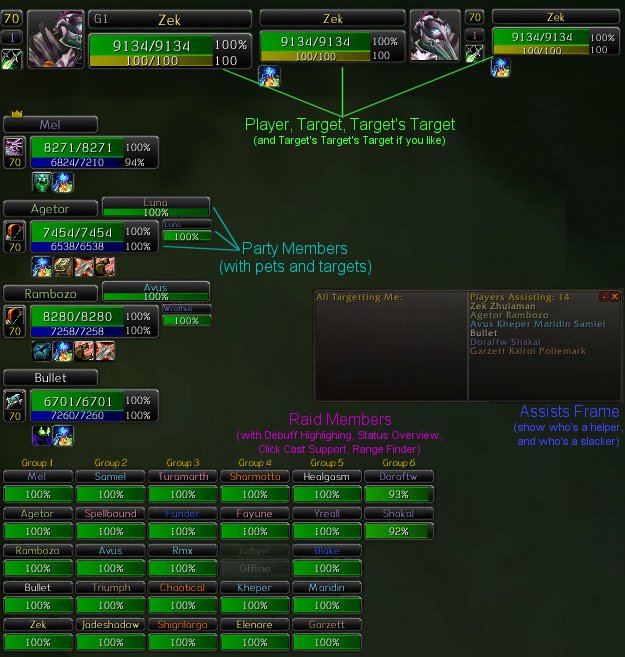
Perl, with Extra stuff. Much enchanced from Nymbia's Perl UnitFrames, and a complete replacement for Blizzard's default unit frames, including raid frames and raid tools, with little remaining of the original Nymbia code.
- Range Finder (combined with optional health check and/or debuff check) for all frames based on spell or item range test.
- HoT Monitor will highlight units clearly that have ''your own'' active Heal over Time spells. Regardless of how many other heal over time buffs are on the raid members, you can keep track of your own ones and when they expire.
- Debuff Highlighting in standard debuff colours on all friendly frames. Priority given to show debuffs that ''you'' can cure first.
- Raid Frames, buff icons, MT list units and some other portions or X-Perl are Created on demand. Saving a lot of time and memory at system startup. Defering the creation of many parts of X-Perl to when they are actually required. And of course, most often outside of raids they are never required and are never created.
- Raid Target icon support for Target, Target's Target, MT Targets.
- Raid Tooltip will show combat rezzers available (druids with Rebirth ready (or very soon available) and any normal rezzers out of combat) if you bring up tooltip of a dead person.
- In-combat indicators for all units.
- 3D Portraits for player, pet, target, focus, party. Optional. Of course this may degrade your framerate somewhat because you are displaying more 3D character models that without this option. But some like it pretty, and it does look cool.
- Red and Green combat flashes for frames when player, pet, target, party, partypets, raid take damage/heals. Useful indication of things happening.
- Added '''time left''' on party member/target buffs/debuffs when in a raid, these depend somewhat on CTRA sending appropriate information over the addon channel, although some of it can be determined at run time by X-Perl, when a player gets a buff for example, we know how long it should last, and therefor when it should expire.
- Totally new options window including all X-Perl options and access via minimap icon and the /xperl splash command.
- Configurable colours for borders and backgrounds. Including class coloured names, and configurable reaction colours.
Much care has been taken with code size, memory load, memory usage per cycle and so on. LuaProfiler/OnEvent mods used extensively and regularly to ensure that X-Perl does not do more work than is absolutely necessary.
Assists View
Will show anyone from raid assising you with your target, and can also show healers or all plus known enemies targetting you.
Tooltips for the same also available (on player and target frames) if you prefer to not use the main window.
MT Targets
Replaces CTRA MT Targets window, and doubles as a replacement for the Perl RaidFrames warrior targets.
Indicator shows which target you are on.
Frames will be coloured to show if tanks have duplicate targets.
Casting Monitor
(WORK IN PROGRESS)
Shows selected classes (defaults to healer classes) in a list (much like the MT List), but with some differences.
Shows mana bars and cast bars on left. Their targets on right. Health bar as normal, but a secondary small red bar on targets which shows the maximum single hit this unit has received since entering combat. The secondary bar will extend downwards from their current HP level down to as far as zero.
A green name on the targets indicates this is the same target that you have. You can click on casters or their targets as expected.
For druids, right clicking on a caster will cast Innervate on them.
For shamans, right clicking on a caster will cast Mana Tide Totem. Check the * indicator to see if they're in your group.
All bars can be re-sized in X-Perl main options (Monitor section).
Totals can be toggled (from the 'T' minibutton at top of frame) which gives overview of raid mana status.
Raid Admin
(WORK IN PROGRESS)
Save/Load raid roster setups Only does direct save and load for the moment, but more to come (templates and such).
Item Check
Replacement for /raitem /radur /raresist /rareg. Use the old commands before, or drop items in the left item list.
Query button will perform /raitem on all ticked items (query always includes dur and resists) and you can then view and review all the results whenever, without having to re-query each item.
Includes everyone in raid, so you don't have to work out who doesn't have items, it'll list them with 0 instead of no entry.
Active Scanner to check raid member's equipment for the item selected. So you can be sure that people actually have the item worn (Onyxia Cloak for example), without having to go round single target inspecting everyone who 'forgot' to install CTRA for the 50th raid in a row.
Grim Reaper
Removed from X-Perl, but continues as it's own standalone Ace mod.
[http://www.wowace.com/projects/grim-reaper/]
More Buffing Features
Can be found in my new universal buffing mod, ZOMGBuffs
Comments


-

Forge_User_26050436 Owner
-
_ForgeUser1474348 Maintainer
-
_ForgeUser507823 Maintainer
-
_ForgeUser5362565 Maintainer
-

Cexikitin Maintainer
-
View User Profile
-
Send Message
Posted Feb 26, 2025Thank you for the update, I cannot live without this mod. <3 -Praylus
-
View User Profile
-
Send Message
Posted Mar 9, 2024Please add an option to show party in arena as well as in raid or just make it default to who in arena/skirmish. It's really irritating to switch back and forth.
-
View User Profile
-
Send Message
Posted Nov 19, 2023WHERE IS THE NUMBER OF COMBO POINTS FOR DRUID AND WARLOCK????? Previously, the number of wombopoints was clearly visible under the player icon, but now in the latest update they are not there and it is impossible to turn it on in the settings!!! FIX IT!!!!!-
View User Profile
-
Send Message
Posted Nov 22, 2022There is a bug - you cant cancel any auras with right mouse button click. Can you fix it? Thanks :)
-
View User Profile
-
Send Message
Posted Dec 7, 2020Z-Perl is the spiritual successor of this addon.
-
View User Profile
-
Send Message
Posted Nov 8, 2016I'm currently experiencing the following error when using X-Perl.
X-Perl has been abandoned, for more information and the updated version of the addon please visit: http://www.curse.com/addons/wow/zperl
Error:Interface\AddOns\XPerl\XPerl_Init.lua:689: attempt to call global 'XPerl_NoFadeBars' (a nil value)
This is causing the player frame, and options plates to be grayed out. It isn't displaying name, player portrait etc..
Any help with figuring this out would be greatly appreciated!
-
View User Profile
-
Send Message
Posted Nov 12, 2016It means X-Perl no longer working anymore. All you can do is stop use it, and considering about switch to Z-Perl, or just use other Unitframe addons.
-
View User Profile
-
Send Message
Posted Oct 21, 2016Time to move on folks!
-
View User Profile
-
Send Message
Posted Sep 12, 2016In the past if i changed the target there was a sound, is it still working?
-
View User Profile
-
Send Message
Posted Sep 7, 2016I sense more drama and confuseion here since someone just updated .toc of this addon to seem someone is working on it
-
View User Profile
-
Send Message
Posted Sep 15, 2016Just the one of maintainer(you can see the commit log and the list of Authors in project site page) do that and I don't know if he ever really do updates more...as he didn't say anything about that...and I'm not sure just updated TOC do works(as I can't test it myself)...
-
View User Profile
-
Send Message
Posted Jul 25, 2016Whoever still use this poor outdated X-Perl, go to use Z-Perl please, X-Perl is no longer updated since Zek never come back or give any real shit, sadly. :(
http://mods.curse.com/addons/wow/zperl
-
View User Profile
-
Send Message
Posted Jul 27, 2016Really wish I could take over this addon so it could stay live for others. I don't like how zperl is set up and others may feel the same.
-
View User Profile
-
Send Message
Posted Jul 27, 2016Brother take over its development and call it as a different realties . We ask all of you !
PS. G-translate from russia.
-
View User Profile
-
Send Message
Posted Jul 29, 2016-
View User Profile
-
Send Message
Posted Jun 14, 2016So, when i waas setting up x-perl i found an option that, it only shows (my) player unit frame when: i'm in combat, targeting somebody, or holding my mouse over the location of the unit frame, Now I have searched alot and i can't find it anywhere,
-
View User Profile
-
Send Message
Posted Jul 21, 2016Hello,
I don't think X-Perl is being updated anymore as the most recent one was from 2013. If you look below, someone says to download "z-perl" instead. I tried it and it works fine. Make sure you type it with a dash to find it.
-
View User Profile
-
Send Message
Posted Dec 6, 20152x XPerl\XPerl_Highlight.lua:32: attempt to call global 'GetNumTalents' (a nil value) XPerl\XPerl_Highlight.lua:32: in function <XPerl\XPerl_Highlight.lua:30> XPerl\XPerl_Highlight.lua:43: in function <XPerl\XPerl_Highlight.lua:41> XPerl\XPerl_Highlight.lua:53: in function `GetModifier' XPerl\XPerl_Highlight.lua:62: in function `GetRankAmount' XPerl\XPerl_Highlight.lua:1452: in function `ev' XPerl\XPerl_Highlight.lua:1305: in function `?' XPerl\XPerl_Highlight.lua:1283: in function <XPerl\XPerl_Highlight.lua:1282>
Locals: name = nil group = 1 GetTalentPosition = <function> defined @XPerl\XPerl_Highlight.lua:30
-
View User Profile
-
Send Message
Posted Jun 15, 2015I downloaded this ui addond because of how cool it looks, really want to use it however, whenever i go to load it up i get constant error messages, is there anything i can do to get it to work?
-
View User Profile
-
Send Message
Posted May 22, 2015I just downloaded this UI addon and all I got was constant errors every click I made. Deleting it now.