TradeskillInfo

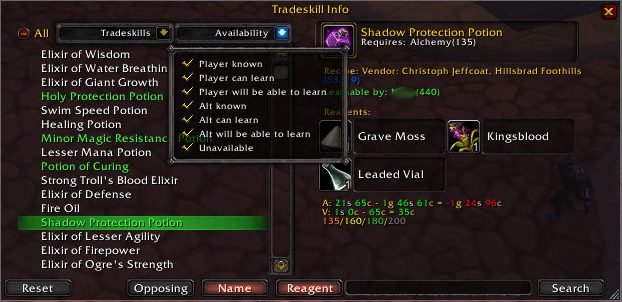
Main Window

Short Description

Complete Tradeskill Information

Long Description

TradeskillInfo is an addon that gives you all the information that you need about tradeskills - including the ones that your character cannot craft.

It can add the following information to the tooltip of an item:

  • What tradeskills it is used in, and how many different recipes for that tradeskill it is used in.
  • Show you where the item comes from. Vendor, dropped, disenchanted or crafted.
  • Show who of your chars can use the item.


It can add the following information to the tooltip for recipes and crafted items:

  • If any of your chars knows it already.
  • If any of your chars can learn it now.
  • If any of your chars will be able to learn it later.
  • Where it comes from. Vendor bought, quested, dropped or crafted.


In the tradeskill craft window it will show:

  • At what skill levels the recipe will shift to a different difficulty level. 120/80/60/40 would mean it's learnable at 40, it will be yellow at 60, green at 80 and grey at 120.
  • The cost of the combine (auctioneer or vendor prices), how much the result sells for to a vendor and the profit/loss.

TradeskillInfo also has it's own UI. It is opened with "/tsi menu" or by binding a key to it in the keybindings menu.

QuickSearch an item in the inventory will open the UI and show all recipes that use that item. QuickSearch key-mouse combination is configurable. Defaults to Shift-RightClick.

RightClicking an reagent icon in the TradeskillInfoUI with the AuctionFrame open will do a search for that reagent in the auction house.

Shift-Click on the recipe name in the list (to the left) with the chatbox open will paste the complete recipe there. (To tell your guildies whats needed to make that uber item)

In the UI you can browse all tradeskills in the game.

  • Filter what tradeskills to show
  • Filter what recipes to show
    • Player known
    • Player learnable
    • Player will be able to learn
    • Alt known
    • Alt learnable
    • Alt will be able to learn
    • Unavailable
  • Freetext search on recipe name and reagent names.

For every recipe it will show:

  • If the it is learned from a recipe, it will show the source of the recipe. Dropped, Vendor bought, quested or faction vendor.
  • What skill level is required, and specialization.
  • Who of your chars knows the recipe.
  • Who of your chars can learn the recipe.
  • Who of your chars will be able to learn the recipe.
  • At what skill levels the recipe will shift to a different difficulty level. 40/60/80/120 would mean it's learnable at 40, it will be yellow at 60, green at 80 and grey at 120.
  • The cost of the combine (both auctioneer and vendor prices), how much the result sells for to a vendor and the profit/loss.

Recipe names are color coded.

  • White: Player knows
  • Light Green: Player can learn
  • Yellow: Player will be able to learn
  • Grey: Alt knows
  • Dark Green: Alt can learn
  • Orange: Alt will be able to learn
  • Red: Unavailable to all your chars

For items not in the local cache of the WoW client, the icon is "?". Clicking on that icon will try and lookup the item. Warning: you will get disconnected if that item has not been seen since server restart.

It also has a graphical configuration screen that is opend with /tsi config or by binding a key to it in the Keybindings menu.

What it does not do: TradeskillInfo is only a browsing tool. It does not assist you in crafting items. You can use Advanced Tradeskill Window, skillet, Cauldron, or other addons I can't remember for improved item crafting.

Note: I have shamelessly stolen this page from the old wowinterface project page of TradeskillInfo.

You must login to post a comment. Don't have an account? Register to get one!

  • Avatar of Claybourne Claybourne Fri, 13 Mar 2009 20:48:22

    I download and use dozens of Addons. Let me say that this is the first addon that has compelled me to leave a comment.

    This is one NICE addon. EXTREMELY useful.

    • hearty applause*
  • Avatar of Paul2200 Paul2200 Mon, 09 Feb 2009 05:08:05

    Is there any way to filter out skill level colors? I am leveling a tradeskill and it would be very useful to not show any gray or green recipes. Is there a way to do this?

    If not, any chance this could be added? Would be a very useful feature! :)

    If anyone knows a quick way to do so, please post, I'll be monitoring this page! :)

  • Avatar of Dys Dys Sat, 24 Jan 2009 15:40:48

    Shabazza, I am still not having any luck observing these freezes. You mentioned that this was something that happened recently. If you meant that the addon started behaving erratically after an update, can you tell me the version number that worked without these freezing problems?

    Also, are there any non-ascii characters in your toon's name? Perhaps there is a problem with saving the known recipes.

  • Avatar of Dys Dys Sat, 24 Jan 2009 15:36:28

    Ydrisella, thanks for reporting inconsistencies. I have recently updated local data according to wowhead published values. Do you mind checking V1.2.0 instead?

  • Avatar of Ydrisselle Ydrisselle Thu, 22 Jan 2009 00:59:57

    There are some incorrect skill requirements in the Inscription list, for example Armor Vellum III and Weapon Vellum III - I'll give you a full list tomorrow.

  • Avatar of shabazza666 shabazza666 Mon, 19 Jan 2009 16:01:41

    Hi,

    It happens every time i open the window. Even if I opened a sub-category. I still use Skillet. The official, not lilspakis.

    regards, sha

  • Avatar of Dys Dys Sun, 11 Jan 2009 14:42:49

    Shabazza, I am not seeing the freezes. Does it happen on a particular trade skill window, or all of them? Also is it only the first time, or every time you open it. And lastly, are you using another addon related to trade skills (Advanced Trade Skill Window, Skillet, Double wide, etc.)?

  • Avatar of shabazza666 shabazza666 Thu, 08 Jan 2009 18:41:57

    Hi,

    with ne newest version i got 1-2sec freezes when i open the tradeskillwindow.

    regards, Sha

  • Avatar of Dys Dys Tue, 30 Dec 2008 20:52:01

    AesirRising, thanks for the report. I should have some time later this week to look into it.

    As for the wowinterface page, I am aware that it is there and rotting away, but since I am not the original author, it is a lot of trouble to try and do something about it.

  • Avatar of AesirRising AesirRising Sun, 21 Dec 2008 15:54:54

    Might be a lib error, I really don't know. But clicking the + icon to expand skills in the character sheet skill tab creates 3 sequences of about (literally) 200 Lua errors, starting with this one:

    Date: 2008-12-21 10:45:30 ID: 1 Error occured in: Global Count: 199 Message: ...dOns\RatingBuster\libs\AceEvent-2.0\AceEvent-2.0.lua line 275:

      C stack overflow
    

    Debug:

      (tail call): ?
      [C]: (for generator)()
      ...dOns\RatingBuster\libs\AceEvent-2.0\AceEvent-2.0.lua:275: TriggerEvent()
      ...dOns\RatingBuster\libs\AceEvent-2.0\AceEvent-2.0.lua:910:
         ...dOns\RatingBuster\libs\AceEvent-2.0\AceEvent-2.0.lua:903
      [C]: ExpandSkillHeader()
      TradeskillInfo\TradeskillInfo.lua:399: UpdateSkills()
      TradeskillInfo\TradeskillInfo.lua:307: ?()
      ...tack\lib\CallbackHandler-1.0\CallbackHandler-1.0.lua:146:
         ...tack\lib\CallbackHandler-1.0\CallbackHandler-1.0.lua:146
      [string "safecall Dispatcher[1]"]:4:
         [string "safecall Dispatcher[1]"]:4
      [C]: ?
      [string "safecall Dispatcher[1]"]:13: ?()
      ...tack\lib\CallbackHandler-1.0\CallbackHandler-1.0.lua:91: Fire()
      ...AddOns\EveryQuest\libs\AceEvent-3.0\AceEvent-3.0.lua:70:
         ...AddOns\EveryQuest\libs\AceEvent-3.0\AceEvent-3.0.lua:69
      [C]: CollapseSkillHeader()
      TradeskillInfo\TradeskillInfo.lua:401: UpdateSkills()
      TradeskillInfo\TradeskillInfo.lua:307: ?()
      ...tack\lib\CallbackHandler-1.0\CallbackHandler-1.0.lua:146:
         ...tack\lib\CallbackHandler-1.0\CallbackHandler-1.0.lua:146
      [string "safecall Dispatcher[1]"]:4:
         [string "safecall Dispatcher[1]"]:4
      [C]: ?
      [string "safecall Dispatcher[1]"]:13: ?()
      ...
      [string "safecall Dispatcher[1]"]:4:
         [string "safecall Dispatcher[1]"]:4
      [C]: ?
      [string "safecall Dispatcher[1]"]:13: ?()
      ...tack\lib\CallbackHandler-1.0\CallbackHandler-1.0.lua:91: Fire()
      ...AddOns\EveryQuest\libs\AceEvent-3.0\AceEvent-3.0.lua:70:
         ...AddOns\EveryQuest\libs\AceEvent-3.0\AceEvent-3.0.lua:69
      [C]: CollapseSkillHeader()
      TradeskillInfo\TradeskillInfo.lua:401: UpdateSkills()
      TradeskillInfo\TradeskillInfo.lua:307: ?()
      ...tack\lib\CallbackHandler-1.0\CallbackHandler-1.0.lua:146:
         ...tack\lib\CallbackHandler-1.0\CallbackHandler-1.0.lua:146
      [string "safecall Dispatcher[1]"]:4:
         [string "safecall Dispatcher[1]"]:4
      [C]: ?
      [string "safecall Dispatcher[1]"]:13: ?()
      ...tack\lib\CallbackHandler-1.0\CallbackHandler-1.0.lua:91: Fire()
      ...AddOns\EveryQuest\libs\AceEvent-3.0\AceEvent-3.0.lua:70:
         ...AddOns\EveryQuest\libs\AceEvent-3.0\AceEvent-3.0.lua:69
      [C]: CollapseSkillHeader()
      Gatherer\GatherUtil.lua:241: GetSkills()
      Gatherer\GatherEvent.lua:119: OnEvent()
      [string "*:OnEvent"]:1:
         [string "*:OnEvent"]:1
      [C]: CollapseSkillHeader()
      [string "*:OnClick"]:2:
         [string "*:OnClick"]:1
    

Facts

Date created
05 Sep 2008
Category
Last update
16 Dec 2009
Development stage
Release
Language
  • deDE
  • enUS
  • esES
  • koKR
  • zhCN
  • zhTW
License
All Rights Reserved
Curse link
TradeskillInfo
Recent files
  • A: r358 for 3.2.0 on 16 Dec 2009
  • A: r357 for 3.2.0 on 15 Dec 2009
  • A: r356 for 3.2.0 on 15 Dec 2009
  • A: r355 for 3.2.0 on 15 Dec 2009
  • A: r354 for 3.2.0 on 15 Dec 2009

Authors