Project 2386
If you have any questions please contact our support team https://support.curseforge.com.
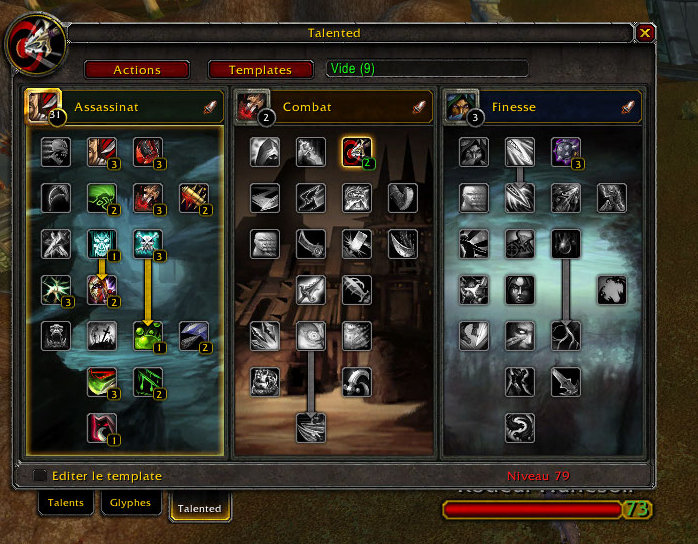
Talented adds spec templates to the Talent UI.
Talented 3
Talented is getting a large update for wow 4. It will no longer replace the default UI but add a new Tab to it, with most of the previous functionality present.
There is an alpha release available on wowace. It's still missing some major parts, but it should give you an idea of the new interface.
Talented_Loader is no longer needed (and in fact will create problems if left installed, so remove it at once).
Update feature List
- Create and view templates for all classes and all pet types.
- Set a specific template as a target, and see it when you're spending your next talent point on level up.
- Apply complete templates with a single click, after a talent wipe.
- Hunters can view the spec of their pet and apply templates to them.
- Share your current build with other, or any template you've made.
- Import templates directly from the Blizzard Talent calculator, wowhead or wowdb.
- Export templates as URL to wowhead, wowdb or the Blizzard Talent calculator.
- Allow pet templates to be imported from and export to wowhead pet calculator.
- Inspection of other characters will also inspect their alternate spec, if they have one.
- A macro command /talented apply <template> allows to automatically apply a template based on its name.
Comments

-

_ForgeUser117147 Owner
-
View User Profile
-
Send Message
Posted Feb 24, 2014This was a great addon back in its day. Sadly Blizzard 'normalized' talent builds and people still think they are less cookie cutter. If it walks like a duck, quaks like a duck, it just might be a duck. There is no more idea of a build just slight optional changes. Though theres always a prime talent per tier for each PvE and PvP. And as I stated while you can pick those, you are opting out of the optimum. And even more depressing they will now be 'normalizing' gear. -sigh- Next well all start at max level and have tea over playing.
-
View User Profile
-
Send Message
Posted Dec 27, 2013Date: 2013-12-27 00:38:49 ID: 2 Error occured in: Global Count: 1 Message: ..\AddOns\Talented_Inspect\inspectui.lua line 101: attempt to call global 'GetNumTalentGroups' (a nil value) Debug: Talented_Inspect\inspectui.lua:101: Talented_Inspect\inspectui.lua:89 (tail call): ? Locals: self = Talented_Inspect { 0 = <userdata> HookInspectUI = <function> defined @Interface\AddOns\Talented_Inspect\inspectui.lua:46 ADDON_LOADED = <function> defined @Interface\AddOns\Talented_Inspect\inspectui.lua:77 UpdateInspectTemplate = <function> defined @Interface\AddOns\Talented_Inspect\inspectui.lua:89 inspections = <table> { } PackTemplate = <function> defined @Interface\AddOns\Talented_Inspect\inspectui.lua:6 GetInspectUnit = <function> defined @Interface\AddOns\Talented_Inspect\inspectui.lua:85 OpenTemplate = <function> defined @Interface\AddOns\Talented_Inspect\inspectui.lua:6 INSPECT_READY = <function> defined @Interface\AddOns\Talented_Inspect\inspectui.lua:89 IterateTalentViews = <function> defined @Interface\AddOns\Talented_Inspect\inspectui.lua:10 CheckHookInspectUI = <function> defined @Interface\AddOns\Talented_Inspect\inspectui.lua:60 ValidateTemplate = <function> defined @Interface\AddOns\Talented_Inspect\inspectui.lua:11 UnhookInspectUI = <function> defined @Interface\AddOns\Talented_Inspect\inspectui.lua:53 UnpackTemplate = <function> defined @Interface\AddOns\Talented_Inspect\inspectui.lua:6 Install = <function> defined @Interface\AddOns\Talented_Inspect\inspectui.lua:13 } unit = "target" name = "Frokak" inspections = <table> { } _ = "Monk" class = "MONK" retval = nil (*temporary) = 1 (*temporary) = nil (*temporary) = true (*temporary) = "attempt to call global 'GetNumTalentGroups' (a nil value)" L = <table> { }
-
View User Profile
-
Send Message
Posted Jan 15, 2014You won't see a fix to that, this hasn't been updated for 2 years lol.
-
View User Profile
-
Send Message
Posted Oct 14, 2012Uninstalled.
-
View User Profile
-
Send Message
Posted Sep 13, 2012An update for 5.0 would be so nice.
I'd really need an AddOn that automatically switch from Bladestorm to Dragonroar! Not just a Hotkey in my Bars that work for both spells, but an AddOn that sets the Talents new, klicks "okay" when WoW says if its fine that it costs 1 Dust of Disappearance etc etc.
greets
-
View User Profile
-
Send Message
Posted Aug 30, 2012Guessing this dies with 5.0?
-
View User Profile
-
Send Message
Posted Oct 3, 2012Hmmm different "builds". sorry to note Sir. The effectiveness of any sort of build predates the applicability of what exists now. For many classes and specs there really is only one good choice per tier. Others while you can play with them would still never denote themselves again as "builds". Some are good for PvP some for PvE. You could try the PvP stuff in PvE. However, the better option in the tier would still trump that selection. In the past it never would do this. "Builds" are noted when there are more then one way to do the same thing. Just in different ways. Currently each encounter (PvP or Pve) is more hardset for each class tier. This would make it more of less a requirement not a "Build". Anything less would be silliness (and I would not call being silly a "Build").
-
View User Profile
-
Send Message
Posted Nov 21, 2012Nothing silly about calling it a "build." As a Mage, I have a "build" for doing dailies, a "build" for leveling, a "build" for raiding, a "build" for dungeons, and a few "builds" for PvP, depending on the setting (RBG or diff Arena comps). It is the current build of your character. Talents and Glyphs, included. Just because it's flexible doesn't change the relevance of the term.
-
View User Profile
-
Send Message
Posted Aug 28, 2012Any update for 5.0.4 in the works?
-
View User Profile
-
Send Message
Posted Aug 28, 2012Talent trees are a thing of the past, so an addon of this nature has a very reduced amount of usefulness.
-
View User Profile
-
Send Message
Posted Aug 28, 2012I disagree
Its great to save some option/templates and apply them with 2 clicks max. Great for raiders and PvP lovers, to test tome diff builds really fast. I hope it gets updated.
-
View User Profile
-
Send Message
Posted Aug 29, 2012You can of course willfully disagree. The truth is the selections per applicable spec are more exact. And require no more time to enable than if you had a addon to do it for you (sadly now). 6 tiers 3 options each. For a given spec each tier and option is cookie-cutter. Very little room for deviation. If you are wanting to swap specs with the new system you should already know the 2 second choices. There really is no more need for a talent system add-on.
6 tiers with 3 options each = there are no more actual builds anymore. Sorry to burst your bubble. As far as a random talent selection sure. Though picking 1-2 differences in the new tree. I wouldn't consider it a "build". The new system has ended the world of builds.
-
View User Profile
-
Send Message
Posted Aug 30, 2012i also want to add to the support for keeping this alive. i find the most useful part is browing other classes talents!
-
View User Profile
-
Send Message
Posted Sep 1, 2012I would like to see an update to this as well. It would be nice to have a pre set of talents to quickly change for needs. I play an enhancement shaman. Maybe for a certain boss we would all be stacked so conductivity would be better where as I would normally have the talent that did something else instead. The new talent trees are all about being able to on the fly change a talent like you do a glyph having the ability to have preset / saved profiles would be awesome. plus I loved being able to see every class' talent tree with having to run an insain mod like altoholic.
-
View User Profile
-
Send Message
Posted Sep 1, 2012+1
(Yeah, Im a wanker, but really nothing more to say than this ; b )
-
View User Profile
-
Send Message
Posted Sep 9, 2012I also think the addon helps, through providing organization.
However, its interface may be too bukly for the new system.
-
View User Profile
-
Send Message
Posted Jun 9, 2012what about the bars? it saves them?
-
View User Profile
-
Send Message
Posted Feb 4, 2012Delete profile needs an are you sure question box. By accident I deleted a profile. So I had to back up the savefile. Exit the game, then restore the save file.
-
View User Profile
-
Send Message
Posted Jan 1, 2012I posted a Fix, it's in the Tickets Area and works with 4.3
-
View User Profile
-
Send Message
Posted Jan 3, 2012Where ? I can't find it tassleof in the ticket area...
Can you post it here please ?
Now I can't see any template I have registered :(