Slightly Smarter TradeSkill
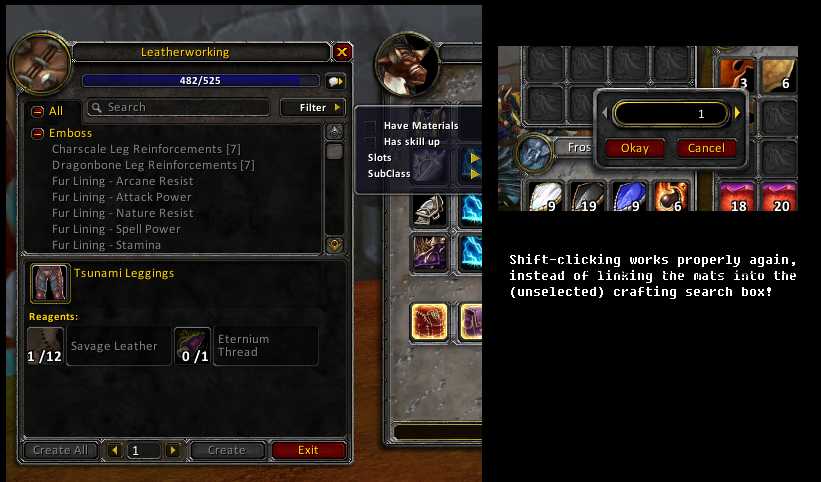
This addon makes two small changes to the default tradeskill window system:
- The "Have Materials" and "Has Skill Up" checkboxes are awesome, but I'm tired of constantly clicking the filter button over and over and over. CHANGE: The "Filter" menu is always shown, all the time.
- Ever have a crafting window open while at the bank, and shift-click to try to split a stack of materials? NOOOOOO, you don't get to split the stack, instead it pastes the item you clicked into the crafting window "Search" box. It does this regardless of whether the Search box has the blinking cursor focus or not! CHANGE: Shift-clicking to split a stack works like it should. Use shift-RIGHT-click to paste an item into the Search field instead. (Technically, it may not be the "right" button; it's actually "button #2" and works out to be the same button you shift-click to open the gem socketing window on a socketed item.)
Be aware that opening any other dropdown menu will close the "Filter" menu. That's simply how the WoW UI works; only one dropdown menu tree can be open at any time.
See the Proper Fix page for a writeup of the real solution.
Comments

-

Farmbuyer Owner
-
View User Profile
-
Send Message
Posted Nov 6, 2012I get this error, and shift doesn't seem to be working:
76x SlightlySmarterTradeSkill-v5\main.lua:5: SetModifiedClick(): Unknown action (TRADESEARCHADD) or binding (SHIFT-BUTTON2)
<in C code>
SlightlySmarterTradeSkill-v5\main.lua:5: in main chunk
<in C code>
FrameXML\UIParent.lua:299: in function "UIParentLoadAddOn"
FrameXML\UIParent.lua:353: in function "TradeSkillFrame_LoadUI"
FrameXML\UIParent.lua:1090: in function <FrameXML\UIParent.lua:657>
<in C code>
FrameXML\SecureTemplates.lua:312: in function "handler"
FrameXML\SecureTemplates.lua:560: in function <FrameXML\SecureTemplates.lua:508>
Locals:
-
View User Profile
-
Send Message
Posted Oct 22, 2011I love the idea of this addon, but unfortunately it does not work with Enhanced Stack Split, which is a must-have for me.
Could you please fix your addon to work with that?
Would also be kind of nice to let the user turn off one of your two features if they only want one.
-
View User Profile
-
Send Message
Posted Oct 25, 20112) The entire addon is exactly three lines of code. Providing user options would be nearly 100 lines. I'm not going to add that kind of bloat. Users wanting only one change can edit the .lua file and comment/remove the lines they don't want.
-
View User Profile
-
Send Message
Posted Oct 25, 2011-
View User Profile
-
Send Message
Posted Oct 27, 2011Thank you!
Maybe you could help what to add for the lines to check the 'Have materials' and close it?
Or is there a way I can look after what to add? I am not made any addon yet, just was looking into the lua codes so far.
Thank you.
-
View User Profile
-
Send Message
Posted Oct 28, 2011[code]TradeSkillFrame.filterTbl.hasMaterials = true[/code]
at the top of the file. I haven't tested that myself though.
-
View User Profile
-
Send Message
Posted Oct 21, 2011Hi!
Is there a way only set 'Have materials' Filter? Looking for it a while now.
Thank you.
-
View User Profile
-
Send Message
Posted Apr 27, 2011Thanks for this.