Skillet-Old
Due to the CurseForge transition we're not currently able to generate updates. Project has moved to:
https://www.curseforge.com/wow/addons/skillet
Skillet:
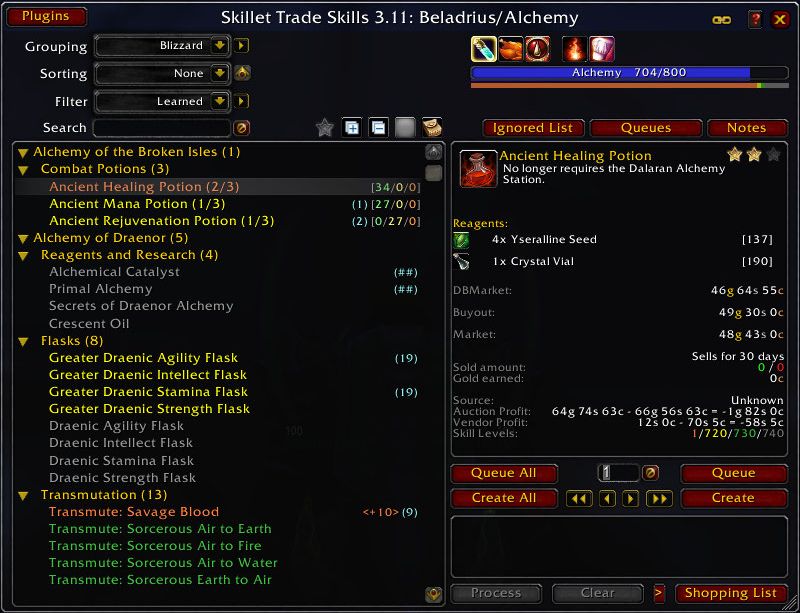
Skillet is a replacement for the default tradeskill and craft UI.
To report bugs and request new features check: https://github.com/b-morgan/skillet/issues
To help with Localization see: http://www.curseforge.com/wow/addons/skillet/localization/
If you are here looking for Skillet on Classic then you can find it at Skillet-Classic.
Other than "Please open an issue" I won't be responding to bug reports in comments.
Features:
- Larger the the standard tradeskill window
- Built-in queue for creating multiple, different items
- Queued items are saved when you log out and are restored on log in
- Automatically buy reagents for queued recipes when visiting a vendor
- If you can craft a reagent needed by a recipe, then clicking on that reagent will take you to its recipe (same features as Reverse Engineering)
- If the item to be crafted requires a minimum level to use, that level can be displayed along with the recipe (disabled by default)
- The shopping list of items needed for all queued recipes for all alts can be displayed at banks, auction houses, or from the command line
- Items needed for crafting queued items can be automatically retrieved from your bank or guild bank (by using the shopping list)
- User editable list of notes attached to reagents and crafted items
- Queued counts added to (optional) notes display
- Crafted counts can be adjusted with Right-click and Shift-right-click on the item icon in the detail frame
- Recipes can be filtered by name, whether or not you could level when creating the item, and whether or not you have the mats available
- Sorting of recipes (name, difficulty, level, and quality of crafted item)
- Tracking inventory on alternate characters
- Plugin support for (limited) modification of the Skillet frame by other addons
- Custom grouping
- User managed Ignored Materials List
- Complete or mostly complete localizations for deDE, esES, frFR, ruRU, koKR, zhCN, zhTW
Compatibility:
- Shadowlands limited functionality in 4.20, 4.21 alpha builds are available.
- TradeSkillMaster Skillet can be used with TSM
- If the TSM Crafting UI is set to 'WOW UI' mode (use the 'WOW UI' button and then close the TSM UI)
- If the Skillet Appearance option TradeSkill Compatibility is checked. Note: Skillet frames have strata and background changes in this mode
FAQ:
- What are the numbers in the middle and how to hide them?
- Blue = How many you have
- Green = How many you can make from materials you have.
- Yellow = How many you can make by crafting the reagents.
- Orange = How many you can make if you purchase materials from a vendor.
- Purple = How many you can make using materials on your alts.
Right-click on the bag icon above the numbers.
- How to search in the item name only? - Start your search phrase with exclamation mark: !ink
- How to search in Auction House? - Alt+Click on shopping list
- How to retrieve items from bank? - Turn on "Display shopping list at banks"
- How to turn off Skillet temporarily? - Shift+Click your profession button/link. It also works for View All in your Guild Tab.
- How to use Enchanting Vellum? - Right Click on Process/Create/Create All button. You create only 1 enchanted vellum, repeat to create more
- How to paste a recipe in the chat? - double click on the recipe list
Changes:
- 4.20
- Update TOC
- Add Overachiever plugin
- Add Shadowlands Enchanting Scroll Data from Tarkumi
- Change Skillet's behavior when TradeSkillMaster addon is active.
- 4.19
- Update for Shadowlands
- Add linking of reagents
- 4.18
- Update Auctionator plugin
- 4.17
- Fix various issues
- 4.16
- Add additional tooltip scaling
- Update Auctionator plugin
- 4.15
- Fix normal bag detection
- Fix setting unlearned favorites
- 4.14
- More Auction House fixes (issue #584)
- 4.13
- Fix Auction House access
- 4.12
- Temporarily disable Auction House access
- 4.11
- Update TOC
- Contains restructured code and bug fixes from Skillet-Classic
- 4.10
- Update TOC
- 4.09
- Add 8.2 Enchanting scroll data (issue #566, thanks Tarkumi)
- 4.08
- Update TOC
- Minor bug fixes
- 4.07
- Update TOC
- Added option to Shopping List to ignore opposite faction
- 4.06
- Fix issues #551, #553, #556
- Added missing option for show crafters
- 4.05
- Remove LibAbacus-3.0 and TradeSkillMaster plugin
- 4.04
- Fix issues #530, #539, and #544
- 4.03
- Fix issues #522, #525, and #529
- 4.02
- Fix issue #521, undo overly aggressive optimizations
- 4.01
- Fix issue #520, Professions fail to load
- 4.00
- Update for Battle for Azeroth

-

bsmorgan Owner
-

sugymaylis Translator