SimpleUnitFrames
About SimpleUnitFrames
SimpleUnitFrames is an extension to the default WoW Unit Frames. Rather than a complete unitframe replacement, this addon adds further information and features to the existing frames and allows a greater degree of customization to enhance their usability.
The v2.x.x series of SimpleUnitFrames involved a complete re-write of the code, however credits go to Rophy and xan for their original work on the v1.x.x series.
All configuration for SimpleUnitFrames can be performed through the Interface Options panel which can be opened through the slash commands /simpleunitframes or /suf, or through ESC -> Interface -> AddOns Tab -> SimpleUnitFrames.
HP, Mana, Energy, Rage & Runic Power Display
The default unitframes only allow either [total]/[max] or [percent] values to be shown on HP and mana bars, however SimpleUnitFrames provides several default overlay options or a method to create your very own styles using LibDogTag-3.0 syntax (also available through the in-game /dog command).
Modules
SimpleUnitFrames comprises the following modules which enhance each frame:
- Class Icon Display
- Text Overlays
- Custom Text Overlay Styles
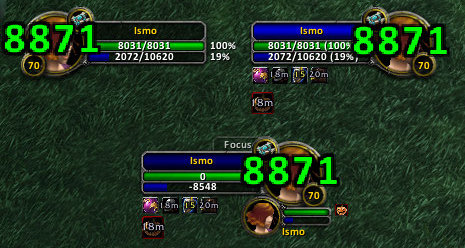
- Portrait Damage Display
- Bar Textures
Supported Frames
SimpleUnitFrames supports the following frames, each with their own customizations available:
- Player
- Pet
- Target
- TargetOfTarget
- Party
- PartyPet
- Focus
- FocusTarget
- Boss
Localization
For translators wishing to create/update translations for other languages than enUS, please do so though the Localization Page.
Bugs & Development
While the best effort is made to ensure that release quality zips do not have any bugs, inevitably errors slip through. If you encounter a bug, please ensure that it has not already been fixed in a more recent beta/alpha release or reported already on the ticket tracker. If the bug persists even in the latest development build and has not been reported, please post a ticket on the Project Tickets Page
Please report bugs and suggest features via the Ticket page rather than using the comments section as it provides a single point of reference to track the development of the addon.
Development builds of SimpleUnitFrames can always be found on the Project Files Page.
Comments

-

Pneumatus Owner
-
View User Profile
-
Send Message
Posted Nov 19, 2022Any plans to update this for 10.0.2 (new API)
-
View User Profile
-
Send Message
Posted Jun 19, 2022Hello there. Does this version work with TBC classic? I use the Classic version of this addon but it didn't get an update for almost 3 years. It's still working but sometimes janky.
-
View User Profile
-
Send Message
Posted Oct 15, 2016Can you add an option to disable player combat text too (Portrait Damage) and make class icons non-transparent please?
-
View User Profile
-
Send Message
Posted Jul 2, 2017My addon No Combat Text allows you to hide or customize the popup text on the player and pet frames.
-
View User Profile
-
Send Message
Posted Aug 21, 2016hey man is it possible for you to make an option to swap the power bar to the top ?
i had an addon like that before i stopped playing and now i cant remember the name of it haha
im sure is a simple tweek, and would be awesome!
-
View User Profile
-
Send Message
Posted Aug 12, 2016Ty. I have been using SUF for a long time.
One problem I see atm is with my Shadow Priest.
I am getting "Unknown tag missing xxx" if I chose any option for Alternate MP for Player Frame. I think that needs an update.
EDIT: The same happens with my Shaman (Enhancement - Maelstrom Resource) and Druid (Balance - Astral Power Resource), but I am not sure if their specialization matters. There could be other classes with replacement Alternate MP bar.
> See ticket.
-
View User Profile
-
Send Message
Posted Mar 1, 2016Can the frame that goes around the bars, portrait, name be customized also?
-
View User Profile
-
Send Message
Posted Nov 1, 2015Really nice addon! This addon have Standart Frame Blizzard + options.
The Only Bad: icons class + level do not move around. You can not change color. And this addon does not control buffs and debuffs.
I want to eliminate these defects and this addon It would be the best in the world!
Sorry for my bad English. I am Russian =)
-
View User Profile
-
Send Message
Posted Dec 5, 2014Please dont abandon this addon, it's the only addon that suites my need! And it rocks!
-
View User Profile
-
Send Message
Posted Nov 7, 2013cann't add a new format for your health?
-
View User Profile
-
Send Message
Posted May 31, 2013Will there be updates to this mod? Sometimes the icon doesn't represent the right class in party frame.
Awesome addon.
-
View User Profile
-
Send Message
Posted Sep 12, 2014I can confirm it. If I create a new group then the icons are not visible. I have to repeatedly press the button "Display Class Icon". The same happens when someone leaves the group or acceding
-
View User Profile
-
Send Message
Posted May 7, 2013The Pally icon does not sit centre like other classes
-
View User Profile
-
Send Message
Posted May 7, 2013The way it is now is how it's always been - it's centered but the circular border just crops off more than other classes.
-
View User Profile
-
Send Message
Posted May 6, 2013Very nice addon this is
I have found a few npcs with no icons at all I think need to take note of them and post a bug report on it
-
View User Profile
-
Send Message
Posted May 5, 2013Addon to work properly, the problem is that if you use it screws fonter portrait damage can be blurred: (
-
View User Profile
-
Send Message
Posted May 5, 2013Any way to change the portrait damage font?
-
View User Profile
-
Send Message
Posted May 7, 2013There's no way to change the font directly - player damage is a standard Blizz thing (and therefore uses blizz's own font). Any addon that changes blizz fonts in general will change it though.
-
View User Profile
-
Send Message
Posted Apr 30, 2013why is this utdated?
-
View User Profile
-
Send Message
Posted Feb 22, 2013Is there any way to turn off the combat text for player frames?