Sick Of Clicking Dailies
Auto Magically clicks though Daily Quests, and Turns them In.
Sick of Clicking Dailies is an addon designed to make picking up daily and weekly quests and turning them in easier and more streamlined when you quest in bulk.
This addon simply skips through all the quest text when interacting with the quest giver.
It also can auto magically skip through gossip options and select a quest reward for the ones that have them.
Now automatically detects daily quests. Repeatable quests that can be completed are also handled. Also automatically selects gossip options.
Includes 2nd LDB-Feed to keep track of daily quests done on all characters for a given realm.
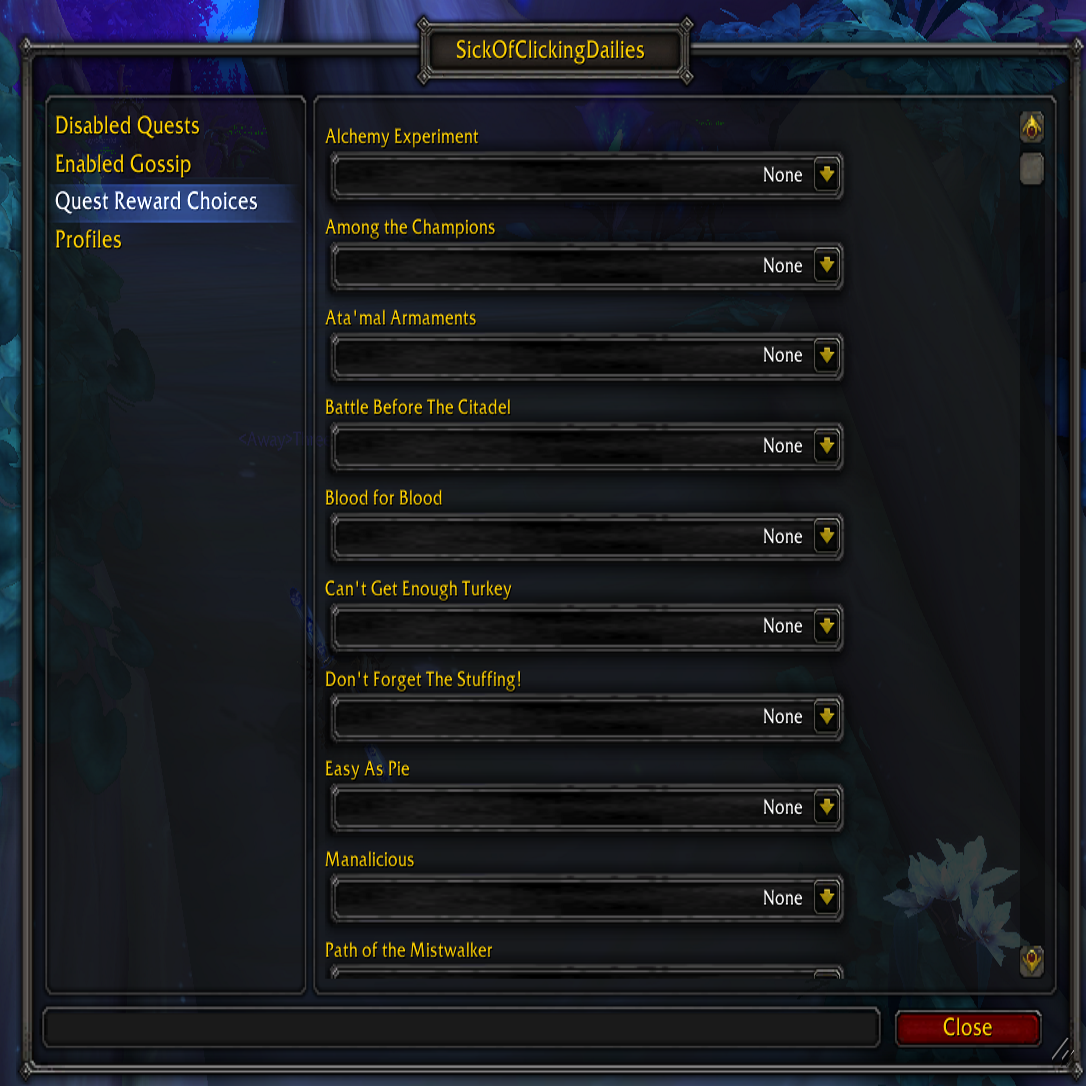
The main options window is opened via /socd.
There you can choose rewards for quests that have rewards, enable previously disabled quests and disable previously enabled gossip options.
Bugs, Errors and Requests Go Here
Known Annoyances
- Some NPCs have a repeatable quest, vendor or other dialogue option as well as a daily quest available, you will need to hold down the shift key in order to disable the addon for that particular click.
Random Features
- Can now automatically select gossip options. Just enable the checkbox at the left side of the gossip option and it will be automatically selected the next time.
- Includes 2nd LDB feed to keep track of daily quests done on all characters for a given realm.
Want to help?
Code
If you would like to contribute feel free to or contact me at [email protected] if you are interested in taking over the project.
Localization
I'm always looking for translators for the various languages. Please see the Localization section of the project to contribute
Comments

-

orionshocked Owner
-

Cexikitin Author
-

Farmbuyer Former Author
-

mcremor Former Author
-
View User Profile
-
Send Message
Posted Feb 20, 2021For people looking for a similar addon, try DailyGrind!
-
View User Profile
-
Send Message
Posted Jan 8, 2021Whelp.....
Much to my own surprise I'll be updating this likely with the phased release of Classic BC (when that eventually happens). This is because I'm actually playing classic currently with little to no interest in Retail.
As it turns out tho... Retail with the shadowlands update has some rather nice updates that will likely also get fixed (maybe) as i don't have a cap'ed char anymore and limited access to daily quests to test with.
-
View User Profile
-
Send Message
Posted Nov 19, 2020This is the best add-on! Please someone take it over! I will donate...
-
View User Profile
-
Send Message
Posted Oct 17, 2020It appears that with the Shadowlands pre-patch, this addon is causing quest text to be replaced with "Filler Text" (quite literally the words "Filler Text" and nothing else). I've filed a bug report, so let's see if this gets fixed.
-
View User Profile
-
Send Message
Posted Oct 18, 2020In reply to spazmoose:
This addon is effectively abandoned; sorry
-
View User Profile
-
Send Message
Posted Nov 19, 2020In reply to orionshocked:
noooooooooooooooo!!!!!!!!!
-
View User Profile
-
Send Message
Posted Nov 29, 2020In reply to orionshocked:
...can you UN-abandon it?
there is no other addon that does what this does, specifically the auto-clicking ONLY SPECIFIC quests
-
View User Profile
-
Send Message
Posted Jul 24, 2020Ok, no reaction = deleting crap. Is there any alternative tool for doing what socd did?
-
View User Profile
-
Send Message
Posted Oct 25, 2016There is a huge issue with the addon, it can get into a loop when a player don't even want the addon to go through the choices!
What happened is that it bought all the 3 weekly raid tokens without me able to stop it to do so.
What I was doing is: -Holding the shift button -so the addon wouldn't automatically complete any of the quests- -Right clicked on the weekly quest giver -Selected the weekly raid token quest for order hall resources
Now here, I've released the shift, thinking that the addon already reallized I don't want it to autocomplete the quest.
However what happened is that the addon bought the token, closed the window, and REOPENED THE COMMUNICATION WINDOW AGAIN AUTOMATICALLY and REPEATING THE EARLIER STEPS EVEN THOUGH I DIDN'T TELL HIM TO DO.
I couldn't stop it, escape out, do anything for the addon to stop the process. If you like this logic, fine, however this is a very critical problem I think. This is a very very serious problem with the addon guys.
I know uninstall the addon I won't risk it again to do something like this. But this could have ended up me loosing craptons of gold or order hall resources on another Daily quest -thank god I'm not aware of such quest at the moment-.
-
View User Profile
-
Send Message
Posted Jul 24, 2016Are you still among us? Will you pick this up again? It still worked in WoD and generally still seems to work in Legion but when the new dailies come out it will need some maintenance for sure.
I couldn't bear doing dailies without this addon.
-
View User Profile
-
Send Message
Posted Jul 25, 2016I've stopped playing WoW and don't know yet when or if I come back to try Legion.
As long as Blizzard didn't change any relevant API this addon will still work without changes for normal dailies. Just dailies with reward choices need to be added manually so they show up in the option menu.
-
View User Profile
-
Send Message
Posted Jan 4, 2021In reply to mcremor:
They changed something...it's borked! Would be amazing if you could fix it for all of us plebs! lol
-
View User Profile
-
Send Message
Posted Sep 1, 2015Not working for new 6.2.2.20444 patch
-
View User Profile
-
Send Message
Posted Sep 1, 2015There were a ton of "didn't return a valid tooltip" errors when I logged in the first time after the patch. I had to go through the "/socd" window's Disabled Quests list, and remove everything from that error. After exiting the game, I removed the Cache folder. I also forced SoCD to do its rescan when logging in.
The next time I logged back in, its quest scanner only found two problematic quests (instead of 20 or 30 like before), and seems to be running well.
-
View User Profile
-
Send Message
Posted Sep 2, 2015Yeah, it's really annoying that the servers don't return tooltips for so many quests right after a patch. Sadly there is nothing I can do about it, Blizzard has to fix this.
But even with many failed tooltips, SOCD should work fine. Only the quests that failed tooltip scanning will not be disabled by default. The only dailies disabled by default in WoD are the ones for the bonus roll coins, so be careful when talking with the bonus roll coin NPC.
-
View User Profile
-
Send Message
Posted Jun 3, 2015Yesterday activated - today trouble - it is definitely SOCD !
-
View User Profile
-
Send Message
Posted Jun 3, 2015This has to be some sort of conflict with another addon that you have installed, otherwise there would be other users having this problem too.
Try disabling all addons except SOCD, I suspect the problem won't happen then.
-
View User Profile
-
Send Message
Posted Apr 30, 2015Now I kicked Socd since 2-3 weeks - and nothing happened again, so I think, that Socd was the troublemaker with closing windows. And iot happened ... hm since 6.0.
-
View User Profile
-
Send Message
Posted Apr 8, 2015My failure, it was only counting something, and this only one time.
BUT - it seems, that this addon makes another thing, and this is a mistake; sometimes I have a sound like moving sheet in a book, and then the games closes all opened window, like questwindow and so on. This happens all 3-4 seconds, and the only way to get it away is porting. And this works not every time.
A few minutes ago it happened, and reload, port, game restart - nothing worked. Socd deactivated, the problem was no longer there.
-
View User Profile
-
Send Message
Posted Apr 8, 2015I have no idea what could cause that. I use SOCD daily since years and never had that problem.
Did this happen when SOCD scanned the quest names after a WoW patch (as printed to the chat window)?