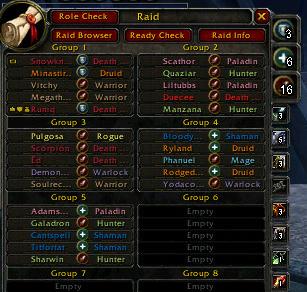
RoleIcons
RoleIcons is a tiny UI mod that adds Blizzard's party/raid role icons (tank/heal/dps) in several useful places in your UI, and provides several other related features.
Role icons are added to:
- The Blizzard raid tab. The role icons replace the level field for max level players.
- Game tooltip when you mouse over a player or raid frame
- Target frame
- HealBot unit frames
- HealBot and Vuhdo tooltip when you mouse over a raid frame
- Party/Raid chat (Blizzard chat frames, Prat, Chatter, WIM)
- NEW in 4.2: System messages that mention group members
- NEW in 4.3: Player popup context menus
- NEW in 4.4: Group member tooltips on map and minimap
Other features:
- Enhances the Blizzard Raid tab with role summary counts and class summary counts
- Adds a role-check button to the Raid tab
- Blizzard Raid tab can now be left-clicked to target a raid member
- Blizzard Raid tab can now be middle-clicked to set a raid member's role
- Automatically sets your role based on your spec when joining a raid or respeccing
- Automatically replies to role checks from the raid leader based on your spec
- Adds a tooltip showing the tier token breakdown for the current raid members
- NEW in 4.0: Displays the "hosting" realm name while in cross-realm groups, showing when it changes and why
- All features are optional and can be toggled using /ri
Basic Usage:
- Install as usual
- It Just Works! (tm)
Command Line Usage:
- /ri help - Get info on command-line options
- /ri check, /rolecheck - perform a Role Check (must be leader or raid assistant)
Featured in a Curse Addon Spotlight!!!
Bug reports or feature requests
Forum thread for general discussion
Comments


-

_ForgeUser405586 Owner
-
View User Profile
-
Send Message
Posted Jan 24, 2026Someone has made a "reloaded" version - https://www.curseforge.com/wow/addons/roleicons-reloaded/comments
-
View User Profile
-
Send Message
Posted Aug 21, 2025Here is the to file
## Interface: 11507, 50500, 110107, 110200
## Title: RoleIcons
## Notes: Adds Party/Raid Role icons in useful ways to the ui....|cffB90A04Updated by: Merthalde |r
## Version: 1.0.0
## X-Build: 181
## X-ReleaseDate: Sunday, 20 July 2025, 5:10:29 AM EST
## X-Revision: $Revision: 001 $
## SavedVariablesPerCharacter: RoleIconsDB
## LoadManagers: AddonLoader
## X-LoadOn-Always: delayed
## X-Curse-Packaged-Version: 1.0.0
## X-Curse-Project-Name: RoleIcons
## X-Curse-Project-ID: roleicons
## X-Curse-Repository-ID: wow/roleicons/mainline
## IconTexture: Interface\AddOns\RoleIcons\Roleicons.tga
## LoadManagers: AddonLoader
## Category-enUS: Merthalde
## Author: .|cffB90A04 BY: Merthalde |r
locale.lua
RoleIcons.lua
-
View User Profile
-
Send Message
Posted Aug 21, 2025-- Utility: Get the full name (Name-Realm) for a unit
local function getUnitFullName(unit)
local name, realm = UnitName(unit)
if not name then return nil end
if not realm or realm == "" then realm = GetRealmName() end
return name .. "-" .. realm
end
-- Utility: Given a full name, return the unit id ("player", "party1", "raid3", etc.) if in group
local function getUnitFromFullName(unitFullName)
if getUnitFullName("player") == unitFullName then return "player" end
if IsInRaid() then
for i = 1, GetNumGroupMembers() do
local unit = "raid" .. i
if getUnitFullName(unit) == unitFullName then return unit end
end
else
for i = 1, GetNumGroupMembers() - 1 do
local unit = "party" .. i
if getUnitFullName(unit) == unitFullName then return unit end
end
-- Check player again for non-raid groups
if getUnitFullName("player") == unitFullName then return "player" end
end
return nil
end
local addonName, vars = ...
local L = vars.L
local LaddonName = L[addonName]
RoleIcons = vars
local addon = RoleIcons
local _G = getfenv(0)
local string, table, pairs, ipairs, tonumber, wipe =
string, table, pairs, ipairs, tonumber, wipe
local InCombatLockdown, UnitGroupRolesAssigned, UnitName, UnitClass, UnitLevel, UnitIsPlayer, UnitIsGroupLeader, UnitIsGroupAssistant =
InCombatLockdown, UnitGroupRolesAssigned, UnitName, UnitClass, UnitLevel, UnitIsPlayer, UnitIsGroupLeader, UnitIsGroupAssistant
local defaults = {
raid = { true, L["Show role icons on the Raid tab"] },
tooltip = { true, L["Show role icons in player tooltips"] },
hbicon = { false, L["Show role icons in HealBot bars"] },
chat = { true, L["Show role icons in chat windows"] },
system = { true, L["Show role icons in system messages"] },
debug = { false, L["Debug the addon"] },
classbuttons = { true, L["Add class summary buttons to the Raid tab"] },
rolebuttons = { true, L["Add role summary buttons to the Raid tab"] },
serverinfo = { true, L["Add server info frame to the Raid tab"] },
trimserver = { true, L["Trim server names in tooltips"] },
autorole = { true, L["Automatically set role and respond to role checks based on your spec"] },
target = { true, L["Show role icons on the target frame (default Blizzard frames)"] },
focus = { true, L["Show role icons on the focus frame (default Blizzard frames)"] },
popup = { true, L["Show role icons in unit popup menus"] },
map = { true, L["Show role icons in map tooltips"] },
}
local settings
local maxlvl = GetMaxLevelForLatestExpansion()
vars.svnrev = {}
vars.svnrev["RoleIcons.lua"] = tonumber(("$Revision: 181 $"):match("%d+"))
-- tie-in for third party addons to highlight raid buttons
-- table maps GUID => highlight = boolean
RoleIcons.unitstatus = {}
RoleIcons.unitstatus.refresh = function() addon.UpdateRGF() end
local chats = {
CHAT_MSG_SAY = 1, CHAT_MSG_YELL = 1,
CHAT_MSG_WHISPER = 1, CHAT_MSG_WHISPER_INFORM = 1,
CHAT_MSG_PARTY = 1, CHAT_MSG_PARTY_LEADER = 1,
CHAT_MSG_INSTANCE_CHAT = 1, CHAT_MSG_INSTANCE_CHAT_LEADER = 1,
CHAT_MSG_RAID = 1, CHAT_MSG_RAID_LEADER = 1, CHAT_MSG_RAID_WARNING = 1,
CHAT_MSG_BATTLEGROUND_LEADER = 1, CHAT_MSG_BATTLEGROUND = 1,
}
local TTframe, TTfunc
local iconsz = 19
local riconsz = iconsz
local role_tex_file = "Interface\\LFGFrame\\UI-LFG-ICON-PORTRAITROLES.blp"
local role_t = "\124T"..role_tex_file..":%d:%d:"
local role_tex = {
DAMAGER = role_t.."0:0:64:64:20:39:22:41\124t",
HEALER = role_t.."0:0:64:64:20:39:1:20\124t",
TANK = role_t.."0:0:64:64:0:19:22:41\124t",
LEADER = role_t.."0:0:64:64:0:19:1:20\124t",
SPACE = role_t.."0:0:64:64:0:0:0:0\124t",
NONE = ""
}
local function getRoleTex(role,size)
local str = role_tex[role]
if not str or #str == 0 then return "" end
if not size then size = 0 end
role_tex[size] = role_tex[size] or {}
str = role_tex[size][role]
if not str then
str = string.format(role_tex[role], size, size)
role_tex[size][role] = str
end
return str
end
-- could also use GetTexCoordsForRole/GetTexCoordsForRoleSmallCircle
local function getRoleTexCoord(role)
local str = role_tex[role]
if not str or #str == 0 then return nil end
local a,b,c,d = string.match(str, ":(%d+):(%d+):(%d+):(%d+)%\124t")
return a/64,b/64,c/64,d/64
end
local function chatMsg(msg)
DEFAULT_CHAT_FRAME:AddMessage("|cff6060ff"..LaddonName.."|r: "..msg)
end
local function debug(msg)
if settings and settings.debug then
chatMsg(msg)
end
end
local function classColor(name, class, unit)
if not class then return name, nil, name end
local color = RAID_CLASS_COLORS[class]
color = color and color.colorStr
if unit and UnitExists(unit) then
if not UnitIsConnected(unit) then
color = "ff808080" -- grey
elseif UnitIsDeadOrGhost(unit) then
color = "ffff1919" -- red
end
end
local cname = name
if color then
cname = "\124c"..color..name.."\124r"
end
return cname, color, name
end
local server_prefixes = {
The=1, Das=1, Der=1, Die=1, La=1, Le=1, Les=1, Los=1, Las=1,
}
local function utfbytewidth(s,b)
local c = s:byte(b)
if not c then return 0
elseif c >= 194 and c <= 223 then return 2
elseif c >= 224 and c <= 239 then return 3
elseif c >= 240 and c <= 244 then return 4
else return 1
end
end
local function trimServer(name, colorunit)
local class = colorunit and
(type(colorunit) == "string" and UnitExists(colorunit) and select(2,UnitClass(colorunit))) or
addon.classcache[name] or
select(2,UnitClass(name))
name = name:gsub("%s","") -- remove space
local cname, rname = name:match("^([^-]+)-([^-]+)$") -- split
if not (cname and rname) then
cname = name
rname = nil
end
if rname and settings.trimserver then
local prefix = rname:match("^(%u[^%u]*)%u")
if prefix and server_prefixes[prefix] and #rname >= #prefix+3 then
rname = rname:gsub("^"..prefix,"")
end
local p = 1 -- trim to first 3 utf8 characters
for i=1,3 do
p = p + utfbytewidth(rname, p)
end
rname = rname:sub(1, p-1) -- trim
end
local ret = cname..(rname and "-"..rname or "")
return classColor(ret, class, type(colorunit) == "string" and colorunit)
end
function addon:trimServer(...) return trimServer(...) end
local sorttemp = {}
local infotemp = {}
local function toonList(role, class)
wipe(sorttemp)
wipe(infotemp)
local base = IsInRaid() and "raid" or "party"
local num = GetNumGroupMembers()
local cnt = 0
for i=1,num do
local unitid
if IsInRaid() then
unitid = "raid"..i
elseif i == num then
unitid = "player"
else
unitid = "party"..i
end
if UnitExists(unitid) then
local uname = GetUnitName(unitid, true)
local urole = UnitGroupRolesAssigned(unitid)
local uclass = select(2,UnitClass(unitid))
if uname and uclass and
((not role) or (role and role == urole)) and
((not class) or (class and class == uclass)) then
local cname = trimServer(uname, unitid)
uname = uname:gsub("%s","")
table.insert(sorttemp,uname)
if not role and urole and urole ~= "NONE" then
cname = getRoleTex(urole)..cname
end
infotemp[uname] = cname
cnt = cnt + 1
end
end
end
table.sort(sorttemp)
local res
for _, name in ipairs(sorttemp) do
res = (res and res..", " or "")..infotemp[name]
end
return res, cnt
end
local function myDefaultRole()
local _, class = UnitClass("player")
if class == "MAGE" or class == "HUNTER" or class == "WARLOCK" or class == "ROGUE" then
return "DAMAGER"
end
local tabIndex = GetSpecialization(false, false)
if not tabIndex then return nil end -- untalented hybrid
local role = GetSpecializationRole(tabIndex,false,false)
return role
end
local frame = CreateFrame("Button", addonName.."HiddenFrame", UIParent)
frame:RegisterEvent("ADDON_LOADED");
frame:RegisterEvent("ROLE_POLL_BEGIN");
frame:RegisterEvent("GROUP_ROSTER_UPDATE");
frame:RegisterEvent("PARTY_INVITE_REQUEST");
frame:RegisterEvent("GROUP_JOINED");
frame:RegisterEvent("ACTIVE_TALENT_GROUP_CHANGED");
frame:RegisterEvent("PLAYER_TARGET_CHANGED");
frame:RegisterEvent("PLAYER_FOCUS_CHANGED");
frame:RegisterEvent("PLAYER_REGEN_ENABLED");
local function UpdateTT(tt, unit, ttline)
if not settings.tooltip then return end
unit = unit or (tt and tt.GetUnit and tt:GetUnit())
if not unit then return end
local role = UnitGroupRolesAssigned(unit)
local leader = GetNumGroupMembers() > 0 and UnitIsGroupLeader(unit)
if (role and role ~= "NONE") or leader then
local name = tt:GetName()
local line = ttline or _G[name.."TextLeft1"]
if line and line.GetText then
local txt = line:GetText()
if txt and not string.find(txt,role_tex_file,1,true) then
if leader then
txt = getRoleTex("LEADER",iconsz)..txt
end
line:SetText(getRoleTex(role,iconsz)..txt)
end
end
end
end
local function UpdateHBTT(unit)
local gtt = HealBot_Globals and HealBot_Globals.UseGameTooltip
if unit == "NONE" then return end
debug("UpdateHBTT: unit="..tostring(unit).." gtt="..tostring(gtt))
local tt = HealBot_Tooltip
local ttl = HealBot_TooltipTextL1
if gtt and gtt ~= 0 then
tt = GameTooltip
ttl = GameTooltipTextLeft1
end
if true and unit == "player" then -- fix a stray role text added by healbot
local txt = ttl and ttl.GetText and ttl:GetText()
if txt then
txt = txt:gsub("^DAMAGER ",""):gsub("^TANK ",""):gsub("^HEALER ","")
ttl:SetText(txt)
end
end
UpdateTT(tt, unit, ttl)
HealBot_Tooltip_Show() -- fix size
end
local function VuhdoHook()
if VuhDoTooltip and VuhDoTooltipTextL1 then
local unit = VuhDoTooltipTextL1:GetText()
if not UnitExists(unit) then
local s = GetMouseFoci()
s = s and s.GetAttribute and s:GetAttribute("unit")
if s and UnitExists(s) then unit = s end
end
UpdateTT(VuhDoTooltip, unit, VuhDoTooltipTextL1)
end
end
local function HBIconHook(button, ...)
if not settings.hbicon or not button then return end
local bar = HealBot_Action_HealthBar and HealBot_Action_HealthBar(button)
local unit = button and button.unit
local role = UnitGroupRolesAssigned(unit)
if not bar or not unit or not role or not UnitExists(unit) then return end
debug("HBIconHook: "..unit.." "..role)
local name = bar.GetName and bar:GetName()
local icon
for idx=15,16 do
local i = name and _G[name.."Icon"..idx]
if not i.GetTexture or not i.GetAlpha then return end
local curr = i:GetTexture()
debug(" Icon"..idx..": "..(curr or "nil"))
if i.SetTexCoord then
i:SetTexCoord(0,1,0,1)
end
if curr and curr:find("PORTRAITROLES") then
if not icon then
icon = i
else -- duplicate role icon
i:SetAlpha(0)
end
elseif curr == nil or i:GetAlpha() == 0 or curr:find("icon_class") then
if not icon then icon = i end
end
end
if not icon or not icon.SetTexture or not icon.SetTexCoord then return end
if role == "NONE" then
icon:SetTexture(0,0,0,0)
icon:SetTexCoord(0,1,0,1)
else
icon:SetTexture(role_tex_file)
icon:SetTexCoord(getRoleTexCoord(role))
icon:SetAlpha(1)
end
end
local function RoleMenuInitialize(self)
UnitPopup_ShowMenu(UIDROPDOWNMENU_OPEN_MENU, "SELECT_ROLE", self.unit, self.name, self.id);
end
local function ShowRoleMenu(self)
HideDropDownMenu(1);
if ( self.id and self.name ) then
FriendsDropDown.name = self.name;
FriendsDropDown.id = self.id;
FriendsDropDown.unit = self.unit;
FriendsDropDown.initialize = RoleMenuInitialize;
FriendsDropDown.displayMode = "MENU";
ToggleDropDownMenu(1, nil, FriendsDropDown, "cursor");
end
end
local classcnt = {}
local rolecnt = {}
local LC = LocalizedClassList(false)
if GetLocale() == "enUS" then
LC["DEATHKNIGHT"] = "DK"
end
local tokendata = {
[L["Vanquisher"]] = { { "ROGUE", LC["ROGUE"] }, { "DEATHKNIGHT", LC["DEATHKNIGHT"] }, { "MAGE", LC["MAGE"] }, { "DRUID", LC["DRUID"] } },
[L["Protector"]] = { { "WARRIOR", LC["WARRIOR"] }, { "HUNTER", LC["HUNTER"] }, { "SHAMAN", LC["SHAMAN"] }, { "MONK", LC["MONK"] } },
[L["Conqueror"]] = { { "PALADIN", LC["PALADIN"] }, { "PRIEST", LC["PRIEST"] }, { "WARLOCK", LC["WARLOCK"] } },
}
local function DisplayTokenTooltip()
if not UnitInRaid("player") then return end
GameTooltip:ClearLines()
--GameTooltip_SetDefaultAnchor(GameTooltip, UIParent);
GameTooltip:SetOwner(addon.headerFrame)
TTframe = addon.headerFrame
TTfunc = DisplayTokenTooltip
GameTooltip:SetAnchorType("ANCHOR_TOPLEFT")
local total = 0
local summstr = ""
for _,role in ipairs({"TANK","HEALER","DAMAGER"}) do
local cnt = rolecnt[role] or 0
summstr = summstr..cnt.." "..getRoleTex(role).." "
total = total + cnt
end
local none = rolecnt["NONE"]
if none and none > 0 then
summstr = summstr..none.." "..L["Unassigned"]
total = total + none
end
GameTooltip:AddLine(L["Tier token breakdown:"])
for token, ti in pairs(tokendata) do
local tokenstr = ""
local cnt = 0
for _,ci in ipairs(ti) do
local class = ci[1]
local lclass = ci[2]
cnt = cnt + (classcnt[class] or 0)
if #tokenstr > 0 then tokenstr = tokenstr..", " end
tokenstr = tokenstr..classColor(lclass,class)
end
GameTooltip:AddLine("\124cffff0000"..cnt.."\124r".." \124cffffffff"..token.." (\124r"..tokenstr.."\124cffffffff)\124r")
end
GameTooltip:AddLine(" ")
GameTooltip:AddLine(total.." "..L["Players:"].." "..summstr)
GameTooltip:Show()
end
local function DisplayServerTooltip()
addon:UpdateServers(true)
if not addon.serverList or not addon.serverFrame then return end
GameTooltip:ClearLines()
--GameTooltip_SetDefaultAnchor(GameTooltip, UIParent);
GameTooltip:SetOwner(addon.serverFrame)
TTframe = addon.serverFrame
TTfunc = DisplayServerTooltip
GameTooltip:SetAnchorType("ANCHOR_BOTTOMRIGHT",-1*addon.serverFrame:GetWidth())
GameTooltip:AddLine(L["Server breakdown:"],1,1,1)
GameTooltip:AddDoubleLine(L["Server"], L["Players"], 1,1,1,1,1,1)
for _,info in ipairs(addon.serverList) do
local num = info.num
local name = info.name
if info.maxlevel > 0 and info.maxlevel ~= maxlvl then
name = name.." ("..LEVEL.." "..info.maxlevel..")"
end
GameTooltip:AddDoubleLine(name, num)
end
GameTooltip:AddLine(" ")
GameTooltip:AddLine(L["Left-click to report in chat"],1,1,1)
GameTooltip:Show()
end
function addon:ServerChatString(maxentries)
local level = addon.serverList[1].maxlevel
local str = ""
local cnt = 0
for _,info in ipairs(addon.serverList) do
if cnt == maxentries or #str > 200 then
str = str..", ..."
break
end
cnt = cnt + 1
if #str > 0 then str = str .. ", " end
local lvlstr = ""
if level < maxlvl or info.maxlevel < level then
lvlstr = "/"..LEVEL.." "..info.maxlevel
end
str = str..info.name.."("..info.num..lvlstr..")"
end
return addonName..": "..L["Server breakdown:"].." "..str
end
local function SortServers(a,b)
if a.maxlevel ~= b.maxlevel then
return a.maxlevel > b.maxlevel, true
elseif a.num ~= b.num then
return a.num > b.num, true
else
return a.name < b.name
end
end
local function UpdateRGF()
if not RaidFrame then return end
if UnitIsGroupLeader("player") or UnitIsGroupAssistant("player") then
if not addon.rolecheckbtn and RaidFrameRaidInfoButton and RaidFrameAllAssistCheckButton then
local btn = CreateFrame("Button","RaidIconsRoleCheckBtn",RaidFrame,"UIPanelButtonTemplate")
btn:SetSize(RaidFrameRaidInfoButton:GetSize())
btn:SetText(ROLE_POLL)
btn:SetPoint("BOTTOMLEFT", RaidFrameAllAssistCheckButton, "TOPLEFT", 0, 2)
btn:SetScript("OnClick", function() InitiateRolePoll() end)
btn:SetNormalFontObject(GameFontNormalSmall)
btn:SetHighlightFontObject(GameFontHighlightSmall)
addon.rolecheckbtn = btn
end
addon.rolecheckbtn:Show()
elseif addon.rolecheckbtn then
addon.rolecheckbtn:Hide()
end
wipe(classcnt)
wipe(rolecnt)
local guessmaxraidlvl = addon.maxraidlvl or maxlvl
addon.maxraidlvl = 0
for i=1,40 do
local btn = _G["RaidGroupButton"..i]
if btn then
if not addon.deftexture then
addon.deftexture = btn:GetNormalTexture():GetTexture()
end
if addon.deftexture then
btn:GetNormalTexture():SetTexture(addon.deftexture)
end
end
if btn and btn.unit and btn.subframes and btn.subframes.level and btn:IsVisible() then
local unit = btn.unit
if unit then
local role = UnitGroupRolesAssigned(unit)
local name = UnitName(unit)
local guid = UnitGUID(unit)
local lclass,class = UnitClass(unit)
if (not class or #class == 0) and btn.name then
lclass,class = UnitClass(btn.name)
end
if class then
classcnt[class] = (classcnt[class] or 0) + 1
end
local lvl = UnitLevel(unit)
if not lvl or lvl == 0 then
lvl = (btn.name and UnitLevel(btn.name)) or 0
end
addon.maxraidlvl = math.max(addon.maxraidlvl, lvl or 0)
if addon.unitstatus[guid] then
btn:GetNormalTexture():SetTexture(0.5,0,0)
end
name = classColor(name, class, unit)
role = role or "NONE"
rolecnt[role] = (rolecnt[role] or 0) + 1
if role ~= "NONE" then
lclass = lclass or ""
if settings.raid then
local txt1 = lvl
local txt2 = lclass
if (lvl == guessmaxraidlvl or lvl == 0) then -- sometimes returns 0 during moves
txt1 = getRoleTex(role,riconsz)
txt2 = lclass
else
--print(unit.." "..lvl)
txt1 = lvl
txt2 = getRoleTex(role,riconsz).." "..lclass
end
btn.subframes.level:SetDrawLayer("OVERLAY")
btn.subframes.level:SetText(txt1)
btn.subframes.class:SetDrawLayer("OVERLAY")
btn.subframes.class:SetText(txt2)
if txt1 ~= lvl and btn.subframes.level:IsTruncated() then
riconsz = riconsz - 1
debug("Reduced iconsz to: "..riconsz)
UpdateRGF()
return
end
end
end
end
if not InCombatLockdown() then
-- extra bonus, make the secure frames targettable
btn:SetAttribute("type1", "target")
btn:SetAttribute("unit", btn.unit)
end
addon.btnhook = addon.btnhook or {}
if not addon.btnhook[btn] then
btn:RegisterForClicks("AnyUp")
btn:SetScript("OnEnter", function(self) -- override to remove obsolete shift-drag prompt
RaidGroupButton_OnEnter(self);
if ( RaidFrame:IsMouseOver() ) then
GameTooltip:Show()
end
end)
btn:HookScript("OnClick", function(self, button)
if button == "MiddleButton" then
ShowRoleMenu(self)
end
end)
addon.btnhook[btn] = true
end
end
end
if addon.maxraidlvl ~= guessmaxraidlvl then -- cache miss
UpdateRGF()
return
end
if addon.rolebuttons then
for role,btn in pairs(addon.rolebuttons) do
if settings.rolebuttons and UnitInRaid("player") and not RaidInfoFrame:IsShown() then
btn.rolecnt = rolecnt[role] or 0
_G[btn:GetName().."Count"]:SetText(btn.rolecnt)
btn:Show()
else
btn:Hide()
end
end
end
if addon.classbuttons then
for i,btn in ipairs(addon.classbuttons) do
local class = btn.class
local count = classcnt[class]
if settings.classbuttons and UnitInRaid("player") and i <= MAX_CLASSES and not RaidInfoFrame:IsShown() then
btn:Show()
local icon = _G[btn:GetName().."IconTexture"]
local fs = _G[btn:GetName().."Count"]
if count and count > 0 then
fs:SetTextHeight(12) -- got too small in 5.x for some reason
fs:SetText(count)
fs:Show()
icon:SetAlpha(1)
SetItemButtonDesaturated(btn, nil)
else
fs:Hide()
icon:SetAlpha(0.5)
SetItemButtonDesaturated(btn, true)
end
else
btn:Hide()
end
end
end
if not addon.headerFrame then
addon.headerFrame = CreateFrame("Button", addonName.."HeaderButton", RaidFrame)
addon.headerFrame:SetPoint("TOPLEFT",RaidFrame,-10,10)
addon.headerFrame:SetSize(74,74)
addon.headerFrame:Show()
addon.headerFrame:SetScript("OnEnter", function() DisplayTokenTooltip() end)
addon.headerFrame:SetScript("OnLeave", function() TTframe = nil; GameTooltip:Hide() end)
end
addon:UpdateServers()
end
addon.UpdateRGF = UpdateRGF
function addon:UpdateServers(intt, groupjoin)
addon.servers = addon.servers or {}
addon.levelcache = addon.levelcache or {}
addon.rolecache = addon.rolecache or {}
addon.classcache = addon.classcache or {}
for _,info in pairs(addon.servers) do
info.num = 0
info.maxlevel = 0
info.unknownlevel = false
end
local num = GetNumGroupMembers()
for i=1,num do
local name, realm, level, class, islead
if IsInRaid() then
local _, rank
name, rank, _, level, _, class = GetRaidRosterInfo(i)
realm = name and name:match("-([^-]+)$")
if not level or level == 0 then level = UnitLevel("raid"..i) end -- empty for offline
if not class or class == "UNKNOWN" then class = select(2,UnitClass("raid"..i)) end -- empty for offline
islead = (rank == 2)
else
local unit = "player"
if i < num then unit = "party"..i end
name, realm = UnitName(unit)
level = UnitLevel(unit)
class = select(2,UnitClass(unit))
islead = UnitIsGroupLeader(unit)
end
if name and level then
if islead and level == 0 and name == UNKNOWN and addon.inviteleader then
-- leader info can be delayed on cross-realm invite
name, realm = addon.inviteleader:match("^([^-]+)-([^-]+)$")
if not name then name = addon.inviteleader end -- same realm
end
if not realm or realm == "" then realm = GetRealmName() end
local fullname = name
if not name:match("-([^-]+)$") then fullname = name.."-"..realm end
if level > 0 then -- sometimes level is not queryable for offline
addon.levelcache[fullname] = level
else
level = addon.levelcache[fullname] or 0
end
local shortname = fullname:gsub("-"..GetRealmName(),"")
local role = UnitGroupRolesAssigned(shortname)
if role then
addon.rolecache[shortname] = role
end
if class and class ~= "UNKNOWN" then
addon.classcache[shortname] = class
end
local r = addon.servers[realm] or { num=0, maxlevel=0, name=realm }
addon.servers[realm] = r
if level ~= 1 then -- since 6.x level 1's don't affect phasing
r.num = r.num + 1
end
r.maxlevel = math.max(r.maxlevel, level)
if level == 0 then
r.unknownlevel = true
end
if groupjoin and islead then
-- joined a new group, default to assuming we are on leader's realm
debug("leader lastServer = "..realm)
addon.lastServer = r
end
end
--myprint(i,name,realm,level,islead)
end
if not addon.lastServer and settings.state and settings.state.lastServer then -- restore lastServer from previous session
addon.lastServer = addon.servers[settings.state.lastServer]
settings.state.lastServer = nil -- only once
debug("Restored lastServer="..tostring(addon.lastServer and addon.lastServer.name))
end
if not addon.serverFrame then
addon.serverFrame = CreateFrame("Button", addonName.."ServerButton", RaidFrame, "InsetFrameTemplate3")
addon.serverFrame:ClearAllPoints()
addon.serverFrame:SetPoint("TOPRIGHT",RaidFrame,-27,-2)
addon.serverFrame:SetSize(125,20)
addon.serverText = addon.serverFrame:CreateFontString(nil,"ARTWORK","GameFontNormalSmall")
addon.serverText:SetPoint("LEFT",addon.serverFrame,10,0)
addon.serverFrame:SetScript("OnEnter", function() DisplayServerTooltip() end)
addon.serverFrame:SetScript("OnLeave", function() TTframe = nil; GameTooltip:Hide() end)
addon.serverFrame:SetScript("OnClick", function()
local str = addon:ServerChatString()
local chat
if IsInGroup(LE_PARTY_CATEGORY_INSTANCE) then
chat = "INSTANCE_CHAT"
elseif IsInRaid() then
chat = "RAID"
elseif IsInGroup() then
chat = "PARTY"
else
return
end
SendChatMessage(str, chat)
end)
end
local list = wipe(addon.serverList or {})
addon.serverList = list
local cnt = 0
for server, info in pairs(addon.servers) do
if info.num > 0 then
table.insert(list, info)
cnt = cnt + 1
end
end
if cnt < 2 then
addon.serverFrame:Hide()
addon.lastServer = list[1] -- nil for ungrouped
addon.serverText:SetText((addon.lastServer and addon.lastServer.name) or GetRealmName()) -- for 3rd party addons
else
table.sort(list, SortServers)
local old = addon.lastServer
local curr = list[1].name
local color
if old and old.unknownlevel and old.num > 0 then
debug("level info missing for a group member on lastserver, suppressing possible transfer")
color = "|cffff1919" -- red
curr = old.name
elseif list[1].maxlevel > list[2].maxlevel or
list[1].num >= list[2].num + 2 then
color = "|cff19ff19" -- green
addon.lastServer = list[1]
elseif list[1].num == list[2].num + 1 and old == list[2] and list[1].unknownlevel then
debug("level info missing for a group member on newserver, suppressing possible transfer")
color = "|cffff1919" -- red
curr = old.name
elseif list[1].num >= list[2].num + 1 then
color = "|cffffff00" -- yellow
addon.lastServer = list[1]
else
color = "|cffff1919" -- red
if old and not select(2,SortServers(list[1],old)) then
curr = old.name
else
curr = curr.." ?"
addon.lastServer = nil
end
end
local new = addon.lastServer
if settings.serverinfo and not IsInInstance() and
new and old and new ~= old then
debug(L["Probable realm transfer"]..": "..
old.name.." ("..old.num.." "..L["Players"].." / "..LEVEL.." "..old.maxlevel..") -> "..
new.name.." ("..new.num.." "..L["Players"].." / "..LEVEL.." "..new.maxlevel..")")
end
addon.serverText:SetText(color..curr.."|r")
if settings.serverinfo then
addon.serverFrame:Show()
else
addon.serverFrame:Hide()
end
end
if settings.state then -- save lastServer between sessions
settings.state.lastServer = addon.lastServer and addon.lastServer.name
end
if not intt and TTframe and TTfunc and
GameTooltip:IsShown() and GameTooltip:GetOwner() == TTframe then -- dynamically update tooltip
TTfunc(TTframe)
end
end
local system_msgs = {
ERR_INSTANCE_GROUP_ADDED_S, -- "%s has joined the instance group."
ERR_INSTANCE_GROUP_REMOVED_S, -- "%s has left the instance group."
ERR_RAID_MEMBER_ADDED_S, -- "%s has joined the raid group."
ERR_RAID_MEMBER_REMOVED_S, -- "%s has left the raid group."
ERR_BG_PLAYER_LEFT_S, -- "%s has left the battle"
RAID_MEMBERS_AFK, -- "The following players are Away: %s"
RAID_MEMBER_NOT_READY, -- "%s is not ready"
ERR_RAID_LEADER_READY_CHECK_START_S, -- "%s has initiated a ready check."
ERR_PLAYER_DIED_S, -- "%s has died."
ERR_NEW_GUIDE_S, -- "%s is now the Dungeon Guide.";
ERR_NEW_LEADER_S, -- "%s is now the group leader.";
ERR_NEW_LOOT_MASTER_S, -- "%s is now the loot master.";
LFG_LEADER_CHANGED_WARNING, -- "%s is now the leader of your group!"; (currently broken via LFG_DisplayGroupLeaderWarning)
JOINED_PARTY, -- "%s joins the party."
LEFT_PARTY, -- "%s leaves the party."
ERR_PARTY_LFG_BOOT_VOTE_FAILED, -- "The vote to kick %s has failed.";
ERR_PARTY_LFG_BOOT_VOTE_SUCCEEDED, -- "The vote to kick %s has passed.";
}
local function patconvert(str)
return "^"..str:gsub("%%%d?%$?s","(.-)").."$" -- replace %s and %4$s with a capture
end
local system_scan = {}
for i, str in ipairs(system_msgs) do
system_scan[i] = patconvert(str)
end
-- messages that need special handling
table.insert(system_scan, (patconvert(ERR_PARTY_LFG_BOOT_VOTE_REGISTERED):gsub("%%%d?%$?d.+$","")))
table.insert(system_msgs, false)
-- "Your request to kick %s has been successfully received. %d |4more request is:more requests are; needed to initiate a vote.";
local icon_scan = patconvert(TARGET_ICON_SET:gsub("[%[%]%-]",".")):gsub("%%%d?%$?d","(%%d+)")
local icon_msg = TARGET_ICON_SET:gsub("\124Hplayer.+\124h","%%s"):gsub("%%%d?%$?[ds]","%%s")
-- "|Hplayer:%s|h[%s]|h sets |TInterface\\TargetingFrame\\UI-RaidTargetingIcon_%d:0|t on %s."
function addon:formatToon(toon, nolink, spacenone)
if not toon then return end
toon = GetUnitName(toon, true) or toon -- ensure name is fully-qualified
if not addon.classcache[toon] and
not (UnitExists(toon) and (UnitInRaid(toon) or UnitInParty(toon))) then return toon end
local role = UnitGroupRolesAssigned(toon)
if role == "NONE" then role = addon.rolecache[toon] end -- use cache if player just left raid
local cname,color,name = trimServer(toon, true)
if not nolink then
-- ticket 14: wrap color outside player link for Prat recognition
--color = color and "\124c"..color or ""
--cname = "["..color.."\124Hplayer:"..toon..":0\124h"..name.."\124h"..(#color>0 and "\124r" or "").."]"
cname = string.format("[%s%s\124Hplayer:%s:0\124h%s\124h%s]",
color and "\124c" or "", color or "",
toon, name,
color and "\124r" or "")
end
if (role and role ~= "NONE") then
cname = getRoleTex(role,0)..cname
elseif spacenone then
cname = getRoleTex("SPACE",0)..cname
end
return cname
end
local function RoleChangedFrame_OnEvent_hook(self, event, changed, from, oldRole, newRole, ...)
if settings.system then
changed = addon:formatToon(changed)
from = addon:formatToon(from)
end
return RoleChangedFrame_OnEvent(self, event, changed, from, oldRole, newRole, ...)
end
local function SystemMessageFilter(self, event, message, ...)
if not settings.system then return false end
if oRA3 and not addon.oRA3hooked then -- oRA3 sends a fake system message when not promoted, catch that too
local oral = LibStub("AceLocale-3.0", true)
oral = oral and oral:GetLocale("oRA3", true)
oral = oral and oral["The following players are not ready: %s"]
if oral then
table.insert(system_msgs, oral)
table.insert(system_scan, patconvert(oral))
addon.oRA3hooked = true
end
local rc = oRA3:GetModule("ReadyCheck",true)
if rc then rc.stripservers = false end -- tell oRA3 not to strip realms from fake server messages
end
if event == "CHAT_MSG_TARGETICONS" then -- special handling for icon message
local _, src, id, dst = message:match(icon_scan)
if not (src and id and dst) then return false end
src = addon:formatToon(src)
id = addon:formatToon(id) -- some locales reverse the fields
dst = addon:formatToon(dst)
return false, icon_msg:format(src, id, dst), ...
end
for idx, pat in ipairs(system_scan) do
local names = message:match(pat)
local msg = system_msgs[idx]
if names then
local newnames = ""
for toon in string.gmatch(names, "[^,%s]+") do
newnames = newnames..(#newnames > 0 and ", " or "")..addon:formatToon(toon)
end
if msg then -- re-print
return false, msg:format(newnames), ...
else -- substitute
return false, message:gsub(names:gsub("%-","."),newnames), ...
end
end
end
return false, message, ...
end
local function ChatFilter(self, event, message, sender, ...)
if not settings.chat then return false end
local role = UnitGroupRolesAssigned(sender)
if (role and role ~= "NONE") then
if not string.find(message,role_tex_file,1,true) then
message = getRoleTex(role,0).." "..message
end
end
return false, message, sender, ...
end
local function PratFilter()
if not settings.chat then return false end
local sm = Prat.SplitMessageOrg
--debug("sm.EVENT="..(sm.EVENT or "nil").." sm.PLAYER="..(sm.PLAYER or "nil"))
if sm and sm.EVENT and sm.PLAYER and
(chats[sm.EVENT] or sm.EVENT == "CHAT_MSG_PARTY_GUIDE") then -- nonevent created by Prat
local role = UnitGroupRolesAssigned(sm.PLAYER)
if (role and role ~= "NONE") then
if not string.find(sm.PLAYER,role_tex_file,1,true) then
sm.PLAYER = getRoleTex(role,0)..sm.PLAYER
end
end
end
end
local function UnitPopup_hook(menu, which, unit, name, userData)
if not settings.popup then return end
debug("UnitPopup_hook: "..tostring(which))
if unit and not UnitIsPlayer(unit) then return end
if which and which:match("^BN_") then return end
if which == "FOCUS" and unit then name = nil end -- workaround a Blizz hack
local line = DropDownList1Button1
local text = line and line.GetText and line:GetText()
if not text or #text == 0 then return end
if not name and unit and UnitExists(unit) then name = GetUnitName(unit,true) end
if not name or not name:match("^"..text) then return end
local role = UnitGroupRolesAssigned(unit or name)
if not role or role == "NONE" then role = addon.rolecache[name] end
local class = (unit and UnitExists(unit) and select(2,UnitClass(unit))) or
addon.classcache[name] or select(2,UnitClass(name))
debug("name="..name.." unit="..tostring(unit).." class="..tostring(class).." role="..tostring(role))
local cname = classColor(name, class, unit)
if (role and role ~= "NONE") then
cname = getRoleTex(role,0)..cname
end
line:SetText(cname)
-- might need to stretch the menu width for long names
local ntext = DropDownList1Button1NormalText
local minwidth = (ntext:GetStringWidth() or 0)
local width = DropDownList1 and DropDownList1.maxWidth
if width and width < minwidth then
DropDownList1.maxWidth = minwidth
end
end
local function WorldMapUnit_OnEnter_hook()
if not WorldMapTooltip:IsShown() or not settings.map then return end
local text = WorldMapTooltipTextLeft1 and WorldMapTooltipTextLeft1:GetText()
if not text or #text == 0 then return end
if not addon.mapbuttons then
addon.mapbuttons = { WorldMapPlayerUpper }
for i=1, MAX_PARTY_MEMBERS do
table.insert(addon.mapbuttons, _G["WorldMapParty"..i])
end
for i=1, MAX_RAID_MEMBERS do
table.insert(addon.mapbuttons, _G["WorldMapRaid"..i])
end
end
text = "\n"..text.."\n"
for _, button in ipairs(addon.mapbuttons) do
if button:IsVisible() and button:IsMouseOver() and button.unit then
local name = button.name or UnitName(button.unit)
local pname = format(PLAYER_IS_PVP_AFK, name)
local fname = GetUnitName(button.unit, true)
local toon = addon:formatToon(fname, true, true)
text = text:gsub("\n"..pname.."\n", "\n"..toon.."\n")
text = text:gsub("\n"..name.."\n", "\n"..toon.."\n")
end
end
text = strtrim(text)
WorldMapTooltip:SetText(text)
WorldMapTooltip:Show()
end
function GameTooltip_Minimap_hook()
if not settings.map or
not GameTooltip:IsShown() or
GameTooltip:GetOwner() ~= Minimap or
GameTooltip:NumLines() ~= 1 then return end
local otext = GameTooltipTextLeft1 and GameTooltipTextLeft1:GetText()
if not otext or #otext == 0 then return end
local text = "\n"..otext.."\n"
text = text:gsub("(\124TInterface\\Minimap[^\124]+\124t)","%1\n\n") -- ignore up/down arrow textures
for name in string.gmatch(text,"[^\n]+") do
if not name:find("\124") then
debug("GameTooltip_Minimap_hook:"..name)
local toon = addon:formatToon(strtrim(name), true, true)
--text = text:gsub("\n"..name.."\n", "\n"..toon.."\n")
local s,e = text:find("\n"..name.."\n",1,true) -- avoid gsub to prevent problems with special chars
if s and e then
text = text:sub(1,s-1).."\n"..toon.."\n"..text:sub(e+1)
end
end
end
text = strtrim(text)
text = text:gsub("\n\n","")
if text ~= otext then
GameTooltip:SetText(text)
GameTooltip:Show()
end
end
local GetColoredName_orig
local function GetColoredName_hook(event, arg1, arg2, ...)
local ret = GetColoredName_orig(event, arg1, arg2, ...)
if chats[event] and settings.chat then
local role = UnitGroupRolesAssigned(arg2)
if role == "NONE" and arg2:match(" *- *"..GetRealmName().."$") then -- ticket 20: ambiguate local toons
role = UnitGroupRolesAssigned(arg2:gsub(" *-[^-]+$",""))
end
if (role and role ~= "NONE") then
ret = getRoleTex(role,0)..""..ret
end
end
return ret
end
local function UpdateTarget(frame)
local Frame = frame:gsub("^(.)",string.upper)
addon.frametex = addon.frametex or {}
local tex = addon.frametex[frame]
if tex then tex:Hide() end
if not settings[frame] or not UnitIsPlayer(frame) or not _G[Frame.."Frame"]:IsVisible() then return end
local role = UnitGroupRolesAssigned(frame)
if role == "NONE" then return end
if not tex then
tex = _G[Frame.."Frame"]:CreateTexture(addonName..Frame.."FrameRole","OVERLAY")
tex:ClearAllPoints()
tex:SetPoint("BOTTOMLEFT", _G[Frame.."FrameTextureFrameName"], "TOPRIGHT",0,-8)
tex:SetTexture(role_tex_file)
tex:SetSize(20,20)
addon.frametex[frame] = tex
end
tex:SetTexCoord(getRoleTexCoord(role))
tex:Show()
end
local reg = {}
local function RegisterHooks()
if not settings then return end
if settings.raid and RaidGroupFrame_Update and not reg["rgb"] then
debug("Registering RaidGroupFrame_Update")
hooksecurefunc("RaidGroupFrame_Update",UpdateRGF)
hooksecurefunc("RaidGroupFrame_UpdateLevel",UpdateRGF)
reg["rgb"] = true
end
if settings.raid and RaidInfoFrame and not reg["rif"] then
debug("Registering RaidInfoframe")
hooksecurefunc(RaidInfoFrame,"Show",UpdateRGF)
hooksecurefunc(RaidInfoFrame,"Hide",UpdateRGF)
reg["rif"] = true
end
if settings.tooltip and GameTooltip and not reg["gtt"] then
debug("Registering GameTooltip")
TooltipDataProcessor.AddTooltipPostCall(Enum.TooltipDataType.Unit, function(tooltip, data) UpdateTT(tooltip) end)
hooksecurefunc(GameTooltipTextLeft1,"SetFormattedText", function() UpdateTT(GameTooltip) end)
hooksecurefunc(GameTooltipTextLeft1,"SetText", function() UpdateTT(GameTooltip) end)
reg["gtt"] = true
end
if settings.tooltip and HealBot_Action_RefreshTooltip and not reg["hb"] then
hooksecurefunc("HealBot_Action_RefreshTooltip", function() UpdateHBTT(HealBot_Data and HealBot_Data["TIPUNIT"]) end)
reg["hb"] = true
end
if settings.hbicon and not reg["hbicon"]
and HealBot_Action_RefreshButton
and HealBot_Action_PositionButton and HealBot_RaidTargetUpdate
and HealBot_OnEvent_ReadyCheckUpdate
then
hooksecurefunc("HealBot_Action_PositionButton", HBIconHook)
hooksecurefunc("HealBot_RaidTargetUpdate", HBIconHook)
hooksecurefunc("HealBot_OnEvent_ReadyCheckUpdate", function(unit)
debug("HealBot_OnEvent_ReadyCheckUpdate "..(unit or "nil"))
HBIconHook(unit and HealBot_Unit_Button and HealBot_Unit_Button[unit])
end)
hooksecurefunc("HealBot_Action_RefreshButton", HBIconHook)
reg["hbicon"] = true
end
-- if settings.tooltip and VUHDO_showTooltip and VUHDO_GLOBAL and VUHDO_GLOBAL["VUHDO_showTooltip"] and not reg["vh"] then
if settings.tooltip and VUHDO_updateTooltip and not reg["vh"] then
hooksecurefunc("VUHDO_updateTooltip", VuhdoHook)
reg["vh"] = true
end
if false and settings.raid and not reg["upm"] then
-- add the set role menu to the raid screen popup CAUSES TAINT
table.insert(UnitPopupMenus["RAID"],1,"SELECT_ROLE")
reg["upm"] = true
end
if false and settings.chat and not reg["chats"] then
for c,_ in pairs(chats) do
ChatFrame_AddMessageEventFilter(c, ChatFilter)
end
reg["chats"] = true
end
if settings.chat and Prat and not reg["prat"] then
hooksecurefunc(Prat,"SplitChatMessage",PratFilter)
reg["prat"] = true
end
if settings.chat and GetColoredName and not reg["gcn"] then
GetColoredName_orig = _G.GetColoredName
_G.GetColoredName = GetColoredName_hook
reg["gcn"] = true
end
if settings.system and not reg["syschats"] then
ChatFrame_AddMessageEventFilter("CHAT_MSG_SYSTEM", SystemMessageFilter)
ChatFrame_AddMessageEventFilter("CHAT_MSG_TARGETICONS", SystemMessageFilter)
reg["syschats"] = true
end
if settings.system and RoleChangedFrame and not reg["rolechange"] then
RoleChangedFrame:SetScript("OnEvent", RoleChangedFrame_OnEvent_hook)
reg["rolechange"] = true
end
if settings.popup and UnitPopup_ShowMenu and not reg["popup"] then
hooksecurefunc("UnitPopup_ShowMenu", UnitPopup_hook)
reg["popup"] = true
end
if settings.map and WorldMapUnit_OnEnter and not reg["map"] then
hooksecurefunc("WorldMapUnit_OnEnter", WorldMapUnit_OnEnter_hook)
-- minimap tooltips are set and shown from C code and cannot be directly hooked
-- intead we hook the events they trigger
GameTooltip:HookScript("OnShow", GameTooltip_Minimap_hook)
GameTooltip:HookScript("OnSizeChanged", GameTooltip_Minimap_hook)
reg["map"] = true
end
if settings.classbuttons and not addon.classbuttons
and RaidClassButton1 then -- for RaidClassButtonTemplate
addon.classbuttons = {}
local function rcb_onenter(self)
local class = self.class
local lclass = class and LC[class]
GameTooltip:SetOwner(self)
TTframe = self
TTfunc = rcb_onenter
if class and lclass then
local list, cnt = toonList(nil, class)
GameTooltip:ClearLines()
GameTooltip:SetText(classColor(lclass,class).." ("..cnt..")")
GameTooltip:AddLine(list,1,1,1,true)
GameTooltip:Show()
end
GameTooltip:ClearAllPoints()
GameTooltip:SetPoint("BOTTOMLEFT",self,"TOPRIGHT")
end
for i = 1,MAX_CLASSES do -- squeeze layout to make everything fit
local rcb = CreateFrame("Button", addonName.."RaidClassButton"..i, RaidFrame, "RaidClassButtonTemplate")
addon.classbuttons[i] = rcb
rcb:SetSize(20,20)
rcb:SetScript("OnEnter",rcb_onenter)
local bkg = rcb:GetRegions() -- background graphic is off-center and needs to be slid up
bkg:ClearAllPoints()
--bkg:SetPoint("TOPLEFT",0,7)
bkg:SetPoint("TOPLEFT",-2,7)
-- more init fixups
rcb.class = CLASS_SORT_ORDER[i]
local icon = _G[rcb:GetName().."IconTexture"]
icon:SetAllPoints()
icon:SetTexture("Interface\\Glues\\CharacterCreate\\UI-CharacterCreate-Classes");
icon:SetTexCoord(unpack(CLASS_ICON_TCOORDS[rcb.class]))
end
local lastrcb = addon.classbuttons[MAX_CLASSES]
lastrcb:ClearAllPoints()
lastrcb:SetPoint("BOTTOMLEFT",RaidFrame,"BOTTOMRIGHT",1,10)
for i = MAX_CLASSES-1,1,-1 do -- squeeze layout to make everything fit
local rcb = addon.classbuttons[i]
rcb:ClearAllPoints()
rcb:SetPoint("BOTTOM",lastrcb,"TOP",0,6) -- spacing
rcb:Show()
lastrcb = rcb
end
end
if settings.rolebuttons and not addon.rolebuttons
and RaidClassButton1 then -- for RaidClassButtonTemplate
addon.rolebuttons = {}
local last
for idx,role in ipairs({"TANK","HEALER","DAMAGER"}) do
local btn = CreateFrame("Button", addonName.."RoleButton"..role, RaidFrame, "RaidClassButtonTemplate")
btn:SetFrameLevel(RaidFrame:GetFrameLevel()+5-idx)
local icon = _G[btn:GetName().."IconTexture"];
if false then -- low-res
icon:SetTexture(role_tex_file)
icon:SetTexCoord(getRoleTexCoord(role))
else -- hi-res
icon:SetTexture("Interface\\LFGFrame\\UI-LFG-ICON-ROLES")
--! Fix copied from https://github.com/WeakAuras/WeakAuras2/pull/5039/files
if role == "TANK" then
icon:SetTexCoord(GetTexCoordsByGrid(1, 2, 256, 256, 67, 67))
elseif role == "HEALER" then
icon:SetTexCoord(GetTexCoordsByGrid(2, 1, 256, 256, 67, 67))
else -- role == "DAMAGER"
icon:SetTexCoord(GetTexCoordsByGrid(2, 2, 256, 256, 67, 67))
end
end
icon:SetAllPoints()
btn:SetScript("OnLoad",function(self) end)
local function ttfn(self)
--GameTooltip_SetDefaultAnchor(GameTooltip, UIParent);
GameTooltip:SetOwner(self)
TTframe = self
TTfunc = ttfn
GameTooltip:SetAnchorType("ANCHOR_RIGHT")
GameTooltip:SetText(getRoleTex(role).._G[role] .. " ("..(btn.rolecnt or 0)..")")
GameTooltip:AddLine(toonList(role),1,1,1,true)
GameTooltip:Show()
end
btn:SetScript("OnEnter",ttfn)
btn:SetScript("OnUpdate",function(self) self:SetFrameLevel(500) end) -- prevent adjacent panel edge from obscuring
btn:SetScript("OnLeave",function() TTframe = nil; GameTooltip:Hide() end)
local bkg = btn:GetRegions() -- background graphic is off-center and needs to be slid up
bkg:ClearAllPoints()
bkg:SetPoint("TOPLEFT",-2,8)
btn:ClearAllPoints()
if last then
btn:SetPoint("TOPLEFT", last, "BOTTOMLEFT",0,-4)
end
btn:SetSize(20,20)
btn:SetScale(1.6)
btn:Show()
addon.rolebuttons[role] = btn
last = btn
end
addon.rolebuttons["TANK"]:SetPoint("TOPLEFT",FriendsFrameCloseButton,"BOTTOMRIGHT",-1,8)
end
if RolePollPopup and not reg["rpp"] then
addon.rppevent = RolePollPopup:GetScript("OnEvent")
if addon.rppevent then
RolePollPopup:SetScript("OnEvent", function(self, event, ...)
if settings.autorole and
UnitGroupRolesAssigned("player") ~= "NONE" and
event == "ROLE_POLL_BEGIN" then
debug("suppressed a RolePollPopup")
else
addon.rppevent(self, event, ...)
end
end)
reg["rpp"] = true
end
end
end
local function OnEvent(frame, event, name, ...)
if event == "ADDON_LOADED" and string.upper(name) == string.upper(addonName) then
debug("ADDON_LOADED: "..name)
RoleIconsDB = RoleIconsDB or {}
settings = RoleIconsDB
for k,v in pairs(defaults) do
if settings[k] == nil then
settings[k] = defaults[k][1]
end
end
settings.state = settings.state or {}
addon:SetupVersion()
RegisterHooks()
addon:UpdateServers()
elseif event == "ADDON_LOADED" then
debug("ADDON_LOADED: "..name)
RegisterHooks()
elseif event == "PLAYER_TARGET_CHANGED" then
UpdateTarget("target")
elseif event == "PLAYER_FOCUS_CHANGED" then
UpdateTarget("focus")
elseif event == "ROLE_POLL_BEGIN" or
event == "GROUP_ROSTER_UPDATE" or
event == "ACTIVE_TALENT_GROUP_CHANGED" or
event == "PLAYER_REGEN_ENABLED" then
UpdateTarget("target")
UpdateTarget("focus")
if settings.autorole and not InCombatLockdown() then
local currrole = UnitGroupRolesAssigned("player")
if (currrole == "NONE" and event ~= "ACTIVE_TALENT_GROUP_CHANGED") or
(currrole ~= "NONE" and event == "ACTIVE_TALENT_GROUP_CHANGED") then
local role = myDefaultRole()
if role and role ~= "NONE" then
debug(event.." setting "..role)
UnitSetRole("player", role)
--RolePollPopup:Hide()
StaticPopupSpecial_Hide(RolePollPopup) -- ticket 4
end
end
end
end
if event == "PARTY_INVITE_REQUEST" then
addon.inviteleader = name
debug("PARTY_INVITE_REQUEST: "..tostring(addon.inviteleader))
end
if event == "GROUP_JOINED" then
debug("GROUP_JOINED")
addon:UpdateServers(false, true)
end
if event == "GROUP_ROSTER_UPDATE" then
addon:UpdateServers()
end
end
frame:SetScript("OnEvent", OnEvent);
SLASH_ROLEICONS1 = L["/ri"]
SlashCmdList["ROLEICONS"] = function(msg)
local cmd = msg:lower()
if cmd == "check" then
InitiateRolePoll()
elseif type(settings[cmd]) == "boolean" then
settings[cmd] = not settings[cmd]
chatMsg(cmd..L[" set to "]..(settings[cmd] and YES or NO))
RegisterHooks()
UpdateRGF()
else
local usage = ""
chatMsg(LaddonName.." "..addon.version)
for c,_ in pairs(defaults) do
usage = usage.." | "..c
end
chatMsg(SLASH_ROLEICONS1.." [ check"..usage.." ]")
chatMsg(" "..SLASH_ROLEICONS1.." check - "..L["Perform a role check (requires assist or leader)"])
for c,v in pairs(defaults) do
chatMsg(" "..SLASH_ROLEICONS1.." "..c.." ["..
(settings[c] and "|cff00ff00"..YES or "|cffff0000"..NO).."|r] "..v[2])
end
end
end
SLASH_ROLECHECK1 = L["/rolecheck"]
SlashCmdList["ROLECHECK"] = function(msg) InitiateRolePoll() end
function addon:SetupVersion()
local svnrev = 0
local T_svnrev = vars.svnrev
T_svnrev["X-Build"] = tonumber((C_AddOns.GetAddOnMetadata(addonName, "X-Build") or ""):match("%d+"))
T_svnrev["X-Revision"] = tonumber((C_AddOns.GetAddOnMetadata(addonName, "X-Revision") or ""):match("%d+"))
for _,v in pairs(T_svnrev) do -- determine highest file revision
if v and v > svnrev then
svnrev = v
end
end
addon.revision = svnrev
T_svnrev["X-Curse-Packaged-Version"] = C_AddOns.GetAddOnMetadata(addonName, "X-Curse-Packaged-Version")
T_svnrev["Version"] = C_AddOns.GetAddOnMetadata(addonName, "Version")
addon.version = T_svnrev["X-Curse-Packaged-Version"] or T_svnrev["Version"] or "@"
if string.find(addon.version, "@") then -- dev copy uses "@.project-version.@"
addon.version = "r"..svnrev
end
local function getUnitFromFullName(unitFullName)
if getUnitFullName("player") == unitFullName then return "player" end
local groupSize = math.max( GetNumGroupMembers(1), GetNumGroupMembers(2) )
for i = 1, groupSize-1 do
local unit = "party" .. i
if getUnitFullName(unit) == unitFullName then return unit end
end
return nil
end
end
local function getUnitFromFullName(unitFullName)
if getUnitFullName("player") == unitFullName then return "player" end
local groupSize = math.max( GetNumGroupMembers(1), GetNumGroupMembers(2) )
for i = 1, groupSize-1 do
local unit = "party" .. i
if getUnitFullName(unit) == unitFullName then return unit end
end
return nil
end
-
View User Profile
-
Send Message
Posted Aug 6, 2025i WILL TRY AND FIX THIS AGAIN
-
View User Profile
-
Send Message
Posted Jul 19, 2025local addonName, vars = ...
local L = vars.L
local LaddonName = L[addonName]
RoleIcons = vars
local addon = RoleIcons
local _G = getfenv(0)
local string, table, pairs, ipairs, tonumber, wipe =
string, table, pairs, ipairs, tonumber, wipe
local InCombatLockdown, UnitGroupRolesAssigned, UnitName, UnitClass, UnitLevel, UnitIsPlayer, UnitIsGroupLeader, UnitIsGroupAssistant =
InCombatLockdown, UnitGroupRolesAssigned, UnitName, UnitClass, UnitLevel, UnitIsPlayer, UnitIsGroupLeader, UnitIsGroupAssistant
local defaults = {
raid = { true, L["Show role icons on the Raid tab"] },
tooltip = { true, L["Show role icons in player tooltips"] },
hbicon = { false, L["Show role icons in HealBot bars"] },
chat = { true, L["Show role icons in chat windows"] },
system = { true, L["Show role icons in system messages"] },
debug = { false, L["Debug the addon"] },
classbuttons = { true, L["Add class summary buttons to the Raid tab"] },
rolebuttons = { true, L["Add role summary buttons to the Raid tab"] },
serverinfo = { true, L["Add server info frame to the Raid tab"] },
trimserver = { true, L["Trim server names in tooltips"] },
autorole = { true, L["Automatically set role and respond to role checks based on your spec"] },
target = { true, L["Show role icons on the target frame (default Blizzard frames)"] },
focus = { true, L["Show role icons on the focus frame (default Blizzard frames)"] },
popup = { true, L["Show role icons in unit popup menus"] },
map = { true, L["Show role icons in map tooltips"] },
}
local settings
local maxlvl = GetMaxLevelForLatestExpansion()
vars.svnrev = {}
vars.svnrev["RoleIcons.lua"] = tonumber(("$Revision: 181 $"):match("%d+"))
-- tie-in for third party addons to highlight raid buttons
-- table maps GUID => highlight = boolean
RoleIcons.unitstatus = {}
RoleIcons.unitstatus.refresh = function() addon.UpdateRGF() end
local chats = {
CHAT_MSG_SAY = 1, CHAT_MSG_YELL = 1,
CHAT_MSG_WHISPER = 1, CHAT_MSG_WHISPER_INFORM = 1,
CHAT_MSG_PARTY = 1, CHAT_MSG_PARTY_LEADER = 1,
CHAT_MSG_INSTANCE_CHAT = 1, CHAT_MSG_INSTANCE_CHAT_LEADER = 1,
CHAT_MSG_RAID = 1, CHAT_MSG_RAID_LEADER = 1, CHAT_MSG_RAID_WARNING = 1,
CHAT_MSG_BATTLEGROUND_LEADER = 1, CHAT_MSG_BATTLEGROUND = 1,
}
local TTframe, TTfunc
local iconsz = 19
local riconsz = iconsz
local role_tex_file = "Interface\\LFGFrame\\UI-LFG-ICON-PORTRAITROLES.blp"
local role_t = "\124T"..role_tex_file..":%d:%d:"
local role_tex = {
DAMAGER = role_t.."0:0:64:64:20:39:22:41\124t",
HEALER = role_t.."0:0:64:64:20:39:1:20\124t",
TANK = role_t.."0:0:64:64:0:19:22:41\124t",
LEADER = role_t.."0:0:64:64:0:19:1:20\124t",
SPACE = role_t.."0:0:64:64:0:0:0:0\124t",
NONE = ""
}
local function getRoleTex(role,size)
local str = role_tex[role]
if not str or #str == 0 then return "" end
if not size then size = 0 end
role_tex[size] = role_tex[size] or {}
str = role_tex[size][role]
if not str then
str = string.format(role_tex[role], size, size)
role_tex[size][role] = str
end
return str
end
-- could also use GetTexCoordsForRole/GetTexCoordsForRoleSmallCircle
local function getRoleTexCoord(role)
local str = role_tex[role]
if not str or #str == 0 then return nil end
local a,b,c,d = string.match(str, ":(%d+):(%d+):(%d+):(%d+)%\124t")
return a/64,b/64,c/64,d/64
end
local function chatMsg(msg)
DEFAULT_CHAT_FRAME:AddMessage("|cff6060ff"..LaddonName.."|r: "..msg)
end
local function debug(msg)
if settings and settings.debug then
chatMsg(msg)
end
end
local function classColor(name, class, unit)
if not class then return name, nil, name end
local color = RAID_CLASS_COLORS[class]
color = color and color.colorStr
if unit and UnitExists(unit) then
if not UnitIsConnected(unit) then
color = "ff808080" -- grey
elseif UnitIsDeadOrGhost(unit) then
color = "ffff1919" -- red
end
end
local cname = name
if color then
cname = "\124c"..color..name.."\124r"
end
return cname, color, name
end
local server_prefixes = {
The=1, Das=1, Der=1, Die=1, La=1, Le=1, Les=1, Los=1, Las=1,
}
local function utfbytewidth(s,b)
local c = s:byte(b)
if not c then return 0
elseif c >= 194 and c <= 223 then return 2
elseif c >= 224 and c <= 239 then return 3
elseif c >= 240 and c <= 244 then return 4
else return 1
end
end
local function trimServer(name, colorunit)
local class = colorunit and
(type(colorunit) == "string" and UnitExists(colorunit) and select(2,UnitClass(colorunit))) or
addon.classcache[name] or
select(2,UnitClass(name))
name = name:gsub("%s","") -- remove space
local cname, rname = name:match("^([^-]+)-([^-]+)$") -- split
if not (cname and rname) then
cname = name
rname = nil
end
if rname and settings.trimserver then
local prefix = rname:match("^(%u[^%u]*)%u")
if prefix and server_prefixes[prefix] and #rname >= #prefix+3 then
rname = rname:gsub("^"..prefix,"")
end
local p = 1 -- trim to first 3 utf8 characters
for i=1,3 do
p = p + utfbytewidth(rname, p)
end
rname = rname:sub(1, p-1) -- trim
end
local ret = cname..(rname and "-"..rname or "")
return classColor(ret, class, type(colorunit) == "string" and colorunit)
end
function addon:trimServer(...) return trimServer(...) end
local sorttemp = {}
local infotemp = {}
local function toonList(role, class)
wipe(sorttemp)
wipe(infotemp)
local base = IsInRaid() and "raid" or "party"
local num = GetNumGroupMembers()
local cnt = 0
for i=1,num do
local unitid
if IsInRaid() then
unitid = "raid"..i
elseif i == num then
unitid = "player"
else
unitid = "party"..i
end
if UnitExists(unitid) then
local uname = GetUnitName(unitid, true)
local urole = UnitGroupRolesAssigned(unitid)
local uclass = select(2,UnitClass(unitid))
if uname and uclass and
((not role) or (role and role == urole)) and
((not class) or (class and class == uclass)) then
local cname = trimServer(uname, unitid)
uname = uname:gsub("%s","")
table.insert(sorttemp,uname)
if not role and urole and urole ~= "NONE" then
cname = getRoleTex(urole)..cname
end
infotemp[uname] = cname
cnt = cnt + 1
end
end
end
table.sort(sorttemp)
local res
for _, name in ipairs(sorttemp) do
res = (res and res..", " or "")..infotemp[name]
end
return res, cnt
end
local function myDefaultRole()
local _, class = UnitClass("player")
if class == "MAGE" or class == "HUNTER" or class == "WARLOCK" or class == "ROGUE" then
return "DAMAGER"
end
local tabIndex = GetSpecialization(false, false)
if not tabIndex then return nil end -- untalented hybrid
local role = GetSpecializationRole(tabIndex,false,false)
return role
end
local frame = CreateFrame("Button", addonName.."HiddenFrame", UIParent)
frame:RegisterEvent("ADDON_LOADED");
frame:RegisterEvent("ROLE_POLL_BEGIN");
frame:RegisterEvent("GROUP_ROSTER_UPDATE");
frame:RegisterEvent("PARTY_INVITE_REQUEST");
frame:RegisterEvent("GROUP_JOINED");
frame:RegisterEvent("ACTIVE_TALENT_GROUP_CHANGED");
frame:RegisterEvent("PLAYER_TARGET_CHANGED");
frame:RegisterEvent("PLAYER_FOCUS_CHANGED");
frame:RegisterEvent("PLAYER_REGEN_ENABLED");
local function UpdateTT(tt, unit, ttline)
if not settings.tooltip then return end
unit = unit or (tt and tt.GetUnit and tt:GetUnit())
if not unit then return end
local role = UnitGroupRolesAssigned(unit)
local leader = GetNumGroupMembers() > 0 and UnitIsGroupLeader(unit)
if (role and role ~= "NONE") or leader then
local name = tt:GetName()
local line = ttline or _G[name.."TextLeft1"]
if line and line.GetText then
local txt = line:GetText()
if txt and not string.find(txt,role_tex_file,1,true) then
if leader then
txt = getRoleTex("LEADER",iconsz)..txt
end
line:SetText(getRoleTex(role,iconsz)..txt)
end
end
end
end
local function UpdateHBTT(unit)
local gtt = HealBot_Globals and HealBot_Globals.UseGameTooltip
if unit == "NONE" then return end
debug("UpdateHBTT: unit="..tostring(unit).." gtt="..tostring(gtt))
local tt = HealBot_Tooltip
local ttl = HealBot_TooltipTextL1
if gtt and gtt ~= 0 then
tt = GameTooltip
ttl = GameTooltipTextLeft1
end
if true and unit == "player" then -- fix a stray role text added by healbot
local txt = ttl and ttl.GetText and ttl:GetText()
if txt then
txt = txt:gsub("^DAMAGER ",""):gsub("^TANK ",""):gsub("^HEALER ","")
ttl:SetText(txt)
end
end
UpdateTT(tt, unit, ttl)
HealBot_Tooltip_Show() -- fix size
end
local function VuhdoHook()
if VuhDoTooltip and VuhDoTooltipTextL1 then
local unit = VuhDoTooltipTextL1:GetText()
if not UnitExists(unit) then
local s = GetMouseFoci()
s = s and s.GetAttribute and s:GetAttribute("unit")
if s and UnitExists(s) then unit = s end
end
UpdateTT(VuhDoTooltip, unit, VuhDoTooltipTextL1)
end
end
local function HBIconHook(button, ...)
if not settings.hbicon or not button then return end
local bar = HealBot_Action_HealthBar and HealBot_Action_HealthBar(button)
local unit = button and button.unit
local role = UnitGroupRolesAssigned(unit)
if not bar or not unit or not role or not UnitExists(unit) then return end
debug("HBIconHook: "..unit.." "..role)
local name = bar.GetName and bar:GetName()
local icon
for idx=15,16 do
local i = name and _G[name.."Icon"..idx]
if not i.GetTexture or not i.GetAlpha then return end
local curr = i:GetTexture()
debug(" Icon"..idx..": "..(curr or "nil"))
if i.SetTexCoord then
i:SetTexCoord(0,1,0,1)
end
if curr and curr:find("PORTRAITROLES") then
if not icon then
icon = i
else -- duplicate role icon
i:SetAlpha(0)
end
elseif curr == nil or i:GetAlpha() == 0 or curr:find("icon_class") then
if not icon then icon = i end
end
end
if not icon or not icon.SetTexture or not icon.SetTexCoord then return end
if role == "NONE" then
icon:SetTexture(0,0,0,0)
icon:SetTexCoord(0,1,0,1)
else
icon:SetTexture(role_tex_file)
icon:SetTexCoord(getRoleTexCoord(role))
icon:SetAlpha(1)
end
end
local function RoleMenuInitialize(self)
UnitPopup_ShowMenu(UIDROPDOWNMENU_OPEN_MENU, "SELECT_ROLE", self.unit, self.name, self.id);
end
local function ShowRoleMenu(self)
HideDropDownMenu(1);
if ( self.id and self.name ) then
FriendsDropDown.name = self.name;
FriendsDropDown.id = self.id;
FriendsDropDown.unit = self.unit;
FriendsDropDown.initialize = RoleMenuInitialize;
FriendsDropDown.displayMode = "MENU";
ToggleDropDownMenu(1, nil, FriendsDropDown, "cursor");
end
end
local classcnt = {}
local rolecnt = {}
local LC = LocalizedClassList(false)
if GetLocale() == "enUS" then
LC["DEATHKNIGHT"] = "DK"
end
local tokendata = {
[L["Vanquisher"]] = { { "ROGUE", LC["ROGUE"] }, { "DEATHKNIGHT", LC["DEATHKNIGHT"] }, { "MAGE", LC["MAGE"] }, { "DRUID", LC["DRUID"] } },
[L["Protector"]] = { { "WARRIOR", LC["WARRIOR"] }, { "HUNTER", LC["HUNTER"] }, { "SHAMAN", LC["SHAMAN"] }, { "MONK", LC["MONK"] } },
[L["Conqueror"]] = { { "PALADIN", LC["PALADIN"] }, { "PRIEST", LC["PRIEST"] }, { "WARLOCK", LC["WARLOCK"] } },
}
local function DisplayTokenTooltip()
if not UnitInRaid("player") then return end
GameTooltip:ClearLines()
--GameTooltip_SetDefaultAnchor(GameTooltip, UIParent);
GameTooltip:SetOwner(addon.headerFrame)
TTframe = addon.headerFrame
TTfunc = DisplayTokenTooltip
GameTooltip:SetAnchorType("ANCHOR_TOPLEFT")
local total = 0
local summstr = ""
for _,role in ipairs({"TANK","HEALER","DAMAGER"}) do
local cnt = rolecnt[role] or 0
summstr = summstr..cnt.." "..getRoleTex(role).." "
total = total + cnt
end
local none = rolecnt["NONE"]
if none and none > 0 then
summstr = summstr..none.." "..L["Unassigned"]
total = total + none
end
GameTooltip:AddLine(L["Tier token breakdown:"])
for token, ti in pairs(tokendata) do
local tokenstr = ""
local cnt = 0
for _,ci in ipairs(ti) do
local class = ci[1]
local lclass = ci[2]
cnt = cnt + (classcnt[class] or 0)
if #tokenstr > 0 then tokenstr = tokenstr..", " end
tokenstr = tokenstr..classColor(lclass,class)
end
GameTooltip:AddLine("\124cffff0000"..cnt.."\124r".." \124cffffffff"..token.." (\124r"..tokenstr.."\124cffffffff)\124r")
end
GameTooltip:AddLine(" ")
GameTooltip:AddLine(total.." "..L["Players:"].." "..summstr)
GameTooltip:Show()
end
local function DisplayServerTooltip()
addon:UpdateServers(true)
if not addon.serverList or not addon.serverFrame then return end
GameTooltip:ClearLines()
--GameTooltip_SetDefaultAnchor(GameTooltip, UIParent);
GameTooltip:SetOwner(addon.serverFrame)
TTframe = addon.serverFrame
TTfunc = DisplayServerTooltip
GameTooltip:SetAnchorType("ANCHOR_BOTTOMRIGHT",-1*addon.serverFrame:GetWidth())
GameTooltip:AddLine(L["Server breakdown:"],1,1,1)
GameTooltip:AddDoubleLine(L["Server"], L["Players"], 1,1,1,1,1,1)
for _,info in ipairs(addon.serverList) do
local num = info.num
local name = info.name
if info.maxlevel > 0 and info.maxlevel ~= maxlvl then
name = name.." ("..LEVEL.." "..info.maxlevel..")"
end
GameTooltip:AddDoubleLine(name, num)
end
GameTooltip:AddLine(" ")
GameTooltip:AddLine(L["Left-click to report in chat"],1,1,1)
GameTooltip:Show()
end
function addon:ServerChatString(maxentries)
local level = addon.serverList[1].maxlevel
local str = ""
local cnt = 0
for _,info in ipairs(addon.serverList) do
if cnt == maxentries or #str > 200 then
str = str..", ..."
break
end
cnt = cnt + 1
if #str > 0 then str = str .. ", " end
local lvlstr = ""
if level < maxlvl or info.maxlevel < level then
lvlstr = "/"..LEVEL.." "..info.maxlevel
end
str = str..info.name.."("..info.num..lvlstr..")"
end
return addonName..": "..L["Server breakdown:"].." "..str
end
local function SortServers(a,b)
if a.maxlevel ~= b.maxlevel then
return a.maxlevel > b.maxlevel, true
elseif a.num ~= b.num then
return a.num > b.num, true
else
return a.name < b.name
end
end
local function UpdateRGF()
if not RaidFrame then return end
if UnitIsGroupLeader("player") or UnitIsGroupAssistant("player") then
if not addon.rolecheckbtn and RaidFrameRaidInfoButton and RaidFrameAllAssistCheckButton then
local btn = CreateFrame("Button","RaidIconsRoleCheckBtn",RaidFrame,"UIPanelButtonTemplate")
btn:SetSize(RaidFrameRaidInfoButton:GetSize())
btn:SetText(ROLE_POLL)
btn:SetPoint("BOTTOMLEFT", RaidFrameAllAssistCheckButton, "TOPLEFT", 0, 2)
btn:SetScript("OnClick", function() InitiateRolePoll() end)
btn:SetNormalFontObject(GameFontNormalSmall)
btn:SetHighlightFontObject(GameFontHighlightSmall)
addon.rolecheckbtn = btn
end
addon.rolecheckbtn:Show()
elseif addon.rolecheckbtn then
addon.rolecheckbtn:Hide()
end
wipe(classcnt)
wipe(rolecnt)
local guessmaxraidlvl = addon.maxraidlvl or maxlvl
addon.maxraidlvl = 0
for i=1,40 do
local btn = _G["RaidGroupButton"..i]
if btn then
if not addon.deftexture then
addon.deftexture = btn:GetNormalTexture():GetTexture()
end
if addon.deftexture then
btn:GetNormalTexture():SetTexture(addon.deftexture)
end
end
if btn and btn.unit and btn.subframes and btn.subframes.level and btn:IsVisible() then
local unit = btn.unit
if unit then
local role = UnitGroupRolesAssigned(unit)
local name = UnitName(unit)
local guid = UnitGUID(unit)
local lclass,class = UnitClass(unit)
if (not class or #class == 0) and btn.name then
lclass,class = UnitClass(btn.name)
end
if class then
classcnt[class] = (classcnt[class] or 0) + 1
end
local lvl = UnitLevel(unit)
if not lvl or lvl == 0 then
lvl = (btn.name and UnitLevel(btn.name)) or 0
end
addon.maxraidlvl = math.max(addon.maxraidlvl, lvl or 0)
if addon.unitstatus[guid] then
btn:GetNormalTexture():SetTexture(0.5,0,0)
end
name = classColor(name, class, unit)
role = role or "NONE"
rolecnt[role] = (rolecnt[role] or 0) + 1
if role ~= "NONE" then
lclass = lclass or ""
if settings.raid then
local txt1 = lvl
local txt2 = lclass
if (lvl == guessmaxraidlvl or lvl == 0) then -- sometimes returns 0 during moves
txt1 = getRoleTex(role,riconsz)
txt2 = lclass
else
--print(unit.." "..lvl)
txt1 = lvl
txt2 = getRoleTex(role,riconsz).." "..lclass
end
btn.subframes.level:SetDrawLayer("OVERLAY")
btn.subframes.level:SetText(txt1)
btn.subframes.class:SetDrawLayer("OVERLAY")
btn.subframes.class:SetText(txt2)
if txt1 ~= lvl and btn.subframes.level:IsTruncated() then
riconsz = riconsz - 1
debug("Reduced iconsz to: "..riconsz)
UpdateRGF()
return
end
end
end
end
if not InCombatLockdown() then
-- extra bonus, make the secure frames targettable
btn:SetAttribute("type1", "target")
btn:SetAttribute("unit", btn.unit)
end
addon.btnhook = addon.btnhook or {}
if not addon.btnhook[btn] then
btn:RegisterForClicks("AnyUp")
btn:SetScript("OnEnter", function(self) -- override to remove obsolete shift-drag prompt
RaidGroupButton_OnEnter(self);
if ( RaidFrame:IsMouseOver() ) then
GameTooltip:Show()
end
end)
btn:HookScript("OnClick", function(self, button)
if button == "MiddleButton" then
ShowRoleMenu(self)
end
end)
addon.btnhook[btn] = true
end
end
end
if addon.maxraidlvl ~= guessmaxraidlvl then -- cache miss
UpdateRGF()
return
end
if addon.rolebuttons then
for role,btn in pairs(addon.rolebuttons) do
if settings.rolebuttons and UnitInRaid("player") and not RaidInfoFrame:IsShown() then
btn.rolecnt = rolecnt[role] or 0
_G[btn:GetName().."Count"]:SetText(btn.rolecnt)
btn:Show()
else
btn:Hide()
end
end
end
if addon.classbuttons then
for i,btn in ipairs(addon.classbuttons) do
local class = btn.class
local count = classcnt[class]
if settings.classbuttons and UnitInRaid("player") and i <= MAX_CLASSES and not RaidInfoFrame:IsShown() then
btn:Show()
local icon = _G[btn:GetName().."IconTexture"]
local fs = _G[btn:GetName().."Count"]
if count and count > 0 then
fs:SetTextHeight(12) -- got too small in 5.x for some reason
fs:SetText(count)
fs:Show()
icon:SetAlpha(1)
SetItemButtonDesaturated(btn, nil)
else
fs:Hide()
icon:SetAlpha(0.5)
SetItemButtonDesaturated(btn, true)
end
else
btn:Hide()
end
end
end
if not addon.headerFrame then
addon.headerFrame = CreateFrame("Button", addonName.."HeaderButton", RaidFrame)
addon.headerFrame:SetPoint("TOPLEFT",RaidFrame,-10,10)
addon.headerFrame:SetSize(74,74)
addon.headerFrame:Show()
addon.headerFrame:SetScript("OnEnter", function() DisplayTokenTooltip() end)
addon.headerFrame:SetScript("OnLeave", function() TTframe = nil; GameTooltip:Hide() end)
end
addon:UpdateServers()
end
addon.UpdateRGF = UpdateRGF
function addon:UpdateServers(intt, groupjoin)
addon.servers = addon.servers or {}
addon.levelcache = addon.levelcache or {}
addon.rolecache = addon.rolecache or {}
addon.classcache = addon.classcache or {}
for _,info in pairs(addon.servers) do
info.num = 0
info.maxlevel = 0
info.unknownlevel = false
end
local num = GetNumGroupMembers()
for i=1,num do
local name, realm, level, class, islead
if IsInRaid() then
local _, rank
name, rank, _, level, _, class = GetRaidRosterInfo(i)
realm = name and name:match("-([^-]+)$")
if not level or level == 0 then level = UnitLevel("raid"..i) end -- empty for offline
if not class or class == "UNKNOWN" then class = select(2,UnitClass("raid"..i)) end -- empty for offline
islead = (rank == 2)
else
local unit = "player"
if i < num then unit = "party"..i end
name, realm = UnitName(unit)
level = UnitLevel(unit)
class = select(2,UnitClass(unit))
islead = UnitIsGroupLeader(unit)
end
if name and level then
if islead and level == 0 and name == UNKNOWN and addon.inviteleader then
-- leader info can be delayed on cross-realm invite
name, realm = addon.inviteleader:match("^([^-]+)-([^-]+)$")
if not name then name = addon.inviteleader end -- same realm
end
if not realm or realm == "" then realm = GetRealmName() end
local fullname = name
if not name:match("-([^-]+)$") then fullname = name.."-"..realm end
if level > 0 then -- sometimes level is not queryable for offline
addon.levelcache[fullname] = level
else
level = addon.levelcache[fullname] or 0
end
local shortname = fullname:gsub("-"..GetRealmName(),"")
local role = UnitGroupRolesAssigned(shortname)
if role then
addon.rolecache[shortname] = role
end
if class and class ~= "UNKNOWN" then
addon.classcache[shortname] = class
end
local r = addon.servers[realm] or { num=0, maxlevel=0, name=realm }
addon.servers[realm] = r
if level ~= 1 then -- since 6.x level 1's don't affect phasing
r.num = r.num + 1
end
r.maxlevel = math.max(r.maxlevel, level)
if level == 0 then
r.unknownlevel = true
end
if groupjoin and islead then
-- joined a new group, default to assuming we are on leader's realm
debug("leader lastServer = "..realm)
addon.lastServer = r
end
end
--myprint(i,name,realm,level,islead)
end
if not addon.lastServer and settings.state and settings.state.lastServer then -- restore lastServer from previous session
addon.lastServer = addon.servers[settings.state.lastServer]
settings.state.lastServer = nil -- only once
debug("Restored lastServer="..tostring(addon.lastServer and addon.lastServer.name))
end
if not addon.serverFrame then
addon.serverFrame = CreateFrame("Button", addonName.."ServerButton", RaidFrame, "InsetFrameTemplate3")
addon.serverFrame:ClearAllPoints()
addon.serverFrame:SetPoint("TOPRIGHT",RaidFrame,-27,-2)
addon.serverFrame:SetSize(125,20)
addon.serverText = addon.serverFrame:CreateFontString(nil,"ARTWORK","GameFontNormalSmall")
addon.serverText:SetPoint("LEFT",addon.serverFrame,10,0)
addon.serverFrame:SetScript("OnEnter", function() DisplayServerTooltip() end)
addon.serverFrame:SetScript("OnLeave", function() TTframe = nil; GameTooltip:Hide() end)
addon.serverFrame:SetScript("OnClick", function()
local str = addon:ServerChatString()
local chat
if IsInGroup(LE_PARTY_CATEGORY_INSTANCE) then
chat = "INSTANCE_CHAT"
elseif IsInRaid() then
chat = "RAID"
elseif IsInGroup() then
chat = "PARTY"
else
return
end
SendChatMessage(str, chat)
end)
end
local list = wipe(addon.serverList or {})
addon.serverList = list
local cnt = 0
for server, info in pairs(addon.servers) do
if info.num > 0 then
table.insert(list, info)
cnt = cnt + 1
end
end
if cnt < 2 then
addon.serverFrame:Hide()
addon.lastServer = list[1] -- nil for ungrouped
addon.serverText:SetText((addon.lastServer and addon.lastServer.name) or GetRealmName()) -- for 3rd party addons
else
table.sort(list, SortServers)
local old = addon.lastServer
local curr = list[1].name
local color
if old and old.unknownlevel and old.num > 0 then
debug("level info missing for a group member on lastserver, suppressing possible transfer")
color = "|cffff1919" -- red
curr = old.name
elseif list[1].maxlevel > list[2].maxlevel or
list[1].num >= list[2].num + 2 then
color = "|cff19ff19" -- green
addon.lastServer = list[1]
elseif list[1].num == list[2].num + 1 and old == list[2] and list[1].unknownlevel then
debug("level info missing for a group member on newserver, suppressing possible transfer")
color = "|cffff1919" -- red
curr = old.name
elseif list[1].num >= list[2].num + 1 then
color = "|cffffff00" -- yellow
addon.lastServer = list[1]
else
color = "|cffff1919" -- red
if old and not select(2,SortServers(list[1],old)) then
curr = old.name
else
curr = curr.." ?"
addon.lastServer = nil
end
end
local new = addon.lastServer
if settings.serverinfo and not IsInInstance() and
new and old and new ~= old then
debug(L["Probable realm transfer"]..": "..
old.name.." ("..old.num.." "..L["Players"].." / "..LEVEL.." "..old.maxlevel..") -> "..
new.name.." ("..new.num.." "..L["Players"].." / "..LEVEL.." "..new.maxlevel..")")
end
addon.serverText:SetText(color..curr.."|r")
if settings.serverinfo then
addon.serverFrame:Show()
else
addon.serverFrame:Hide()
end
end
if settings.state then -- save lastServer between sessions
settings.state.lastServer = addon.lastServer and addon.lastServer.name
end
if not intt and TTframe and TTfunc and
GameTooltip:IsShown() and GameTooltip:GetOwner() == TTframe then -- dynamically update tooltip
TTfunc(TTframe)
end
end
local system_msgs = {
ERR_INSTANCE_GROUP_ADDED_S, -- "%s has joined the instance group."
ERR_INSTANCE_GROUP_REMOVED_S, -- "%s has left the instance group."
ERR_RAID_MEMBER_ADDED_S, -- "%s has joined the raid group."
ERR_RAID_MEMBER_REMOVED_S, -- "%s has left the raid group."
ERR_BG_PLAYER_LEFT_S, -- "%s has left the battle"
RAID_MEMBERS_AFK, -- "The following players are Away: %s"
RAID_MEMBER_NOT_READY, -- "%s is not ready"
ERR_RAID_LEADER_READY_CHECK_START_S, -- "%s has initiated a ready check."
ERR_PLAYER_DIED_S, -- "%s has died."
ERR_NEW_GUIDE_S, -- "%s is now the Dungeon Guide.";
ERR_NEW_LEADER_S, -- "%s is now the group leader.";
ERR_NEW_LOOT_MASTER_S, -- "%s is now the loot master.";
LFG_LEADER_CHANGED_WARNING, -- "%s is now the leader of your group!"; (currently broken via LFG_DisplayGroupLeaderWarning)
JOINED_PARTY, -- "%s joins the party."
LEFT_PARTY, -- "%s leaves the party."
ERR_PARTY_LFG_BOOT_VOTE_FAILED, -- "The vote to kick %s has failed.";
ERR_PARTY_LFG_BOOT_VOTE_SUCCEEDED, -- "The vote to kick %s has passed.";
}
local function patconvert(str)
return "^"..str:gsub("%%%d?%$?s","(.-)").."$" -- replace %s and %4$s with a capture
end
local system_scan = {}
for i, str in ipairs(system_msgs) do
system_scan[i] = patconvert(str)
end
-- messages that need special handling
table.insert(system_scan, (patconvert(ERR_PARTY_LFG_BOOT_VOTE_REGISTERED):gsub("%%%d?%$?d.+$","")))
table.insert(system_msgs, false)
-- "Your request to kick %s has been successfully received. %d |4more request is:more requests are; needed to initiate a vote.";
local icon_scan = patconvert(TARGET_ICON_SET:gsub("[%[%]%-]",".")):gsub("%%%d?%$?d","(%%d+)")
local icon_msg = TARGET_ICON_SET:gsub("\124Hplayer.+\124h","%%s"):gsub("%%%d?%$?[ds]","%%s")
-- "|Hplayer:%s|h[%s]|h sets |TInterface\\TargetingFrame\\UI-RaidTargetingIcon_%d:0|t on %s."
function addon:formatToon(toon, nolink, spacenone)
if not toon then return end
toon = GetUnitName(toon, true) or toon -- ensure name is fully-qualified
if not addon.classcache[toon] and
not (UnitExists(toon) and (UnitInRaid(toon) or UnitInParty(toon))) then return toon end
local role = UnitGroupRolesAssigned(toon)
if role == "NONE" then role = addon.rolecache[toon] end -- use cache if player just left raid
local cname,color,name = trimServer(toon, true)
if not nolink then
-- ticket 14: wrap color outside player link for Prat recognition
--color = color and "\124c"..color or ""
--cname = "["..color.."\124Hplayer:"..toon..":0\124h"..name.."\124h"..(#color>0 and "\124r" or "").."]"
cname = string.format("[%s%s\124Hplayer:%s:0\124h%s\124h%s]",
color and "\124c" or "", color or "",
toon, name,
color and "\124r" or "")
end
if (role and role ~= "NONE") then
cname = getRoleTex(role,0)..cname
elseif spacenone then
cname = getRoleTex("SPACE",0)..cname
end
return cname
end
local function RoleChangedFrame_OnEvent_hook(self, event, changed, from, oldRole, newRole, ...)
if settings.system then
changed = addon:formatToon(changed)
from = addon:formatToon(from)
end
return RoleChangedFrame_OnEvent(self, event, changed, from, oldRole, newRole, ...)
end
local function SystemMessageFilter(self, event, message, ...)
if not settings.system then return false end
if oRA3 and not addon.oRA3hooked then -- oRA3 sends a fake system message when not promoted, catch that too
local oral = LibStub("AceLocale-3.0", true)
oral = oral and oral:GetLocale("oRA3", true)
oral = oral and oral["The following players are not ready: %s"]
if oral then
table.insert(system_msgs, oral)
table.insert(system_scan, patconvert(oral))
addon.oRA3hooked = true
end
local rc = oRA3:GetModule("ReadyCheck",true)
if rc then rc.stripservers = false end -- tell oRA3 not to strip realms from fake server messages
end
if event == "CHAT_MSG_TARGETICONS" then -- special handling for icon message
local _, src, id, dst = message:match(icon_scan)
if not (src and id and dst) then return false end
src = addon:formatToon(src)
id = addon:formatToon(id) -- some locales reverse the fields
dst = addon:formatToon(dst)
return false, icon_msg:format(src, id, dst), ...
end
for idx, pat in ipairs(system_scan) do
local names = message:match(pat)
local msg = system_msgs[idx]
if names then
local newnames = ""
for toon in string.gmatch(names, "[^,%s]+") do
newnames = newnames..(#newnames > 0 and ", " or "")..addon:formatToon(toon)
end
if msg then -- re-print
return false, msg:format(newnames), ...
else -- substitute
return false, message:gsub(names:gsub("%-","."),newnames), ...
end
end
end
return false, message, ...
end
local function ChatFilter(self, event, message, sender, ...)
if not settings.chat then return false end
local role = UnitGroupRolesAssigned(sender)
if (role and role ~= "NONE") then
if not string.find(message,role_tex_file,1,true) then
message = getRoleTex(role,0).." "..message
end
end
return false, message, sender, ...
end
local function PratFilter()
if not settings.chat then return false end
local sm = Prat.SplitMessageOrg
--debug("sm.EVENT="..(sm.EVENT or "nil").." sm.PLAYER="..(sm.PLAYER or "nil"))
if sm and sm.EVENT and sm.PLAYER and
(chats[sm.EVENT] or sm.EVENT == "CHAT_MSG_PARTY_GUIDE") then -- nonevent created by Prat
local role = UnitGroupRolesAssigned(sm.PLAYER)
if (role and role ~= "NONE") then
if not string.find(sm.PLAYER,role_tex_file,1,true) then
sm.PLAYER = getRoleTex(role,0)..sm.PLAYER
end
end
end
end
local function UnitPopup_hook(menu, which, unit, name, userData)
if not settings.popup then return end
debug("UnitPopup_hook: "..tostring(which))
if unit and not UnitIsPlayer(unit) then return end
if which and which:match("^BN_") then return end
if which == "FOCUS" and unit then name = nil end -- workaround a Blizz hack
local line = DropDownList1Button1
local text = line and line.GetText and line:GetText()
if not text or #text == 0 then return end
if not name and unit and UnitExists(unit) then name = GetUnitName(unit,true) end
if not name or not name:match("^"..text) then return end
local role = UnitGroupRolesAssigned(unit or name)
if not role or role == "NONE" then role = addon.rolecache[name] end
local class = (unit and UnitExists(unit) and select(2,UnitClass(unit))) or
addon.classcache[name] or select(2,UnitClass(name))
debug("name="..name.." unit="..tostring(unit).." class="..tostring(class).." role="..tostring(role))
local cname = classColor(name, class, unit)
if (role and role ~= "NONE") then
cname = getRoleTex(role,0)..cname
end
line:SetText(cname)
-- might need to stretch the menu width for long names
local ntext = DropDownList1Button1NormalText
local minwidth = (ntext:GetStringWidth() or 0)
local width = DropDownList1 and DropDownList1.maxWidth
if width and width < minwidth then
DropDownList1.maxWidth = minwidth
end
end
local function WorldMapUnit_OnEnter_hook()
if not WorldMapTooltip:IsShown() or not settings.map then return end
local text = WorldMapTooltipTextLeft1 and WorldMapTooltipTextLeft1:GetText()
if not text or #text == 0 then return end
if not addon.mapbuttons then
addon.mapbuttons = { WorldMapPlayerUpper }
for i=1, MAX_PARTY_MEMBERS do
table.insert(addon.mapbuttons, _G["WorldMapParty"..i])
end
for i=1, MAX_RAID_MEMBERS do
table.insert(addon.mapbuttons, _G["WorldMapRaid"..i])
end
end
text = "\n"..text.."\n"
for _, button in ipairs(addon.mapbuttons) do
if button:IsVisible() and button:IsMouseOver() and button.unit then
local name = button.name or UnitName(button.unit)
local pname = format(PLAYER_IS_PVP_AFK, name)
local fname = GetUnitName(button.unit, true)
local toon = addon:formatToon(fname, true, true)
text = text:gsub("\n"..pname.."\n", "\n"..toon.."\n")
text = text:gsub("\n"..name.."\n", "\n"..toon.."\n")
end
end
text = strtrim(text)
WorldMapTooltip:SetText(text)
WorldMapTooltip:Show()
end
function GameTooltip_Minimap_hook()
if not settings.map or
not GameTooltip:IsShown() or
GameTooltip:GetOwner() ~= Minimap or
GameTooltip:NumLines() ~= 1 then return end
local otext = GameTooltipTextLeft1 and GameTooltipTextLeft1:GetText()
if not otext or #otext == 0 then return end
local text = "\n"..otext.."\n"
text = text:gsub("(\124TInterface\\Minimap[^\124]+\124t)","%1\n\n") -- ignore up/down arrow textures
for name in string.gmatch(text,"[^\n]+") do
if not name:find("\124") then
debug("GameTooltip_Minimap_hook:"..name)
local toon = addon:formatToon(strtrim(name), true, true)
--text = text:gsub("\n"..name.."\n", "\n"..toon.."\n")
local s,e = text:find("\n"..name.."\n",1,true) -- avoid gsub to prevent problems with special chars
if s and e then
text = text:sub(1,s-1).."\n"..toon.."\n"..text:sub(e+1)
end
end
end
text = strtrim(text)
text = text:gsub("\n\n","")
if text ~= otext then
GameTooltip:SetText(text)
GameTooltip:Show()
end
end
local GetColoredName_orig
local function GetColoredName_hook(event, arg1, arg2, ...)
local ret = GetColoredName_orig(event, arg1, arg2, ...)
if chats[event] and settings.chat then
local role = UnitGroupRolesAssigned(arg2)
if role == "NONE" and arg2:match(" *- *"..GetRealmName().."$") then -- ticket 20: ambiguate local toons
role = UnitGroupRolesAssigned(arg2:gsub(" *-[^-]+$",""))
end
if (role and role ~= "NONE") then
ret = getRoleTex(role,0)..""..ret
end
end
return ret
end
local function UpdateTarget(frame)
local Frame = frame:gsub("^(.)",string.upper)
addon.frametex = addon.frametex or {}
local tex = addon.frametex[frame]
if tex then tex:Hide() end
if not settings[frame] or not UnitIsPlayer(frame) or not _G[Frame.."Frame"]:IsVisible() then return end
local role = UnitGroupRolesAssigned(frame)
if role == "NONE" then return end
if not tex then
tex = _G[Frame.."Frame"]:CreateTexture(addonName..Frame.."FrameRole","OVERLAY")
tex:ClearAllPoints()
tex:SetPoint("BOTTOMLEFT", _G[Frame.."FrameTextureFrameName"], "TOPRIGHT",0,-8)
tex:SetTexture(role_tex_file)
tex:SetSize(20,20)
addon.frametex[frame] = tex
end
tex:SetTexCoord(getRoleTexCoord(role))
tex:Show()
end
local reg = {}
local function RegisterHooks()
if not settings then return end
if settings.raid and RaidGroupFrame_Update and not reg["rgb"] then
debug("Registering RaidGroupFrame_Update")
hooksecurefunc("RaidGroupFrame_Update",UpdateRGF)
hooksecurefunc("RaidGroupFrame_UpdateLevel",UpdateRGF)
reg["rgb"] = true
end
if settings.raid and RaidInfoFrame and not reg["rif"] then
debug("Registering RaidInfoframe")
hooksecurefunc(RaidInfoFrame,"Show",UpdateRGF)
hooksecurefunc(RaidInfoFrame,"Hide",UpdateRGF)
reg["rif"] = true
end
if settings.tooltip and GameTooltip and not reg["gtt"] then
debug("Registering GameTooltip")
TooltipDataProcessor.AddTooltipPostCall(Enum.TooltipDataType.Unit, function(tooltip, data) UpdateTT(tooltip) end)
hooksecurefunc(GameTooltipTextLeft1,"SetFormattedText", function() UpdateTT(GameTooltip) end)
hooksecurefunc(GameTooltipTextLeft1,"SetText", function() UpdateTT(GameTooltip) end)
reg["gtt"] = true
end
if settings.tooltip and HealBot_Action_RefreshTooltip and not reg["hb"] then
hooksecurefunc("HealBot_Action_RefreshTooltip", function() UpdateHBTT(HealBot_Data and HealBot_Data["TIPUNIT"]) end)
reg["hb"] = true
end
if settings.hbicon and not reg["hbicon"]
and HealBot_Action_RefreshButton
and HealBot_Action_PositionButton and HealBot_RaidTargetUpdate
and HealBot_OnEvent_ReadyCheckUpdate
then
hooksecurefunc("HealBot_Action_PositionButton", HBIconHook)
hooksecurefunc("HealBot_RaidTargetUpdate", HBIconHook)
hooksecurefunc("HealBot_OnEvent_ReadyCheckUpdate", function(unit)
debug("HealBot_OnEvent_ReadyCheckUpdate "..(unit or "nil"))
HBIconHook(unit and HealBot_Unit_Button and HealBot_Unit_Button[unit])
end)
hooksecurefunc("HealBot_Action_RefreshButton", HBIconHook)
reg["hbicon"] = true
end
-- if settings.tooltip and VUHDO_showTooltip and VUHDO_GLOBAL and VUHDO_GLOBAL["VUHDO_showTooltip"] and not reg["vh"] then
if settings.tooltip and VUHDO_updateTooltip and not reg["vh"] then
hooksecurefunc("VUHDO_updateTooltip", VuhdoHook)
reg["vh"] = true
end
if false and settings.raid and not reg["upm"] then
-- add the set role menu to the raid screen popup CAUSES TAINT
table.insert(UnitPopupMenus["RAID"],1,"SELECT_ROLE")
reg["upm"] = true
end
if false and settings.chat and not reg["chats"] then
for c,_ in pairs(chats) do
ChatFrame_AddMessageEventFilter(c, ChatFilter)
end
reg["chats"] = true
end
if settings.chat and Prat and not reg["prat"] then
hooksecurefunc(Prat,"SplitChatMessage",PratFilter)
reg["prat"] = true
end
if settings.chat and GetColoredName and not reg["gcn"] then
GetColoredName_orig = _G.GetColoredName
_G.GetColoredName = GetColoredName_hook
reg["gcn"] = true
end
if settings.system and not reg["syschats"] then
ChatFrame_AddMessageEventFilter("CHAT_MSG_SYSTEM", SystemMessageFilter)
ChatFrame_AddMessageEventFilter("CHAT_MSG_TARGETICONS", SystemMessageFilter)
reg["syschats"] = true
end
if settings.system and RoleChangedFrame and not reg["rolechange"] then
RoleChangedFrame:SetScript("OnEvent", RoleChangedFrame_OnEvent_hook)
reg["rolechange"] = true
end
if settings.popup and UnitPopup_ShowMenu and not reg["popup"] then
hooksecurefunc("UnitPopup_ShowMenu", UnitPopup_hook)
reg["popup"] = true
end
if settings.map and WorldMapUnit_OnEnter and not reg["map"] then
hooksecurefunc("WorldMapUnit_OnEnter", WorldMapUnit_OnEnter_hook)
-- minimap tooltips are set and shown from C code and cannot be directly hooked
-- intead we hook the events they trigger
GameTooltip:HookScript("OnShow", GameTooltip_Minimap_hook)
GameTooltip:HookScript("OnSizeChanged", GameTooltip_Minimap_hook)
reg["map"] = true
end
if settings.classbuttons and not addon.classbuttons
and RaidClassButton1 then -- for RaidClassButtonTemplate
addon.classbuttons = {}
local function rcb_onenter(self)
local class = self.class
local lclass = class and LC[class]
GameTooltip:SetOwner(self)
TTframe = self
TTfunc = rcb_onenter
if class and lclass then
local list, cnt = toonList(nil, class)
GameTooltip:ClearLines()
GameTooltip:SetText(classColor(lclass,class).." ("..cnt..")")
GameTooltip:AddLine(list,1,1,1,true)
GameTooltip:Show()
end
GameTooltip:ClearAllPoints()
GameTooltip:SetPoint("BOTTOMLEFT",self,"TOPRIGHT")
end
for i = 1,MAX_CLASSES do -- squeeze layout to make everything fit
local rcb = CreateFrame("Button", addonName.."RaidClassButton"..i, RaidFrame, "RaidClassButtonTemplate")
addon.classbuttons[i] = rcb
rcb:SetSize(20,20)
rcb:SetScript("OnEnter",rcb_onenter)
local bkg = rcb:GetRegions() -- background graphic is off-center and needs to be slid up
bkg:ClearAllPoints()
--bkg:SetPoint("TOPLEFT",0,7)
bkg:SetPoint("TOPLEFT",-2,7)
-- more init fixups
rcb.class = CLASS_SORT_ORDER[i]
local icon = _G[rcb:GetName().."IconTexture"]
icon:SetAllPoints()
icon:SetTexture("Interface\\Glues\\CharacterCreate\\UI-CharacterCreate-Classes");
icon:SetTexCoord(unpack(CLASS_ICON_TCOORDS[rcb.class]))
end
local lastrcb = addon.classbuttons[MAX_CLASSES]
lastrcb:ClearAllPoints()
lastrcb:SetPoint("BOTTOMLEFT",RaidFrame,"BOTTOMRIGHT",1,10)
for i = MAX_CLASSES-1,1,-1 do -- squeeze layout to make everything fit
local rcb = addon.classbuttons[i]
rcb:ClearAllPoints()
rcb:SetPoint("BOTTOM",lastrcb,"TOP",0,6) -- spacing
rcb:Show()
lastrcb = rcb
end
end
if settings.rolebuttons and not addon.rolebuttons
and RaidClassButton1 then -- for RaidClassButtonTemplate
addon.rolebuttons = {}
local last
for idx,role in ipairs({"TANK","HEALER","DAMAGER"}) do
local btn = CreateFrame("Button", addonName.."RoleButton"..role, RaidFrame, "RaidClassButtonTemplate")
btn:SetFrameLevel(RaidFrame:GetFrameLevel()+5-idx)
local icon = _G[btn:GetName().."IconTexture"];
if false then -- low-res
icon:SetTexture(role_tex_file)
icon:SetTexCoord(getRoleTexCoord(role))
else -- hi-res
icon:SetTexture("Interface\\LFGFrame\\UI-LFG-ICON-ROLES")
--! Fix copied from https://github.com/WeakAuras/WeakAuras2/pull/5039/files
if role == "TANK" then
icon:SetTexCoord(GetTexCoordsByGrid(1, 2, 256, 256, 67, 67))
elseif role == "HEALER" then
icon:SetTexCoord(GetTexCoordsByGrid(2, 1, 256, 256, 67, 67))
else -- role == "DAMAGER"
icon:SetTexCoord(GetTexCoordsByGrid(2, 2, 256, 256, 67, 67))
end
end
icon:SetAllPoints()
btn:SetScript("OnLoad",function(self) end)
local function ttfn(self)
--GameTooltip_SetDefaultAnchor(GameTooltip, UIParent);
GameTooltip:SetOwner(self)
TTframe = self
TTfunc = ttfn
GameTooltip:SetAnchorType("ANCHOR_RIGHT")
GameTooltip:SetText(getRoleTex(role).._G[role] .. " ("..(btn.rolecnt or 0)..")")
GameTooltip:AddLine(toonList(role),1,1,1,true)
GameTooltip:Show()
end
btn:SetScript("OnEnter",ttfn)
btn:SetScript("OnUpdate",function(self) self:SetFrameLevel(500) end) -- prevent adjacent panel edge from obscuring
btn:SetScript("OnLeave",function() TTframe = nil; GameTooltip:Hide() end)
local bkg = btn:GetRegions() -- background graphic is off-center and needs to be slid up
bkg:ClearAllPoints()
bkg:SetPoint("TOPLEFT",-2,8)
btn:ClearAllPoints()
if last then
btn:SetPoint("TOPLEFT", last, "BOTTOMLEFT",0,-4)
end
btn:SetSize(20,20)
btn:SetScale(1.6)
btn:Show()
addon.rolebuttons[role] = btn
last = btn
end
addon.rolebuttons["TANK"]:SetPoint("TOPLEFT",FriendsFrameCloseButton,"BOTTOMRIGHT",-1,8)
end
if RolePollPopup and not reg["rpp"] then
addon.rppevent = RolePollPopup:GetScript("OnEvent")
if addon.rppevent then
RolePollPopup:SetScript("OnEvent", function(self, event, ...)
if settings.autorole and
UnitGroupRolesAssigned("player") ~= "NONE" and
event == "ROLE_POLL_BEGIN" then
debug("suppressed a RolePollPopup")
else
addon.rppevent(self, event, ...)
end
end)
reg["rpp"] = true
end
end
end
local function OnEvent(frame, event, name, ...)
if event == "ADDON_LOADED" and string.upper(name) == string.upper(addonName) then
debug("ADDON_LOADED: "..name)
RoleIconsDB = RoleIconsDB or {}
settings = RoleIconsDB
for k,v in pairs(defaults) do
if settings[k] == nil then
settings[k] = defaults[k][1]
end
end
settings.state = settings.state or {}
addon:SetupVersion()
RegisterHooks()
addon:UpdateServers()
elseif event == "ADDON_LOADED" then
debug("ADDON_LOADED: "..name)
RegisterHooks()
elseif event == "PLAYER_TARGET_CHANGED" then
UpdateTarget("target")
elseif event == "PLAYER_FOCUS_CHANGED" then
UpdateTarget("focus")
elseif event == "ROLE_POLL_BEGIN" or
event == "GROUP_ROSTER_UPDATE" or
event == "ACTIVE_TALENT_GROUP_CHANGED" or
event == "PLAYER_REGEN_ENABLED" then
UpdateTarget("target")
UpdateTarget("focus")
if settings.autorole and not InCombatLockdown() then
local currrole = UnitGroupRolesAssigned("player")
if (currrole == "NONE" and event ~= "ACTIVE_TALENT_GROUP_CHANGED") or
(currrole ~= "NONE" and event == "ACTIVE_TALENT_GROUP_CHANGED") then
local role = myDefaultRole()
if role and role ~= "NONE" then
debug(event.." setting "..role)
UnitSetRole("player", role)
--RolePollPopup:Hide()
StaticPopupSpecial_Hide(RolePollPopup) -- ticket 4
end
end
end
end
if event == "PARTY_INVITE_REQUEST" then
addon.inviteleader = name
debug("PARTY_INVITE_REQUEST: "..tostring(addon.inviteleader))
end
if event == "GROUP_JOINED" then
debug("GROUP_JOINED")
addon:UpdateServers(false, true)
end
if event == "GROUP_ROSTER_UPDATE" then
addon:UpdateServers()
end
end
frame:SetScript("OnEvent", OnEvent);
SLASH_ROLEICONS1 = L["/ri"]
SlashCmdList["ROLEICONS"] = function(msg)
local cmd = msg:lower()
if cmd == "check" then
InitiateRolePoll()
elseif type(settings[cmd]) == "boolean" then
settings[cmd] = not settings[cmd]
chatMsg(cmd..L[" set to "]..(settings[cmd] and YES or NO))
RegisterHooks()
UpdateRGF()
else
local usage = ""
chatMsg(LaddonName.." "..addon.version)
for c,_ in pairs(defaults) do
usage = usage.." | "..c
end
chatMsg(SLASH_ROLEICONS1.." [ check"..usage.." ]")
chatMsg(" "..SLASH_ROLEICONS1.." check - "..L["Perform a role check (requires assist or leader)"])
for c,v in pairs(defaults) do
chatMsg(" "..SLASH_ROLEICONS1.." "..c.." ["..
(settings[c] and "|cff00ff00"..YES or "|cffff0000"..NO).."|r] "..v[2])
end
end
end
SLASH_ROLECHECK1 = L["/rolecheck"]
SlashCmdList["ROLECHECK"] = function(msg) InitiateRolePoll() end
function addon:SetupVersion()
local svnrev = 0
local T_svnrev = vars.svnrev
T_svnrev["X-Build"] = tonumber((C_AddOns.GetAddOnMetadata(addonName, "X-Build") or ""):match("%d+"))
T_svnrev["X-Revision"] = tonumber((C_AddOns.GetAddOnMetadata(addonName, "X-Revision") or ""):match("%d+"))
for _,v in pairs(T_svnrev) do -- determine highest file revision
if v and v > svnrev then
svnrev = v
end
end
addon.revision = svnrev
T_svnrev["X-Curse-Packaged-Version"] = C_AddOns.GetAddOnMetadata(addonName, "X-Curse-Packaged-Version")
T_svnrev["Version"] = C_AddOns.GetAddOnMetadata(addonName, "Version")
addon.version = T_svnrev["X-Curse-Packaged-Version"] or T_svnrev["Version"] or "@"
if string.find(addon.version, "@") then -- dev copy uses "@.project-version.@"
addon.version = "r"..svnrev
end
end
-
View User Profile
-
Send Message
Posted Dec 31, 2024I noticed in 11.0.7 the icon shown in chat messages was incorrectly showing as a dps icon instead of tank icon. It appears Blizzard changed UnitGroupRolesAssigned() so it only accepts a unitID, and no longer works right if a character name is passed to it.
TO FIX THIS, in the file RoleIcons.lua, find the function GetColoredName_hook(event, arg1, arg2, ...)
Inside it, find this line ...
local role = UnitGroupRolesAssigned(arg2)
and change it to ...
local role = UnitGroupRolesAssigned( getUnitFromFullName(arg2) )
ALSO, add the following new function prior to the GetColoredName_hook function ...
local function getUnitFromFullName(unitFullName)
if getUnitFullName("player") == unitFullName then return "player" end
local groupSize = math.max( GetNumGroupMembers(1), GetNumGroupMembers(2) )
for i = 1, groupSize-1 do
local unit = "party" .. i
if getUnitFullName(unit) == unitFullName then return unit end
end
return nil
end
-
View User Profile
-
Send Message
Posted Aug 14, 2024Caveat copy-paste-r, but in theory this is a sufficiently-updated copy of RoleIcons.lua: https://pastebin.com/51jgmCwZ
Has the max player level fix I posted four years ago and UppyDan's tooltip fix from two years ago, in addition to three (so far) 11.0.2 changes: a tweak to how it grabs the list of classes, something to do with "GetTexCoordsForRole" for which I found *one* relevant hit on the internet (thank you random WeakAuras GitHub pull request!), and freshly added "C_Addon." in front of a few deprecated function calls.
Hopefully we're good for another two years, but if something else breaks and either it's a simple enough fix or someone else posts a solution I'll *try* and keep that link up-to-date.
-
View User Profile
-
Send Message
Posted Aug 14, 2024Oh wow, I'd forgotten/not-known it had token breakdowns you could show too. I'll try and remember to poke at that at some point, for the upcoming TWW season, but not tonight. For now, I think the more important bits work and that's good enough for me.
-
View User Profile
-
Send Message
Posted Feb 5, 2024this doesnt work in Dragonflight...
-
View User Profile
-
Send Message
Posted Jun 6, 2023Can someone share an fixed filed working?
Cannot get the ICON to work in Raid... tried the comment fixes but nothing
-
View User Profile
-
Send Message
Posted May 30, 20235x Interface\FrameXML\Bindings.xml:1 RoleIcons/RoleIcons.lua:1 (null)
-
View User Profile
-
Send Message
Posted Jan 28, 2023That would be an addon really cool to have in WotLK.
Anyone got it working for 3.4.1+ ?
-
View User Profile
-
Send Message
Posted Nov 19, 2022Thanks UppyDan for trying to fix this but neither of the changes have made difference for me. Previous one with blocking a whole bunch of lines still popped an error at the start and the error was gone after changing the line # 1024. But as soon as joined a party (created a group in LFG since it marks you as being in a party group), another error appeared and no role icons on any portraits. I am also using Shadowed Unit Frames addon and pretty sure that one has support for Role Icons function calling out from this one. Here's the new error that appears when joining a party.
22x RoleIcons/RoleIcons.lua:1227: attempt to call global 'UpdateTarget' (a nil value)
[string "@RoleIcons/RoleIcons.lua"]:1227: in function <RoleIcons/RoleIcons.lua:1202>
Locals:
frame = RoleIconsHiddenFrame {
0 = <userdata>
}
event = "PLAYER_REGEN_ENABLED"
name = nil
(*temporary) = nil
(*temporary) = "target"
(*temporary) = "attempt to call global 'UpdateTarget' (a nil value)"
string = <table> {
split = <function> defined =[C]:-1
match = <function> defined =[C]:-1
gmatch = <function> defined =[C]:-1
upper = <function> defined =[C]:-1
gsub = <function> defined =[C]:-1
format = <function> defined =[C]:-1
utf8sub = <function> defined @Outfitter/Libraries/UTF8/utf8.lua:183
lower = <function> defined =[C]:-1
sub = <function> defined =[C]:-1
len = <function> defined =[C]:-1
utf8lower = <function> defined @Outfitter/Libraries/UTF8/utf8.lua:276
gfind = <function> defined =[C]:-1
join = <function> defined =[C]:-1
rep = <function> defined =[C]:-1
utf8len = <function> defined @Outfitter/Libraries/UTF8/utf8.lua:158
char = <function> defined =[C]:-1
rtgsub = <function> defined @FrameXML/RestrictedInfrastructure.lua:618
utf8upper = <function> defined @Outfitter/Libraries/UTF8/utf8.lua:266
reverse = <function> defined =[C]:-1
byte = <function> defined =[C]:-1
trim = <function> defined =[C]:-1
utf8reverse = <function> defined @Outfitter/Libraries/UTF8/utf8.lua:286
find = <function> defined =[C]:-1
}
addonName = "RoleIcons"
debug = <function> defined @RoleIcons/RoleIcons.lua:84
settings = <table> {
hbicon = true
map = true
debug = false
chat = true
raid = true
classbuttons = true
popup = true
system = true
state = <table> {
}
trimserver = true
autorole = true
focus = true
target = true
serverinfo = true
tooltip = true
rolebuttons = true
}
pairs = <function> defined =[C]:-1
defaults = <table> {
hbicon = <table> {
}
debug = <table> {
}
map = <table> {
}
popup = <table> {
}
tooltip = <table> {
}
serverinfo = <table> {
}
chat = <table> {
}
system = <table> {
}
trimserver = <table> {
}
autorole = <table> {
}
focus = <table> {
}
target = <table> {
}
raid = <table> {
}
classbuttons = <table> {
}
rolebuttons = <table> {
}
}
addon = <table> {
unitstatus = <table> {
}
ServerChatString = <function> defined @RoleIcons/RoleIcons.lua:402
svnrev = <table> {
}
SetupVersion = <function> defined @RoleIcons/RoleIcons.lua:1284
UpdateRGF = <function> defined @RoleIcons/RoleIcons.lua:432
UpdateServers = <function> defined @RoleIcons/RoleIcons.lua:588
version = "r183"
formatToon = <function> defined @RoleIcons/RoleIcons.lua:785
trimServer = <function> defined @RoleIcons/RoleIcons.lua:145
L = <table> {
}
revision = 183
}
RegisterHooks = <function> defined @RoleIcons/RoleIcons.lua:1007
InCombatLockdown = <function> defined =[C]:-1
UnitGroupRolesAssigned = <function> defined =[C]:-1
myDefaultRole = <function> defined @RoleIcons/RoleIcons.lua:190
-
View User Profile
-
Send Message
Posted Nov 18, 2022Another fix for DragonFlight (for the "OnTooltipSetUnit" error):
In RoleIcons.lua, around line 1024, replace this line ...
GameTooltip:HookScript("OnTooltipSetUnit", UpdateTT)
with this line ...
TooltipDataProcessor.AddTooltipPostCall(Enum.TooltipDataType.Unit, function(tooltip, data) UpdateTT(tooltip) end)
-
View User Profile
-
Send Message
Posted Nov 21, 2022In reply to UppyDan:
I`ll test also.
-
View User Profile
-
Send Message
Posted Nov 16, 2022Author hasn't logged in for about 4 years. Hopefully someone takes over this great addon or is it dead for good? :(
There are a couple of other Unit Frame addons that use this one for role icons too.
-
View User Profile
-
Send Message
Posted Nov 4, 2022Fix for DragonFlight - In RoleIcons.lua, comment out all the lines in the function UpdateTarget(). (See below.) I'm not sure what it breaks, but seems to work good enough.
local function UpdateTarget(frame)
-- local Frame = frame:gsub("^(.)",string.upper)
-- addon.frametex = addon.frametex or {}
-- local tex = addon.frametex[frame]
-- if tex then tex:Hide() end
-- if not settings[frame] or not UnitIsPlayer(frame) or not _G[Frame.."Frame"]:IsVisible() then return end
-- local role = UnitGroupRolesAssigned(frame)
-- if role == "NONE" then return end
-- if not tex then
-- tex = _G[Frame.."FrameTextureFrame"]:CreateTexture(addonName..Frame.."FrameRole","OVERLAY")
-- tex:ClearAllPoints()
-- tex:SetPoint("BOTTOMLEFT", _G[Frame.."FrameTextureFrameName"], "TOPRIGHT",0,-8)
-- tex:SetTexture(role_tex_file)
-- tex:SetSize(20,20)
-- addon.frametex[frame] = tex
-- end
-- tex:SetTexCoord(getRoleTexCoord(role))
-- tex:Show()
end
-
View User Profile
-
Send Message
Posted Oct 15, 2020Tentative fix - Open up RoleIcons.lua and go to line 29, looks like this:
local maxlvl = MAX_PLAYER_LEVEL_TABLE[#MAX_PLAYER_LEVEL_TABLE]
Replace it with this:
local maxlvl = GetMaxLevelForLatestExpansion()
YMMV, caveat updater, etc and so forth. Theoretically future-proofed?
-
View User Profile
-
Send Message
Posted Oct 15, 2020In reply to Veyska:
I came here to post this same fix. I mean, what could go wrong?
-
View User Profile
-
Send Message
Posted Oct 19, 2020Hey thanks for this.