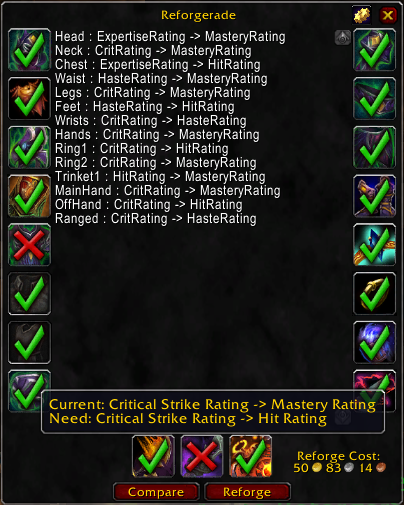
Reforgerade
Reforges your gear to the results returned by reforging calculators.
Usage: Talk to a reforging NPC and paste the results you get from using a reforging calculator, then click the reforge button.
Items that are already reforged correctly will show a green check mark over the their icon. Items with reforges that do not match the input will show a red X over the icon. Slots with missing, invalid, or not understood input will show a yellow question mark over the slot's icon. After reviewing the reforge changes click the Reforge button to automatically make the shown reforge changes.
Supported reforging tools:
- Shadowcraft (Thanks to wT-)
- WoW Reforge
- Ask Mr. Robot
- Rawr (experimental)
- FemaleDwarf
Update for 5.0 by _JS_
Comments

-

legowxelab2z8 Owner
-
View User Profile
-
Send Message
Posted Dec 7, 2020Thx for this, very useful back in the day!
-
View User Profile
-
Send Message
Posted Oct 15, 2014Seems like Reforging doesn't exist anymore, thanks for this addon as this made everyday life so much easier :)
-
View User Profile
-
Send Message
Posted Sep 27, 2013@legowxelab2z8
Ah, I see - well that's kinda backward. After not being able to find it yesterday, I ended up just making a Chrome extension that would parse the reforge info right off the page, and reformat it for use in Reforgerade. I guess I really didn't need to do that after all; but I guess it still saves a click. :p
Anyway, glad to hear about the extra format support coming, and nice work on the addon! It's saved me a ton of time already.
-
View User Profile
-
Send Message
Posted Sep 27, 2013@DigitalUtopia
I'm working on a new version that is compatible with the native Ask Mr. Robot export format, but until then you can click on the export button, and when the export window pops up click on the text at the bottom that says "Do you want to export only your reforges to a different addon? Reforge-Only Export". The export will then give you the old export format that is compatible with Reforgerade.
-
View User Profile
-
Send Message
Posted Sep 27, 2013Am I blind or something? It appears that Ask Mr. Robot has disabled Reforgerade compatible output on their site.
-
View User Profile
-
Send Message
Posted Sep 26, 2013Looks like askmrrobot is trying to push their addon, and as such, has removed the option to export to a reforgerade compatable format.
-
View User Profile
-
Send Message
Posted Nov 4, 2013There's a button on the bottom of the export frame called "reforge-only export" which has the Reforgerade compatible format.
-
View User Profile
-
Send Message
Posted Aug 22, 2013@Adirelle
AddonLoader support sounds like a great idea since reforging isn't something that is done very often. Thanks for the code contribution I will add it to the next update.
-
View User Profile
-
Send Message
Posted Aug 22, 2013Hello,
Any chance to get AddonLoader support baked in ? This allow users that install AddonLoader to postpone loading of the addon until you actually speak to the reforging NPC. This saves memory and loading time for all these game sessions when you do not speak to the reforging NPC. Plus, this is as simple as adding this to the toc file (already verified) :
-
View User Profile
-
Send Message
Posted May 31, 20135.3 Update?
-
View User Profile
-
Send Message
Posted Mar 16, 2013hello!how can i copy the stats from Mr.Robot?i m using wowreforge but its bugged for now and i need to reforge.ty!
-
View User Profile
-
Send Message
Posted Mar 16, 2013After you optimize your reforges with Ask Mr. Robot click on the "Export" button and then click "Reforge Export" Copy the text provided the and paste it into the Reforgerade window when ingame.
-
View User Profile
-
Send Message
Posted Mar 11, 2013Bump for an update to 5.2, love the addon. Thanks!
-
View User Profile
-
Send Message
Posted Mar 11, 2013Nothing seems to have broke with 5.2, so I updated the version number. Now it should load without having to check "Load out of date AddOns"
-
View User Profile
-
Send Message
Posted Mar 13, 2013Thanks! I always worry whenever I see addons not being updated so many great addosn get abandoned!
-
View User Profile
-
Send Message
Posted Dec 12, 2012you can add "restore them all"?
thank you for great add-on.
-
View User Profile
-
Send Message
Posted Dec 8, 2012Awesome addon! Can I make a suggestion or two as far as what would make this even better? Have it so it can save reforges for each spec. Even if it's just a button you press for each spec and it automatically loads the pasted reforges that it saves in game into the window that would be awesome. As of right now, I'm having to copy and paste each time from SC, if it could save my current reforges in the game and then be able to load them within the addon, without me having to tab out, load SC, copy and paste each time, that would save a bunch of time.
If you really wanted to, you could have it automatically load those reforges knowing which spec you are in. As a rogue, I am constantly jumping from combat to assassination specs and having to reforge, it's not just when I get new gear. So to be able to walk up to the reforger, have it automatically load the last known best reforging that I entered and saved and for the spec I am in, hit the button and be done would be incredible.
Thanks!
-
View User Profile
-
Send Message
Posted Nov 28, 2012hello all!!!i simply cant work this addon with wowreforge..can anyone pls help me to tell me the exact steps how to make it work with wowreforge???maybe a screnshot??im looking forward for an answer pls...thank you in advance...
-
View User Profile
-
Send Message
Posted Nov 28, 2012Full Image Album Here
-
View User Profile
-
Send Message
Posted Nov 29, 2012thank you friend!! i ll give it a try a.s.a.p!!!