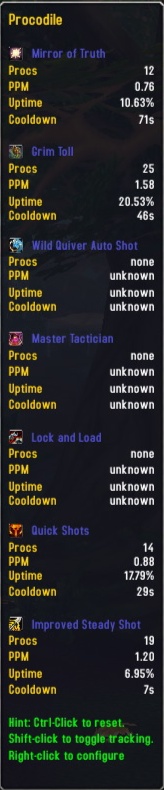
Procodile
Procodile gathers statistics on certain chance-on-use spells, also known as procs. It currently tracks:
- Number of procs
- Procs per minute (PPM)
- Uptime (percentage of time spent tracking)
- Damage per second (DPS)
- Min/average/max damage
- Energy regen on self
- Energy regen for party/raid per second
- Estimated internal cooldown
The estimated internal cooldown is the shortest time between two procs in one fight. The DPS is only shown for procs where it makes sense, such as Bandit's Insignia. Likewise, energy regen (Replenishment for instance) is only shown where applicable.
Procs and cooldowns can be announced with combat text messages, screen flashing and shaking, and sounds, to get your attention.
Procodile can show bars for the estimated internal cooldown, and for the duration of aura-style procs, where a temporary buff or debuff is applied to you or your target. The bars can be fully customized.
It will automatically find your worn proc items, enchants, talents, and glyphs. You can also add your own spells to track. You can disable those procs you are not interested in.
Note that not all items, enchants and talents are included. They are hardcoded in since that is the only way of associating, for example, an item with a proc.
Statistics can be displayed through an LDB display addon (a few examples are Titan, Fortress, and DockingStation), or from a minimap button. Proc statistics are also shown in item tooltips.
SharedMedia is recommended for more fonts, textures and sounds.
Missing a proc, or one not working?
File a ticket about it please and I will most likely be able to add/fix it. Most of the procs Procodile can track are not tested by myself.
Comments


-

zarnivoop Owner
-
View User Profile
-
Send Message
Posted May 1, 2011-
View User Profile
-
Send Message
Posted May 1, 2011Go to the Procodile addon folder and open up Procodile.lua in your favorite text editor. Go to line 636 or search for "unfiltered" and the line you want should say something like
function Procodile:COMBAT_LOG_EVENT_UNFILTERED(event, timestamp, blah blah blah...
Look for eventtype, srcGUID, srcname, etc...
You want to put hideCaster between eventtype and srcGUID so the entire line reads like this.
function Procodile:COMBAT_LOG_EVENT_UNFILTERED(event, timestamp, eventtype, hideCaster, srcGUID, srcName, srcFlags, dstGUID, dstName, dstFlags, ...)
Feel free to replace the entire line 636 with the above line and addon should work like before.
-
View User Profile
-
Send Message
Posted Feb 17, 2011I'm using this addon for 2 or 3 years. A little data mining in PvP cause its hard to get good datas about that theme.
Today I wonted to test something and sudently i relaised: using this addon for improved hamstring is great for me.
So I wont to say: oldy, but goldy! - I hope this addon will be continued, if it does not work somedays for some reason.
Greets
-
View User Profile
-
Send Message
Posted Dec 8, 2010It seems that the new Cataclysm Spell ID's are not workink now,
are there any plans to update this addon in the near future ?
-
View User Profile
-
Send Message
Posted Jul 26, 2010Ive been trying to get Rime/ Freezing Fog to register on Procodile, but can't locate a spell ID for it. It's imperative as a Frost DW DK. Does anyone know? Any help is appreciated!
-
View User Profile
-
Send Message
Posted Feb 10, 2010something like recount
-
View User Profile
-
Send Message
Posted Feb 10, 2010-
View User Profile
-
Send Message
Posted Jan 29, 2010-
View User Profile
-
Send Message
Posted Jan 10, 2010pls add options "background color" for bar.
-
View User Profile
-
Send Message
Posted Jan 9, 2010-
View User Profile
-
Send Message
Posted Jan 7, 2010-
View User Profile
-
Send Message
Posted Jan 5, 20101x Procodile-1.0\Procodile.lua:324: attempt to call global 'InterfaceOptionsFrame_OpenToFrame' (a nil value) Procodile-1.0\ProcodileFu.lua:13: in function `OpenMenu' LibFuBarPlugin-Mod-3.0-14211:1964: in function <...ib\LibFubarPlugin-Mod-3.0\LibFuBarPlugin-Mod-3.0.lua:1956>
Locals: self = <table> { GetFuBarText = <function> @ Procodile\lib\LibFubarPlugin-Mod-3.0\LibFuBarPlugin-Mod-3.0.lua:911: SetDefaultModuleLibraries = <function> @ AtlasLoot\Libs\AceAddon-3.0\AceAddon-3.0.lua:381: ToggleFuBarMinimapAttached = <function> @ Procodile\lib\LibFubarPlugin-Mod-3.0\LibFuBarPlugin-Mod-3.0.lua:529: EnableModule = <function> @ AtlasLoot\Libs\AceAddon-3.0\AceAddon-3.0.lua:346: modules = <table> {} baseName = "Procodile" IterateEmbeds = <function> @ AtlasLoot\Libs\AceAddon-3.0\AceAddon-3.0.lua:456: ToggleFuBarIconShown = <function> @ Procodile\lib\LibFubarPlugin-Mod-3.0\LibFuBarPlugin-Mod-3.0.lua:942: UpdateFuBarPlugin = <function> @ Procodile\lib\LibFubarPlugin-Mod-3.0\LibFuBarPlugin-Mod-3.0.lua:552: ReattachFuBarTooltip = <function> @ Procodile\lib\LibFubarPlugin-Mod-3.0\LibFuBarPlugin-Mod-3.0.lua:1148: HideFuBarIcon = <function> @ Procodile\lib\LibFubarPlugin-Mod-3.0\LibFuBarPlugin-Mod-3.0.lua:997: SetFuBarIcon = <function> @ Procodile\lib\LibFubarPlugin-Mod-3.0\LibFuBarPlugin-Mod-3.0.lua:789: SetDefaultModulePrototype = <function> @ AtlasLoot\Libs\AceAddon-3.0\AceAddon-3.0.lua:423: Show = <function> @ Procodile\lib\LibFubarPlugin-Mod-3.0\LibFuBarPlugin-Mod-3.0.lua:712: defaultModuleState = true IsEnabled = <function> @ AtlasLoot\Libs\AceAddon-3.0\AceAddon-3.0.lua:465: OnFuBarClick = <function> @ Procodile\ProcodileFu.lua:86: DisableModule = <function> @ AtlasLoot\Libs\AceAddon-3.0\AceAddon-3.0.lua:364: OpenMenu = <function> @ Procodile\ProcodileFu.lua:12: GetDefaultPosition = <function> @ Procodile\lib\LibFubarPlugin-Mod-3.0\LibFuBarPlugin-Mod-3.0.lua:1088: OnModuleEnable = <function> @ Procodile\ProcodileFu.lua:16: SetFuBarOption = <function> @ Procodile\lib\LibFubarPlugin-Mod-3.0\LibFuBarPlugin-Mod-3.0.lua:306: SetEnabledState = <function> @ AtlasLoot\Libs\AceAddon-3.0\AceAddon-3.0.lua:438: IsFuBarMinimapAttached = <function> @ Procodile\lib\LibFubarPlugin-Mod-3.0\LibFuBarPlugin-Mod-3.0.lua:516: enabledState = true SetFontSize = <function> @ Procodile\lib\LibFubarPlugin-Mod-3.0\LibFuBarPlugin-Mod-3.0.lua:1183: OnUpdateFuBarText = <function> @ Procodile\ProcodileFu.lua:20: UpdateFuBarTooltip = <function> @ Procodile\lib\LibFubarPlugin-Mod-3.0\LibFuBarPlugin-Mod-3.0.lua:655: IterateModules = <function> @ AtlasLoot\Libs\AceAddon-3.0\AceAddon-3.0.lua:451: OnFuBarLeave = <function> @ Procodile\ProcodileFu.lua:83: IsFuBarTextShown = <function> @ Procodile\lib\LibFubarPlugin-Mod-3.0\LibFuBarPlugin-Mod-3.0.lua:1009: OnModuleInitialize = <function> @ Procodile\ProcodileFu.lua:5: CheckWidth = <function> @ Procodile\lib\LibFubarPlugin-Mod-3.0\LibFuBarPlugin-Mod-3.0.lua:832: NewModule = <function> @ AtlasLoot\Libs\AceAddon-3.0\AceAddon-3.0.lua:255: CreateBasicPluginFrame = <function> @ Procodile\lib\LibFubarPlugin-Mod-3.0\LibFuBarPlugin-Mod-3.0.lua:1261: ToggleFuBarTooltipDetached = <function> @ Procodile\lib\LibFubarPlugin-Mod-3.0\LibFuBarPlugin-Mod-3.0.lua:1114: ShowFuBarIcon = <function> @ Procodile\lib\LibFubarPlugin-Mod-3.0\LibFuBarPlugin-Mod-3.0.lua:985: IsFuBarTooltipDetached = <function> @ Procodile\lib\LibFubarPlugin-Mod-3.0\LibFuBarPlugin-Mod-3.0.lua:1098: minimapIcon = LibFuBarPlugin-Mod-3.0_Procodile_FuBar_FrameMinimapButtonIcon {} CreatePluginChildFrame = <function> defined @Interface\AddOn
--
View User Profile
-
Send Message
Posted Dec 26, 2009-
View User Profile
-
Send Message
Posted Dec 26, 20091x LibBars-1.0-77991 (Procodile):310: attempt to call method 'SetTextFontObject' (a nil value) Procodile-1.0\Procodile.lua:541: in function `SetupBars' Procodile-1.0\Procodile.lua:311: in function <Procodile\Procodile.lua:295> (tail call): ?: <in C code>: ? <string>:"safecall Dispatcher[1]":9: in function <[string "safecall Dispatcher[1]"]:5> (tail call): ?: AceAddon-3.0-5 (AtlasLoot):510: in function `InitializeAddon' AceAddon-3.0-5 (AtlasLoot):622: in function <...\AddOns\AtlasLoot\Libs\AceAddon-3.0\AceAddon-3.0.lua:615>
-
View User Profile
-
Send Message
Posted Dec 2, 2009I track lots of procs and it now goes off me screen, please tell me what i can do to change this or that u can provide me with an update soon ty :)
-
View User Profile
-
Send Message
Posted Dec 25, 2009-
View User Profile
-
Send Message
Posted Nov 21, 2009"Elusive Power" from the item "Abyssal Rune"
-
View User Profile
-
Send Message
Posted Nov 15, 2009The odd thing is that even though I have a spell disabled (Missile barrage Proc for arcane mages), I still get messages that a new cooldown for this proc is detected. I find this odd for 2 reasons, first off I have it disabled I would think you would want to disable cooldown tracking as well, plus the CD on this is essentially 0 Secs, so I would think that once the CD gets down low enough (basically a GCD) that I would stop getting these messages, but for whatever reason that doesn't happen.
THe possible improvement would be a setting to "Lock Cooldowns" this could potentially save CPU cycles as well while raiding as you wouldn't have to be checking the cooldown each time to see if it was lower than before. I'm not sure how everyone else uses it but I tend to get my new cooldown info on the test dummy when I get a new trinket, I'd rather not have it changing on the fly after that. I think the other reason that I have run into this is that I arena and even though i use 5 min CD 2 min apart while arenaing the CD is still 5 Min, it is just reset every time new match starts, as are all CDs for arenas.
Just some ideas. love the add on. keep up the good work.
Ming
-
View User Profile
-
Send Message
Posted Oct 17, 2009-
View User Profile
-
Send Message
Posted Oct 13, 2009Procodile saves all settings upon logout/login, except for the textures of cooldownbars/aurabars. Anyone else having this issue, and/or know how to fix it?