
Prat 3.0
In loving memory of Jon Akthar (Sylvanaar)
Hello WoW community, I'm LuciferCatnip, Sylvanaar was my coworker and my mentor. It goes without saying that Jon was an amazingly talented individual. He always seemed to know everything… but he once said to me "It's not about knowing the answers, it's about asking the right questions", he always challenged me to ask me the right questions until I would arrive at the answer on my own terms. Jon was also a champion of the open source movement, and so with special thanks to Gil from Curseforge as well as Sylvanaar's family, there's no better way to honor Sylvanaar's legacy than to keep his project going strong in the community.
If you'd like to help maintain Prat, please reach out to MysticalOS or LuciferCatnip directly. Thank you so much.
About
Prat-3.0 is a chat enhancement addon for World of Warcraft.
It is made up of 30+ smaller "modules" which each provide additional functionality, and can be enabled or disabled individually.
In game, type /prat for a menu. Or use the icon on one of the many data broker hosts.
Prat has just about every feature you can think of, and then some. Really. When I get some more time, I'll try and put together a full list (Even I have lost count)
(Thanks to Dreamsight for this partial list)
- Sync your chat settings across your account (Beta)
- Machine learning powered spam filter (Beta)
- Change arrows, buttons, mouse scroll for chat scroll, scroll speed
- you can add player color per channel, color per level, color per class
- timestamps (styled)
- Whether to show timestamp (what format the timestamp should be in)
- Whether to show players level
- You can select the option for channel "stickys" (last channel you used you auto use when hitting enter, that sort of thing – or last thing someone said)
- Change the looks of the chat's editbox - as well as where it appears (you can even undock it and move it to where you'd like it to be)
- Chat fading, fading delay
- You can change the font to a list of fonts, add an outline to it, monochrome it (if you don’t mind messing with files a bit you could probably even add other fonts to that list)
- Change the chat frame/chat box appearance
- Keep chat history between game sessions
- Set channel abbreviations
- Set brackets and color(or something instead of brackets)round player/lvl
- Alt invite option (press keyboard “alt” button and click on the player’s name to auto inv them)
- Raid icon
- Invite links - click them to invite the person
- URL copying
- Full chat copying + copy button
- Click timestamp to copy line
- Configurable alerts when your name or other word is mentioned
- Enables tell target /tt which whispers your target
- Alias options - make macros into short commands
- See names of players Alt characters
- Change chat sounds (incoming and outgoing as well as per channel)
- Achievements info and grats
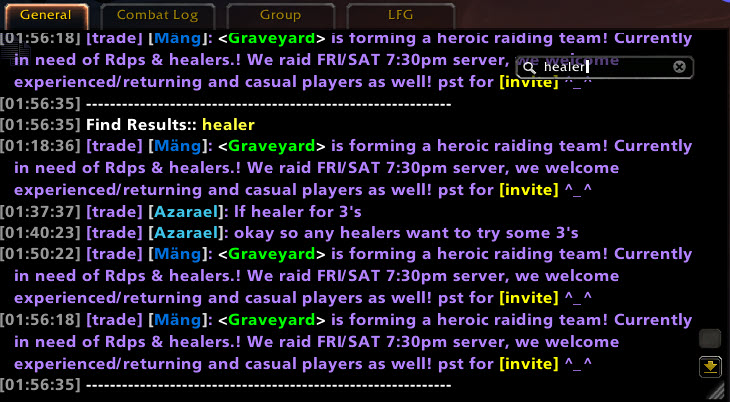
- Full chat search and search box
- Customizable filters for advanced users
- Show item icon next to item links and player class icon next to player names
- Icon-only options for newcomers chat
- Optional flashing or font color change for chat tabs when a new message comes in.
You can enable/disable all Prat modules - don't have to have the ones you don't use running
While trying to reduce resource utilization, it is also important to note that some people prefer the features, and don't care that an addon uses 500k more.
Comments

-

QTartemis Owner
-

humfras Former Author
-

lucifercatnip Author
-

MrFIXlT Former Author
-

MysticalOS Author
-

pompachomp Former Author
-

SunnySunflow Translator
-

sylvanaar Former Author
-
View User Profile
-
Send Message
Posted Sep 22, 2026the timestamp for npc dialogue gets shown twice: https://imgur.com/a/ntCopzL
-
View User Profile
-
Send Message
Posted Sep 21, 2026Thanks for updating this for Forever! I love this addon and it would not have been the same to play without it.
-
View User Profile
-
Send Message
Posted Sep 20, 2026Does this add-on allow extended post support (e.g. a long RP post, typed in at once, broken up across several messages?)
-
View User Profile
-
Send Message
Posted Sep 20, 2026The problem alway is the new chat window stuck and not closing sometimes fix this plz
-
View User Profile
-
Send Message
Posted Sep 19, 2026Still not allowing TRP3 NPC emotes to work
-
View User Profile
-
Send Message
Posted Sep 19, 2026@Kauqilla You'll want Prat version 3.9.109. From TRP side, the code is in now, but waiting for them to publish a release :)
-
View User Profile
-
Send Message
Posted Sep 19, 2026945x Prat-3.0/modules/Sounds.lua:229: attempt to index field 'PLAYERLINKRAW' (a nil value)
[Prat-3.0/modules/Sounds.lua]:229: in function '?'
[Ace3/CallbackHandler-1.0/CallbackHandler-1.0.lua]:109: in function <...Ons/Ace3/CallbackHandler-1.0/CallbackHandler-1.0.lua:109>
[C]: ?
[Ace3/CallbackHandler-1.0/CallbackHandler-1.0.lua]:19: in function <...Ons/Ace3/CallbackHandler-1.0/CallbackHandler-1.0.lua:15>
[Ace3/CallbackHandler-1.0/CallbackHandler-1.0.lua]:54: in function 'Fire'
[Prat-3.0/addon/addon.lua]:673: in function <Prat-3.0/addon/addon.lua:542>
[tail call]: ?
[Blizzard_ChatFrameBase/Shared/ChatFrame.lua]:14: in function 'OnEvent'
[Blizzard_ChatFrameBase/Mainline/FloatingChatFrame.lua]:146: in function <...lizzard_ChatFrameBase/Mainline/FloatingChatFrame.lua:145>
Locals:
self=<table>{
lastevent=260
modules=<table>
defaultModuleLibraries=<table>
name="Prat_Sounds"
orderedModules=<table>
lasteventtype="CHAT_MSG_RAID_LEADER"
db=<table>
baseName="Prat-3.0"
PL=<table>
enabledState=true
defaultModuleState=true
moduleName="Sounds"
}
_="Prat_PostAddMessage"
message=<table>{
sS=""
Ss=""
pP=""
Pp=""
SERVER=""
CAPTUREOUTPUT=false
ORG=<table>
OUTPUT="|WQynaroth-Draenor (Horde)|w has joined the raid group."
MESSAGE="|WQynaroth-Draenor (Horde)|w has joined the raid group."
}
_=ChatFrame1 <FloatingChatFrame.xml:645>{
shouldFadeAfterInactivity=true
hasActiveChanges=false
isScrollingMessageFrame=true
systemPositionDirty=false
buttonFrame=ChatFrame1ButtonFrame <FloatingChatFrame.xml:455>
snappedFrames=<table>
alternativeDefaultLanguage="Common"
hasOwnFontObject=true
oldAlpha=0.615686
channelList=<table>
FontStringContainer=Frame <ScrollingMessageFrame.xml:9>
messageTypeList=<table>
fontObject=table: 00000197B8593530 <UnknownFile:0>
systemNameString="Chat Frame"
EditModeResizeButton=Button <EditModeSystemTemplates.xml:173>
settingsDialogAnchor=<table>
clickAnywhereButton=ChatFrame1ClickAnywhereButton <FloatingChatFrame.xml:403>
isLayoutDirty=false
systemInfo=<table>
buttonSide="left"
ResizeButton=ChatFrame1ResizeButton <FloatingChatFrame.xml:416>
overrideFadeTimestamp=794933.352000
settingDisplayInfoMap=<table>
fontStringPool=<table>
dirtySettings=<table>
mouseOutTime=1.002000
isInitialized=1
defaultLanguage="Common"
isUninteractable=false
allowScroll=true
name="General"
checkedGMOTD=true
isDocked=1
ScrollToBottomButton=Button <FloatingChatFrame.xml:475>
isDisplayDirty=true
downKeys=<table>
savedSystemInfo=<table>
onDisplayRefreshedCallbacks=<table>
visibleLines=<table>
oldestFadingLineTimestamp=794933.352000
textIsCopyable=false
scrollOffset=0
fadeDurationSecs=3
timeVisibleSecs=120
historyBuffer=<table>
mouseInTime=0
editBox=ChatFrame1EditBox <FloatingChatFrame.xml:496>
zoneChannelList=<table>
Background=ChatFrame1Background <FloatingChatFrame.xml:6>
insertMode=2
ScrollBar=Frame <ChatFrame.xml:5>
Selection=Frame <EditModeSystemTemplates.xml:167>
allowAtGlues=true
system=8
settingMap=<table>
isStaticDocked=true
isLocked=true
}
event="CHAT_MSG_SYSTEM"
msgtype="SYSTEM"
(*temporary)=nil
(*temporary)=nil
(*temporary)="SYSTEM"
(*temporary)=nil
(*temporary)=nil
(*temporary)=nil
(*temporary)=nil
(*temporary)=nil
(*temporary)=nil
(*temporary)=nil
(*temporary)=nil
(*temporary)=nil
(*temporary)="attempt to index field 'PLAYERLINKRAW' (a nil value)"
-
View User Profile
-
Send Message
Posted Sep 19, 2026@seventii Fixed in 3.9.109. Thought I fully tested those fixes.
-
View User Profile
-
Send Message
Posted Sep 18, 2026Please make an update for Forever 1..60!
-
View User Profile
-
Send Message
Posted Sep 18, 2026@lvangh Added :)
-
View User Profile
-
Send Message
Posted Sep 20, 2026@QTartemis The addon doesn't seem to save text size between sessions on Forever (1.60.1).
-
View User Profile
-
Send Message
Posted Sep 17, 2026As others are reporting this is preventing me from seeing NPC Emotes. Emotes beginning with /e | message
Only in the main chatbox of note. The chat window belonging to Lister/Eavesdropper displays the message correctly.
Is this planned to be addressed? While I enjoy Prat I primarily Roleplay and this is a bit of a dealbreaker.
-
View User Profile
-
Send Message
Posted Sep 18, 2026@Ranleli There's a fix going into TRP for this shortly.
-
View User Profile
-
Send Message
Posted Sep 19, 2026@QTartemis Still not working
-
View User Profile
-
Send Message
Posted Sep 14, 2026Prat is hiding trp3 NPC emotes entirely, only showing the player name and not the emote itself. Happens to me when I post and others when they post.
-
View User Profile
-
Send Message
Posted Sep 18, 2026@Sanguiness130 There's a fix going into TRP for this shortly.
-
View User Profile
-
Send Message
Posted Sep 1, 2026It's not throwing errors but Prat is now hiding trp3 emotes using the | flag to remove the player's name from the beginning
-
View User Profile
-
Send Message
Posted Sep 8, 2026No errors thrown but if I leave UCM and Chattery enabled and disable PRAT I can do the /me | The squirrel jumps off the tree and lands in the Priestess' hair and it gets shown.
Any idea why prat is eating the NPC emotes?
-
View User Profile
-
Send Message
Posted Sep 9, 2026@Kauqilla I am encountering the same issue. The emote is still visible to others, just not by myself.
-
View User Profile
-
Send Message
Posted Sep 9, 2026@Mini_Tyrael yep so annoying