Omen Threat Meter
Omen

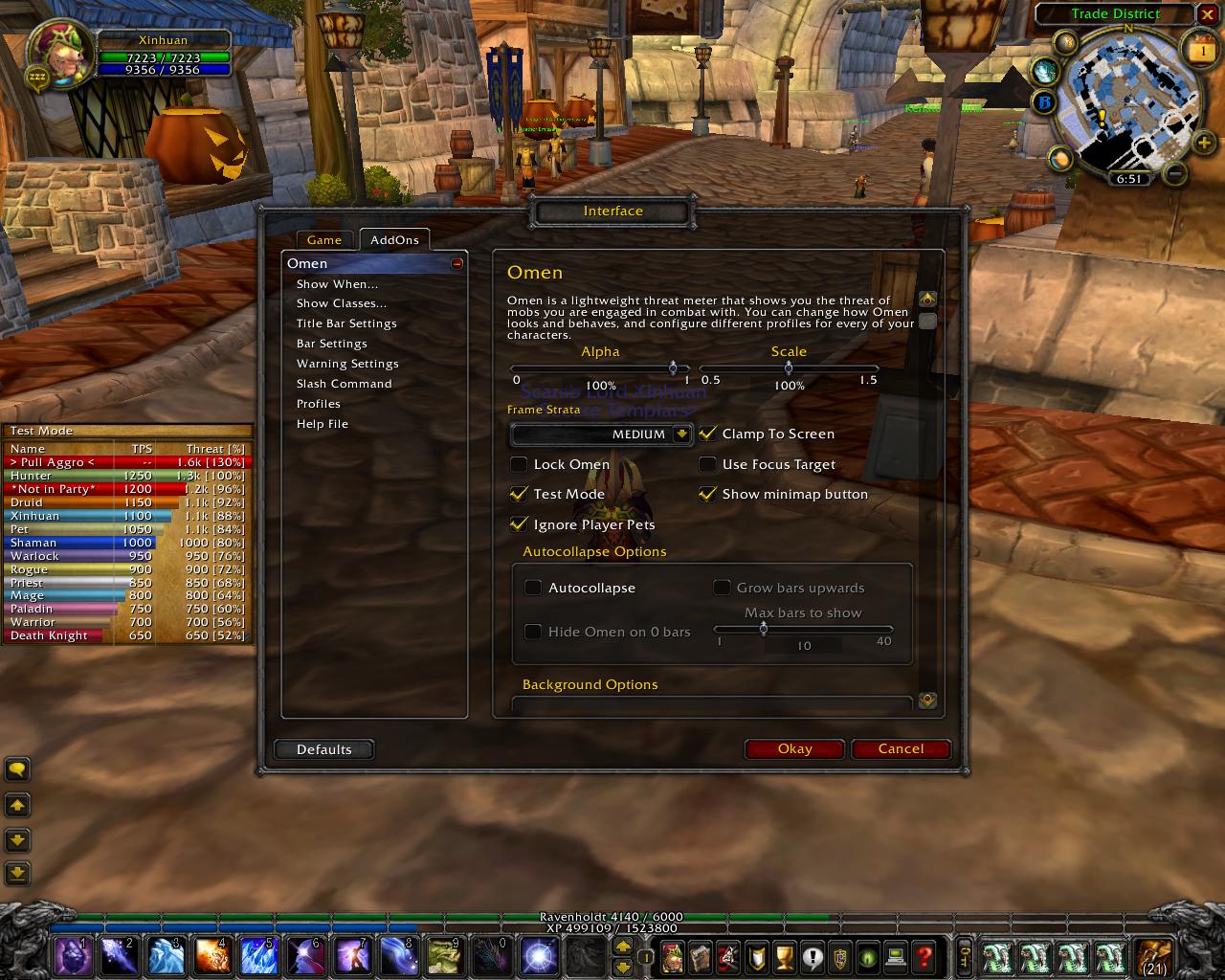
Omen is a threat meter.
Basically, enemies in WoW decide who to attack by deciding who is the most threatening based on the abilities you use. What Omen does is provide accurate values of your group's relative threat level on individual enemies, so that you can see when you're in danger of pulling aggro (or, if you're next on the snack list if your tank bites it). This info is usually only critical in raids, where only tanks can survive aggro, but it's useful for any multi-player situation.
Changes from version v3.1.6 to v3.1.7
- Add option to choose what sound channel to play warnings on, default is SFX (thanks tharai).
- Add fixes for MoP patch 5.0.4 (thanks dridzt).
- Removed compatibility code for older versions of WoW. This version now only runs in MoP.
FAQ
How is Omen3 different from Omen2?
Omen3 relies completely on the Blizzard threat API and threat events. It does not attempt to calculate or extrapolate threat unlike Omen2 except when Tricks, Misdirection, Mirror Image, Fade and glyphed Hand of Salvation are active.
Omen2 used what we called the Threat-2.0 library. This library was responsible for monitoring the combat log, spellcasting, buffs, debuffs, stances, talents and gear modifiers for calculating each individuals threat. Threat was calculated based on what was known or approximated from observed behaviors. Many abilities such as knockbacks were just assumed (to be a 50% threat reduction) as they were mostly impossible to confirm.
The Threat-2.0 library also included addon communication to broadcast your threat to the rest of the raid as long as they were also using Threat-2.0. This data was then used to provide a raid wide display of threat information.
Since patch 3.0.2, Omen no longer does any of these things and the need for a threat library is no longer necessary. Omen3 uses Blizzard's new in-built threat monitor to obtain exact values of every members threat. This means Omen3 has no need for synchronisation of data, combat log parsing or guessing, resulting in a significant increase in performance with regards to network traffic, CPU time and memory used. The implementation of boss modules for specific threat events (such as Nightbane wiping threat on landing) are also no longer necessary.
Further benefits of this new implementation include the addition of NPC threat on a mob (eg, Human Kalecgos). However, there are some drawbacks; frequency of updates are much slower, threat details cannot be obtained unless somebody in your party/raid are targetting the mob and it is also not possible to obtain threat from a mob you are not in direct combat with.
How do I get rid of the 2 vertical gray lines down the middle?
Lock your Omen. Locking Omen will prevent it from being moved or resized, as well as prevent the columns from being resized. If you haven't realized it, the 2 vertical gray lines are column resizing handles.
How do I make Omen3 look like Omen2?
Change both the Background Texture and Border Texture to Blizzard Tooltip, change the Background Color to black (by dragging the luminance bar to the bottom), and the Border Color to blue.
Why does no threat data show on a mob when I target it even though it is in combat?
The Blizzard threat API does not return threat data on any mob you are not in direct combat with. We suspect this is an effort on Blizzard's part to save network traffic.
Is there ANY way around this Blizzard limitation? Not being able to see my pet's threat before I attack has set me back to guessing.
There is no way around this limitation short of us doing the guessing for you (which is exactly how Omen2 did it).
The goal of Omen3 is to provide accurate threat data, we no longer intend to guess for you and in the process lower your FPS. Have some confidence in your pet/tank, or just wait 2 seconds before attacking and use a low damage spell such as Ice Lance so that you can get initial threat readings.
Can we get AoE mode back?
Again, this is not really possible without guessing threat values. Blizzard's threat API only allows us to query for threat data on units that somebody in the raid is targeting. This means that if there are 20 mobs and only 6 of them are targeted by the raid, there is no way to obtain accurate threat data on the other 14.
This is also extremely complicated to guess particularly for healing and buffing (threat gets divided by the number of mobs you are in combat with) because mobs that are under crowd control effects (sheep, banish, sap, etc) do not have their threat table modified and addons cannot reliably tell how many mobs you are in combat with. Omen2's guess was almost always wrong.
The tooltips on unit mouseover shows a threat % that does not match the threat % reported by Omen3. Why?
Blizzard's threat percentage is scaled to between 0% and 100%, so that you will always pull aggro at 100%. Omen reports the raw unscaled values which has pulling aggro percentages at 110% while in melee range and 130% otherwise.
By universal agreement, the primary target of a mob is called the tank and is defined to be at 100% threat.
The threat updates are slow...
Omen3 updates the threat values you see as often as Blizzard updates the threat values to us.
In fact, Blizzard updates them about once per second, which is much faster than what Omen2 used to sync updates. In Omen2, you only transmitted your threat to the rest of the raid once every 3 seconds (or 1.5s if you were a tank).
Where can I report bugs or give suggestions?
Who wrote Omen3?
Xinhuan (Blackrock/Barthilas US Alliance) did.
Do you accept Paypal donations?
Yes, send to xinhuan AT gmail DOT com.
Older Changes
Changes from version v3.1.5 to v3.1.6
- Multiply the threat values reported by the WoW Servers in Dragon Soul instance by 10 because they are scaled by 10%. This fixes MI/Fade/Tricks oddities and reported TPS values.
Changes from version v3.1.4 to v3.1.5
- Remove code that causes divide by 0 for future WoW updates/PTRs.
- Show the "Hide Minimap Button" option if the button is ever registered with LDBIcon instead of trying to check whether FuBar or FuBar2Broker is loaded.
Changes from version v3.1.3 to v3.1.4
- Omen will no longer create a second unremovable minimap button for the players that have other installed addons providing the LibFuBarPlugin-3.0 library but are not using FuBar.
Changes from version v3.1.2 to v3.1.3
- Optimize CLEU codepath for 4.2 instead of 4.1 now that we are in 4.2. That is, the 4.2 forward compatibility code is now 4.1 backwards compatibility code.
- Rearrange initialization code slightly.
Changes from version v3.1.1 to v3.1.2
- Fixed issue where some players are unable to see any threat text on the bars until the current profile or TPS option is changed. The fix also fixes issues with some bar settings being "reverted to default" on login.
- Fixed potential errors caused from combat log changes introduced in patch 4.2 PTR (untested on PTR servers).
Changes from version v3.1.0 to v3.1.1
- Fixed errors caused from combat log changes introduced in patch 4.1.
Changes from version v3.0.11 to v3.1.0
- Omen3 will now read the combat log and:
- Track and estimate temporary threat created by Tricks and Misdirect
- Track and estimate threat caused by damage while Fade, Mirror Image and glyphed Hand of Salvation are active
- Display these *estimated* threat in a grey (default) color bar, with an expiry countdown (earliest one) next to the name.
- When using class colored bars, the alpha transparency of the bars is now controlled by the "BG Bar Color" setting (which can only be modified if "Use Class Colors" is turned off).
Changes from version v3.0.10 to v3.0.11
- Death Knights will now check for Blood Presence instead of Frost Presence for tanking (the description wasn't updated, please update DISABLE_WHILE_TANKING_DESC at http://www.wowace.com/addons/omen-threat-meter/localization/ for your language).
Changes from version v3.0.9 to v3.0.10
- Updated a few digits in the TOC to make people happy for Cataclysm.
- Removed the outdated Warrior FAQ.
Changes from version v3.0.8 to v3.0.9
- Add option to make Omen click-through (non-interactive).
- Optimized the bar animation code significantly.
- Fix bar backgrounds not being set to the inverted color on login if the "Invert Bar/Text Colors" setting is on. This wasn't noticeable if the bar label color was the default white text with 100% alpha.
Changes from version v3.0.7 to v3.0.8
- Fix GetShapeShiftFormInfo() error that occurs for DKs when they aren't in any presence. This occurs when they respec between their primary/secondary specs and the game drops them out of all presences and subsequently enter combat presence-less.
- Add ConfigMode support (see addon OneButtonConfig).
- Omen will now update its bars immediately on showing from a hidden state instead of updating on the next threat event.
- Includes updates to all localizations via http://www.wowace.com/projects/omen-threat-meter/localization/
Changes from version v3.0.6 to v3.0.7
- Add optional !ClassColors support.
- Add /omen show and /omen hide slash commands.
- Add "Invert Bar/Text Colors" option (default off) which swaps the bar background and text colors.
- Omen now generates the config tables on demand to make it use less memory.
- Omen now provides better error feedback if AceGUI-3.0-SharedMediaWidgets is not found and will continue to function (but without any config).
- Includes updates to all localizations via http://www.wowace.com/projects/omen-threat-meter/localization/
Changes from version v3.0.5 to v3.0.6
- Update zhTW/zhCN/deDE localizations
- Add Fade/MI Color to the options. This color is used on players under the effects of MI/Fade.
- Add 410065408 threat to all players with negative threat for display purposes. English translation: You can now see the "un-Faded/un-MIed threat" of players under the effects of Fade and Mirror Image.
Changes from version v3.0.4 to v3.0.5
- Implement an update event throttle, reducing CPU usage significantly without any loss of updates.
- Clear the guidNameLookup table on zoning to recover some memory.
- Fix Omen getting stuck to the mouse if autocollapse is on and you moved Omen while you are in combat and exited combat during the move.
- Set a player's threat to 0 (for display purposes) if the player's threat is less than 0. This occurs on Fade and Mirror Image, which gives the caster a temporary threat reduction of 410057408 (or 4.1m threat in Omen's terms). Previously Omen ignored players with negative threat.
- Omen will now remember its visible state when you log out (applicable only if auto-show/hide is off).
Changes from version v3.0.3 to v3.0.4
- Update ruRU, koKR and zhTW localizations
- Fix "Passed X% of Y's threat" message where it would report your name instead of the tank's name if you passed your tank's aggro AND pulled aggro at the same time.
Changes from version v3.0.2 to v3.0.3
- Update various localizations. esMX will now see the same translations as esES
- Add LSM callbacks so that the user can use custom media or media registered by other addons correctly
- Allow the user to have different background settings for the Title Bar than from the main Omen window
Changes from version v3.0.1 to v3.0.2
- Update various localizations
- Fix error that occurs on changing Clamp To Screen option
- Add option to change the Pet Color and changed the default Pet Color to violet
- Omen will no longer create its internal minimap button if FuBar or Broker2FuBar are loaded
- Fix bugs with "Hide Omen on 0 bars" option that caused Omen to keep appearing when unwanted
Changes from version v3.0.0 to v3.0.1
- Fix error that occurs on changing profiles: Omen-3.0.0\Omen.lua:592: attempt to index global 'bar' (a nil value)
Changes from version RC3 to v3.0.0
- Updated various localizations
- Add Show threat values and % options
- Add Aoogah! sound from Omen2
- Fix Omen's alpha setting not applying on login
- Add option not to use class colors
- Fix bug which caused ghost bars to show when some classes are not selected to be shown
- Add Tank Bar color option
- Add "Always Show Self" option
- Add Show/Hide Title Bar option
- Add Use Focus Target and Test Mode checkboxes into the configuration panel
- Add Show Aggro Bar option
- Make Test Mode much more useful by showing bars of every possible class and the player
- Fix minor issue where the TPS numbers are 1 pixel higher than the rest of the text on the threat bars
- Hard embed LibDataBroker-1.1 and use it
- Add LibDBIcon-1.0 external
- Add minimap button option, default shown
- Fix Omen's FuBar plugin issue for right clicks to open the configuration panel interfering with library upgrading paths
- Rewrite Auto Show/Hide options to be more intuitive. Add option not to use Auto Show/Hide
- Add an internal flag so that if the user manually toggles Omen's visibility, it stays shown/hidden until he next zones, join/leave a party/raid, or change any Auto Show/Hide settings
- Add option to ignore player pets to display threat info on (Default: On). Yes, player pets have aggro tables too!
- Add Frame Strata and Clamp To Screen options
- Apply a whole list of configuration settings that were forgotten on changing profiles
- Updated the FAQ
Changes from version RC2 to RC3
- Renamed localization\deDE.lua to Localization\deDE.lua so that the auto-generated zip file will contain the folder "Localization" rather than "localization", which means Omen will now work on non-Windows operating systems
Changes from version RC1 to RC2
- Add keybind to toggle using the focus target
- Fix missing localization entry for "Passed %s%% of %s's threat!"
- Add option to color your own threat bar to a color of your choice
- Fix "VGrip1Ratio" error that occurs when completing a drag and Omen incorrectly attempts to hide itself.
Comments


-

Xinhuan Owner
-

_ForgeUser757630 Author
-

Ardentvark Author
-

nevcairiel Author
-
View User Profile
-
Send Message
Posted Jan 21, 2026Really old addon but I still very much make use of it. It's been on life support for years now, kept working by fan patches, but as expected is broken with Midnight pre patch. Threat is not secret so maybe there is hope for a update??? Fingers crossed...
-
View User Profile
-
Send Message
Posted Jan 29, 2026In reply to Tealc_1899: I'm working on dragging it kicking and screaming into Midnight.
-
View User Profile
-
Send Message
Posted Feb 3, 2026In reply to erekrules: Hey thats awesome news erekrules!! Please keep us updated on the progress of things as it will definitely be useful!!!
-
View User Profile
-
Send Message
Posted Apr 23, 2026In reply to erekrules: Soooo, how's it going?
-
View User Profile
-
Send Message
Posted Apr 24, 2026In reply to Der_Adrinator: Not well. Blizzard hides GUIDs in dungeons. So, while threat itself isn't secret, the second you try to do a GUID look up for threat comparison with enemies, other party members, etc, you get the secret value error. Outside of dungeons there aren't the same kind of restrictions, but that's a pretty limited scope for a threat addon. I'm afraid it's not possible to bring Omen back right now, but I'm not an LUA wizard, either. Maybe Blizzard will further relax some of their restrictions in the future, but until then... :(
-
View User Profile
-
Send Message
Posted Apr 26, 2026In reply to erekrules: Ah, dang :(
Lets hope for the best...
-
View User Profile
-
Send Message
Posted Mar 19, 2025How can I adjust the delay after fight to look at the bars? Also, how can I look at the "History" of recent fights?
-
View User Profile
-
Send Message
Posted Jan 5, 2025"Message: Interface/AddOns/Omen/Omen.lua:8: attempt to call global 'GetAddOnMetadata' (a nil value) the fix for this error is just cause blizzard changed api GetAddOnMetadata into C_AddOns.GetAddOnMetadata api so u need to go into the addon and change GetAddOnMetadata into C_AddOns.GetAddOnMetadata. but ofc the author could do that easly
-
View User Profile
-
Send Message
Posted Dec 23, 2024I got the other Omen and can not access any options/config, it only takes me to the game options. Also can not post comments on it.
-
View User Profile
-
Send Message
Posted Nov 17, 2024need this addon for classic wow vanila 1.15.4
-
View User Profile
-
Send Message
Posted Nov 13, 2024Anyone found a fix yet?
-
View User Profile
-
Send Message
Posted Nov 17, 2024In reply to hibacho_: waiting for someone kind who can fix it and post for us.
-
View User Profile
-
Send Message
Posted Nov 21, 2024In reply to hibacho_:
I found a fix! This fix was for the latest version 2022 Retail I added what @LFGKilikk mentioned for line 8 and 9. That didnt fully work though so in addition to his, do the following
Replace any instance of SetMinResize and REPLACE with SetResizeBounds
Replace self.Anchor:SetUserPlaced(nil) with self.Anchor:SetUserPlaced(false)
This worked for me. Let me know if it works for you. Cheers!
-
View User Profile
-
Send Message
Posted Nov 21, 2024In reply to hibacho_:
/omen config and right click on the icon does not work but you can still get to the settings through the game options and then going to the addons tab
-
View User Profile
-
Send Message
Posted Dec 23, 2024In reply to hibacho_: It does not show up on that list for me.
-
View User Profile
-
Send Message
Posted Dec 12, 2024In reply to hibacho_: Oh thx, I was already desperate that I would ever find a solution, everything worked. Thanks again
-
View User Profile
-
Send Message
Posted Dec 14, 2024In reply to hibacho_: Parfais merci
-
View User Profile
-
Send Message
Posted Oct 22, 2024I can not get this addon to work for me for some reason. I keep getting this Lua error:
"Message: Interface/AddOns/Omen/Omen.lua:8: attempt to call global 'GetAddOnMetadata' (a nil value)
Time: Tue Oct 22 11:17:29 2024
Count: 1
Stack: Interface/AddOns/Omen/Omen.lua:8: attempt to call global 'GetAddOnMetadata' (a nil value)
[string "@Interface/AddOns/Omen/Omen.lua"]:8: in main chunk
Locals: Omen = <table> {
modules = <table> {
}
defaultModuleLibraries = <table> {
}
name = "Omen"
orderedModules = <table> {
}
enabledState = true
defaultModuleState = true
}
L = <table> {
HUNTER = "Hunter"
Height of each bar = "Height of each bar"
Passed %s%% of %s's threat! = "Passed %s%% of %s's threat!"
Show Omen when you are alone = "Show Omen when you are alone"
Show threat per second values = "Show threat per second values"
Turning this on will cause Omen to hide whenever you are in a battleground or arena. = "Turning this on will cause Omen to hide whenever you are in a battleground or arena."
Tells Omen to additionally check your 'focus' and 'focustarget' before your 'target' and 'targettarget' in that order for threat display. = "Tells Omen to additionally check your 'focus' and 'focustarget' before your 'target' and 'targettarget' in that order for threat display."
TPS Window = "TPS Window"
PET = "Pet"
Show Classes... = "Show Classes..."
'My Bar' BG Color = "'My Bar' BG Color"
Show Omen when any of the following are true = "Show Omen when any of the following are true"
Center Omen = "Center Omen"
Click to toggle the Omen window = "Click to toggle the Omen window"
Alpha = "Alpha"
> Pull Aggro < = "> Pull Aggro <"
Control the font size of the labels = "Control the font size of the labels"
Master = "Master"
Show Pull Aggro Bar = "Show Pull Aggro Bar"
DEMONHUNTER = "Demon Hunter"
The font that the labels will use = "The font that the labels will use"
Background Tile Size = "Background Tile Size"
SHAMAN = "Shaman"
Click Through = "Click Through"
Display large numbers in Ks = "Display large numbers in Ks"
Use !ClassColors addon for class colors for the background color of threat bars = "Use !ClassColors addon for class colors for the background color of threat bars"
A collection of help pages = "A collection of help pages"
Clamp To Screen = "Clamp To Screen"
Tank Bar Color = "Tank Bar Color"
Frame's border color = "Frame's border color"
Title Bar Background Options = "Title Bar Background Options"
Max bars to show = "Max bars to show"
Open the configuration dialog = "Open the configuration dialog"
Font Outline = "Font Outline"
Heading background color = "Heading background color"
Turning this on will cause Omen to hide whenever you are not in combat. = "Turning this on will cause Omen to hide whenever you are not in combat."
Tile Background = "Tile Background"
Configure title bar settings. = "Configure title bar settings."
Frame's background color = "Frame's background color"
Border Texture = "Border Texture"
General Settings = "General Settings"
This section controls when Omen is automatically shown or hidden. = "This section controls when Omen is automatically shown or hidden."
Grow bars upwards = "Grow bars upwards"
Omen Quick Menu = "Omen Quick Menu"
Show the Omen minimap button = "Show the Omen minimap button"
Border Thickness = "Border Thickness"
IGNORE_PLAYER_PETS_DESC = "Tells Omen to skip enemy player pets when determining which unit to display threat data on.
Player pets maintain a threat table when in Aggressive or Defensive mode and behave just like normal mobs, attacking the target with the highest threat. If the pet is instructed to attack a specific target, the pet still maintains the threat table, but sticks on the assigned target which by definition has 100% threat. Player pets can be taunted to force them to attack you.
However, player pets on Passive mode do not have a threat table, and taunt does not work on them. They only attack their assigned target when instructed and do so without any threat table.
When a player pet is instructed to Follow, the pet"
-
View User Profile
-
Send Message
Posted Oct 30, 2024In reply to b00st3r86: i'm developing a humble project who can be useful for tank
https://www.curseforge.com/wow/addons/threat-monitor-the-warwithin
-
View User Profile
-
Send Message
Posted Sep 19, 2024this is the error im getting
Error -> [string "Omen.lua"]:3: attempt to call a nil value (global 'LibStub')