Mountiful
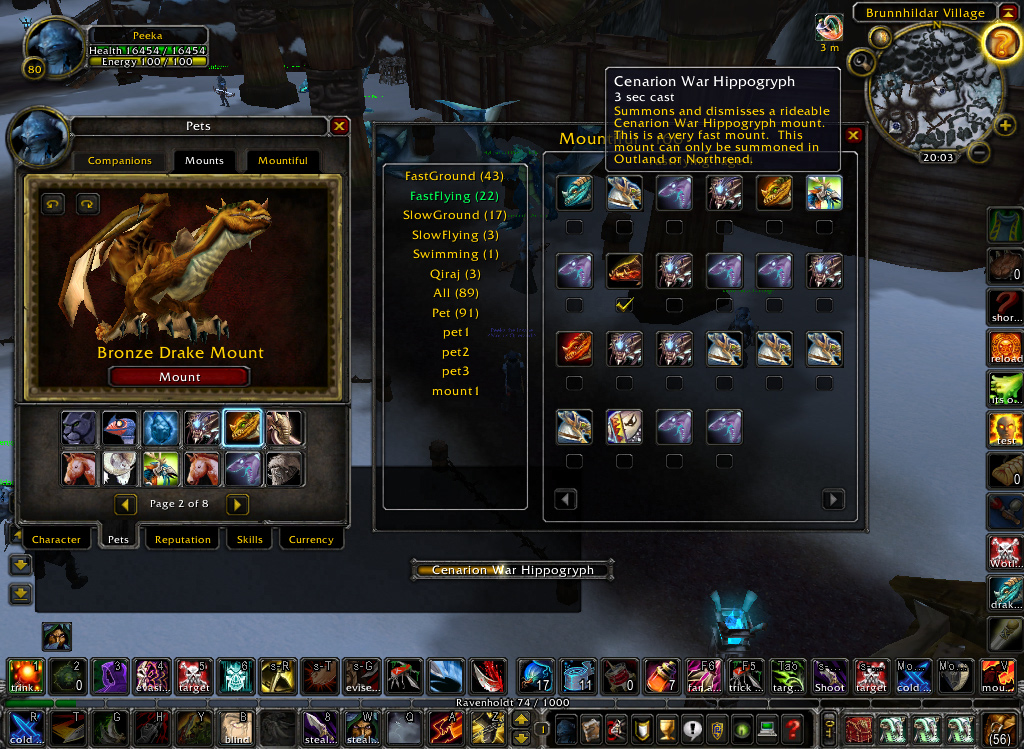
Mountiful is a mod that helps you randomly select and use a mount or pet based on pre-defined categories.
Features
- A new macro named 'Mountiful' should appear in your general macros. Click it to summon your mount. The icon should always show the next mount that will be cast.
- Right-click to summon a ground mount. Shift-Right-Click to change the icon.
- A new button should appear in your spell interface, below the default Mount button, that brings up the interface
- /mountiful, /mount, and /mo will also bring up the interface.
- Single-clicking on the mount will summon that mount/pet.
- 24 mounts are shown at once and are grouped by speed and ground/flying.
- Allows you to customize which mounts are used for each category
- Safeflying feature will keep you from dismounting in the air when turned on
- Support for Pets
- Support for Keybindings
- Now works with druid flight forms! (You must use either the keybindings or the macro. The /mount command will not work for flight forms)
- Auto dismiss pets when you stealth (Rogue love :)
Commands
Mount Commands (Depreciated)
- /click Mountiful - Casts the best mount for your location. Supports druid flight forms.
- /mount smart - randomly selects the best mount for your location. Does not work with druid flight forms.
- /mount smart pre - randomly selects the best pre-selected mount for your location
- /mount <category> - randomly uses a mount/pet from that category
- /mount <category> pre - randomly uses a pre-selected mount/pet from that category
- /mount add <name> - adds a new mount category (or just use the 'add' button in the interface)
- /mount remove <category> - removes an existing category
- /mount safeflying - toggle safeflying on/off
- /mount autoremount - If you want the first click/press to Dismount, and then the 2nd click/press to cast another mount (As opposed to a mount always being summoned when you click/press)
- /mount rebuildselections - rebuilds selections database (fixes graphical glitches and/or wrong mount being summoned)
- /mount preselecteddefault - Sets whether the automated macro uses preselected categories
- /mount settings - See what all your settings are currently at
- /mount reset - Removes settings and categories. Use this as a last resort if things aren't working.
- /mount help - See this text in-game
- /mount autopet - Automatically summon a companion when you mount.


-
View User Profile
-
Send Message
Posted Sep 18, 2013After the new patch (5.4) my flying mount macro doesn't work anymore - the preselection is not considered anymore and it summons a ground mount every now and then. I'm hoping for an update soon.
-
View User Profile
-
Send Message
Posted Mar 17, 2013Still wrongly categorized (ground instead of flying):
- Argent Hippogryph
- Armored Snowy Gryphon
- Celestial Steed
- Cenarion War Hippogryph
- Ebon Gryphon
- Golden Gryphon
- Swift Blue Gryphon
- Swift Green Gryphon
- Swift Purple Gryphon
- Swift Red Gryphon
Thanks for the fix :)
-
View User Profile
-
Send Message
Posted Oct 26, 2012Since the revival of this addon, my Flying and Ground mounts keep getting jumbled. Someone claimed that it was because of adding new Battle Pets, but there are times where I haven't added any since login, and they still get mixed up. I regularly have to rebuild the selections, or I just end up summoning a bunch of ground mounts when I want to fly somewhere.
-
View User Profile
-
Send Message
Posted Mar 1, 2013It appears that Mountiful is no longer checking my characters' skills before selecting the next mount to summon. On a new DK in Outland, for example, it continuously tries to summon flying mounts. For my non-Tailors, it tries to summon carpets, and for my non-90s, it tries to summon Cloud Serpents. Did something happen in patch 5.1 that broke this?
-
View User Profile
-
Send Message
Posted Oct 11, 2012I'm glad to see that mountiful is mostly working. I use it extensively.
However I see two problems.
1. I can't add any new categories. "/mount add Drake" or similar doesn't create a category. Also the new category buttons are missing from the window.
2. I have two categories assigned to keys. Fly and Ground. If I repeatedly press the key for one of the categories, it works. When I switch to the other category, the first time I press the key, I get a mount from the previous category. All following keypresses for that category work. The same action occurs when I switch back to the previous category. Seems like the active category is stored somewhere and isn't updated until after it's used.
-
View User Profile
-
Send Message
Posted Oct 12, 2012Can you just use the macro Mountiful creates? :)
-
View User Profile
-
Send Message
Posted Oct 14, 2012The default macro works just fine. I would like to choose a random non-drake or a random drake. That is why I want to create my own categories. Currently using r227.
-
View User Profile
-
Send Message
Posted Oct 19, 2012Alas, I must admit, I have never used the custom categories, nor have I updated the custom categories code from the very original. This will be a while till i get to it.
-
View User Profile
-
Send Message
Posted Oct 6, 2012Hi!
Could you pls reassign these mount to flying instead of ground:
Celestial Steed, Imperial Quilen, Tyrael's Charger, Flying Machines (both), Flying Carpets (all three).
Thank you.
-
View User Profile
-
Send Message
Posted Oct 7, 2012fixed in new beta
-
View User Profile
-
Send Message
Posted Oct 3, 2012This addon still shows up as out-of-date in the addon screen, FYI
-
View User Profile
-
Send Message
Posted Oct 2, 2012Whenever i make a new category, pet or mount, it gets deleted when i relog. Common bug?
Edit: Imperial Quilen seems to be categoriesed as ground mount. Also, when a new battle pet is added, /mount smart pre seems to summon mounts it's not supposed to do.
-
View User Profile
-
Send Message
Posted Sep 28, 2012The macro never appeared for me in my General Macro's list - did a complete fresh install of it too from the downloads section, any idea's?
Just have to say I used this back in Wrath and I am so glad it's back and being updated. Thank you
-
View User Profile
-
Send Message
Posted Oct 1, 2012Only thing that should cause it to fail is having the maximum amount of macros. If general macros are full it uses character macros.
-
View User Profile
-
Send Message
Posted Sep 27, 2012Ok, its working perfectly for me now.
But I can only test on the PTR so its still Beta status (no longer playing my toon with 140 mounts :) so let me know how it goes. If No one complains I will Release it in a few days
-
View User Profile
-
Send Message
Posted Sep 27, 2012The download button here links to an old file... check the "other downloads" tab.
-
View User Profile
-
Send Message
Posted Sep 27, 2012Yes, its still beta status. I recommend using the Curse Client, it has a setting for alpha, beta or release
-
View User Profile
-
Send Message
Posted Sep 26, 2012Basic functionality restored. Good news - mounts don't have to be 'learned' anymore thanks to the new Mount page. selection checkmarks still broken, working on it
-
View User Profile
-
Send Message
Posted Sep 26, 2012I just updated the Toc file. So its bugged? I'll work on it when I can.
-
View User Profile
-
Send Message
Posted Sep 2, 2012So while it says it was updated 25 hours ago, it still chooses a ground mount in flying zones, tries to pick swimming mounts while on the ground and can't seem to work with the new pet system (which is fine, but stop telling me I have no pets).
I was hoping for some sort of update to all of the complaints that seem to have been here for years, but apparently there is none. Which makes me sad, since I'd like to have a mod that randomly chooses mounts for me (but the appropriate ones for the zone I'm in).