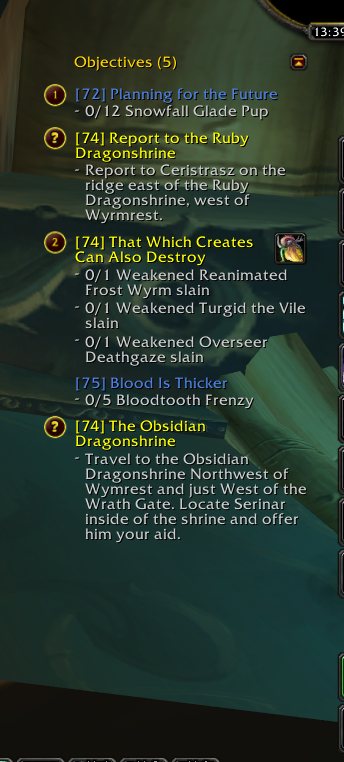
Moncai Quest Tracker
Moncai Quest Tracker
I have been developing my modified quest tracker over the past few years. Each time Blizzard updated it's tracker, I updated mine with it. Coded from the ground up again for patch 3.3 and adapted to 4.0.1, I'm releasing it here so others may benefit.
New release
- Beta 4.0.1 is live and fixes issues with some quests and adds the option to show quest ID's
- Beta 4.0.0 is live and should fix (hopefully all) Cataclysm incompatibilities.
- Beta 3.3.3.2 (r36) is live. This fixes Questguru compatibility, collapsed tracker width and re-introduces the buddy system (at a basic level).
Current features
- New: Tracker is optionally movable and you may choose to display Item buttons on the left side, see config (/mqt) under "Placement"
- Tracker shows levels and colors but still stays true to the original by Blizzard
- Includes all the questing goodies Blizzard has put into the 3.3.3 update
- If you quest with someone else who has this tracker, you can track their progress
- Works with QuestHelper 1.3.x, reflecting the order in which to do the quests (version 1.3.10 tested)
- Works with Tourguide style addons by using built-in proximity sorting
- Shift-click a header in the Questlog to toggle the watches for all quests under that header
- Access the configuration screen by typing /mqt in the chat window or via "Game Menu"-"Interface"-"Addons"
- A few features I have missed
QuestHelper integration
For a successfull integration with QuestHelper, please mind the following things:
- Please use version 1.3.7 or higher of QuestHelper
- Make sure it's enabled in the configuration screen (type /mqt to access it)
- Disable the built-in tracker of QuestHelper, either via it's configuration menu or via the slash command "/qh track" (without the quotes).
Since QuestHelper is no longer actively developed, you may also want to disable the integration and then Right-Click the WatchFrame header ("Objectives") and in the pop-up menu select "Proximity" under "Sort Quests". Tip: this also works well with Tourguide based addons
Upcoming features
For now I consider the tracker fairly feature-complete except for the buddy leveling-system which I hope to extend in the future. If you have ideas, feel free to create a ticket on wowace describing your wanted feature.
Beta, what does that mean?
Oh yes, there will be bugs! Since I am only one person it's impossible for me to test every setup or addon-combination. If you like, please give it a try, and help me make the addon better. Your feedback is kindly appreciated!
Feedback
Your feedback is important! Please submit bugreports, localizations in your language and suggestions. Have a problem? Please create a ticket on wowace. Like my addon? Tell others :D
Where to post what
- Bug reports, suggestions for new features and improvements: Create a ticket on wowace
- Comments, questions, praise: Feel free to post right here :D
- Please submit your translation updates via WowAce localization. Your help is much appreciated! When sufficient lines have been translated, the language will be integrated into the addon.
Comments on curse.com and wowace.com
Extremely long postings of error messages are unwanted in the comments section and will be deleted. Please create a ticket with your problem on wowace. Feel free to post a comment about having created such a ticket of course!
Comments


-

Forge_User_39331286 Owner
-
View User Profile
-
Send Message
Posted Nov 19, 2014<p>Hi, I like this Quest Tracker, but have 4 errors everytime I log on. I tried to do a ticket at WOWACE, but that was usless. Not sure I can copy the errors here, but I am going to try.</p>
<p>Date: 2014-11-19 14:08:28</p>
<p>ID: 1</p>
<p>Error occured in: Global</p>
<p>Count: 1</p>
<p>Message: ..\AddOns\MoncaiQuestTracker\Core.lua line 19:</p>
<p> attempt to perform arithmetic on global 'WATCHFRAME_LINEHEIGHT' (a nil value)</p>
<p>Debug:</p>
<p> MoncaiQuestTracker\Core.lua:19: in main chunk</p>
<p>Locals:</p>
<p>MQT = <table> {</p>
<p> SetDefaultModuleLibraries = <function> defined @Interface\AddOns\Ace3\AceAddon-3.0\AceAddon-3.0.lua:398</p>
<p> Enable = <function> defined @Interface\AddOns\Ace3\AceAddon-3.0\AceAddon-3.0.lua:325</p>
<p> NewModule = <function> defined @Interface\AddOns\Ace3\AceAddon-3.0\AceAddon-3.0.lua:266</p>
<p> Print = <function> defined @Interface\AddOns\Ace3\AceConsole-3.0\AceConsole-3.0.lua:54</p>
<p> EnableModule = <function> defined @Interface\AddOns\Ace3\AceAddon-3.0\AceAddon-3.0.lua:363</p>
<p> modules = <table> {</p>
<p> }</p>
<p> GetModule = <function> defined @Interface\AddOns\Ace3\AceAddon-3.0\AceAddon-3.0.lua:241</p>
<p> IterateEmbeds = <function> defined @Interface\AddOns\Ace3\AceAddon-3.0\AceAddon-3.0.lua:473</p>
<p> IsModule = <function> defined @Interface\AddOns\Ace3\AceAddon-3.0\AceAddon-3.0.lua:499</p>
<p> defaultModuleLibraries = <table> {</p>
<p> }</p>
<p> WATCHFRAME_QUEST_OFFSET = 5</p>
<p> WATCHFRAME_MINIMUMWIDTH = 220</p>
<p> SetEnabledState = <function> defined @Interface\AddOns\Ace3\AceAddon-3.0\AceAddon-3.0.lua:455</p>
<p> GetArgs = <function> defined @Interface\AddOns\Ace3\AceConsole-3.0\AceConsole-3.0.lua:144</p>
<p> enabledState = true</p>
<p> UnregisterChatCommand = <function> defined @Interface\AddOns\Ace3\AceConsole-3.0\AceConsole-3.0.lua:111</p>
<p> Printf = <function> defined @Interface\AddOns\Ace3\AceConsole-3.0\AceConsole-3.0.lua:69</p>
<p> RegisterChatCommand = <function> defined @Interface\AddOns\Ace3\AceConsole-3.0\AceConsole-3.0.lua:85</p>
<p> GetName = <function> defined @Interface\AddOns\Ace3\AceAddon-3.0\AceAddon-3.0.lua:310</p>
<p> defaultModuleState = true</p>
<p> Disable = <function> defined @Interface\AddOns\Ace3\AceAddon-3.0\AceAddon-3.0.lua:345</p>
<p> IterateModules = <function> defined @Interface\AddOns\Ace3\AceAddon-3.0\AceAddon-3.0.lua:468</p>
<p> name = "MoncaiQuestTracker"</p>
<p> SetDefaultModulePrototype = <function> defined @Interface\AddOns\Ace3\AceAddon-3.0\AceAddon-3.0.lua:440</p>
<p> IsEnabled = <function> defined @Interface\AddOns\Ace3\AceAddon-3.0\AceAddon-3.0.lua:482</p>
<p> orderedModules = <table> {</p>
<p> }</p>
<p> SetDefaultModuleState = <function> defined @Interface\AddOns\Ace3\AceAddon-3.0\AceAddon-3.0.lua:418</p>
<p> DisableModule = <function> defined @Interface\AddOns\Ace3\AceAddon-3.0\AceAddon-3.0.lua:381</p>
<p>}</p>
<p>L = <table> {</p>
<p> is finished with %s = "is finished with %s "</p>
<p> .*: (%d+) ?/ ?%d+ = ".*: (%d+) ?/ ?%d+"</p>
<p> is finished = "is finished"</p>
<p> Let's Party! = "Let's Party!"</p>
<p> You = "You"</p>
<p> QuestHelper integration active = "QuestHelper integration active"</p>
<p> Moncaí's Quest Tracker loading, stand by... = "Moncaí's Quest Tracker loading, stand by..."</p>
<p> ([^ ]+)$ = "([^ ]+)$"</p>
<p> Moncaí's Quest Tracker enabled = "Moncaí's Quest Tracker enabled"</p>
<p> Could not add buddy, buffer full = "Could not add buddy, buffer full"</p>
<p> are finished = "are finished"</p>
<p> (.*): %d+ ?/ ?%d+ = "(.*): %d+ ?/ ?%d+"</p>
<p> needs %1$d more %2$s = "needs %1$d more %2$s "</p>
<p> mqt = "mqt"</p>
<p> Command not found = "Command not found"</p>
<p> Hey, you're working on %s, I'll add it! = "Hey, you're working on %s, I'll add it!"</p>
<p> rl = "rl"</p>
<p> Moncaí Questtracker = "Moncaí Questtracker"</p>
<p> Welcome to the group, = "Welcome to the group, "</p>
<p> need = "need"</p>
<p> Goodbye, = "Goodbye, "</p>
<p> Moncaí's Quest Tracker disabled = "Moncaí's Quest Tracker disabled"</p>
<p> has = "has "</p>
<p> (.*)(: ?.*) = "(.*)(: ?.*)"</p>
<p> [%d] %s = "[%d] %s"</p>
<p> (.*): (%d+) ?/ ?(%d+) = "(.*): (%d+) ?/ ?(%d+)"</p>
<p> needs = "needs"</p>
<p> PANIC! = "PANIC!"</p>
<p> QuestHelper integration disabled = "QuestHelper integration disabled"</p>
<p>}</p>
<p>(*temporary) = nil</p>
<p>(*temporary) = "MoncaiQuestTracker"</p>
<p>(*temporary) = false</p>
<p>(*temporary) = <table> {</p>
<p> is finished with %s = "is finished with %s "</p>
<p> .*: (%d+) ?/ ?%d+ = ".*: (%d+) ?/ ?%d+"</p>
<p> is finished = "is finished"</p>
<p> Let's Party! = "Let's Party!"</p>
<p> You = "You"</p>
<p> QuestHelper integration active = "QuestHelper integration active"</p>
<p> Moncaí's Quest Tracker loading, stand by... = "Moncaí's Quest Tracker loading, stand by..."</p>
<p> ([^ ]+)$ = "([^ ]+)$"</p>
<p> Moncaí's Quest Tracker enabled = "Moncaí's Quest Tracker enabled"</p>
<p> Could not add buddy, buffer full = "Could not add buddy, buffer full"</p>
<p> are finished = "are finished"</p>
<p> (.*): %d+ ?/ ?%d+ = "(.*): %d+ ?/ ?%d+"</p>
<p> needs %1$d more %2$s = "needs %1$d more %2$s "</p>
<p> mqt = "mqt"</p>
<p> Command not found = "Command not found"</p>
<p> Hey, you're</p>
<p>AddOns:</p>
<p> AccurateTime, vv1.8</p>
<p> Swatter, v5.0.0 (<%codename%>)</p>
<p> Ace3, v</p>
<p> ACP, v3.4.14</p>
<p> Altoholic, v5.4.008</p>
<p> ArkAutoLootBoP, v11100</p>
<p> Armory, vv12.1.2</p>
<p> ArmoryGuildBank, vv12.1.2</p>
<p> Astrolabe, v1.0</p>
<p> Atlas, v1.31.00</p>
<p> AtlasArena, v1.5.05</p>
<p> AtlasBattlegrounds, v1.31.00</p>
<p> AtlasBurningCrusade, v1.31.00</p>
<p> AtlasCataclysm, v1.31.00</p>
<p> AtlasClassicWoW, v1.31.00</p>
<p> AtlasDungeonLocs, v1.31.00</p>
<p> AtlasMistsofPandaria, v1.31.00</p>
<p> AtlasOutdoorRaids, v1.31.00</p>
<p> AtlasScenarios, v1.31.00</p>
<p> AtlasTransportation, v1.31.00</p>
<p> AtlasWorldEvents, v3.10</p>
<p> AtlasWrathoftheLichKing, v1.31.00</p>
<p> AtlasLoot, vv7.07.03</p>
<p> AtlasLootCataclysm, vv7.07.03</p>
<p> AtlasLootClasses, vv1.5</p>
<p> AtlasLootClassicWoW, vv7.07.03</p>
<p> AtlasLootLoader, vv7.07.03</p>
<p> AtlasLootMistsofPandaria, vv7.07.03</p>
<p> AtlasMajorCitiesEnhanced, vv1.02</p>
<p> AtlasQuest, v4.9.0</p>
<p> AucAdvanced, v5.21c.5521 (SanctimoniousSwamprat)</p>
<p> AucFilterBasic, v5.21c.5521 (SanctimoniousSwamprat)</p>
<p> AucFilterOutlier, v5.21c.5521.5459(5.21c/embedded)</p>
<p> AucMatchUndercut, v5.21c.5521.5507(5.21c/embedded)</p>
<p> AucStatHistogram, v5.21c.5521 (SanctimoniousSwamprat)</p>
<p> AucStatiLevel, v5.21c.5521 (SanctimoniousSwamprat)</p>
<p> AucStatPurchased, v5.21c.5521 (SanctimoniousSwamprat)</p>
<p> AucStatSales, v5.21c.5521.5476(5.21c/embedded)</p>
<p> AucStatSimple, v5.21c.5521 (SanctimoniousSwamprat)</p>
<p> AucStatStdDev, v5.21c.5521 (SanctimoniousSwamprat)</p>
<p> AucStatWOWEcon, v5.21c.5521.5323(5.21c/embedded)</p>
<p> AucUtilAHWindowControl, v5.21c.5521.5347(5.21c/embedded)</p>
<p> AucUtilAppraiser, v5.21c.5521.5495(5.21c/embedded)</p>
<p> AucUtilAskPrice, v5.21c.5521.5447(5.21c/embedded)</p>
<p> AucUtilAutoMagic, v5.21c.5521.5443(5.21c/embedded)</p>
<p> AucUtilCompactUI, v5.21c.5521.5496(5.21c/embedded)</p>
<p> AucUtilEasyBuyout, v5.21c.5521.5507(5.21c/embedded)</p>
<p> AucUtilFixAH, v5.21c.5521 (SanctimoniousSwamprat)</p>
<p> AucUtilItemSuggest, v5.21c.5521.5417(5.21c/embedded)</p>
<p> AucUtilPriceLevel, v5.21c.5521.5458(5.21c/embedded)</p>
<p> AucUtilScanButton, v5.21c.5521.5403(5.21c/embedded)</p>
<p> AucUtilScanFinish, v5.21c.5521.5515(5.21c/embedded)</p>
<p> AucUtilScanProgress, v5.21c.5521.4979(5.21c/embedded)</p>
<p> AucUtilScanStart, v5.21c.5521.5347(5.21c/embedded)</p>
<p> AucUtilSearchUI, v5.21c.5521.5515(5.21c/embedded)</p>
<p> AucUtilSimpleAuction, v5.21c.5521.5514(5.21c/embedded)</p>
<p> AucUtilVendMarkup, v5.21c.5521.4828(5.21c/embedded)</p>
<p> AutoRepair, v</p>
<p> Babylonian, v5.1.DEV.332(/embedded)</p>
<p> BadBoy, v12.428</p>
<p> Bagnon, v6.0.15</p>
<p> Bartender4, v4.6.5</p>
<p> BeanCounter, v5.21c.5521 (SanctimoniousSwamprat)</p>
<p> Configator, v5.1.DEV.376(/embedded)</p>
<p> DataStore, v6.0.001</p>
<p> DataStoreAchievements, v6.0.001</p>
<p> DataStoreAgenda, v6.0.001</p>
<p> DataStoreAuctions, v6.0.001</p>
<p> DataStoreCharacters, v6.0.001</p>
<p> DataStoreContainers, v6.0.001</p>
<p> DataStoreCrafts, v6.0.001</p>
<p> DataStoreCurrencies, v6.0.001</p>
<p> DataStoreInventory, v6.0.001</p>
<p> DataStoreMails, v6.0.001</p>
<p> DataStorePets, v6.0.001</p>
<p> DataStoreQuests, v6.0.001</p>
<p> DataStoreReputations, v6.0.001</p>
<p> DataStoreSpells, v6.0.001</p>
<p> DataStoreStats, v6.0.001</p>
<p> DataStoreTalents, v6.0.001</p>
-
View User Profile
-
Send Message
Posted Oct 17, 2014Hi Are you going to update this for 6.X?
I know you guys do this in your spare time so just wondering :)
-
View User Profile
-
Send Message
Posted Oct 18, 2014Yes, I am going to! Thanks for understanding my time limits. This addon is tightly integrated into Blizzard's own code so needs extensive rewriting after a major patch. Stay tuned!
-
View User Profile
-
Send Message
Posted Jun 2, 2014Sadly the addon is freezing my client while entering senario while the tracker is being floated. I have to end the task to get out of it :( I've verified this with only quest tracker installed.
-
View User Profile
-
Send Message
Posted Nov 11, 2013Is this addon responsible for duplicate "Discovered: ...." messages with white font? I don't at least remember seeing them before today when i installed it.
By the way only reason i got the addon was for the quest items on left side in tracking list. It is the only functionality i need from quest mods, and installing QuestHelper would've added much more bloat than this.
-
View User Profile
-
Send Message
Posted Sep 27, 2013Everytime I get a quest with "On Warchief's Command" in its name (sorry, I do not know if this is the exact name in english, because I have no US client) from the big board in one of the main cities in the quest tracker 3 grey "quests" with "[nil] in their name and "--" in their description appear under the received quest. I have ensured that they appear nowhere else. Please fix this - it is extremely annoying because I can not remove them!
-
View User Profile
-
Send Message
Posted Sep 15, 2013Does it help you track quests by zone? I'm hoping that i can find an addon that will help me make sure i've done all the quests of the zone I'm or of any particular zone I've been in in the past.
-
View User Profile
-
Send Message
Posted Jul 6, 2013Finally I found what I was looking for, thought I was SOL. I hate the Blizzard tracking, definitely glad to see someone has taken the time to make this addon. I am downloading it now and I hope to keep it indefinitely or until you stop working on it :S!
-
View User Profile
-
Send Message
Posted Jun 17, 2013I just installed Moncai Quest Tracker and when I log on to my charater, the chat window tells me that your addon has loaded but it doesn't appear on my screen. How do I get it to come up? I tried it with no other addons and nothing. By the way, typing '/mgt' in chat only brings up a message that tells you to type 'Help' for the commands that are available.
-
View User Profile
-
Send Message
Posted Jun 13, 2013Thanks for letting me know! Solving this is possibly complicated, but when I have some time I will look into it!
Great to hear you like the addon!
-
View User Profile
-
Send Message
Posted May 25, 2013It took a few days longer than expected, but the 5.3.0 update should be up shortly. Thank you for your patience!
-
View User Profile
-
Send Message
Posted May 23, 2013It doesn't work in mop.... do you have plans to update it? I just want N. Stranglethorn quests, but that doesn't work either. The add on doesn't show up in my character profiler at wow startup.... how do we update the data.
-
View User Profile
-
Send Message
Posted May 23, 2013Any chance of update for 5.3 ? Great addon for moving quests on good positon.. thx for ur work
-
View User Profile
-
Send Message
Posted Apr 18, 2013Would be awesome if the tracker could be hidden until mouseover. =)
-
View User Profile
-
Send Message
Posted Apr 17, 2013Unfortunately doesn't work well with PetTracker and LUI Core. Great potential in this addon though.
-
View User Profile
-
Send Message
Posted Mar 6, 2013Might need 5.2 update not sure.
-
View User Profile
-
Send Message
Posted Mar 8, 2013I've uploaded the 5.2.0 version just now!
-
View User Profile
-
Send Message
Posted Feb 18, 2013Is there an option to assign a keybind to show/minimize the quest tracker, or is that even possible?
-
View User Profile
-
Send Message
Posted Feb 20, 2013It should be possible, I'll look into it for you!
-
View User Profile
-
Send Message
Posted Jan 23, 2013Hello,
the questtracker dosent show up. i can move the yellow dot but nothing else. any idea?
thank you.