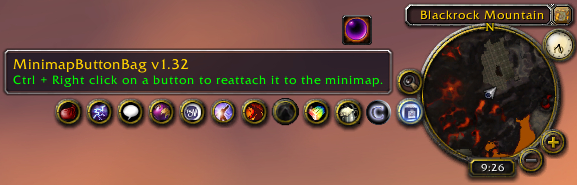
MBB
The Addon HidingBar supersedes MBB on all aspects and is continually updated.
https://www.curseforge.com/wow/addons/hidingbar
MBB reduces minimap buttons and makes them accessible through a pop out menu. Click the MBB button to expand the menu and display the buttons. Each button that is collapsed into the menu can be reattached to the minimap with Ctrl + Right Click. The MBB button can also be detached from minimap with Ctrl + Right Click.
Hot Key
- Ctrl + Right Click - detach / reattach a minimap button
Slash Commands
- /mbb - shows the MBB commands
- /mbb buttons - shows a list of all rfames in the MBB bar
- /mbb reset position - resets the position of the MBB button
- /mbb reset all - resets the MBB settings
Source Code and Issue Tracking
Comments


-

VallanTV Owner
-

Forge_User_75527174 Author
-

karlsnyder Author
-
View User Profile
-
Send Message
Posted Jan 22, 2026Any chance on an update for 12.0?
-
View User Profile
-
Send Message
Posted Feb 11, 2025Hey guys there is any way to resize the mini map button??
-
View User Profile
-
Send Message
Posted Oct 28, 2022I'm not getting it to line up properly with the new (larger) minimap, but I've managed to get rid of the errors so that it works properly otherwise.
If you're playing DF prepatch and want to use this, simply edit the MBB.xml and replace all instances of the following:
"relativeTo" should be "relativeKey"
"relativeFrom" should be "relativePoint"
This will allow you to use the addon, though it won't line up for the minimap, so you should just CTRL+Right Click to un-anchor it and move it freely.
EDIT: I managed to just bruteforce my way to make it line up for the minimap as well.
Open MBB.lua and go to line 764
MBB_MinimapButtonFrame:SetPoint("TOPLEFT", Minimap, "TOPLEFT", 81-(cos(angle)*108), -83+(sin(angle)*108));
-
View User Profile
-
Send Message
Posted Oct 28, 2022In reply to KveruLars:
Thank you!
Options Menu was a bit "off" after the replace but works for me:-)
I added a pull request for your fix to the github repository
its a MBB reborn addon up that is updated
-
View User Profile
-
Send Message
Posted Oct 29, 2022In reply to CoreMeeko2:
its a MBB reborn addon up that is updated
I wasn't aware, now I feel dumb!
-
View User Profile
-
Send Message
Posted Oct 30, 2022In reply to KveruLars:
Thanks for the attempt at fixing this. However for me, this still produces a ton of errors. A ton of XML errors and line 764 in my MBB.lua is blank. If I replaced that particular line in my lua which occurs 3 times, it throws a error.
-
View User Profile
-
Send Message
Posted Oct 31, 2022In reply to zippy_do_da:
That's weird. If you want, I could upload my changes for you to try.
Edit: Or just try to download this PR from Github. Someone else has done the same changes
https://github.com/vallantv/MBB/pull/27/commits/df3f9f567da848b80a6858406161bb9aeefabd73
-
View User Profile
-
Send Message
Posted Nov 1, 2022In reply to KveruLars:
https://www.curseforge.com/wow/addons/minimapbuttonbag-reborn-mmb-reborn
-
View User Profile
-
Send Message
Posted Nov 1, 2022In reply to KveruLars:
https://www.curseforge.com/wow/addons/minimapbuttonbag-reborn-mmb-reborn
-
View User Profile
-
Send Message
Posted Sep 13, 2021is there a version of this that works with burning crusade classic? i see the addon is working for classic but it glitches with errors when i try to make it work via just copying it into burning addons folder and checking use out of date addons.. suggestions for replacement if there are no plans to work on it for burning crusade?
-
View User Profile
-
Send Message
Posted Jun 1, 2021Worked fine until the update went out on wowup.io a few hours ago now im getting:
Date: 2021-06-01 16:03:47
ID: 1
Error occured in: Global
Count: 1
Message: ..\AddOns\MBB\MBB.lua line 91:
hooksecurefunc(): SecureStateAnchor_RunChild is not a function
Debug:
[string "=[C]"]: hooksecurefunc()
[string "@MBB\MBB.lua"]:91: MBB_OnLoad()
[string "*:OnLoad"]:1:
[string "*:OnLoad"]:1
Locals:
-
View User Profile
-
Send Message
Posted May 26, 2021If you want this working for TBC Classic, just download it, place it in your addons folder then replace the ##Interface line with ## Interface: 20501.
Update to new interface number once we get a new bigger patch.
-
View User Profile
-
Send Message
Posted Jun 1, 2021In reply to Nitrak:
Can you expound on this?
I've got it in the addons folder, but opening the MBB folder itself offers me many options to choose from. Some I can open, others I cannot. I already did a "interface" search in the MBB.xml doc, but came up empty-handed. Any chance you could dumb this down a bit for someone like myself?
-
View User Profile
-
Send Message
Posted Jun 1, 2021In reply to Nitrak:
Can you expound on this?
I've got it in the addons folder, but opening the MBB folder itself offers me many options to choose from. Some I can open, others I cannot. I already did a "interface" search in the MBB.xml doc, but came up empty-handed. Any chance you could dumb this down a bit for someone like myself?
-
View User Profile
-
Send Message
Posted Jun 1, 2021In reply to Nitrak:
Can you expound on this?
I've got it in the addons folder, but opening the MBB folder itself offers me many options to choose from. Some I can open, others I cannot. I already did a "interface" search in the MBB.xml doc, but came up empty-handed. Any chance you could dumb this down a bit for someone like myself?
-
View User Profile
-
Send Message
Posted Jun 1, 2021In reply to Nitrak:
Can you expound on this?
I've got it in the addons folder, but opening the MBB folder itself offers me many options to choose from. Some I can open, others I cannot. I already did a "interface" search in the MBB.xml doc, but came up empty-handed. Any chance you could dumb this down a bit for someone like myself?
-
View User Profile
-
Send Message
Posted Jun 1, 2021In reply to MadROMAD:
It kinda works without changing anything.
-
View User Profile
-
Send Message
Posted Jul 25, 2021In reply to Wingston:
Because it does for you, dosnt mean that it does for everyone else.
-
View User Profile
-
Send Message
Posted Jul 25, 2021In reply to Wingston:
Because it does for you, dosnt mean that it does for everyone else.
-
View User Profile
-
Send Message
Posted Jun 5, 2021In reply to MadROMAD:
This isn't really changing anything, only the versionnumber, so you can forceload with load out of date addons enabled.
However, the line you're searching for is located in MBB.toc