LilSparky's Workshop
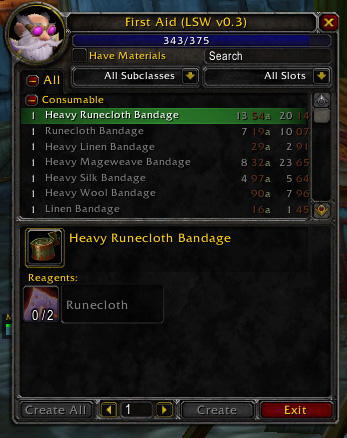
LilSparky's Workshop adds auction-derived pricing information for trade skills right into the trade skill recipe frame. Each skill is evaluated for material costs and potential value of the item created. These two numbers are listed next to each skill in an easy-to-read format.
Supported Auction Scanners:
- Auctioneer
- AuctionLite
- AuctionMaster
- Auctionator
Optionally Requires:
- Informant (for vendor availability)
LibPeriodicTable (for vendor availability)
Trade Skill Interfaces Supported:
- GnomeWorks
- AdvancedTradeSkillWindow
- Skillet
- Blizzard's Standard UI
- Doublewide Tradeskills
- Tradeskill HD
Auction pricing models can be selected by right-clicking either the value column or the cost column (each can have a different pricing method attached).
The Value column can be left clicked to cycle through the different valuation methods for the resultant item: Auction Value (a), Vendor Value (v), Disenchant Value (d) or the greatest of the three different values (the default). Any instance of an item Value being greater than the Cost to create it will have a highlighted Value entry. Optionally, the Value column can be displayed as a percentage of the Cost column.
The Cost column simply sums up the costs for each reagent and reports the total.
Both columns can be combined into a single "Profit" column which simply reflects the Value minus the Cost.
Tooltips for each column give more details about the price breakdowns LSW is considering.
A note regarding vendor availability:
LSW utilizes supplied item databases to determine when an item is readily available from a vendor. Occasionally this may not be accurate, usually because the item is a trade in for another item and not buyable with gold. I have provided a simple way to over-ride the vendor database:
/script LSWConfig.vendorOverride[item#] = (true/false/nil)
The item# is the item ID for the specific item. It is a single number. For example, 2589 is Linen Cloth.
Setting the value to "true" means the item is available at the vendor.
Setting the value to "false" means the item is not available at the vendor.
Setting the value to "nil" means to use the provided databse.
There is now also a right-click option to override the vendor availability and also to hand enter specific prices for items.
A note about frame/auction support:
LSW utilizes a plug in scheme to handle support to handle pricing and frame support. I am unlikely to add additional plugins directly into LSW. The goal of the plugin system is to provide basic templates that other addon authors could employ to provide LSW support on their end while at the same time providing functionality for a base set of common mods. Addon authors are free to contact me regarding the plugin system if issues arise or the system doens't make sense.
Comments


-

craigcurse Owner
-

_ForgeUser280725 Author
-
_ForgeUser8814248 Author
-

WildCard_25 Author
-
View User Profile
-
Send Message
Posted Apr 21, 2014Got the following error
Message: ...ace\AddOns\LilSparkysWorkshop\lilsparkysworkshop-119release.lua:1407: attempt to compare number with nil
Time: 04/21/14 19:26:00
Count: 20
Stack: ...ace\AddOns\LilSparkysWorkshop\lilsparkysworkshop.lua:1667: in function `GetItemCost'
...ace\AddOns\LilSparkysWorkshop\lilsparkysworkshop.lua:1527: in function <...ace\AddOns\LilSparkysWorkshop\lilsparkysworkshop.lua:1504>
...ace\AddOns\LilSparkysWorkshop\lilsparkysworkshop.lua:1560: in function `triggerFunction'
...ace\AddOns\LilSparkysWorkshop\lilsparkysworkshop.lua:2673: in function <...ace\AddOns\LilSparkysWorkshop\lilsparkysworkshop.lua:2665>
Locals: self = <table> {
getPigmentSources = <function> defined @Interface\AddOns\LilSparkysWorkshop\pricingSupport\milling_support.lua:351
UpdateSingleRecipePrice = <function> defined @Interface\AddOns\LilSparkysWorkshop\lilsparkysworkshop.lua:1504
GetAuctionValue = <function> defined @Interface\AddOns\LilSparkysWorkshop\lilsparkysworkshop.lua:402
pricingInitialized = true
vendorCost = <function> defined @Interface\AddOns\LilSparkysWorkshop\pricingSupport\getSellValue_support.lua:13
auctionCost = <function> defined @Interface\AddOns\LilSparkysWorkshop\pricingSupport\auctionator_support.lua:16
AddToItemCache = <function> defined @Interface\AddOns\LilSparkysWorkshop\lilsparkysworkshop.lua:1053
FlushPriceData = <function> defined @Interface\AddOns\LilSparkysWorkshop\lilsparkysworkshop.lua:1631
getDisenchantValue = <function> defined @Interface\AddOns\LilSparkysWorkshop\pricingSupport\disenchanting_support.lua:367
GetAlgorithmFunction = <function> defined @Interface\AddOns\LilSparkysWorkshop\lilsparkysworkshop.lua:380
parentFrame = TradeSkillFrame {
}
FormatMoney = <function> defined @Interface\AddOns\LilSparkysWorkshop\lilsparkysworkshop.lua:767
RegisterFrameSupport = <function> defined @Interface\AddOns\LilSparkysWorkshop\lilsparkysworkshop.lua:2422
auctionValue = <function> defined @Interface\AddOns\LilSparkysWorkshop\pricingSupport\auctionator_support.lua:16
RegisterAlgorithm = <function> defined @Interface\AddOns\LilSparkysWorkshop\lilsparkysworkshop.lua:351
itemCache = <table> {
}
buttonNamePattern = "TradeSkillSkill(%d+)"
ChatMessage = <function> defined @Interface\AddOns\LilSparkysWorkshop\lilsparkysworkshop.lua:720
GetFrameSupportList = <function> defined @Interface\AddOns\LilSparkysWorkshop\lilsparkysworkshop.lua:2463
getDisenchantResults = <function> defined @Interface\AddOns\LilSparkysWorkshop\pricingSupport\disenchanting_support.lua:350
buttonScripts = <table> {
}
GetTimer = <function> defined @Interface\AddOns\LilSparkysWorkshop\lilsparkysworkshop.lua:2574
recipeCache = <table> {
}
UpdateItemCost = <function> defined @Interface\AddOns\LilSparkysWorkshop\lilsparkysworkshop.lua:1334
getMillingResults = <function> defined @Interface\AddOns\LilSparkysWorkshop\pricingSupport\milling_support.lua:331
version = "LSW r119"
spellCooldown = <table> {
}
GetAlgorithms = <function> defined @Interface\AddOns\LilSparkysWorkshop\lilsparkysworkshop.lua:376
CreateDynamicButtons = <function> defined @Interface\AddOns\LilSparkysWorkshop\lilsparkysworkshop.lua:2339
GenerateAlgorithmMenu = <function> defined @Interface\AddOns\LilSparkysWorkshop\lilsparkysworkshop.lua:407
disenchantValue = <function> defined @Interface\AddOns\LilSparkysWorkshop\pricingSupport\auctionator_support.lua:11
FilterButtonText = <function> defined @Interface\AddOns\LilSparkysWorkshop\ButtonTextFilter.lua:64
AddRecipe = <function> defined @Interface\AddOns\LilSparkysWorkshop\lilsparkysworkshop.lua:1141
rev = 119
QueryServerInfo = <function> defined @Interface\AddOns\LilSparkysWorkshop\lilsparkysworkshop.lua:744
buttonTextNamePattern = "TradeSkillSkill%d"
DeleteTimer = <function> defined @Interface\AddOns\LilSparkysWorkshop\lilsparkysworkshop.lua:2568
FindID = <function> defined @Interface\AddOns\LilSparkysWorkshop\lilsparkysworkshop.lua:735
vendorValue = <function> defined @Interface\AddOns\LilSparkysWorkshop\pricingSupp
-
View User Profile
-
Send Message
Posted Mar 8, 2014Love the idea of this addon, but its too glitchy for MOP i really wish this got an update but yeah thanks anyways it looks like it was agreat addon in its day. Unfortunatley its just too out of date to keep it installed. If you ever paln on updating it please let me know.
-
View User Profile
-
Send Message
Posted Nov 23, 2013Hello, I am having a problem with his addon since WoW updated to 5.4. In the enchanting window, on certain pandaria enchants there are numbers such as 80 etc into the enchant, and when it calculates the prize, instead of just 1 enchant its the price of 80 or 160 etc, making it impossible to check if something is worthy or not by just a look. Am I the only one having this problem? Is there any way I could fix it?
-
View User Profile
-
Send Message
Posted Nov 23, 2013You are not the only one...
Still wondering how to fix it / if it's possible to fix.
After all, this addon is rater old..
-
View User Profile
-
Send Message
Posted Oct 31, 2013@lilsparky
I opened a ticket about it, it's definitely reporting invalid values.
-
View User Profile
-
Send Message
Posted Oct 12, 2013So, I have some terrible news... this addon has started crashing WoW x64 out during the loading screen for me... It still runs fine on 32 bit WoW though.
Any ideas? (besides using the 32 bit WoW) I tried deleting all the addon settings but no luck.
(WoW 64 also has trouble with "Have We Met")
Stupid Beta Launcher doesn't let you choose what version of WoW to run
-
View User Profile
-
Send Message
Posted Oct 12, 2013lsw isn't exactly abandoned. it still works, but it sounds like the tsm module needs to be updated to reflect tsm changes. i didn't implement the tsm module, so i don't really know what it should be changed to.
-
View User Profile
-
Send Message
Posted Oct 9, 2013Sadly seems like this is abonded for real now :(
Only thing I can suggest to people is Tradeskillmaster Crafting mod, even though im against bloat :) this is really handy and does show prices as sparky in tradeskill window, and are also alot more configurable in HOW it should caclulate profit and crafting.
Thanks for the time I had sparky :) Appreciate it.
-
View User Profile
-
Send Message
Posted Oct 2, 2013@yunohu
if it's just for enchanting, i think it may be an api bug i've seen reported regarding the # of items crafted (enchants apparently return a random value now). i don't think i've seen anything peculiar on the ptr, so it could be fixed now and waiting for an update. i'll double-check.
-
View User Profile
-
Send Message
Posted Oct 1, 2013The values that lilsparky's workshop reports for crafting items is totally bogus in 5.4. It will tell me things like 875g for an enchant, but auctioneer reports it as 3g for the enchant. The auctioneer value matches up with what is in the AH.
-
View User Profile
-
Send Message
Posted Sep 10, 2013Strings have changed in TSM, and Sparky's shop errors out now, and GetData does not function anymoore :(
...ns\LilSparkysWorkshop\pricingSupport\tsm_support.lua:9: attempt to call method 'GetData' (a nil value)
Time: 09/10/13 16:27:09
Count: 963
Stack: [string "*:OnLoad"]:6: in function <[string "*:OnLoad"]:1>
Interface\AddOns\Auctionator\AtrErrorInspector.lua:106: in function <Interface\AddOns\Auctionator\AtrErrorInspector.lua:51>
[C]: in function `GetData'
...ns\LilSparkysWorkshop\pricingSupport\tsm_support.lua:9: in function `auctionCost'
...ace\AddOns\LilSparkysWorkshop\lilsparkysworkshop.lua:1350: in function <...ace\AddOns\LilSparkysWorkshop\lilsparkysworkshop.lua:1338>
...ace\AddOns\LilSparkysWorkshop\lilsparkysworkshop.lua:1514: in function <...ace\AddOns\LilSparkysWorkshop\lilsparkysworkshop.lua:1508>
...ace\AddOns\LilSparkysWorkshop\lilsparkysworkshop.lua:1565: in function `triggerFunction'
...ace\AddOns\LilSparkysWorkshop\lilsparkysworkshop.lua:2580: in function <...ace\AddOns\LilSparkysWorkshop\lilsparkysworkshop.lua:2572>
Locals: msg = nil
self = <unnamed> {
0 = <userdata>
origErrorHandler = <function> defined Interface\FrameXML\BasicControls.xml:<Scripts>:4
errorHandler = <function> defined @Interface\AddOns\TradeSkillMaster\Util\ErrorHandler.lua:223
handler = <function> defined *:OnLoad:1
}
Maybe some of the earlier good people here know how to fix this? :P you guys allways solved the problems for me :)
-
View User Profile
-
Send Message
Posted Aug 11, 2013Evertime I open my profession I get this global error, is there a way to fix this
Date: 2013-08-11 09:36:47
ID: 1
Error occured in: Global
Count: 1
Message: ...ace\AddOns\LilSparkysWorkshop\lilsparkysworkshop.lua line 1407:
attempt to compare number with nil
Debug:
...ace\AddOns\LilSparkysWorkshop\lilsparkysworkshop.lua:1407:
...ace\AddOns\LilSparkysWorkshop\lilsparkysworkshop.lua:1334
...ace\AddOns\LilSparkysWorkshop\lilsparkysworkshop.lua:1667: GetItemCost()
...ace\AddOns\LilSparkysWorkshop\lilsparkysworkshop.lua:1527:
...ace\AddOns\LilSparkysWorkshop\lilsparkysworkshop.lua:1504
...ace\AddOns\LilSparkysWorkshop\lilsparkysworkshop.lua:1560: triggerFunction()
...ace\AddOns\LilSparkysWorkshop\lilsparkysworkshop.lua:2673:
...ace\AddOns\LilSparkysWorkshop\lilsparkysworkshop.lua:2665
Locals:
itemID = 52327
cache = <table> {
auctionCost = 36600
bestCost = 36600
BOP = false
vendorCost = 0
vendorValue = 0
syncCost = 1
source = "a"
canCraft = <table> {
}
craftSource = <table> {
}
}
spam = nil
bestCost = 36600
source = "a"
itemIsVendorItem = false
(*temporary) = nil
(*temporary) = 500
(*temporary) = "table"
(*temporary) = 0
(*temporary) = 0
(*temporary) = 1
(*temporary) = 200
(*temporary) = false
(*temporary) = 200
(*temporary) = 52327
(*temporary) = <table> {
tradeSkillLevel = 0
additional = "Elemental"
class = 7
limited = "0"
cat = 6
soulBind = 0
quality = 1
usedList = <table> {
}
tradeSkillName = ""
usageText = "Alchemy, Blacksmithing, Enchanting, Engineering, Jewelcrafting, Leatherworking, Mining, Tailoring, Inscription"
specialBind = 0
requiredFor = <table> {
}
rewardFrom = <table> {
}
quantity = "1"
tradeSkillCode = 0
usedby = "171,164,333,202,755,165,186,197,773"
isPlayerMade = false
stack = 200
classText = "Trade Goods - Elemental"
buy = 0
}
(*temporary) = "0"
(*temporary) = false
(*temporary) = false
(*temporary) = 0
(*temporary) = 0
(*temporary) = 1
(*temporary) = 200
(*temporary) = nil
(*temporary) = "attempt to compare number with nil"
itemCache = <table> {
38426 = <table> {
}
45811 = <table> {
}
33567 = <table> {
}
36860 = <table> {
}
36924 = <table> {
}
42103 = <table> {
}
75063 = <table> {
}
54475 = <table> {
}
12364 = <table> {
}
41528 = <table> {
}
21851 = <table> {
}
75064 = <table> {
}
33568 = <table> {
}
4240 = <table> {
}
36925 = <table> {
}
75065 = <table> {
}
54476 = <table> {
}
52718 = <table> {
}
4308 = <table> {
}
4312 = <table> {
}
41593 = <table> {
}
21340 = <table> {
}
4324 = <table> {
}
53038 = <table> {
}
4344 = <table> {
}
36926 = <table> {
}
13867 = <table> {
}
54445 = <table> {
}
54477 = <table> {
}
52719 = <table> {
}
41594 = <table> {
}
21852 = <table> {
}
21884 = <table> {
}
14043 = <table> {
}
10998 = <table> {
}
9999 = <table> {
}
36927 = <table> {
}
10023 = <table> {
}
10031 = <table> {
}
54446 = <table> {
}
54478 = <table> {
}
14155 = <table> {
}
11134 = <table> {
}
52720 = <table> {
}
11174 = <table> {
}
41595 = <table> {
}
75070 = <table> {
}
52976 = <table> {
}
52177 = <table> {
}
22572 = <table> {
}
93421 = <table> {
}
54447 = <table> {
}
54479 = <table> {
}
3355 = <table> {
}
3357 = <table> {
}
52721 = <table> {
}
3369 = <table> {
}
21853 = <table> {
}
21885 = <table> {
}
52977 = <table> {
}
6786 = <table> {
}
52178 = <table> {
}
36929 = <table> {
}
54448 = <table> {
}
54480 = <table> {
}
34052 = <table> {
}
1206 = <table> {
}
41597 = <table> {
}
1210 = <table> {
}
93552 = <table> {
}
23436 = <table> {
}
53010 = <table> {
}
22445 = <table> {
}
52179 = <table> {
}
37921 = <table> {
}
36930 = <table> {
}
13860 = <table> {
}
2450 = <table> {
}
2452 = <table> {
}
54481 = <table> {
}
34053 = <table> {
}
34085 = <table> {
}
45626 = <table> {
}
41598 = <table> {
}
21854 = <table> {
}
21886 = <table> {
}
7026 = <table> {
}
7046 = <table> {
}
7050 = <table> {
}
10008 = <table> {
}
36931 = <table> {
}
10024 = <table> {
}
23117 = <table> {
}
10040 = <table> {
}
54450 = <table> {
}
54482 = <table> {
}
93619 = <table> {
}
24268 = <table> {
}
11135 = <table> {
}
11175 = <table> {
}
41599 = <table> {
}
23437 = <table> {
}
22446 = <table> {
}
52181 = <table> {
}
2568 = <table> {
}
39969 = <table> {
}
36932 = <table> {
}
42111 = <table> {
}
2578 = <table> {
}
2580 = <table> {
}
93557 = <table> {
}
34055 = <table> {
}
34087 = <table> {
}
92726 = <table> {
}
41600 = <table> {
}
21855 = <table> {
}
35622 = <table> {
}
37700 = <table> {
}
6263 = <table> {
}
52182 = <table> {
}
41984 = <table> {
}
36901 = <table> {
}
36933 = <table> {
}
43103 = <table> {
}
93559 = <table> {
}
34056 = <table> {
}
4305 = <table> {
}
43583 = <table> {
}
41601 = <table> {
}
23438 = <table> {
}
35623 = <table> {
}
2244
AddOns:
Swatter, v4.3.1 (<%codename%>)
Auctionator, v3.1.4
Babylonian, v5.1.DEV.130(/embedded)
BagBrother, v
Bagnon, v5.3.6
Configator, v5.1.DEV.299(/embedded)
DebugLib, v5.1.DEV.275(/embedded)
epgp, v5.9.13
GatherMate2, v1.26
Informant, v5.11.5146 (DangerousDingo)
LilSparkysWorkshop, v
Postal, v3.5.1
RazerAnansi, v2.5.0
RazerNaga, v2.5.0
RazerNagaCast, v
RazerNagaXP, v
Recount, v
SellJunk, v3.0.8
Stubby, v5.11.5146 (DangerousDingo)
BlizRuntimeLib_enUS v5.3.0.50300 <us>
(ck=1fb)
-
View User Profile
-
Send Message
Posted Aug 25, 2013Seconded. I get the exact same error every time.
-
View User Profile
-
Send Message
Posted Jun 23, 2013I have this addon and Gnomeworks both installed on my computer but i'm not see anything involving LilSparky's value amounts anywhere - and yes they are both installed.
-
View User Profile
-
Send Message
Posted Jun 18, 2013I am not sure if this breaks anything else, but the error seems to be treating cache.canCraft as an array in line 1407.
Shorten that line from
local canCraft = cache.canCraft and (type(cache.canCraft) ~= "table" or (LSW[cache.canCraft[1]] >= cache.canCraft[2]))
to
local canCraft = cache.canCraft;
and the error goes away. I tried writing some alternate code to see if it was a table, but the LSW[...} part always errors out.
-
View User Profile
-
Send Message
Posted Jun 15, 2013Edit: tl;dr: Well apparently I'm an idiot. I just realised clicking on the LSW column actually causes it to cycle through auction, vendor and DE information, which I interpreteded as broken :$
When I open LSW I get a global error and it works properly at first, but after a few moments all the auction data goes blank. Using with Skillet.
Date: 2013-06-15 17:54:36
ID: 1
Error occured in: Global
Count: 1
Message: ...ace\AddOns\LilSparkysWorkshop\lilsparkysworkshop.lua line 1407:
attempt to compare number with nil
Debug:
[C]: ?
...ace\AddOns\LilSparkysWorkshop\lilsparkysworkshop.lua:1407:
...ace\AddOns\LilSparkysWorkshop\lilsparkysworkshop.lua:1334
...ace\AddOns\LilSparkysWorkshop\lilsparkysworkshop.lua:1667: GetItemCost()
...ace\AddOns\LilSparkysWorkshop\lilsparkysworkshop.lua:1527:
...ace\AddOns\LilSparkysWorkshop\lilsparkysworkshop.lua:1504
...ace\AddOns\LilSparkysWorkshop\lilsparkysworkshop.lua:1560: triggerFunction()
...ace\AddOns\LilSparkysWorkshop\lilsparkysworkshop.lua:2673:
...ace\AddOns\LilSparkysWorkshop\lilsparkysworkshop.lua:2665
Locals:
AddOns: (omitted)
(ck=117e)
-
View User Profile
-
Send Message
Posted May 31, 2013I have taken over maintenance of KevTool Queue, an addon which allows you to automaticaly queue items up for crafting in GnomeWorks or Skillet with a simple command. I have found the combination of GW, LilSparky's Workshop, and KTQ to be extremely powerful. It saves me an enormous amount of time on my daily crafting chores.
I've posted a new version of KTQ with some updates for WoW 5.3. If you'd like to check it out, please go to:
http://wow.curseforge.com/addons/kevtool-queue/
Or search for KevTool Queue in the Curse client.
-
View User Profile
-
Send Message
Posted May 31, 2013I have taken over maintenance of KevTool Queue, an addon which allows you to automatically queue items up for crafting in GnomeWorks or Skillet with a simple command. I have found the combination of GW, LilSparky's Workshop, and KTQ to be extremely powerful. It saves me an enormous amount of time on my daily crafting chores.
I've posted a new version of KTQ with some updates for WoW 5.3. If you'd like to check it out, please go to:
http://wow.curseforge.com/addons/kevtool-queue/
Or search for KevTool Queue in the Curse client.
-
View User Profile
-
Send Message
Posted May 29, 2013hughescr has been added as an author for lsw
-
View User Profile
-
Send Message
Posted May 28, 2013Thank you good sir , For the easy fix :)