IceHUD
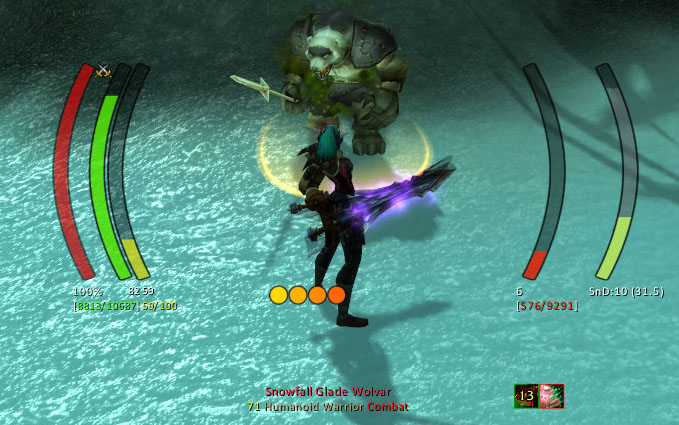
IceHUD is a highly configurable and customizable HUD addon in the spirit of DHUD, MetaHUD, and others designed to keep your focus in the center of the screen where your character is.
What it is
- Player and target health and mana bars, casting and mirror bars, pet health and mana bars, druid mana bar in forms, extensive target info, ToT display, and much more
Short feature list
- Lots of different bar shapes and patterns to make the HUD look like you want
- Class-specific modules such as combo point counters, Slice'n'dice timers, druid mana trackers, Eclipse bar, Holy Power monitoring, Warlock shard tracking, and more
- Target-of-target bars, Crowd Control timers, Range Finders, Threat meters, and plenty of other helpful modules
- Lots of DogTag-supported strings for extreme customizability (with the option to completely disable DogTag support for those that dislike the CPU toll that it takes)
- Cast lag indicator (optional)
- Alpha settings for in combat, target selected, etc.
- Fully customizable bars and counters capable of tracking buff/debuff applications on any unit, spell/ability cooldowns, and the health/mana of any unit you specify. The custom health/mana bars will even work with crazy unit specifications like "focustargettargetfocustarget" if you want!
- Highly configurable (can totally re-arrange all bars, change text display, etc.)
Slash commands
- /icehud - opens the configuration UI to tweak any setting
- /icehudCL - command-line access to tweak IceHUD settings (for use with macros, etc.)
A Note on WoW Midnight
The 12.0 patch, for the Midnight expansion, made significant, sweeping changes to how addons work in the game. As a result, many features previously available are no longer allowed by the game. If IceHUD is no longer doing something it used to do, the most likely reason is that it's not possible (or much more difficult) in the new patch. Feel free to create a GitHub issue for any errors you find; it's expected that there will be some errors for a while due to the extent of changes required.
If you have any custom DogTags using Fractional*:Short, they will no longer work in Midnight - use something like [[HP:Short] '/' [MaxHP:Short]] instead. Many other enemy-HP-or-buff-dependent features, such as Low Threshold flashing or in-combat buff/debuff tracking, are no longer allowed by the game.
See the wiki page for an exhaustive list of Midnight/12.0 changes.
Frequently Asked Questions
-
How do I hide the default Blizzard player, target unit frames and party unit frames? Type /icehud, expand the "Module Settings" section, click "Player Health" or "Target Health," and check "Hide Blizzard Frame" and/or "Hide Blizzard Party Frame". (NOTE: before version 1.3.7, the player/target unitframes were hidden by default. Follow the same steps to enable them if desired)
-
How do I turn off click-targeting and menus on the player bar? Type /icehud, expand the "Module Settings" section, click "Player Health," un-check "Allow click-targeting." Note that as of v1.3, there is now an option to allow click-targeting out of combat, but turn it off while in combat.
-
How do I hide the HUD or change its transparency based on combat, targeting, etc.? Type /icehud, check the "Transparency Settings" section. Nearly any combination of states should be available for tweaking.
-
Even if the rest of the HUD is transparent, the health percentages seem to show up. Why? Type /icehud, expand the "Module Settings" section, expand "Player Health," click "Text Settings," look for options about keeping the lower/upper text blocks alpha locked. If the text is alpha locked, it will not drop below 100%, otherwise it respects its bar's transparency setting. Player Health/Mana, Target Health/Mana, and pet bars should all have these options.
-
Is there any way to see combo points for Rogues and Druids or sunder applications for Warriors? Yes, check the "Combo Points" and "Sunders" modules in the /icehud configuration panel. (Note that these modules may not show up if you're not of the appropriate class to see them. They should be present for their respective classes, however.)
-
What's this thing at the top of the player's cast bar and threat bar? It's darker than the rest of the bar. (and may be colored red) That's the Cast Lag Indicator (or the aggro-pull warning for the Threat bar) that shows you when you can start casting a new spell and still be able to finish the current one (based on your lag to the server). You can disable this in the Player Cast Bar settings under the /icehud configuration screen.
-
Is there a bar that shows breath underwater and if so, how can I adjust it? Yes, this is called the MirrorBarHandler in the module settings portion of the /icehud configuration. It's called that because it mirrors casting bar behavior, displays more than just breathing (fatigue is one example), and that's what Blizzard calls it. It can be moved/adjusted/resized/etc. as with any other module.
-
There's a long green bar that sometimes shows up below everything else. What is it? That would be the TargetOfTarget module. That module is available for people who don't want the full ToT health/mana bars, but do want some sort of ToT representation on the screen. It's configurable through the /icehud module settings.
-
IceHUD needs a bar or counter for buff/debuff X! Good news: as of v1.5, you can create as many bars and counters for any buffs or debuffs you want! Type /icehud, select one of the custom module types in the drop-down at the top of the settings page, and press the Create button. This will create a custom module and automatically select it in the list. It is highly recommend that you rename the bar as soon as possible to avoid any confusion later.
-
How do I turn off the resting/combat/PvP/etc. icons on the player or target? Type /icehud, expand Module Settings, expand PlayerHealth (or TargetHealth for targets), click Icon Settings. You can control every aspect of the icons there including location, visibility, draw order, etc.
-
How do I turn off buffs/debuffs on the player's or target's bar? Type /icehud, expand Module Settings, expand PlayerInfo (or TargetInfo for targets), select Buff Settings or Debuff Settings, and un-check "show buffs" (or "show debuffs").
-
How do I turn off these big huge bars that pulse whenever one of my abilities procs? This isn't IceHUD - it's Blizzard's Spell Alerts they added in 4.0.1. Interface options => Combat => "Spell Alert Opacity" to turn them off or search for a mod to tweak their positioning/size/etc.
-
I don't like where some of the bars are placed. How do I put the health/mana on the left/right? Type /icehud, expand Module Settings, expand whatever module you want to move (e.g. PlayerHealth, PlayerMana), and adjust the "Side" and "Offset" settings. "Side" controls whether it's on the left or the right and "Offset" controls how far from center it is.
-
Which module displays Monk Chi power? Prior to v1.11.2, this module was called HarmonyPower. Harmony was the original name for Chi back when 5.0 was in beta, so I used Blizzard's name for it while I was developing for Cataclysm. IceHUD v1.11.2 changed this module to be called Chi.
-
How do I add commas/periods into big numbers like health? If you have DogTags enabled, you can open the Text Settings for the module in question and add SeparateDigits() around the tag you're trying to split up. To display Health/MaxHealth with commas, use: [(SeparateDigits(HP):HPColor "/" SeparateDigits(MaxHP):HPColor):Bracket]. To use periods instead of commas, use: [(SeparateDigits(HP, "."):HPColor "/" SeparateDigits(MaxHP, "."):HPColor):Bracket]. Use the /dog help menu to build your own similar tags for Mana, etc.
-
The countdown timers on buffs and debuffs completely obscure the icon. How do I disable or adjust the text? IceHUD is not responsible for this countdown text and cannot control it. The 6.0 patch added an option in the game client to display counts on top of cooldowns. Look at the Action Bars menu under the game's Interface options. You can turn the text on or off there. Mods like OmniCC or CooldownCount will generally give you the same feature but allow you to control when, where, and how the text shows up.
-
When I rotate some modules 90 degrees, such as the castbar, the bar appears to wiggle up and down as it fills or empties. How do I fix this? This is a side effect of the animation API that I'm co-opting to force a rotation without having to provide duplicates of every bar texture in the mod. Any bar moving sufficiently quickly and updating rapidly will cause this. IceHUD is intended to be a vertically-oriented mod, so the rotation feature is there for people who are willing to accept the side effects that come with it. My suggestion is to use one of the many horizontally-oriented bar mods out there if you're wanting horizontal bars. Quartz is a good castbar replacement that you can use and disable IceHUD's built-in castbar, for example.
-
How do I get rid of the bars that showed up beneath the player in the 7.0 patch? Blizzard added a "Personal Resource Display" feature in the 7.0 game client. You can disable it in the Game options -> Interface -> Names -> Personal Resource Display.
-
Why is there no target castbar for Classic? The Classic game client doesn't offer a reliable way to show castbars for anyone except the player. You can install the LibClassicCasterino addon to enable support, but it's a best guess and not at all accurate.
-
Why do buff/debuff timers not work in Classic? The Classic game client doesn't provide this information to addons because it wasn't a feature when the game first released. You can install the LibClassicDurations addon to enable support, but it's a best guess and not at all accurate.
See here for a user-created guide to creating new IceHUD textures.
Comments


-

Parnic Owner
-
View User Profile
-
Send Message
Posted Oct 17, 2026In Wow Forever after the mopst recent patch, the player icons (PvP, Rested, Party Leader) do not appear unless you are targeting a plater or npc or you have Alpha always set to 100%
-
View User Profile
-
Send Message
Posted Oct 17, 2026@Crusader_Nejaa thanks for the report. I'd like to hold off on chasing Blizzard's changes through the beta and wait for the real release. They keep breaking things and then changing them.
-
View User Profile
-
Send Message
Posted Oct 17, 2026@Parnic Totally fair, nothing really important as broken right now anyway. Also, I just came back to playing wow and I was so excited to see IceHud was still up and running. I started using it in the original TBC release and I absolutely loved it. So thanks for everything, I'm excited to be using you mod again
-
View User Profile
-
Send Message
Posted Oct 19, 2026@Crusader_Nejaa I just tried this in Forever and everything seems to be working as expected for both the PvP icon and the Combat icon. The icons follow the bar's transparency settings, so if the bar is hidden, the icons are too. That's why there's a separate "lock icons to 100%" setting on the Icon config panel under PlayerHealth.
If you're seeing something different, let me know, but right now it looks to be working as intended, at least on Forever client build 1.60.1.70450 and IceHUD v1.17.27-alpha2.
-
View User Profile
-
Send Message
Posted Oct 19, 2026@Parnic I just double checked and you're absolutly right. Recently I did change the OOC Alpha to 0% but must not have realize the icons were on the same slider, I'm sorry about that
-
View User Profile
-
Send Message
Posted Oct 14, 2026@orange_heart there is an option in the IceHUD cast bar to show or hide the default cast bar. You may need to reload the UI when making some of those types of changes.
Edit: I was responding to a now-deleted question about showing the default cast bar alongside IceHUD's.
-
View User Profile
-
Send Message
Posted Oct 13, 2026Icehud crashes whenever I go into a dungeon in Forever. The while pve it runs great.
-
View User Profile
-
Send Message
Posted Oct 13, 2026@SnagaGhash by"crashes", do you mean it puts an error on screen? What does the error say? What dungeon are you trying?
-
View User Profile
-
Send Message
Posted Oct 19, 2026@Parnic I've gone to Wailing Cavern's twice and I don't remember the other. But each time I got nine crash warning and I had to clear them before I gave up. I read them but I didn't clip them since the game locked up for all the crashes.
-
View User Profile
-
Send Message
Posted Oct 19, 2026@SnagaGhash A screenshot or video would be immensely helpful if you can get one. I am still hoping that Blizzard gives us the ability to create max-level characters on the PTR to make testing stuff like this easier. I really don't want to level someone up enough to be able to enter a dungeon and fight in it. :(
-
View User Profile
-
Send Message
Posted Oct 9, 2026Hi, I would like to check whether slice and dice is capable of being monitored in Forever.
-
View User Profile
-
Send Message
Posted Oct 9, 2026@czei I don't currently have a high-enough Rogue to test it and don't have the time to spend to level one right now, but I expect it should work. Try it and let me know.
-
View User Profile
-
Send Message
Posted Oct 9, 2026@Parnic I've tested it already. It indeed doesn't work. It shows combo points instead. It's pretty weird, I have no idea why this is happening in my case
-
View User Profile
-
Send Message
Posted Oct 9, 2026@czei This really shouldn't be possible; the code is never using the combo points for anything other than computing the maximum duration of the buff and deciding when to show/hide the module. Are you sure you don't have another module, like ComboPointsBar, placed in the same slot/offset as SliceAndDice and you're seeing that instead?
-
View User Profile
-
Send Message
Posted Oct 9, 2026@Parnic yes, i disabled all other addons except icehud, im only using PlayerMana, ComboPoints and SliceAndDice modules in icehud, and this is what happened in my case, SliceAndDice module showed combo points as Bar, same as ComboPointsBar module
-
View User Profile
-
Send Message
Posted Oct 9, 2026@czei Okay, I have no idea why that would be. The duration of SnD is going to be proportional to combo points, but it should still show the SnD duration as a number.
I don't plan on playing Forever, but if Blizzard releases a PTR version for it that allows creation of max-level characters, I can try it on a target dummy or something. Otherwise, pull requests are accepted and appreciated over on github.
-
View User Profile
-
Send Message
Posted Oct 8, 2026Hi, is there still no cure for the gigantic duration text on buffs/debuffs? (Forever)
-
View User Profile
-
Send Message
Posted Oct 8, 2026@slowkerd Check a few comments down from this one. I'll reproduce my response here:
Either the base game or another addon you have installed is adding the text you're seeing - that's not an IceHUD feature. You should configure buff timer text through whatever is providing it (there are some options in the game itself for this) or you can adjust the size of the buffs/debuffs in IceHUD to be large enough to contain the text if you want to keep it.
-
View User Profile
-
Send Message
Posted Oct 8, 2026And I was sure I checked the posts here too. Witch hunt commencing, thanks!
-
View User Profile
-
Send Message
Posted Oct 10, 2026@Parnic I deleted WTF and every addon except IceHUD and I'm still having the problem. To be clear, the icons in question are TargetInfo Buff/Debuff. The full wipe has made the text a little smaller and changed the font but it's still disruptively large and I want it gone altogether. It's hard to see the icons under the duration text.