HeadCount
Overview
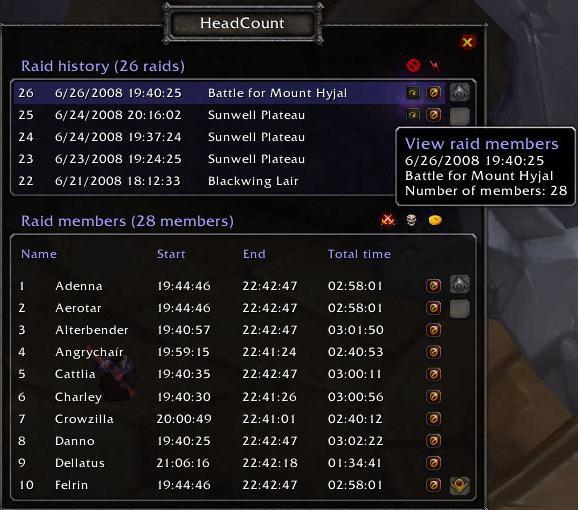
HeadCount is a configurable World of Warcraft add-on that automatically tracks raid attendance, loot, and boss kills.
HeadCount answers the following questions:
- How long is a player active in a raid?
- How long is a player on standby for a raid?
- How long is a player offline during a given raid?
- What loot dropped during a raid and who received it?
- What boss kills occurred during a given raid and who was there for the kill?
Downloads
Curse
http://wow.curse.com/downloads/wow-ad.../head-count.aspx
WoW Interface
http://www.wowinterface.com/downloads/info8867-HeadCount.html...
WoW Ui
http://wowui.worldofwar.net/?p=mod&m=6819
Information
HeadCount forum thread: http://forums.wowace.com/showthread.php?t=12225...
Project page: http://www.wowace.com/projects/head-count/
Wish list
All defects and enhancement requests (wish list) items can be filed and/or reviewed on the HeadCount work ticket page:
http://www.wowace.com/projects/head-c.../tickets/
Features
Raids
- Raid creation: Automatically creates a new raid as you join or start a raid.
- Raid finalization: Automatically ends an existing raid as you leave a raid.
- Raid management: The user can end raids, remove raids, or remove all raids on demand.
- Raid zone tracking: Zone name are automatically added to raids as you zone into a raid instance for the first time.
Player attendance
- Player tracking: Players are tracked based on their timed participation in the raid. Players can be tracked based on configurable raid groups for raid list activity (active raiding players) and wait list players (queue/standby players).
- Player removal: The user can remove tracked information for specific players on demand.
- Player history: View specific player history for a raid to see how and when a player moved from activity to standby to offline and back during a raid.
- No list tracking: Players can be tracked as non-raid list and non-standby players as needed. Players that go offline are automatically taken out of the raid and wait list groups for tracking purposes.
- Integrated wait list: Receive whispers from members outside of the raid group in order to track them.
Boss kills
- Boss kill tracking: Tracks the world bosses killed during the course of a raid and the raid list members present for the kill.
- Boss kill removal: The user can remove tracked boss kills on demand.
- Manual boss kill: The user can add a boss kill to the current raid at the current time with the current roster via /hc boss add [bossname]
Loot
- Loot tracking: Tracks loot received during a raid based on configurable item level quality (default: Epic item level or higher)
- Loot removal: The user can remove specific pieces of loot on demand.
- Loot exclusion: The user can manage loot exclusion which will prevent certain pieces of loot from being tracked during a raid. (e.g. - Emblem of Valor)
Export
- Export: Users can export current raid attendance and received loot information to one of a number of formats (CSV, XML, Text, EQdkp XML string, phpBB forum post, phpBB with ItemStats forum post).
Reporting
- Boss kill broadcast: The user can optionally broadcast when the raid kills a boss to a configurable chat channel.
- Loot broadcast: The user can optionally broadcast when a player receives a valid piece of loot to a configurable chat channel.
Performance
- Fault tolerance: If the mod owner quits WoW, restarts WoW, or reloads their UI during a raid and returns to the game, HeadCount will attempt to gracefully recover from the outage to continue tracking the active raid.
- Attendance delay: Configure how often HeadCount should manage attendance updates to increase or decrease performance and/or accuracy.
Comments


-

_ForgeUser724295 Owner
-

JerryBlade Author
-

moonfann Author
-
View User Profile
-
Send Message
Posted Dec 25, 2010-
View User Profile
-
Send Message
Posted Nov 8, 2010There is a Headcount2 in development now. The Alpha version can be found at: http://www.wowace.com/addons/head-count-2/
-
View User Profile
-
Send Message
Posted Nov 8, 2010-
View User Profile
-
Send Message
Posted Oct 31, 2010You need to register with wowace.com to DL. This fix works for me.
-
View User Profile
-
Send Message
Posted Oct 30, 2010http://www.2shared.com/file/Zrb-TLFB/HeadCountFrames.html doesn't allow me to download the file.
-
View User Profile
-
Send Message
Posted Oct 31, 2010Though http://www.2shared.com/file/Zrb-TLFB/HeadCountFrames.html works just fine, you need to choose "Save file to your PC: click here" (took me like 1 minute to find though, dunno why they make it that small.
Hugsies
-
View User Profile
-
Send Message
Posted Oct 27, 2010Message: [string "HeadCountFrame:OnLoad"]:1: attempt to index global 'this' (a nil value)
Time: Wed Oct 27 07:22:43 2010
Count: 1
Stack: [C]: ?
[string "*:OnLoad"]:1: in function <[string "*:OnLoad"]:1>
Locals:
Message: Interface\AddOns\HeadCount\HeadCountFrames.lua:283: attempt to concatenate a nil value
Time: Wed Oct 27 07:22:43 2010
Count: 10
Stack: [C]: ?
Interface\AddOns\HeadCount\HeadCountFrames.lua:283: in function `HeadCountFrameContentMembersTemplate_Load'
[string "*:OnLoad"]:1: in function <[string "*:OnLoad"]:1>
Locals:
Message: Interface\AddOns\HeadCount\HeadCountFrames.lua:289: attempt to concatenate a nil value
Time: Wed Oct 27 07:22:43 2010
Count: 10
Stack: [C]: ?
Interface\AddOns\HeadCount\HeadCountFrames.lua:289: in function `HeadCountFrameContentBossTemplate_Load'
[string "*:OnLoad"]:1: in function <[string "*:OnLoad"]:1>
Locals:
Message: Interface\AddOns\HeadCount\HeadCountFrames.lua:289: attempt to concatenate a nil value
Time: Wed Oct 27 07:22:43 2010
Count: 10
Stack: [C]: ?
Interface\AddOns\HeadCount\HeadCountFrames.lua:289: in function `HeadCountFrameContentBossTemplate_Load'
[string "*:OnLoad"]:1: in function <[string "*:OnLoad"]:1>
Locals:
Message: Interface\AddOns\HeadCount\HeadCountFrames.lua:165: attempt to concatenate a nil value
Time: Wed Oct 27 07:22:43 2010
Count: 1
Stack: [C]: ?
Interface\AddOns\HeadCount\HeadCountFrames.lua:165: in function `HeadCountFrameLootManagementPopup_Load'
[string "*:OnLoad"]:1: in function <[string "*:OnLoad"]:1>
Locals:
Message: Interface\AddOns\HeadCount\HeadCountFrames.lua:187: attempt to concatenate a nil value
Time: Wed Oct 27 07:22:43 2010
Count: 1
Stack: [C]: ?
Interface\AddOns\HeadCount\HeadCountFrames.lua:187: in function `HeadCountFrameLootManagementTemplate_Load'
[string "*:OnLoad"]:1: in function <[string "*:OnLoad"]:1>
Locals:
Message: Interface\AddOns\HeadCount\RaidTracker.lua:394: Unable to determine battleground status because the zone is nil.
Time: Wed Oct 27 07:22:57 2010
Count: 1
Stack: ...\AddOns\HeadCount\libs\AceEvent-2.0\AceEvent-2.0.lua:299: in function `TriggerEvent'
...\AddOns\HeadCount\libs\AceEvent-2.0\AceEvent-2.0.lua:910: in function <...\AddOns\HeadCount\libs\AceEvent-2.0\AceEvent-2.0.lua:903>
Locals: <none>
Message: Interface\AddOns\HeadCount\RaidTracker.lua:340: Unable get raid by id because the id is not a number.
Time: Wed Oct 27 07:22:58 2010
Count: 1
Stack: ...\AddOns\HeadCount\libs\AceEvent-2.0\AceEvent-2.0.lua:299: in function `TriggerEvent'
...\AddOns\HeadCount\libs\AceEvent-2.0\AceEvent-2.0.lua:910: in function <...\AddOns\HeadCount\libs\AceEvent-2.0\AceEvent-2.0.lua:903>
Locals: <none>
-
View User Profile
-
Send Message
Posted Oct 27, 2010-
View User Profile
-
Send Message
Posted Oct 21, 2010/headcount loot add [link] <raid_number> <player_name>
But after several try, the <player_name> can only be English (or other?),
if I type Chinese player name, the command is invalid.
By the way, someone has completed Localized-zhTW. I hope it can add into the addon someday...
-
View User Profile
-
Send Message
Posted Oct 20, 2010-
View User Profile
-
Send Message
Posted Oct 20, 2010Thanks to devilcat and Galvin.
Hugsies
-
View User Profile
-
Send Message
Posted Oct 20, 2010-
View User Profile
-
Send Message
Posted Oct 12, 2010-
View User Profile
-
Send Message
Posted Oct 13, 2010-
View User Profile
-
Send Message
Posted Oct 13, 2010-
View User Profile
-
Send Message
Posted Oct 14, 2010All you have to do is replace 'this' reference to 'self', and change the global reference of self into local (argument) reference in all the _Click() and _Enter() handlers.
-
View User Profile
-
Send Message
Posted Oct 14, 2010-
View User Profile
-
Send Message
Posted Oct 14, 2010I am not planning on getting involved on development of this add-on.
This is just FYI.
-
View User Profile
-
Send Message
Posted Oct 15, 2010-
View User Profile
-
Send Message
Posted Oct 15, 2010Example:
HeadCount:HeadCountFrameRaidHistoryContentTemplateHitArea_Click()
HeadCount:HeadCountFrameRaidHistoryContentTemplateHitArea_Enter()
HeadCount:HideMouseOver(self)
should be:
HeadCount:HeadCountFrameRaidHistoryContentTemplateHitArea_Click(self)
HeadCount:HeadCountFrameRaidHistoryContentTemplateHitArea_Enter(self)
HeadCount:HideMouseOver(self)
Any place you see the word "this" should be changed to "self"
this:GetName()
should be:
self:GetName()