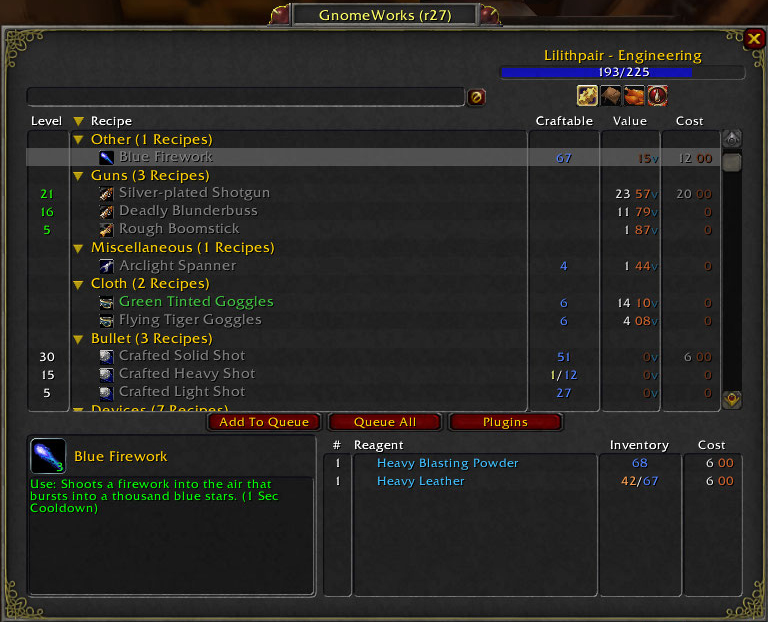
GnomeWorks TradeSkill Frame
GnomeWorks TradeSkill Frame -
a complete replacement for the blizzard trade skill frame.
early alpha just to test some things out.
Comments


-

craigcurse Owner
-

_ForgeUser280725 Author
-
_ForgeUser8814248 Author
-
Forge_User_91081625 Author
-

WildCard_25 Author
-
View User Profile
-
Send Message
Posted Apr 10, 2017how to enable Russian localization?
-
View User Profile
-
Send Message
Posted Feb 9, 2015I very often throws out of the game if I'm trying to create the object by using the Queue.
I'm taking the necessary ingredients from the bank, but when I click "Create" button, the game closes and reports critical error:
"ERROR #132 (0x85100084) Fatal exception!
Program: ...\Wow.exe
ProcessID: 4864
Exception: ACCES_VIOLATION
The instruction at "0x00bf2925" referenced memory at
"0x00000000".
The memory coul not be "read"."
-
View User Profile
-
Send Message
Posted Oct 15, 2014Gnomeworks doesnt understand the new reagent bank. And wont create items with stuff stored there :(
-
View User Profile
-
Send Message
Posted Aug 10, 2014ok, this may be a very newbe question but I just watched a you tube video about Gnomeworks and Lilsparky's Workshop and come here to realize that both addons are done by the same individual . But, my question is do I have to have both addons installed to get the full benifits?
-
View User Profile
-
Send Message
Posted Jun 30, 2014@penaiel
Yeah, that bug has been there for years, I've reported it a few times.
-
View User Profile
-
Send Message
Posted Jan 1, 2014Hi, I have some problem with Gnomeworks (r232) that is leave a ghost mouseover info even when crafting window is closed, I hope my supplied screenshoot can show what I mean.
http://i44.tinypic.com/24d1s3d.jpg
-
View User Profile
-
Send Message
Posted Oct 17, 2013@lilsparky
I've created http://www.wowace.com/addons/lil-sparkys-workshop/tickets/111-for-enchanting-insane-values-for-enchants-are-shown/ with an example of how LSW is broken. ;)
-
View User Profile
-
Send Message
Posted Oct 3, 2013gw is updated for 5.4. i'll see how to get that version pushed over here.
-
View User Profile
-
Send Message
Posted Oct 1, 2013@lilsparky
@lilsparky
There's a twitter feed response to the ProfessionVault author where they acknowledge it is a bug, and it will be fixed in an upcoming release. ;)
For lil sparky's workshop, I noted the issue I'm seeing on its main page. Basically, it is giving me utterly bogus values for enchants vs what auctioneer reports.
-
View User Profile
-
Send Message
Posted Oct 1, 2013@yunohu
yeah, the changes i've made are all mostly non-destructive. pretty easy to undo via commenting/uncommenting.
the thing is, i don't think they've really said this is a bug. my reading of that blue post acknowledged they're aware of the issue and from their standpoint, i think they're likely to address only a couple of issues related to how links are currently working - namely the inability to use links from alts or other toons you haven't seen in the current session. i suspect they won't restore the ability to do any data mining via the trade links (all recipes, level data, heck you can even mine toon names if you had the patience to run thru every guid).
as for lsw, what's broken? it seems to work for me.
-
View User Profile
-
Send Message
Posted Oct 1, 2013@lilsparky -
If you get time, if you could see why lil sparky's workshop broke, that'd be great too. ;)
-
View User Profile
-
Send Message
Posted Oct 1, 2013@lilsparky
Blizzard has acknowledge that what has happened is a bug, and that it will be fixed in an upcoming patch, so I would leave the current tradeskills code around (although commented out of course) so that once they have resolved the bug, you can more easily drop stuff back in place. ;)
-
View User Profile
-
Send Message
Posted Oct 1, 2013it turns out the problem was related to how i got gw to handle the lack if linkable tradeskills. because smelting has never been linkable (nor has runeforging) i've got a special case set up for skills that don't link. basically, i've simply added all trades to this list. the side effect is that i've only expected smelting and runeforging so there's some logic that test for those cases explicitly when interacting with unlinkable trades. this is why smelting worked and why scroll making and milling and such work.
anyway, i think it's working now, but we'll see what other issues crop up. one thing i'm a bit concerned about is the lack of level data and how it gw will handle it. i guess we'll find out!
-
View User Profile
-
Send Message
Posted Sep 30, 2013I've tried on two toons now, definitely the first profession is the one affected. One toon is a blacksmith/miner, the other an enchanter/inscriptionist. I can smelt, and I can create glyphs, but I can't enchant to craft armor/weapons.
-
View User Profile
-
Send Message
Posted Sep 30, 2013@lilsparky
My character have jewelcrafting and enchanting as professions. Scroll Making queue is working fine, GW switching to enchanting and makes the scrolls. However enchanting and jewelcrafting queue is not working, even if I manually switch to it.
-
View User Profile
-
Send Message
Posted Sep 29, 2013hmm... okay, well, i'll try to take a look at that. see if manually switching to the proper tradeskill lets the processing occur. it could be related to how gw switches tradeskills.
-
View User Profile
-
Send Message
Posted Sep 29, 2013Hmm, queue processing seems to be borked in r231 (still not showing up packaged, but I checked it out via svn).
What's happening is that when I click the process button on the queue to make something, nothing happens. Well, almost. If what's next to be made is something I put in the queue directly (or used QueueProfitable to put it in the queue) then nothing happens. If it's something that needs to be made in order to make something in the queue, then the processing happens. The example I have is: Queued Pyrium Weapon Chain, in my bags was Pyrite Ore. The processing button prompted to smelt Pyrite, clicked, smelting done. The button changed to Process Pyrium Weaon Chain, clicked, nothing.
-
View User Profile
-
Send Message
Posted Sep 29, 2013Is GnomeWorks abandoned?
The project site has ben down for quite some time now.
-
View User Profile
-
Send Message
Posted Sep 29, 2013r231 should allow browsing of alt's recipes (if you've looked at them in gw). again, not really tested a ton.
-
View User Profile
-
Send Message
Posted Sep 28, 2013well, presumably r230 will show up once the packager is running again...?