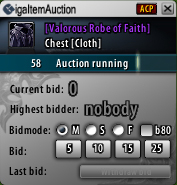
GigaItemAuction
GigaItemAuction what's that?
GigaItemAuction is a DKP-Auctioneer–AddOn for dropped items.
There is minimum work for the lead and on the other hand maximum time management.
Features
AuctionControlPanel (only Admins)
How to start an auction? (only Admins)
Suggestions and Bugs
For suggestions and bugs, post a ticket here: http://www.wowace.com/projects/gigaitemauction/create-ticket/
PS: (Germany) Du kannst dein Ticket auch in Deutsch verfassen. Translations
WowAce/Curse has setup a very good and easy to use translation system, see: http://www.wowace.com/projects/gigaitemauction/localization/
GigaItemAuction is a DKP-Auctioneer–AddOn for dropped items.
There is minimum work for the lead and on the other hand maximum time management.
Features
- Timer and StatusBar
- Color for highest bidder
- Green = highest bidder: self
- Yellow = highest bidder: other, you have the chance to overbid the other bidder
- Red = highest bidder: other, you are overbid by another bidder
- Grey = nobody bid
- GigaItemAuction plays a sound for every action (switch on or off you have the choice)
- "if an auction starts"
- "if an auction ends"
- "if somebody bid on an auction"
- "if somebody retired his/her bid"
- "if an auction was interrupted"
- "if an auction starts after an interruption"
- "if you got an information from the lead (eg. wrong bid)"
- "if the lead change the settings from an running auction (eg. bidtime)"
- 3 bidmodes: M = Main, S = Second, F = Fun(admins can enable/disable this modes)
- Low attendance mode (Below XX% Attend)(admins may change the amount of attendance required and enable/disable this mode)
- 4 bidbuttons (eg. [+5] [+10] [+25] [+50] )(you can change the value for every button.)
- Withdraw bid (eg. sync problems)
- Auction Itemfiltering System(you can adjust the filter for every auction.)
- Extended admin options
- Compatible with FuBar(FuBar attach error: lock the FuBar panel)
- You can see the last 10 offers in FuBar
AuctionControlPanel (only Admins)
- Just guild admins can see this option (standard rank 1,2,3) (eg. 1 = guild master, 2 = officer, 3 = class leader)
- You can reset / restart / pause / cancel the current auction
- You can change in real-time the bid-time
- Bidlogbook: you can see all bidder just to control
How to start an auction? (only Admins)
- Just guild admins can start an auction (standard rank 1,2,3) (eg. 1 = guild master, 2 = officer, 3 = class leader)
- You have to post in the Guild-Chat: [ITEMLINK][MIN DKP]#
- [ITEMLINK] = postet itemlink, or itemid, or itemname
- [MIN DKP] = minimum bid DKP
- eg. [Webbed Death]5#, [Webbed Death]150#, ...
- You have to post in the Raid-Chat: [ITEMLINK][MIN DKP]#
- [ITEMLINK] = postet itemlink, or itemid, or itemname
- [MIN DKP] = minimum bid DKP
- eg. [Webbed Death]5#, [Webbed Death]150#, ...
- If you start an auction in the guild: the whole guild can bid for items.
- If you start an auction in the raid: ONLY the raid can bid for items.
Suggestions and Bugs
For suggestions and bugs, post a ticket here: http://www.wowace.com/projects/gigaitemauction/create-ticket/
PS: (Germany) Du kannst dein Ticket auch in Deutsch verfassen. Translations
WowAce/Curse has setup a very good and easy to use translation system, see: http://www.wowace.com/projects/gigaitemauction/localization/


-

Forge_User_00528235 Owner
Comments