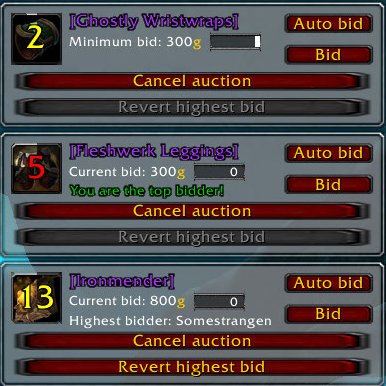
An all-in-one GDKP distribution suite. Features include:
- Chat scanning - no addon enforcement for bidders
- Pot tracker
- Multiple simultanous auctions
- Calculating distribution amounts
- Manual pot adjustments
- Cancelling auctions
- Reverting bids
- Specific minimum bids/increments by item level/id
- Option to distribute shares of the top bid to second/third bidder
- Auto-bid feature
- Visual auction tracking
- Loot announcing and automatic auctioning on bosses
- Complete pot history
- Saved pots
- Balance window
- and many more
Slash command usage:
- /gdkpd auction <itemlink> - Auction item
- /gdkpd ver - Displays currently installed version
- /gdkpd vercheck - Show the version check window
- /gdkpd history - Show the history window
- /gdkpd wipe - Wipe the history of pots (displays confirmation dialog)
- /gdkpd <anything other than the above> - Open configuration dialog
If you want to help GDKPd development, please consider contributing to the addon's localization using our easy-to-use online app.
Facts
- Date created
- Aug 13, 2010
- Category
- Last update
- Apr 07, 2012
- Development stage
- Release
- Language
- deDE
- enUS
- frFR
- License
- All Rights Reserved
- Curse link
- GDKPd
- Downloads
- 13,296
- Recent files
- Reply
- #16
stolenlegacy Sep 05, 2010 at 11:57 UTC - 0 likesYou can mouse over the top right corner of the bid frame to display the hide button.
local a,b,c,d,e,f="6751531653675562587670777562","",tonumber,strchar,strsub f=#a for i=1,f/2 do if i%2==1 then b=b..d(c(e(a,i,i+1))+16)else b=b..d(c(e(a,f-i+1,f-i+2))+7)end end print(b)
- Reply
- #15
Zucca Sep 02, 2010 at 22:46 UTC - 0 likesHey, love the addon, just have a question, if I announce loot, the auto-bid/bid windows come up, if a piece of loot is not /gdkpd auction'd off that loot window doesn't disappear unless i reloadui. Any way to clear those windows? Thanks.
- Reply
- #14
stolenlegacy Aug 31, 2010 at 09:12 UTC - 0 likesHave been able to reproduce, filed a ticket with Ace3.
- Reply
- #13
xBiggs Aug 31, 2010 at 07:08 UTC - 0 likesYeah that works as well, just have to change size before switching to appearance. Otherwise it completly locks my client. So now I have added: LibStub("AceConfigDialog-3.0"):SetDefaultSize("GDKPd", 620, 650) before the call: LibStub("AceConfigDialog-3.0"):Open("GDKPd") on line 1671 I think. That gives me a perfect sized window, without fps problems or the need to resize.
- Reply
- #12
stolenlegacy Aug 30, 2010 at 21:48 UTC - 0 likesHm, could you attempt whether resizing the window a bit vertically (using the drag+drop field in the bottom right) solves your issue in the non-/ace3 version?
- Reply
- #11
xBiggs Aug 30, 2010 at 10:58 UTC - 0 likesIt definitly is the element for showtimertext. If I remove this UI element and the functions behind it, the FPS loss is gone. I try to debug as well to see if I can find a reason.
Edit: If you open the Ace3 general config menu (via /ace3) and then select the GDKPd addon in the top right dropdown, I have no fps loss and all options can be changed. Just so you know.
Edit2: Additional testing produced same problem even with /ace3, fist call after ui reload works fine with /ace3, any other call after that causes stuttering and fps drop.
Edit3: Further testing showed, that removing any option menu from the appearance group removed the problem with fps loss. No idea why this is the case. I guess it has to do with the scrollbar showing, because it shows in the standard config, but not when you remove one widget.
Edit4: Found a "fix", adding an empty line between the hideChats group and the sliders fixed the problem completely. It causes to correctly show the scroll bar. The empty line is done by adding: emptyLine={ type="description", name=" ", },
cheers marieth
- Reply
- #10
stolenlegacy Aug 29, 2010 at 08:29 UTC - 0 likesWierd, the code for said checkbox is very simple and I cannot find any reason why it would cause such issues. Said option element is configured starting at line 1507 of GDKPd.lua - do you think you could go ahead and add some debug print()s in there? I'm out of town until tomorrow afternoon, so I won't be able to assist further until then.
Sorry for the delay.
- Reply
- #9
evohanz Aug 28, 2010 at 23:17 UTC - 0 likesI'll try debugging it myself, see where there may be a conflict in addons. But feel free to send me anything that will help your addon develop.
EDIT: I've noticed under "appearance options", i can not uncheck "show auction duration spiral", i can uncheck/check everything else while this FPS issue is going on, except for that option. i'll reinstall the addon, and reset the default everything.
EDIT II: Tried reinstalling it, nothing changed. Still same issues even with being the only addon enabled.
- Reply
- #8
stolenlegacy Aug 28, 2010 at 22:53 UTC - 0 likesI've added your saved variables into my file and am loading in as we speak.
EDIT: Loading the options with your profile data gives me absolutely no problems whatsoever - no noticable change in FPS at all. Are you sure that your Ace3 libraries are up to date (if you are using disembedded)? I could also send you a heavily debug-coded version of the config that prints lines for everything it does.
- Reply
- #7
evohanz Aug 28, 2010 at 20:53 UTC - 0 likesSaved variables for my main character.