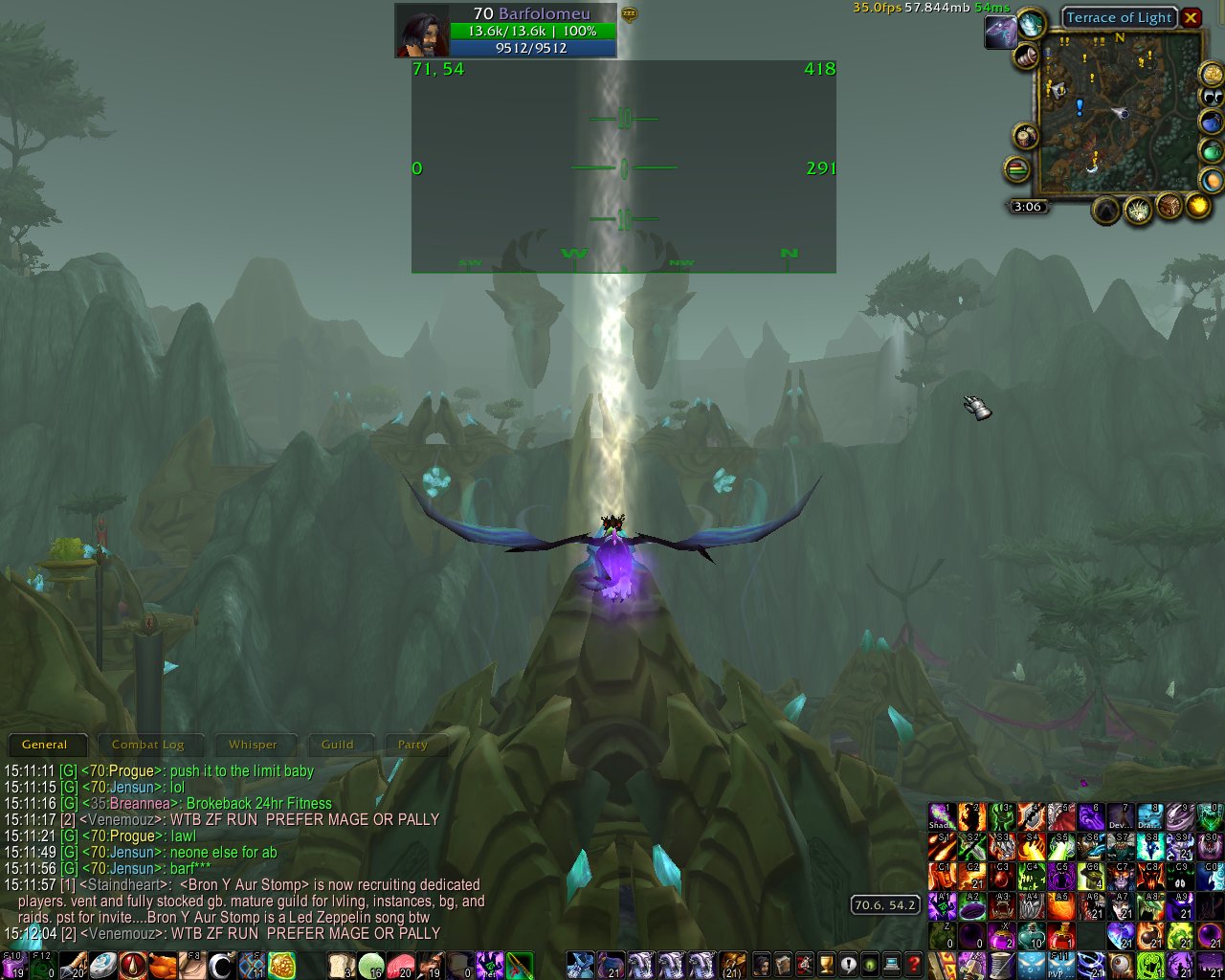
FlightHUD
UPDATE
Since Blizzard removed GetUnitPitch() in 7.1, I no longer plan to maintain this addon. If Blizzards sees fit to put it, or some equivalent, back, then I'll revive it. Until then, this addon is dead.
FlightHUD
Displays a fully configurable fighter jet style Heads Up Display (HUD) while flying, riding, or swimming.
FAQ:
Q: Can altitude/elevation be displayed?
A: No. Blizzard doesn't provide the ability for addons to get z-axis information.
Features:
- Shows your current heading in degrees as text and as a graphic with cardinal points relative to the mimimap.
- Shows the true pitch of your character. This is no longer a hack, as patch 3.0.2 added GetPlayerPitch(), an API call that returns a character's true pitch. Before patch 3.0.2, the camera pitch was used, and the pitch display was not accurate unless you always kept your camera behind your character.
- Shows map coordinates.
- Shows your true speed, horizontal speed, or both, as a percentage, where a normally running character is 100%, or as yards per second, or both.
- Configurable transparency of the text and graphics.
- Configurable transparency of the background.
- Configurable size of the text.
- Configurable size of the pitch graphic.
- Configurable frame size.
- Congigurable colors of all HUD elements.
- Movable frame. Hold control while hovering the mouse over the frame and left click drag to move it. (First unlock the frame in the config with /fh or /flighthud or from the Interface -> Addons -> FlightHUD menu)
- Waypoints. (Configurable Alt/Shift/Ctrl/Combination)-rightclick on the map to add a waypoint. Multiple waypoints are supported. Waypoints appear in the HUD and float as you pan. Each point shows the distance and bearing to the point, plus an ETA if you're moving.
- Waypoints can now be made persistent and configured to show only in the zones they're created in or vice versa.
- Waypoints can be deleted by right clicking on them in the world map or mimi map.
QuestHelper integration: See the default QuestHelper quest as a persistent waypoint.(Seems QuestHelper is no longer a thing)- Blizzard POI (Point of Interest) integration: (modifier)-click a POI on the map to set it, and subsequently unset it, as a waypoint. The modifier can be set in the config.
- Automatic quest tracking waypoints in the HUD.
- Arrival sound: Set a sound to be played upon arrival at a waypoint.
- Keybind to toggle level flight. (Simply toggles pitchlimit from 0 to 88 and back. Still have to pitch up or down for pitch to be 0 once pitchlimit is 0)
TODO:
- Add an odometer.
- Editable, movable waypoints.
- Add an interface to manage waypoints. (Can't delete a POI waypoint when it no longer appears on the map)
- HUD frame skins to make it look like a real fighter HUD.
- Configurable locations of text and graphics within the parent frame. Perhaps at some point make them detachable.
- Fix the waypoint adding text on the map. Seems this stopped working at some point.
Known bugs:
- There's a bug in Astrolabe that causes an error when entering a garrison mine. While this bug shows as coming from FlightHUD, many other addons that use Astrolabe have open bugs showing the exact same trace.
- There's been a pervasive bug that would completely hang the client. I've known about this bug for about 2 years now, but I've never been able to consistently reproduce it, and therefore, debugging has always been non-trivial. If you experience the game client completely hanging after zoning (a portal, a zone instance, teleporting directly to a dungeon, a summon), please report a bug. To get around the bug, disable the "Quest POI Integration" in "Waypoint Options" in the FlightHUD config. This option is now disabled by default.
Reporting bugs:
- Please post bug reports here. While I monitor the comments on curse.com, it makes my life easier if bugs are reported in the wowace bug tracker.
Video:
Comments

-

Barfolomeu Owner
-

_ForgeUser3657781 Translator
-

chkmyid Translator
-
View User Profile
-
Send Message
Posted Nov 10, 2023With 10.2s new camera follow pitch stuff, I was curious if it might be possible now? I'm unsure if they are exposing the right hook though...
-
View User Profile
-
Send Message
Posted Feb 26, 2023This would be nice to have for Dragonflight.
If you can't calculate the pitch with that removed function (thanks blizzard), then can you calculate the forward speed and rate of descent to get close?
-
View User Profile
-
Send Message
Posted Jul 16, 2023In reply to fleonard: Yeah I sent a message through here to the developer back in early June but haven't gotten a response yet.
-
View User Profile
-
Send Message
Posted Jul 17, 2023In reply to fleonard:
No
-
View User Profile
-
Send Message
Posted Mar 4, 2018-
View User Profile
-
Send Message
Posted Mar 5, 2018In reply to outsider0649:
-
View User Profile
-
Send Message
Posted Mar 6, 2018In reply to Barfolomeu:
-
View User Profile
-
Send Message
Posted Mar 6, 2018In reply to outsider0649:
-
View User Profile
-
Send Message
Posted Mar 10, 2018In reply to Barfolomeu:
-
View User Profile
-
Send Message
Posted Mar 10, 2018In reply to Barfolomeu:
In reply to Barfolomeu:
-
View User Profile
-
Send Message
Posted Mar 11, 2018In reply to outsider0649:
-
View User Profile
-
Send Message
Posted Mar 12, 2018In reply to outsider0649:
In reply to Barfolomeu:
-
View User Profile
-
Send Message
Posted Mar 12, 2018In reply to outsider0649:
-
View User Profile
-
Send Message
Posted Mar 13, 2018In reply to Barfolomeu:
-
View User Profile
-
Send Message
Posted Mar 14, 2018In reply to outsider0649:
-
View User Profile
-
Send Message
Posted Mar 14, 2018In reply to Barfolomeu:
-
View User Profile
-
Send Message
Posted Feb 11, 2025In reply to outsider0649:
Sorry for the very very late reply. I just started playing WoW again (cata classic, no less, where I wrote most of FlightHUD), and my interest in reviving the addon has been piqued.
Anyhow, show me the API calls that get the values of all these variables and I will revive the addon. Showing me math doesn't help if the values of the variables cannot be obtained.
-
View User Profile
-
Send Message
Posted Mar 14, 2018In reply to outsider0649:
-
View User Profile
-
Send Message
Posted Jun 23, 2017Pitch won't work... So not very usefull
-
View User Profile
-
Send Message
Posted Oct 26, 2016With the removal of GetUnitPitch() in 7.1, effectively killing the pitch element of the addon, I don't feel that it's worth maintaining any more. Sorry, but the addon dies here.