FlagRSP2
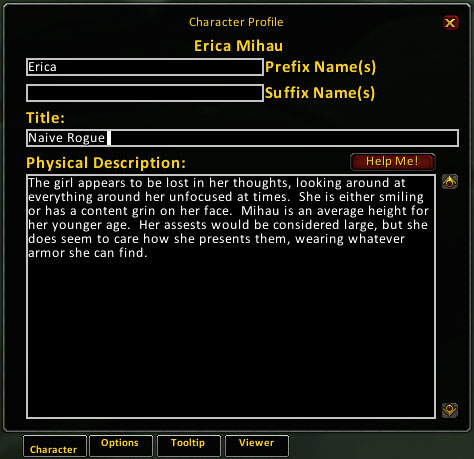
FlagRSP2 is an AddOn for World of Warcraft that allows players to add additional information about their characters into the game. It is designed to support role players and allow others with MSP compatible AddOns to easily see if the character is a role player or is even in character. Characters can be fleshed out with additional names, titles, and detailed descriptions.
FlagRSP2 is a continuation of flagRSP 0.5.6 by Flokru. FlagRSP2 is a completely new code base designed to be more efficient and play well with other AddOns. As of 2.5, FlagRSP2 uses the new Mary Sue Protocol to communicate, and no longer uses chat channels.
If your FlagRSP2 copy is OLDER than 1.5.x you should delete the FlagRSP2 directory first!(The Curse Client will do this for you if you use that.) Copy the "flagRSP2" folder into your World of Warcraft AddOns folder. Before selecting your character and entering the game other MSP RP AddOns such as MyRolePlay must be disabled to prevent conflicts.
If you really like this AddOn and would like to help support it, there are a couple of things you can do. You can help by providing clear bug reports that try to accurately describe the problem and screenshots are helpful. Submit your trouble ticket here.
FlagRSP2 is a continuation of flagRSP 0.5.6 by Flokru. FlagRSP2 is a completely new code base designed to be more efficient and play well with other AddOns. As of 2.5, FlagRSP2 uses the new Mary Sue Protocol to communicate, and no longer uses chat channels.
If your FlagRSP2 copy is OLDER than 1.5.x you should delete the FlagRSP2 directory first!(The Curse Client will do this for you if you use that.) Copy the "flagRSP2" folder into your World of Warcraft AddOns folder. Before selecting your character and entering the game other MSP RP AddOns such as MyRolePlay must be disabled to prevent conflicts.
If you really like this AddOn and would like to help support it, there are a couple of things you can do. You can help by providing clear bug reports that try to accurately describe the problem and screenshots are helpful. Submit your trouble ticket here.
Comments

-

Azxiana Owner
-

_ForgeUser1001224 Translator
-
_ForgeUser22044 Translator
-

Myoukochou Author
-
View User Profile
-
Send Message
Posted Oct 16, 2014Would love to see an update for Warlords! Thanks for doing your best to keep up with this mod. It's my most favorite! :)
-
View User Profile
-
Send Message
Posted Jun 30, 2014I don't want to be impatient, but, any update on development or a bug fix? I'm still not seeing any descriptions, and both other main RP addons require you to click buttons and stuff to see people's description. FlagRSP is simple and easy.
-
View User Profile
-
Send Message
Posted Jun 3, 2014Since the last update, I haven't been able to see anyone else's RP details. Not any custom names, descriptions, nothing. They, apparently, can see mine. But I can't see noodly-nothing. I've used FlagRSP for years. Like... I'm talking 5+ years or something, and I've always loved the no-nonsense, no extraneous bullcrap approach. It's breaking my heart that it's now bugged. Is there -any- chance of an update to fix this? I seriously love this addon, and I would really like to have it back to full capacity.
-
View User Profile
-
Send Message
Posted Jul 30, 2014Agreed! Waiting hopefully for an update! :)
-
View User Profile
-
Send Message
Posted May 21, 2014Thank you sooooo much for updating this and keeping up with it! This really is my fav RP addon! ^.^
-
View User Profile
-
Send Message
Posted May 6, 2014Since the update, no one is showing up for me as having any RP flags at all, and I know there are other FlagRSP2 users on my server, as they'd been there before I updated.
My boyfriend and I both have FlagRSP2, just freshly deleted and reinstalled (each thinking it was a bad install), and we cannot see each other's profiles. In party, out of party, it doesn't matter. We do not show up to each other as having any RP-flag addons whatsoever.
Is this an issue with the xml file you'd mentioned you'd forgotten to link and we should just sit tight for an update, or is this something else?
-
View User Profile
-
Send Message
Posted May 3, 2014Just released a few minor bug fixes as version 2.5.5. The ptBR translation is included in this, but I forgot to link it in the embeds.xml file. That will be included on that next pass.
-
View User Profile
-
Send Message
Posted Apr 29, 2014Love to see this updated, because it's still my most favorite RP addon. The tooltip is what does it for me. The colors and layout are still the best. Perhaps integrate it into flagRSP MoP? Pretty please?
-
View User Profile
-
Send Message
Posted Apr 29, 2014I have considered separating the tooltip out as a different extension, but there are plenty of extensions out there that do this already with more features. TipTac looks like a decent replacement.
-
View User Profile
-
Send Message
Posted May 3, 2014Check the updated date. :)
-
View User Profile
-
Send Message
Posted May 20, 2014Helps if I'd read! YAY! <3 I actually use TipTac on top of FlagRSP2. While TipTac is awesome, it just doesn't look as shiny as the tooltip for this does. So with the combination of both, life is good!
-
View User Profile
-
Send Message
Posted Sep 7, 2013The AddOn uses not-so-up-to-date libs. If you want to get rid of Couldn't find inherited node Lua-Error, go to AddOn's folder, open embeds.xml and then copy this:
<Button name="UIPanelButtonTemplate2" inherits="UIPanelButtonTemplate" virtual="true"></Button>
and place it between <Script file="localization\znTW.lua"/> and </Ui>
-
View User Profile
-
Send Message
Posted Jun 8, 2013If this isn't being maintained anymore, could someone maybe take it over? Some of us prefer the simplicity of the ui and lack of options for metagamable information that this addon has over the competition.
-
View User Profile
-
Send Message
Posted Jun 8, 2013Etarna took it over, but gave it up soon afterwards.
-
View User Profile
-
Send Message
Posted Jan 26, 2013Really would like this updated.... I do not like the original flagrsp's set up and i really.... miss this one.
-
View User Profile
-
Send Message
Posted Dec 3, 2012I've had the same problem as BlackKnight35 for the past few months now, mine stopped working when MoP was released. This is the error message I get:
Message: ...AceGUI-3.0\widgets\AceGUIWidget-MultiLineEditBox.lua:265: CreateFrame(): Couldn't find inherited node "UIPanelButtonTemplate2"
Time: 12/03/12 18:13:42
Count: 1
Stack: [C]: ?
...AceGUI-3.0\widgets\AceGUIWidget-MultiLineEditBox.lua:265: in function `?'
...rface\AddOns\flagRSP2\libs\AceGUI-3.0\AceGUI-3.0.lua:136: in function <...rface\AddOns\flagRSP2\libs\AceGUI-3.0\AceGUI-3.0.lua:125>
...rface\AddOns\flagRSP2\libs\AceGUI-3.0\AceGUI-3.0.lua:174: in function `Create'
...nfig-3.0\AceConfigDialog-3.0\AceConfigDialog-3.0.lua:1123: in function <...nfig-3.0\AceConfigDialog-3.0\AceConfigDialog-3.0.lua:1054>
...nfig-3.0\AceConfigDialog-3.0\AceConfigDialog-3.0.lua:1081: in function <...nfig-3.0\AceConfigDialog-3.0\AceConfigDialog-3.0.lua:1054>
...nfig-3.0\AceConfigDialog-3.0\AceConfigDialog-3.0.lua:1581: in function `FeedGroup'
...nfig-3.0\AceConfigDialog-3.0\AceConfigDialog-3.0.lua:1853: in function `Open'
...nfig-3.0\AceConfigDialog-3.0\AceConfigDialog-3.0.lua:1881: in function <...nfig-3.0\AceConfigDialog-3.0\AceConfigDialog-3.0.lua:1879>
(tail call): ?
[C]: ?
[string "safecall Dispatcher[2]"]:9: in function <[string "safecall Dispatcher[2]"]:5>
(tail call): ?
...rface\AddOns\flagRSP2\libs\AceGUI-3.0\AceGUI-3.0.lua:314: in function `Fire'
...GUI-3.0\widgets\AceGUIContainer-BlizOptionsGroup.lua:20: in function <...GUI-3.0\widgets\AceGUIContainer-BlizOptionsGroup.lua:19>
[C]: in function `Show'
Interface\FrameXML\InterfaceOptionsFrame.lua:204: in function `InterfaceOptionsFrame_Show'
Interface\FrameXML\InterfaceOptionsFrame.lua:482: in function `InterfaceOptionsFrame_OpenToCategory'
Interface\AddOns\flagRSP2\flagRSP2.lua:120: in function `OnClick'
...AddOns\flagRSP2\libs\LibDBIcon-1.0\LibDBIcon-1.0.lua:127: in function <...AddOns\flagRSP2\libs\LibDBIcon-1.0\LibDBIcon-1.0.lua:127>
Locals: <none>
And I do hope there'll be an update soon, this is the very best RP addon there is!
-
View User Profile
-
Send Message
Posted Oct 10, 2012Has this stopped working for anyone else since the recent 5.05? Mine fails to load, even when I choose to load out of date add ons.
-
View User Profile
-
Send Message
Posted Feb 14, 2012I am expeariencing exactly the same issues as AmethystNightfall, but since several versions now.
It started some patches ago that the info box scaled toa very small box where reading is a pain. Resizing the box helps but as soon as you target another player the box gets sized back to this very small window.
I use a recently fresh installation of WoW, no other addons and the latest version, still having these issues.
Sadly this leaves the addon completly useless because its main benefits are destroyed by this bug.
Also very randomly and without any notification the Addon loses all my flags i put on my characters, from one day to another they´re all gone for no reason.
It happens not often but every few month till half a year is a good guess.
-
View User Profile
-
Send Message
Posted Feb 11, 2012I've been using FlagRSP for years. Recently wandered back into the game after several months and love some of the new changes - but I have one major issue, not sure if this is a bug or as designed. I'm using 2.5.3.
Why does clicking "Okay" at the bottom of the interface not save the updates you've made to your profile, name, or title? It took me a while to realize where my profiles were "disappearing" to, and this was it. I see now the "Accept" button underneath the profile section, or the "Okay" button that appears next to my name or title, which makes me think this is by design.
We have been conditioned within WoW and other interfaces that the Okay button at the bottom right of a window is a confirmation, that our changes will be saved. However in using this add-on I now have to be extra vigilant. The little buttons to commit the separate changes are extremely easy to miss, and there's no warning I have unsaved changes, like another interface might do.
Any hope of changing this?
-
View User Profile
-
Send Message
Posted Nov 16, 2011flagRSP2 2.5.2 fixes a bug which permitted people to put colours (and, importantly, possibly dangerous or misleading pipe control characters) in their name via nefarious means. (The same bug was also fixed in MRP 4.2.0.92 a couple of hours ago.)