EveryQuest
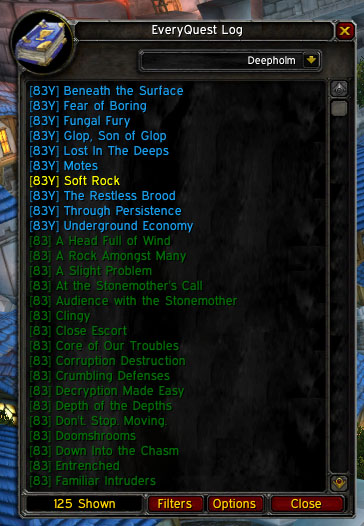
EveryQuest is a Quest History tracker and quest list window. Integrates with Lightheaded to show any comments for any quest in the game. Create chat links by shift-clicking the quest name.
What's New
- Go to Current Zone Button (r184) - Click the Book!
- Custom coloring (r184)
- Show if you've done that daily today using colors (above)
- Race Filter (r177)
- Class Filter (r177)
- Cataclysm Data (r174)
In the Works
- Updated EveryQuest:Quest Giver data
- Quest Series information
- Reputation lists and filters
Error Reports
Please direct all support requests to Wowace.
Before submitting error reports, reproduce the error with debugging on (in the main options window), if it's an import that you are doing, it will spam your default chat frame. I only need the last dozen or so lines of output.
Also, please be specific as to the version number of EveryQuest, WoW version, Locale (enUS, enGB, esES, etc.)
Lastly if it is a lua error (not something printed to your chat frame), provide a complete stack trace from an addon like Bug Grabber
Refrain from posting error reports to the comments section. Use a ticket instead
Localization
Wowace localization is now setup for all you world travelers! Visit the localization page to translate.
Opening the Window
To display the main quest list you have multiple options:
- If you are using the default questlog window, there will be a small button near the book icon with the letters "EQ" to toggle the window.
- If you are using a LibDataBroker display addon, such as Fortress, EveryQuest has its own launcher. Click the launcher to open the window. Right-click to open the options
- Bind the window the a key using the key bindings interface from the main menu.
- Type /everyquest
What does it do?
Quest History
As you complete quests in game, EveryQuest will keep track of which ones you have done. It also tracks which quests you've failed or abandoned so that you can easily get them again. Once you complete a quest, the date and time is saved to see when you did it. Additionally if the quest is a daily quest, it keeps a running total of how many times you've done the quest along with the most recent completion date.
Also you can query the server for quests you've completed prior to your first use of EveryQuest. Access this option from the options screen.
Quest List
EveryQuest comes with a database of quests available in game. These are browse able by quest category using the drop down menu at the top of the window. Quests in the list will change colors depending on there status (unknown, failed/abandoned, in progress, completed, turned in).
If you have LightHeaded loaded, clicking a quest will open the Lightheaded window the the quest you clicked on.
To create a quest link for insertion into the chat edit box, have the chat edit box open then shift-click the quest in the main window.
Filters
To filter the list of quests, click the Filters button on the main window or navigate to the filters window until the Blizzard Interface options. Changing these filters will update the window immediately.
Sorting
There is a default sorting of the quest list. This can be changed using the weights and order options in the options window (Click Filters or Options in the main EveryQuest window to open the options window).
Manually Changing a Quests status
To manually change a quests status, right click it in the main window and select the new status from the menu. Having a quest on ignore is different then it's status. When a quest is on ignore the status will still update when you start doing it or complete it.
EveryQuest: Quest Givers
I finished up a quest giver module that mimics the functionality of Handynotes: Quest Givers but integrates EveryQuest quest history and filtering.
Comments

-

_ForgeUser1093118 Owner
-
View User Profile
-
Send Message
Posted Dec 7, 2020Quest Completist is a good alternative.
-
View User Profile
-
Send Message
Posted Dec 11, 2013Message: EveryQuest-r217-release\Core.lua:1586: bad argument #3 to "format" (string expected, got nil)
Time: 12/11/13 04:37:02
Count: 2
Stack: Interface\AddOns\EveryQuest\Core.lua:1586: in function `LoadModule'
Interface\AddOns\EveryQuest\Core.lua:1570: in function `GetQuestList'
Interface\AddOns\EveryQuest\Core.lua:1057: in function `GetQuestData'
Interface\AddOns\EveryQuest\Core.lua:734: in function `AddQuest'
Interface\AddOns\EveryQuest\events.lua:82: in function `?'
...ist\libs\CallbackHandler-1.0\CallbackHandler-1.0.lua:147: in function <...ist\libs\CallbackHandler-1.0\CallbackHandler-1.0.lua:147>
[string "safecall Dispatcher[7]"]:4: in function <[string "safecall Dispatcher[7]"]:4>
[C]: ?
[string "safecall Dispatcher[7]"]:13: in function `?'
...ist\libs\CallbackHandler-1.0\CallbackHandler-1.0.lua:92: in function `Fire'
...Quest\libs\LibQuestEvents-1.0\LibQuestEvents-1.0.lua:234: in function `QUEST_LOG_UPDATE'
...Quest\libs\LibQuestEvents-1.0\LibQuestEvents-1.0.lua:101: in function <...Quest\libs\LibQuestEvents-1.0\LibQuestEvents-1.0.lua:94>
Locals: <none>
-
View User Profile
-
Send Message
Posted Jan 4, 2014how would that work?
Would we have to personally change the files from the zip you make?
-
View User Profile
-
Send Message
Posted Jan 5, 2014I would not worry about it too much. Backu68 posted this almost 10 months ago, and I would guess it is not going to happen. If you are interested in more up-to-date quest information you might want to use the addons Wholly and Grail. They basically do what EveryQuest used to do, and can do a lot more.
-
View User Profile
-
Send Message
Posted Mar 7, 2013I am an avid fan of this addon, and saddened to see the original author appears to have abandoned it. Presently, I am working on the database of Pandaria quests. Once it's completed, I will put the changed files into a zip, and make it publically available.
-
View User Profile
-
Send Message
Posted Jan 6, 2013when will this be updated for mop
-
View User Profile
-
Send Message
Posted Jan 6, 2013Based on the fact that is has not been updated for almost two years now, I would think probably never. You might want to try the addons Wholly and Grail. Together they provide functionality like this.
-
View User Profile
-
Send Message
Posted Feb 22, 2013You should also try a addon called "Quest Completist" it works great for me and you can also do a Server Query so it find all that quests you've all ready done.
-
View User Profile
-
Send Message
Posted Dec 9, 2012i cant see server query button :(
-
View User Profile
-
Send Message
Posted Nov 2, 2012The hot fix does work to a degree but it does not add the new areas in Pandria.
-
View User Profile
-
Send Message
Posted Oct 23, 2012Currently running the latest version downloaded through the Curse Client on WoW 5.0.5. The add-on screen says EveryQuest is out of date. My biggest problem is that it won't allow me to query the server, the button is just not there - the option screen says;
Step 1; Click to query the server
And that's it, now button, just the rest of the Options box is blank! I've updated the query.lua file posted below, however that's made no difference. See attached pic... here
-
View User Profile
-
Send Message
Posted Sep 21, 2012I have made a hotfix for 5.0.4. Its just a small corretion inside some functions.
You can grab the fixed file here: http://www.wowace.com/addons/everyquest/tickets/150-5-0-4-hotfix/
Greetings Steve
-
View User Profile
-
Send Message
Posted Sep 14, 2012This addon stopped working for me in 5.0.4
-
View User Profile
-
Send Message
Posted Sep 15, 2012You might want to use the addons Wholly and Grail instead.
-
View User Profile
-
Send Message
Posted Aug 30, 2012I tried to put in a glyph and got the following message:
Message: [ADDON_ACTION_FORBIDDEN] AddOn "EveryQuest" tried to call the protected function "CastGlyph()". Time: 08/30/12 03:52:38 Count: 1 Stack: [C]: in function `CastGlyph' ...terface\AddOns\Blizzard_GlyphUI\Blizzard_GlyphUI.lua:527: in function `GlyphFrameSpell_OnClick' [string "*:OnClick"]:1: in function <[string "*:OnClick"]:1>
Locals: <none>
-
View User Profile
-
Send Message
Posted Aug 21, 2012MY EQ Window not show the quest list
-
View User Profile
-
Send Message
Posted Aug 16, 2012Installed it because I've started on my Loremaster achiev.
Installed, purged old data and something went wrong(?).
Had 2799/3000 quests completed for the "The Seeker" Achiev/title. And after purge/install I've got 2331/3000 quests done. Why is that? -.-
*** EDIT ***
Seems like it was just a tracking bug. Turned in a quest and got back to 2800 quests done :)
-
View User Profile
-
Send Message
Posted Aug 17, 2012Blizzard has some issues with quest count tracking. Usually completing another quest will get the count back in order. This happens whether there are addons present.
-
View User Profile
-
Send Message
Posted Aug 5, 2012Learned to read the post before I download an addon that was recommended to me by a quild member. EveryQuest is outdated and not working in WoW as of today (8-5-12).
-
View User Profile
-
Send Message
Posted Jul 3, 2012However, you may have a hard time getting it to work in MoP. You can download prerelease versions of Wholly and Grail that work in MoP from http://ns1.mithrandir.com/WorldOfWarcraft/WhollyGrailPrerelease.shtml until they are next released officially.