Data Broker Volume Control
The main goal of this addon is to provide a Data Broker icon/text to set the game volume, but you can use it in many other ways.
Usage
- With a Data Broker display
- With the icon on the minimap
- With the command line
Icon
- Left-Click: Mute sound
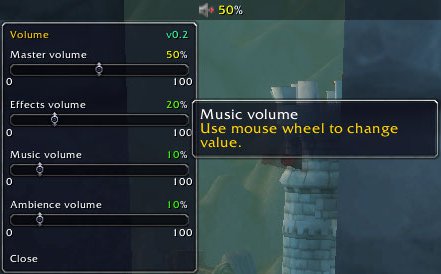
- Right-Click: Display the sliders menu
- Shift+Right-Click: Display the options menu
Options menu
- Blizlike mute
- Show/Hide the minimap icon
- Queued volume boost
- No tooltip mode
- Close the menu
What is blizlike mute? Default mute behavior do not switch off music, with this disabled it will.
When using a DataBroker display, using the mouse wheel on the icon change the master volume value.
Queued volume boost will set master volume to 100%, unmute and enable background sounds when a random dungeon/raid/scenario group is ready, and return all options to previous state when entering the dungeon/raid/scenario.
No tooltip mode will display the sliders menu when hovering the icon, and the options menu will display on right click.
Command line
Commands: "/bv", "/brokervolume" (They do the same thing)
- /bv: Display commands help.
- /bv show: Show the minimap icon
- /bv <master|effects|music|ambience> <0-100>, will set the volume for the given category.
Notes
If you find an error or have a suggestion please use the tickets page on WowAce, you can also help with localization.
Comments


-

Forge_User_34400336 Owner
-

dartraiden Translator
-

Elnarfim Translator
-
Forge_User_63899711 Translator
-
yunrong81 Translator
-
View User Profile
-
Send Message
Posted Oct 29, 2022I added
A.icon:IconCallback(nil, "BrokerVolumeIcon", "icon", A.ldb.icon)
on line 1000, pushing the 'end' on that line to 1001. This fixes the minimap button icon to actually change texture when muted/unmuted etc.
-
View User Profile
-
Send Message
Posted Oct 26, 2022Fixes for Dragonflight pre-patch
1) Fix dropdown menu:
Find line 358 in VolumeSliders.lua:
replace ADD by "ADD" (with quotes)
2) Fix the minimap button icon to actually change texture when muted/unmuted:
See comment above
Download: https://github.com/dartraiden/broker-volume/releases
-
View User Profile
-
Send Message
Posted Dec 9, 2022In reply to dartraiden:
Thanks! One remaining issue:
When I connect or disconnect my USB DAC I get this error:
1x Broker_Volume/Core.lua:750: attempt to perform arithmetic on local 'volume' (a nil value)
[string "@Broker_Volume/Core.lua"]:750: in function `GetVolumePercent'
[string "@Broker_Volume/Core.lua"]:986: in function `UpdateBroker'
[string "@Broker_Volume/Cor
-
View User Profile
-
Send Message
Posted Oct 19, 2020I've update the code with the changes mentioned by Dakhran. A pull request is pending approval from the author, so he can release an updated version of this.
Meanwhile, you can download a working version here: https://github.com/KayopsGaming/broker-volume-releases/raw/main/Broker_Volume-1.9.0.zip
-
View User Profile
-
Send Message
Posted Oct 17, 2020I've made the changes listed in the comments below. Here's a link for the download: https://bit.ly/3ja4G2
-
View User Profile
-
Send Message
Posted Oct 14, 2020Getting the following error message in pre-patch:
Interface\AddOns\Broker_Volume\VolumeSliders.lua:25: attempt to call method 'SetBackdrop' (a nil value)
This is the absolute best volume addon out there...pretty please update for Shadowlands =[
-
View User Profile
-
Send Message
Posted Oct 14, 2020In reply to omicron_prime:
I did a fix to my personal copy that seems to work. Change line 21 in VolumeSliders.lua to this (blue is new):
local f = CreateFrame("Frame", "BrokerVolumeSlidersFrame", UIParent, BackdropTemplateMixin and "BackdropTemplate");
EDIT: that gets the sliders working, but I also had to change every instance of ActionStatus_DisplayMessage to ActionStatus:DisplayMessage, changing the underline to a colon.
-
View User Profile
-
Send Message
Posted Oct 14, 2020In reply to Dakhran:
did you change the ActionStatus_DisplayMessage in the same LUA file? I can't seem to find any instances of that
Also, I changed that line of the LUA and now i get
Interface\AddOns\Broker_Volume\Core.lua:1305: attempt to call method 'CreateSlidersFrame' (a nil value)
:\
-
View User Profile
-
Send Message
Posted Oct 14, 2020In reply to omicron_prime:
Oh, sorry, the ActionStatus_DisplayMessage was in Core.lua, not VolumeSliders.lua.
Also, just to check, on my copy (which is based on the 1.7.5 release version), lines 20-23 of the updated VolumeSliders.lua should be:
function A:CreateSlidersFrame() local f = CreateFrame("Frame", "BrokerVolumeSlidersFrame", UIParent, BackdropTemplateMixin and "BackdropTemplate"); f:SetFrameStrata("DIALOG"); f:SetSize(200, 305);-
View User Profile
-
Send Message
Posted Oct 17, 2020In reply to Dakhran:
thank you thank you thank you!
-
View User Profile
-
Send Message
Posted Oct 18, 2020In reply to Dakhran:
Cheers!
Those changes work, you can download them from here: https://github.com/KayopsGaming/broker-volume-releases/raw/main/Broker_Volume-1.9.0.zip
-
View User Profile
-
Send Message
Posted Oct 18, 2020In reply to Dakhran:
Cheers!
Those changes work, you can download them from here: https://github.com/KayopsGaming/broker-volume-releases/raw/main/Broker_Volume-1.9.0.zip
-
View User Profile
-
Send Message
Posted Oct 15, 2020In reply to Dakhran:
Thanks! Wasn't sure how to fix broken calls to ActionStatus_DisplayMessage(). You saved me a lot of time. :)
-
View User Profile
-
Send Message
Posted Oct 17, 2020In reply to Dakhran:
Thank you so much!
-
View User Profile
-
Send Message
Posted Oct 17, 2020In reply to Dakhran:
Thank you so much!
-
View User Profile
-
Send Message
Posted Oct 17, 2020In reply to Dakhran:
Thank you so much!
-
View User Profile
-
Send Message
Posted Sep 29, 2020Very useful Broker, I'm so glad it exists. I hope it will work on SL.
Good work, thanks !
-
View User Profile
-
Send Message
Posted Oct 12, 2018I posted this on WowAce, but I'll also post here because I'm not sure which site you check the most. <3
It would be great if there was a "/bv on" and "/bv off" commands. Or enable/disable, or mute/unmute (although the latter might get confused with the Blizlike mute).
Reason for this is that sometimes I need to be able to quickly mute or unmute the sound. (I've hidden the mini-map button.)
Another GREAT thing would be sets you could save, like profiles. I like to have my sound a certain way for fishing, another way for raiding, another way for outdoor combat, etc etc. And then the ability to toggle them with commands. (For example: /bv profile [profile-name-here]). I could make macros for each set, but that's just more clutter for my spell bars. :(
Thank you for what you've done this far. I've been wanting something like this for a while now. I'm so glad I've found this!
-
View User Profile
-
Send Message
Posted Aug 14, 2018This would be a great addon if it didn't enable background music every time the main volume was changed. I've disabled the music for a reason.
-
View User Profile
-
Send Message
Posted Jul 20, 2018Hello,
Is it possible to implement a general volume control just by wheel mouse over the sound icon ?
thank you very much for your works