Chatter
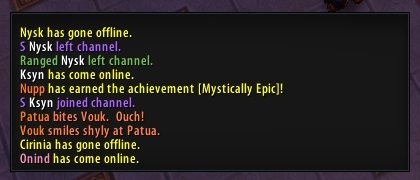
Chatter is a comprehensive, lightweight, mega-configurable chat enhancement addon. It supports a whole bunch of stuff, including:
- Hiding buttons
- Custom aliases for channel names
- Coloring of player names by class or deterministic HSV formula, and player levels next to names
- Custom font and font size for your chat frames
- Custom background, border, and positioning for the edit box
- Option to let the edit box border color match the color of the channel you are typing in
- Channel colors remembered by name, rather than by number
- Scrolling your chat frames with the mouse wheel.
- Sticky channels, configurable
- Ability to copy a chat frame's contents to your clipboard
- Ability to copy URLs to your clipboard
- Ability to customize the background and border of your chat frames
- Timestamps
- A /tt command to send a tell to your target
- A module that turns the word "invite" into clickable links that let you invite the speaker.
- Highlights both for custom keywords in specific channels
- Chat fading toggles
- Text justification
- Autologging (Off by default)
- Alt linking
- Much larger and smaller chat frames than default
- A Groupsay (/gr) command to talk to your group, whether that's battleground, raid, or party.
- Chat Tab look-n-feel modifications
- Paging through chat tabs with the scroll wheel
Comments

-

Ardentvark Owner
-

Forge_User_68327307 Former Author
-

moonfann Author
-

Stanzilla Maintainer
-
View User Profile
-
Send Message
Posted Jun 9, 2025THe actual version produce many errors
look at https://tinypic.host/image/Screenshot-2025-06-09-213126.3MezRf
-
View User Profile
-
Send Message
Posted Jan 21, 2025after tp : frame chat drop down
-
View User Profile
-
Send Message
Posted Nov 16, 2024Currently has a bug where the Pet Battle menus are messed up and you cannot fight or flee.
-
View User Profile
-
Send Message
Posted Nov 1, 2024CATA Classic:
18x Blizzard_SharedXML/Classic/UIDropDownMenu.lua:385: attempt to perform arithmetic on field 'numButtons' (a nil value)
[string "@Blizzard_SharedXML/Classic/UIDropDownMenu.lua"]:385: in function `UIDropDownMenu_AddButton'
[string "@Chatter/Chatter.lua"]:177: in function <Chatter/Chatter.lua:168>
[string "=(tail call)"]: ?
[string "=[C]"]: in function `FCF_Tab_OnClick'
[string "*FloatingChatFrame.xml:308_OnClick"]:1: in function <[string "*FloatingChatFrame.xml:308_OnClick"]:1>
[string "=[C]"]: ?
-
View User Profile
-
Send Message
Posted Sep 27, 2024I updated to the alpha version today - and I still get LUA errors:
Message: Interface/AddOns/Chatter/Modules/AltNames.lua:222: attempt to index global 'UnitPopupButtons' (a nil value)
Time: Fri Sep 27 16:32:30 2024
Count: 1
Stack: Interface/AddOns/Chatter/Modules/AltNames.lua:222: attempt to index global 'UnitPopupButtons' (a nil value)
Locals:
-
View User Profile
-
Send Message
Posted Sep 3, 2024Message: Interface/AddOns/Chatter/Modules/AltNames.lua:222: attempt to index global 'UnitPopupButtons' (a nil value)
Time: Wed Sep 4 06:22:04 2024
Count: 1
Stack: Interface/AddOns/Chatter/Modules/AltNames.lua:222: attempt to index global 'UnitPopupButtons' (a nil value)
Locals:
-
View User Profile
-
Send Message
Posted Aug 24, 2024@Ardentvark, I see the mod was updated today. It is still showing as for game version 9.0.2. Has it been updated for TWW?
-
View User Profile
-
Send Message
Posted Aug 25, 2024In reply to Fapnapkin: i cant really tell, but he could be starting with the errors from 4 years ago and is working forward?
-
View User Profile
-
Send Message
Posted Sep 2, 2024In reply to Fapnapkin:
go to versions in the curseforge app - there are 2 alpha releases updated for 11.0.2
-
View User Profile
-
Send Message
Posted Jun 5, 2024It would appear that the addon is abandoned since it's been nearly four years since the last update. I've long been the patient sort, but it's causing errors that directly affects my enjoyment of the game. (With the end of Dragonflight in sight, it will only become even more broken with The War Within.)
I'm sad to bid this farewell; I was among its earliest adopters because I found it perfect for me. So long and thanks for all the text. /salute
-
View User Profile
-
Send Message
Posted Aug 20, 2024In reply to Sojourna:
Not sure if youve seen this? https://legacy.curseforge.com/wow/addons/chatter-patched-for-dragonflight
-
View User Profile
-
Send Message
Posted May 14, 2023;
-
View User Profile
-
Send Message
Posted May 3, 2023Any chance of a update for 10.1? please n' ty
-
View User Profile
-
Send Message
Posted Dec 28, 2022having the following lua errors...
16x Chatter/Modules/ChatFrameBorders.xml:8 Unrecognized XML: TileSize
16x Chatter/Modules/ChatFrameBorders.xml:9 Unrecognized XML: AbsValue
20x Chatter/Modules/AltNames.lua:222: attempt to index global 'UnitPopupButtons' (a nil value)
[string "@Chatter/Modules/AltNames.lua"]:222: in main chunk
Locals:
addon = "Chatter"
private = <table> {
}
Chatter = <table> {
SetDefaultModuleLibraries = <function> defined @AdiBags/libs/AceAddon-3.0/AceAddon-3.0.lua:363
Enable = <function> defined @AdiBags/libs/AceAddon-3.0/AceAddon-3.0.lua:290
RegisterChatCommand = <function> defined @AdiBags/libs/AceConsole-3.0/AceConsole-3.0.lua:81
FCF_Tab_OnClick = <function> defined @Chatter/Chatter.lua:172
EnableModule = <function> defined @AdiBags/libs/AceAddon-3.0/AceAddon-3.0.lua:328
modules = <table> {
}
GetModule = <function> defined @AdiBags/libs/AceAddon-3.0/AceAddon-3.0.lua:206
IterateEmbeds = <function> defined @AdiBags/libs/AceAddon-3.0/AceAddon-3.0.lua:438
IsClassic = false
SecureHook = <function> defined @AdiBags/libs/AceHook-3.0/AceHook-3.0.lua:335
defaultModuleLibraries = <table> {
}
TimeLeft = <function> defined @Chatter/Libs/AceTimer-3.0/AceTimer-3.0.lua:172
UnregisterChatCommand = <function> defined @AdiBags/libs/AceConsole-3.0/AceConsole-3.0.lua:107
RawHookScript = <function> defined @AdiBags/libs/AceHook-3.0/AceHook-3.0.lua:394
ScheduleRepeatingTimer = <function> defined @Chatter/Libs/AceTimer-3.0/AceTimer-3.0.lua:129
CancelAllTimers = <function> defined @Chatter/Libs/AceTimer-3.0/AceTimer-3.0.lua:160
Printf = <function> defined @AdiBags/libs/AceConsole-3.0/AceConsole-3.0.lua:65
SetDefaultModulePrototype = <function> defined @AdiBags/libs/AceAddon-3.0/AceAddon-3.0.lua:405
name = "Chatter"
IsEnabled = <function> defined @AdiBags/libs/AceAddon-3.0/AceAddon-3.0.lua:447
orderedModules = <table> {
}
ScheduleTimer = <function> defined @Chatter/Libs/AceTimer-3.0/AceTimer-3.0.lua:94
DisableModule = <function> defined @AdiBags/libs/AceAddon-3.0/AceAddon-3.0.lua:346
SetUpdateConfig = <function> defined @Chatter/Chatter.lua:229
OnDisable = <function> defined @Chatter/Chatter.lua:262
OnEnable = <function> defined @Chatter/Chatter.lua:245
GetArgs = <function> defined @AdiBags/libs/AceConsole-3.0/AceConsole-3.0.lua:140
Print = <function> defined @AdiBags/libs/AceConsole-3.0/AceConsole-3.0.lua:50
Disable = <function> defined @AdiBags/libs/AceAddon-3.0/AceAddon-3.0.lua:310
IsHooked = <function> defined @AdiBags/libs/AceHook-3.0/AceHook-3.0.lua:492
hooks = <table> {
}
FCF_OpenTemporaryWindow = <function> defined @Chatter/Chatter.lua:186
IsModule = <function> defined @AdiBags/libs/AceAddon-3.0/AceAddon-3.0.lua:464
RemoveMenuHook = <function> defined @Chatter/Chatter.lua:168
SetDefaultModuleState = <function> defined @AdiBags/libs/AceAddon-3.0/AceAddon-3.0.lua:383
OpenConfig = <function> defined @Chatter/Chatter.lua:207
OnInitialize = <function> defined @Chatter/Chatter.lua:76
SetEnabledState = <function> defined @AdiBags/libs/AceAddon-3.0/AceAddon-3.0.lua:420
Hook = <function> defined @AdiBags/libs/AceHook-3.0/AceHook-3.0.lua:273
enabledState = true
defaultModulePrototype = <table> {
}
CancelTimer = <function> defined @Chatter/Libs/AceTimer-3.0/AceTimer-3.0.lua:147
AddMenuHook = <function> defined @Chatter/Chatter.lua:164
NewModule = <function> defined @AdiBags/libs/AceAddon-3.0/AceAddon-3.0.lua:231
UnhookAll = <function> defined @AdiBags/libs/AceHook-3.0/AceHook-3.0.lua:476
Unhook = <function> defined @AdiBags/libs/AceHook-3.0/AceHook-3.0.lua:417
IterateModules = <function> defined @AdiBags/libs/AceAddon-3.0/AceAddon-3.0.lua:433
SecureHookScript = <function> defined @AdiBags/libs/AceHook-3.0/AceHook-3.0.lua:409
RawHook = <
20x Chatter/Modules/TinyChat.lua:21: attempt to call method 'SetMinResize' (a nil value)
[string "@Chatter/Modules/TinyChat.lua"]:21: in function <Chatter/Modules/TinyChat.lua:18>
[string "=[C]"]: ?
[string "@AdiBags/libs/AceAddon-3.0-13/AceAddon-3.0.lua"]:66: in function <...ceAdiBags/libs/AceAddon-3.0/AceAddon-3.0.lua:61>
[string "@AdiBags/libs/AceAddon-3.0-13/AceAddon-3.0.lua"]:523: in function <...ceAdiBags/libs/AceAddon-3.0/AceAddon-3.0.lua:516>
[string "=(tail call)"]: ?
[string "@Chatter/Chatter.lua"]:252: in function <Chatter/Chatter.lua:245>
[string "=[C]"]: ?
[string "@AdiBags/libs/AceAddon-3.0-13/AceAddon-3.0.lua"]:66: in function <...ceAdiBags/libs/AceAddon-3.0/AceAddon-3.0.lua:61>
[string "@AdiBags/libs/AceAddon-3.0-13/AceAddon-3.0.lua"]:523: in function `EnableAddon'
[string "@AdiBags/libs/AceAddon-3.0-13/AceAddon-3.0.lua"]:626: in function <...ceAdiBags/libs/AceAddon-3.0/AceAddon-3.0.lua:611>
[string "=[C]"]: in function `LoadAddOn'
[string "@FrameXML/UIParent.lua"]:538: in function `UIParentLoadAddOn'
[string "@FrameXML/UIParent.lua"]:743: in function `MajorFactions_LoadUI'
[string "@Blizzard_ExpansionLandingPage/Blizzard_DragonflightLandingPage.lua"]:100: in function `SetUpMajorFactionList'
[string "@Blizzard_ExpansionLandingPage/Blizzard_DragonflightLandingPage.lua"]:93: in function `RefreshMajorFactionList'
[string "@Blizzard_ExpansionLandingPage/Blizzard_DragonflightLandingPage.lua"]:88: in function `RefreshOverlay'
[string "@Blizzard_ExpansionLandingPage/Blizzard_DragonflightLandingPage.lua"]:80: in function <...sionLandingPage/Blizzard_DragonflightLandingPage.lua:76>
[string "=[C]"]: ?
[string "=[C]"]: in function `CreateFrame'
[string "@Blizzard_ExpansionLandingPage/Blizzard_DragonflightLandingPage.lua"]:49: in function `CreateOverlay'
[string "@Blizzard_ExpansionLandingPage/Blizzard_ExpansionLandingPage.lua"]:63: in function `RefreshExpansionOverlay'
[string "@Blizzard_ExpansionLandingPage/Blizzard_ExpansionLandingPage.lua"]:35: in function <...pansionLandingPage/Blizzard_ExpansionLandingPage.lua:33>
22x Chatter/Modules/ChatTabs.lua:181: attempt to index field '?' (a nil value)
[string "@Chatter/Modules/ChatTabs.lua"]:181: in function <Chatter/Modules/ChatTabs.lua:174>
[string "=[C]"]: ?
[string "@AdiBags/libs/AceAddon-3.0-13/AceAddon-3.0.lua"]:66: in function <...ceAdiBags/libs/AceAddon-3.0/AceAddon-3.0.lua:61>
[string "@AdiBags/libs/AceAddon-3.0-13/AceAddon-3.0.lua"]:523: in function <...ceAdiBags/libs/AceAddon-3.0/AceAddon-3.0.lua:516>
[string "=(tail call)"]: ?
[string "@Chatter/Chatter.lua"]:252: in function <Chatter/Chatter.lua:245>
[string "=[C]"]: ?
[string "@AdiBags/libs/AceAddon-3.0-13/AceAddon-3.0.lua"]:66: in function <...ceAdiBags/libs/AceAddon-3.0/AceAddon-3.0.lua:61>
[string "@AdiBags/libs/AceAddon-3.0-13/AceAddon-3.0.lua"]:523: in function `EnableAddon'
[string "@AdiBags/libs/AceAddon-3.0-13/AceAddon-3.0.lua"]:626: in function <...ceAdiBags/libs/AceAddon-3.0/AceAddon-3.0.lua:611>
[string "=[C]"]: in function `LoadAddOn'
[string "@FrameXML/UIParent.lua"]:538: in function `UIParentLoadAddOn'
[string "@FrameXML/UIParent.lua"]:743: in function `MajorFactions_LoadUI'
[string "@Blizzard_ExpansionLandingPage/Blizzard_DragonflightLandingPage.lua"]:100: in function `SetUpMajorFactionList'
[string "@Blizzard_ExpansionLandingPage/Blizzard_DragonflightLandingPage.lua"]:93: in function `RefreshMajorFactionList'
[string "@Blizzard_ExpansionLandingPage/Blizzard_DragonflightLandingPage.lua"]:88: in function `RefreshOverlay'
[string "@Blizzard_ExpansionLandingPage/Blizzard_DragonflightLandingPage.lua"]:80: in function <...sionLandingPage/Blizzard_DragonflightLandingPage.lua:76>
[string "=[C]"]: ?
[string "=[C]"]: in function `CreateFrame'
[string "@Blizzard_ExpansionLandingPage/Blizzard_DragonflightLandingPage.lua"]:49: in function `CreateOverlay'
[string "@Blizzard_ExpansionLandingPage/Blizzard_ExpansionLandingPage.lua"]:63: in function `RefreshExpansionOverlay'
[string "@Blizzard_ExpansionLandingPage/Blizzard_ExpansionLandingPage.lua"]:35: in function <...pansionLandingPage/Blizzard_ExpansionLandingPage.lua:33>
18x Chatter/Modules/AltNames.lua:1 (null)
18x Chatter/Modules/ChatFrameBorders.xml:4 Unrecognized XML: Backdrop
18x Chatter/Modules/ChatFrameBorders.xml:4 Unrecognized XML attribute: bgFile
18x Chatter/Modules/ChatFrameBorders.xml:4 Unrecognized XML attribute: edgeFile.
18x Chatter/Modules/ChatFrameBorders.xml:4 Unrecognized XML attribute: tile
18x Chatter/Modules/ChatFrameBorders.xml:5 Unrecognized XML: EdgeSize
18x Chatter/Modules/ChatFrameBorders.xml:6 Unrecognized XML: AbsValue
18x Chatter/Modules/ChatFrameBorders.xml:6 Unrecognized XML attribute: val
Will continue to post all the errors if more come up. Thank you for fixing them all!
-
View User Profile
-
Send Message
Posted Dec 21, 2022Someone made a Dragonflight update for this here: https://www.curseforge.com/wow/addons/chatter-patched-for-dragonflight
-
View User Profile
-
Send Message
Posted Dec 6, 2022It still works for me, but the errors make it so I cant resize the windows. I hope this gets updated soon.
-
View User Profile
-
Send Message
Posted Nov 12, 2022This could badly use an update for patch 10.0.0. I really don't want to have to use another chat addon because they're either bloated or user unfriendly. :(
-
View User Profile
-
Send Message
Posted Oct 30, 2022Totally prevents pet battles:
Message: Interface/AddOns/Chatter/Modules/ChatTabs.lua:90: attempt to index field '?' (a nil value)
Time: Sun Oct 30 17:36:37 2022
Count: 1
Stack: Interface/AddOns/Chatter/Modules/ChatTabs.lua:90: attempt to index field '?' (a nil value)
[string "@Interface/AddOns/Chatter/Modules/ChatTabs.lua"]:90: in function `Decorate'
[string "@Interface/AddOns/Chatter/Chatter.lua"]:194: in function <Interface/AddOns/Chatter/Chatter.lua:186>
[string "=(tail call)"]: ?
[string "@Interface/AddOns/Blizzard_PetBattleUI/Blizzard_PetBattleUI.lua"]:173: in function `PetBattleFrame_Display'
[string "@Interface/AddOns/Blizzard_PetBattleUI/Blizzard_PetBattleUI.lua"]:109: in function <...AddOns/Blizzard_PetBattleUI/Blizzard_PetBattleUI.lua:106>
Locals: self = <table> {
HideTab = <function> defined @Interface/AddOns/Chatter/Modules/ChatTabs.lua:312
SetDefaultModuleLibraries = <function> defined @Interface/AddOns/Chatter/Libs/AceAddon-3.0/AceAddon-3.0.lua:367
Enable = <function> defined @Interface/AddOns/Chatter/Libs/AceAddon-3.0/AceAddon-3.0.lua:294
NewModule = <function> defined @Interface/AddOns/Chatter/Libs/AceAddon-3.0/AceAddon-3.0.lua:235
EnableModule = <function> defined @Interface/AddOns/Chatter/Libs/AceAddon-3.0/AceAddon-3.0.lua:332
modules = <table> {
}
GetModule = <function> defined @Interface/AddOns/Chatter/Libs/AceAddon-3.0/AceAddon-3.0.lua:210
IterateEmbeds = <function> defined @Interface/AddOns/Chatter/Libs/AceAddon-3.0/AceAddon-3.0.lua:442
SecureHookScript = <function> defined @Interface/AddOns/Chatter/Libs/AceHook-3.0/AceHook-3.0.lua:410
defaultModuleLibraries = <table> {
}
OnClick = <function> defined @Interface/AddOns/Chatter/Modules/ChatTabs.lua:275
RawHookScript = <function> defined @Interface/AddOns/Chatter/Libs/AceHook-3.0/AceHook-3.0.lua:395
UndecorateTabs = <function> defined @Interface/AddOns/Chatter/Modules/ChatTabs.lua:145
defaultModuleState = true
baseName = "Chatter"
GetName = <function> defined @Interface/AddOns/Chatter/Libs/AceAddon-3.0/AceAddon-3.0.lua:279
GetOptions = <function> defined @Interface/AddOns/Chatter/Modules/ChatTabs.lua:359
OnLeave = <function> defined @Interface/AddOns/Chatter/Modules/ChatTabs.lua:350
OnEnter = <function> defined @Interface/AddOns/Chatter/Modules/ChatTabs.lua:345
name = "Chatter_ChatTabs"
OnMouseWheel = <function> defined @Interface/AddOns/Chatter/Modules/ChatTabs.lua:320
IsEnabled = <function> defined @Interface/AddOns/Chatter/Libs/AceAddon-3.0/AceAddon-3.0.lua:451
orderedModules = <table> {
}
Decorate = <function> defined @Interface/AddOns/Chatter/Modules/ChatTabs.lua:86
DisableModule = <function> defined @Interface/AddOns/Chatter/Libs/AceAddon-3.0/AceAddon-3.0.lua:350
ToggleTabShow = <function> defined @Interface/AddOns/Chatter/Modules/ChatTabs.lua:281
FCF_Close = <function> defined @Interface/AddOns/Chatter/Modules/ChatTabs.lua:271
OnDisable = <function> defined @Interface/AddOns/Chatter/Modules/ChatTabs.lua:243
OnEnable = <function> defined @Interface/AddOns/Chatter/Modules/ChatTabs.lua:174
RegisterMessage = <function> defined @Interface/AddOns/Chatter/Libs/CallbackHandler-1.0/CallbackHandler-1.0.lua:90
HookScript = <function> defined @Interface/AddOns/Chatter/Libs/AceHook-3.0/AceHook-3.0.lua:366
toggleLabel = "Chat Tabs"
DecorateTabs = <function> defined @Interface/AddOns/Chatter/Modules/ChatTabs.lua:112
IsHooked = <function> defined @Interface/AddOns/Chatter/Libs/AceHook-3.0/AceHook-3.0.lua:493
OnInitialize = <function> defined @Interface/AddOns/Chatter/Modules/ChatTabs.lua:71
Disable = <function> defined @Interface/AddOns/Chatter/Libs/AceAddon-3.0/AceAddon-3.0.lua:314
IsModule = <function> defined @Interface/AddOns/Chatter/Libs/AceAddon-3.0/AceAddon-3.0.lua:217
db = <table> {
}
SetDefaultModuleState = <function> defined @Interface/AddOns/Chatter/Libs/AceAddon-3.0/AceAddon-3.0.lua:387
UnregisterAllEvents = <function> defined @Interface/AddOns/Chatter/Libs/CallbackHandler-1.0/CallbackHandler-1.0.lua:174
SendMessage = <function> defined @I
WoW retail.
-
View User Profile
-
Send Message
Posted Nov 21, 2022In reply to AlexL1118:
yes I confirm :(
-
View User Profile
-
Send Message
Posted Nov 21, 2022In reply to illydan2513:
Oh, I already forgot that I wrote this...
In order to get it a bit better in v10.0.2, I did the following temporary patches:
1) File "Modules\AltNames.lua", before line 218:
UnitPopupButtons = {}2) File "Modules\ChatTabs.lua":
Comment the content of function "mod:Decorate()" (I left the function empty).
3) File "Modules\ChatTabs.lua":
Comment lines 181--194.
4) File "Modules\TinyChat.lua":
Replace all instances of
by
All prefixes (words before colons) should stay as is.
5) File "Modules\ChatFrameBorders.xml":
Comment lines 4--14.
No idea what I did, but many error messages disappeared.