Cartographer
CARTOGRAPHER HAS NOT BEEN UPDATED FOR 3.3!!!
DO NOT CREATE BUG REPORTS SAYING IT IS BROKEN!
There are no plans to do any major bug fixes for Cartographer (v2 or v3). If there is an update it will only be a minor fix. (It has already been this way since at least 2008.) Cartographer(v2) uses an outdated framework that will not be updated in the case of major breakages so Cartographer(v2) would require a complete rewrite. Neither of the two main developers (Ckknight and Arrowmaster) have the time nor desire to do this currently. Occasionally a new version might be released to include fixes made by other developers or new versions of embedded libraries.
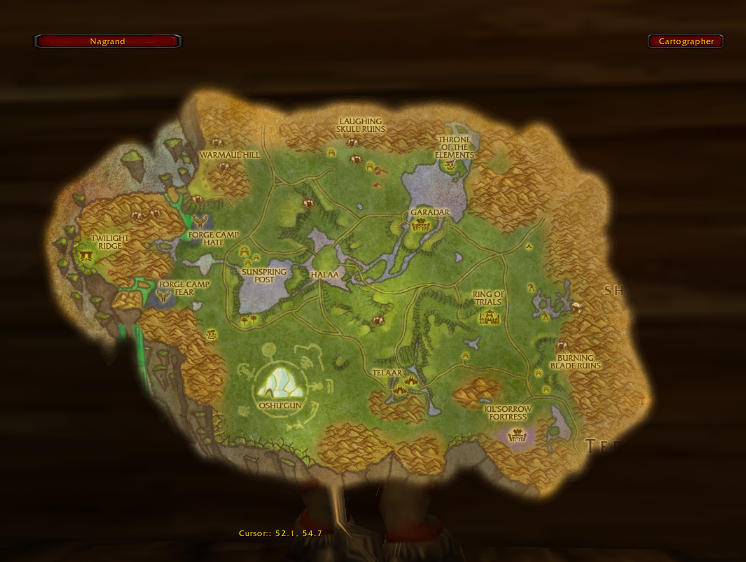
Cartographer is a modular, lightweight, and efficient framework for manipulation of the world map. It is based on Rock and other libraries of the WoWAce community.
- Battlegrounds : allows viewing of battlegrounds outside of the zone.
- Coordinates : adds coordinates to the bottom of the world map of the player and the cursor.
- Foglight : Shows unexplored areas on the map. replacement for MozzFullWorldMap or Unexplorer. Much more efficient, though.
- Group Colors : turns all your party's and your raid's POIs into circles colored based on class, and shows a number on them based on their raid group.
- Instance Maps : shows maps of instances.
- Instance Notes : adds boss notes and such to instance maps.
- Look 'n' Feel : allows you to change the transparency, position, and scale of the world map.
- Notes : lets you put notes on the map, similar to MapNotes.
- Zone Info : on hovering over a zone, it will show the levels of the zone, the instances in the zone, their levels, and the group size the instance is made for (e.g. 5-man, 40-man).
Comments

-

ckknight Owner
-

_ForgeUser1046201 Contributor
-

Arrowmaster1 Author
-
Forge_User_39331286 Contributor
-

Xinhuan Contributor
-
View User Profile
-
Send Message
Posted Jul 25, 2019i'm still amazed nobody has taken over this old gem :'(
-
View User Profile
-
Send Message
Posted Sep 12, 2011-
View User Profile
-
Send Message
Posted Jul 19, 2011-
View User Profile
-
Send Message
Posted Jul 16, 2011-
View User Profile
-
Send Message
Posted Jul 15, 2011Good luck to you guys in all your endeavors, I hope you still come back or we'll see you in another line: p
-
View User Profile
-
Send Message
Posted Jul 3, 2011sigh
-
View User Profile
-
Send Message
Posted Jul 7, 2011-
View User Profile
-
Send Message
Posted Jul 9, 2011with handy notes http://wow.curse.com/downloads/wow-addons/details/handynotes.aspx
-
View User Profile
-
Send Message
Posted Jun 30, 2011I suggest to anyone who is downloading addons to take a look at the date that tells you the last time it was updated. If the thing has not been updated for several years, why would you download it?
-
View User Profile
-
Send Message
Posted Jun 6, 2011-
View User Profile
-
Send Message
Posted Jun 11, 2011-
View User Profile
-
Send Message
Posted Jun 15, 2011-
View User Profile
-
Send Message
Posted May 20, 2011-
View User Profile
-
Send Message
Posted May 20, 2011-
View User Profile
-
Send Message
Posted May 17, 2011-
View User Profile
-
Send Message
Posted May 17, 2011-
View User Profile
-
Send Message
Posted May 13, 2011Love,
Me
-
View User Profile
-
Send Message
Posted May 5, 2011-
View User Profile
-
Send Message
Posted Apr 22, 2011http://wow.curse.com/downloads/packs/5015/default.aspx
-
View User Profile
-
Send Message
Posted Apr 9, 2011SP