Cartographer

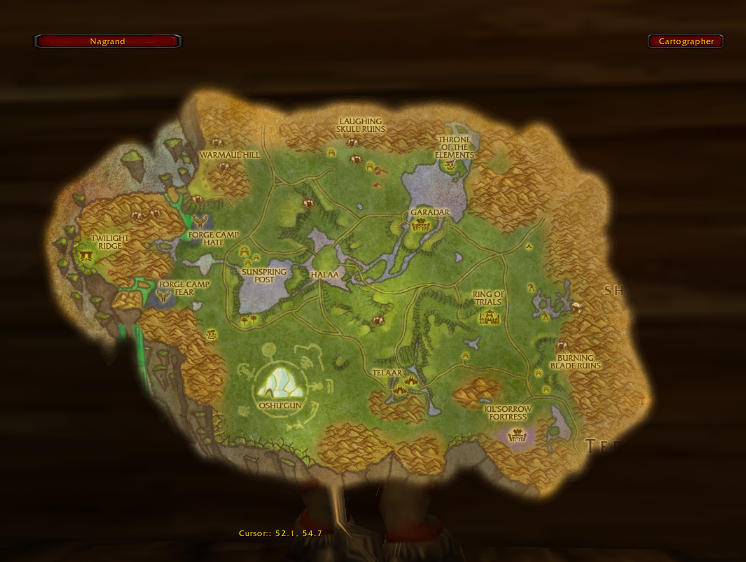
Transparency on - Nagrand

CARTOGRAPHER IS OUT OF DATE ON WOWMATRIX. ZONE INFO IS FIXED IN MOST RECENT VERSION ON CURSE.

Cartographer is a modular, lightweight, and efficient framework for manipulation of the world map. It is based on Rock and other libraries of the wowace community.

  • Battlegrounds : allows viewing of battlegrounds outside of the zone.
  • Coordinates : adds coordinates to the bottom of the world map of the player and the cursor.
  • Foglight : Shows unexplored areas on the map. replacement for MozzFullWorldMap or Unexplorer. Much more efficient, though.
  • Group Colors : turns all your party's and your raid's POIs into circles colored based on class, and shows a number on them based on their raid group.
  • Instance Maps : shows maps of instances.
  • Instance Notes : adds boss notes and such to instance maps.
  • Look 'n' Feel : allows you to change the transparency, position, and scale of the world map.
  • Notes : lets you put notes on the map, similar to MapNotes.
  • Zone Info : on hovering over a zone, it will show the levels of the zone, the instances in the zone, their levels, and the group size the instance is made for (e.g. 5-man, 40-man).

There is a new "experimental" version of Cartographer, called Cartographer3, at http://www.curse.com/downloads/details/12701/


If you are experiencing any issues

You play on a mac and the addon doesn't show up in-game This problem is generally being caused by unzippers on macintosh. You are supposed to put all folders inside the zip directly into your addon folder, not in a cartographer-vx.y.z subfolder! So if your paths are [...]/Interface/Addons/Cartographer and [...]/Interface/Addons/Cartographer_"modulename", it should work as expected :D.
Death Knights and Phased Content, Arrow not showing While you are in the starting area the content is instanced and you are, in fact, not in the "real" world of Azeroth. Once you go visit Stormwind / Orgrimmar as final part of the questline the arrow should work again as expected.
If you are having issues related to POI's (the blue dots) please back-up and delete or rename your WTF folder (or just the cartographer 'account' database, WTF\Account\"username"\SavedVariables\Cartographer.lua)
Is the addon showing up as "Out of Date" and you're using Windows Vista?
The addon directory seems to have been moved for people on Vista. Apparently it's in "C:\Users\Public\Games\World of Warcraft". If you update plugins in the old directory, it just plain won't notice! At all! And you'll get errors. Update it in the new location.
(explanation courtesy of QuestHelper addon)
Read the whole story here How-To: Trouble-Shoot AddOns under Vista
Bug reporting
Please disable all other addons except those included in this package, then test the issue. If the issue persists, please post on the bug tracker:
http://www.wowace.com/projects/cartographer/tickets/
We welcome your feedback!
Please do not post long bug reports in the comments below, use the bug tracker.


You must login to post a comment. Don't have an account? Register to get one!

  • Avatar of Yishua Yishua Thu, 15 Oct 2009 20:36:18

    B4 I ask the question every1 has asked or wants 2 know I'd like to comment about how I'm thankfull 4 the time u & your ppl. take making/keeping up these addons ckknight. Now that the ass kissing is done lol. Would there be an update 4 cartographer & it's plugins any time soon?

  • Avatar of mogcraft mogcraft Sat, 15 Aug 2009 20:52:39

    2009/08/15 20:41:50-1275-x1]: Cartographer_Notes-2.0\Notes.lua:4182: Trying to iterate through notes in an unknown zone: "Das Nordmeer" Cartographer_Notes-2.0\Notes.lua:3950: in function `IterateNearbyNotes' Cartographer_Notes-2.0\Notes.lua:4182: in function <Interface\AddOns\Cartographer_Notes\Notes.lua:4147> Cartographer_Notes-2.0\Notes.lua:4332: in function `object_method' LibRockTimer-1.0-90232 (FuBar):289: in function <...Ons\FuBar\libs\LibRockTimer-1.0\LibRockTimer-1.0.lua:227>

    -

  • Avatar of Heritz Heritz Fri, 14 Aug 2009 02:51:41

    There are a lot of errors in Hrothgar's Landing, the new island in 3.2, north of the Argent Tournament grounds. It seems like the zone map isn't included in the addon and it throws a bunch of Lua errors in the center of the screen.

  • Avatar of TBABlackPanther TBABlackPanther Tue, 11 Aug 2009 19:40:41

    [2009/08/11 21:16:46-2711-x1]: Cartographer_POI-2.0\POI.lua:143: Trying to set a note with an unknown zone: "Hrothgars Landestelle" <in C code>: in function `ProcessMapClick' Interface\FrameXML\WorldMapFrame.lua:686: in function <Interface\FrameXML\WorldMapFrame.lua:674>: (tail call): ?: (tail call): ?: (tail call): ?: Cartographer-r2323\Cartographer.lua:27: in function <Interface\AddOns\Cartographer\Cartographer.lua:26>

    -

  • Avatar of Samtaur Samtaur Mon, 10 Aug 2009 03:49:08

    The Way Points Arrow is showing as a big Block of Arrows(all possible views and white) and a scrambled number(or it doesn't move) distance meter. it looks kinda small as well.

    Any Ideas?

  • Avatar of Skizelli Skizelli Fri, 07 Aug 2009 13:16:02

    In addition to the error the poster below reported, will there ever be an update for Cartographer_Notes? It seems it's been error-ridden for quite a while now:

    Cartographer_Notes-2.0\Notes.lua:3636: bad argument #1 to 'rawget' (table expected, got nil) Cartographer_Notes-2.0\Notes.lua:3636: in function `UnregisterNotesDatabase'

    Last edited on 07 Aug 2009 by Skizelli
  • Avatar of TBABlackPanther TBABlackPanther Thu, 06 Aug 2009 18:16:02

    Hi, i have this error:

    [2009/08/06 20:06:10-2692-x1]: Cartographer_POI-2.0\POI.lua:143: Trying to set a note with an unknown zone: "Hrothgars Landestelle" <in C code>: in function `ProcessMapClick' Interface\FrameXML\WorldMapFrame.lua:686: in function <Interface\FrameXML\WorldMapFrame.lua:674>: (tail call): ?: (tail call): ?: (tail call): ?: Cartographer-r2323\Cartographer.lua:27: in function <Interface\AddOns\Cartographer\Cartographer.lua:26>

    -

    and follow error.

  • Avatar of Robeeyay Robeeyay Wed, 05 Aug 2009 19:38:01

    I've just installed the lastest version of Cart. (unistalled and restarted comp to be on the safe side) and I can't configure the 'look n feel' or any settings, or set waypoints....

    Can anyone help or point me in the right direction? I should just state for the record that I'm a complete IT noob! For instance I don;t know how the hell to find LibRockConfig-1.0 (first one under the files tab - which files tab? where?? )and extract it to the Lib folder in the Cartographer folder, which of course is in your addons folder.

    Help anyone! This is driving me mental.... -.-

  • Avatar of Aoife Aoife Wed, 05 Aug 2009 11:45:19

    Cr1ms, I did as you suggested and it fixed that problem but another popped up - I wasn't able to see exactly what it was at the time - i'll do that when i log in this morning.

    thanks for the tip!

  • Avatar of Cr1ms0nGh0st Cr1ms0nGh0st Wed, 05 Aug 2009 02:29:49

    To fix Cartographer for new patch go to LibRockConfig-1.0 (first one under the files tab)and extract it to the Lib folder in the Cartographer folder, which of course is in your addons folder. Do this and it will work again. If you don't trust my link then you'll find it on this page also under Relationships- Embedded library. I hope this helps. It worked for me.

    Last edited on 05 Aug 2009 by Cr1ms0nGh0st

Facts

Date created
05 Dec 2006
Category
Last update
07 Aug 2009
Development stage
Release
Language
  • deDE
  • enUS
  • esES
  • frFR
  • koKR
  • ruRU
  • zhCN
  • zhTW
License
All Rights Reserved
Curse link
Cartographer
Reverse relationships
1
Recent files
  • A: r2329 for 3.2.0 on 07 Aug 2009
  • R: v2.5.6 for 3.2.0 on 05 Aug 2009
  • A: r2327 for 3.2.0 on 05 Aug 2009
  • R: v2.5.5 for 3.2.0 on 05 Aug 2009
  • A: r2325 for 3.2.0 on 05 Aug 2009

Authors