Broker_uClock
Broker uClock
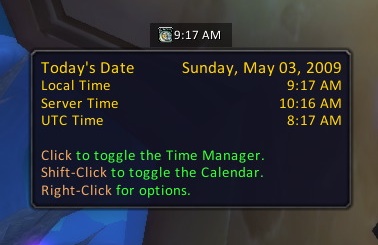
Minimalistic date/time display for Broker with optional hourly chime.



The Quick Intro
Broker uClock is the spiritual successor to my old FuBar uClock, which itself was a re-write of FuBar ClockFu, re-written from the ground up using Ace-3.0 and LibDataBroker-1.1.
- Shows realm time, local time, or UTC time in the data feed (or all three!).
- Shows today's date aswell as realm time, local time, and UTC time in the tooltip.
- Toggles the in-game Time Manager (stop watch, alarm clock, etc.) if clicked.
- Toggles GroupCalendar (if installed) or the in-game calendar if shift-clicked.
As uClock is written to utilise LibDataBroker, you must also install a "broker display" addon in order for this addon to work.
Configuration
Options can be found in the config window accessed by right-clicking the plugin.
- Choose to have a chime play at the start of a new hour. The sound file can be configured or turned off completely.
- Choose which time formats you want shown in the data feed, and what order they appear in.
- Choose whether to show seconds or hide them.
- Choose whether to have the time shown in 12-hour or 24-hour format.
Support








-

Ravendwyr Owner