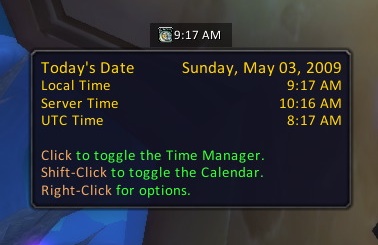
Latest Broker uClock Files http://www.wowace.com/addons/broker-uclock/files/ The latest files available for Broker uClock en-us Tue, 04 Aug 2009 19:13:20 +0000 WowAce.com (http://www.wowace.com) v3.2.3 http://www.wowace.com/addons/broker-uclock/files/28-v3-2-3/ <p>Version 3.2.3<br> - Updated for WoW 3.2.0.<br> - Library update.</p> <p>Version 3.2.2<br> - Fixed calendar toggle for users with GroupCalendar version 5.</p> <p>Version 3.2.1<br> - Added some more sounds for the hourly chime, recommended by Nandini.</p> <p>Version 3.2<br> - Added an option to chime at the top of every hour (i.e. 1:00pm etc). The chime sound is configurable.<br> - Added an option to show or hide Blizzard's minimap clock.<br> - Configuration has been moved to Blizzard's Interface Options frame.</p> <p>Version 3.1.4<br> - The current month should no longer display as &#34;26&#34; for Korean clients.</p> <p>Version 3.1.3<br> - Fixed a problem with Simplified Chinese translations not being registered.<br> - Fixed the names of weekdays not being translated for non-Korean clients.<br> - Fixed the names of months not being translated for non-English clients.</p> <p>Version 3.1.2<br> - Added Korean (koKR), Simplified Chinese (zhCN) and Traditional Chinese (zhTW) translations. Thanks, Damjau and Sparanoid!</p> <p>Version 3.1.1<br> - Added support for multiple localizations. Translators needed!</p> <p>Version 3.1<br> - Added support for the UTC time format.<br> - Removed the text colour options, as most Broker Displays already have text colouring options.</p> <p>Version 3.0.3<br> - Updated for WoW 3.1.0.</p> <p>Version 3.0.2<br> - You can now choose to show local time, realm time, or both in the display.<br> - Restructured the tooltip slightly. Today's date is now shown at the top, with local and server times underneath.</p> <p>Version 3.0.1<br> - Fixed the offset of &#34;uClock&#34; in the dropdown menu.<br> - Fixed a bug where the tooltip would remain shown when you open the dropdown menu.</p> <p>Version 3.0<br> - Re-written to use Ace-3.0 and LibDataBroker-1.1.</p> <p>Version 2.0.12<br> - Removed unused libraries to shrink download file size.</p> <p>Version 2.0.11<br> - Added an icon (can be disabled).<br> - Added hints to the tooltip.<br> - Shift-clicking the plugin should now toggle GroupCalender if it is installed, or Blizzard's Calendar if not.</p> <p>Version 2.0.9<br> - Bugfixes. Coding in the middle of the night is bad, m'kay?</p> <p>Version 2.0.8<br> - Having the &#34;Show Coloured Text&#34; option enabled should now make the text white instead of FuBar's default yellow.</p> <p>Version 2.0.7<br> - Updated .toc for Patch 3.0.2.<br> - Added Server Time display. Game Time can now be found in the tooltip.<br> - Added options to show seconds and show 12hr format.<br> - Shift-clicking the plugin will now toggle Blizzard's Calendar.<br> - Right-clicking the plugin will show uClock's options frame.</p> <p>Version 1.0.6<br> - Initial public release.</p> Tue, 04 Aug 2009 19:13:20 +0000 http://www.wowace.com/addons/broker-uclock/files/28-v3-2-3/ http://www.wowace.com/addons/broker-uclock/files/28-v3-2-3/ no-reply@curseforge.com (ethancentaurai) v3.2.3-nolib http://www.wowace.com/addons/broker-uclock/files/27-v3-2-3-nolib/ <p>Version 3.2.3<br> - Updated for WoW 3.2.0.<br> - Library update.</p> <p>Version 3.2.2<br> - Fixed calendar toggle for users with GroupCalendar version 5.</p> <p>Version 3.2.1<br> - Added some more sounds for the hourly chime, recommended by Nandini.</p> <p>Version 3.2<br> - Added an option to chime at the top of every hour (i.e. 1:00pm etc). The chime sound is configurable.<br> - Added an option to show or hide Blizzard's minimap clock.<br> - Configuration has been moved to Blizzard's Interface Options frame.</p> <p>Version 3.1.4<br> - The current month should no longer display as &#34;26&#34; for Korean clients.</p> <p>Version 3.1.3<br> - Fixed a problem with Simplified Chinese translations not being registered.<br> - Fixed the names of weekdays not being translated for non-Korean clients.<br> - Fixed the names of months not being translated for non-English clients.</p> <p>Version 3.1.2<br> - Added Korean (koKR), Simplified Chinese (zhCN) and Traditional Chinese (zhTW) translations. Thanks, Damjau and Sparanoid!</p> <p>Version 3.1.1<br> - Added support for multiple localizations. Translators needed!</p> <p>Version 3.1<br> - Added support for the UTC time format.<br> - Removed the text colour options, as most Broker Displays already have text colouring options.</p> <p>Version 3.0.3<br> - Updated for WoW 3.1.0.</p> <p>Version 3.0.2<br> - You can now choose to show local time, realm time, or both in the display.<br> - Restructured the tooltip slightly. Today's date is now shown at the top, with local and server times underneath.</p> <p>Version 3.0.1<br> - Fixed the offset of &#34;uClock&#34; in the dropdown menu.<br> - Fixed a bug where the tooltip would remain shown when you open the dropdown menu.</p> <p>Version 3.0<br> - Re-written to use Ace-3.0 and LibDataBroker-1.1.</p> <p>Version 2.0.12<br> - Removed unused libraries to shrink download file size.</p> <p>Version 2.0.11<br> - Added an icon (can be disabled).<br> - Added hints to the tooltip.<br> - Shift-clicking the plugin should now toggle GroupCalender if it is installed, or Blizzard's Calendar if not.</p> <p>Version 2.0.9<br> - Bugfixes. Coding in the middle of the night is bad, m'kay?</p> <p>Version 2.0.8<br> - Having the &#34;Show Coloured Text&#34; option enabled should now make the text white instead of FuBar's default yellow.</p> <p>Version 2.0.7<br> - Updated .toc for Patch 3.0.2.<br> - Added Server Time display. Game Time can now be found in the tooltip.<br> - Added options to show seconds and show 12hr format.<br> - Shift-clicking the plugin will now toggle Blizzard's Calendar.<br> - Right-clicking the plugin will show uClock's options frame.</p> <p>Version 1.0.6<br> - Initial public release.</p> Tue, 04 Aug 2009 19:13:15 +0000 http://www.wowace.com/addons/broker-uclock/files/27-v3-2-3-nolib/ http://www.wowace.com/addons/broker-uclock/files/27-v3-2-3-nolib/ no-reply@curseforge.com (ethancentaurai) v3.2.2 http://www.wowace.com/addons/broker-uclock/files/26-v3-2-2/ <p>Version 3.2.2<br> - Fixed calendar toggle for users with GroupCalendar version 5.</p> <p>Version 3.2.1<br> - Added some more sounds for the hourly chime, recommended by Nandini.</p> <p>Version 3.2<br> - Added an option to chime at the top of every hour (i.e. 1:00pm etc). The chime sound is configurable.<br> - Added an option to show or hide Blizzard's minimap clock.<br> - Configuration has been moved to Blizzard's Interface Options frame.</p> <p>Version 3.1.4<br> - The current month should no longer display as &#34;26&#34; for Korean clients.</p> <p>Version 3.1.3<br> - Fixed a problem with Simplified Chinese translations not being registered.<br> - Fixed the names of weekdays not being translated for non-Korean clients.<br> - Fixed the names of months not being translated for non-English clients.</p> <p>Version 3.1.2<br> - Added Korean (koKR), Simplified Chinese (zhCN) and Traditional Chinese (zhTW) translations. Thanks, Damjau and Sparanoid!</p> <p>Version 3.1.1<br> - Added support for multiple localizations. Translators needed!</p> <p>Version 3.1<br> - Added support for the UTC time format.<br> - Removed the text colour options, as most Broker Displays already have text colouring options.</p> <p>Version 3.0.3<br> - Updated for WoW 3.1.0.</p> <p>Version 3.0.2<br> - You can now choose to show local time, realm time, or both in the display.<br> - Restructured the tooltip slightly. Today's date is now shown at the top, with local and server times underneath.</p> <p>Version 3.0.1<br> - Fixed the offset of &#34;uClock&#34; in the dropdown menu.<br> - Fixed a bug where the tooltip would remain shown when you open the dropdown menu.</p> <p>Version 3.0<br> - Re-written to use Ace-3.0 and LibDataBroker-1.1.</p> <p>Version 2.0.12<br> - Removed unused libraries to shrink download file size.</p> <p>Version 2.0.11<br> - Added an icon (can be disabled).<br> - Added hints to the tooltip.<br> - Shift-clicking the plugin should now toggle GroupCalender if it is installed, or Blizzard's Calendar if not.</p> <p>Version 2.0.9<br> - Bugfixes. Coding in the middle of the night is bad, m'kay?</p> <p>Version 2.0.8<br> - Having the &#34;Show Coloured Text&#34; option enabled should now make the text white instead of FuBar's default yellow.</p> <p>Version 2.0.7<br> - Updated .toc for Patch 3.0.2.<br> - Added Server Time display. Game Time can now be found in the tooltip.<br> - Added options to show seconds and show 12hr format.<br> - Shift-clicking the plugin will now toggle Blizzard's Calendar.<br> - Right-clicking the plugin will show uClock's options frame.</p> <p>Version 1.0.6<br> - Initial public release.</p> Sat, 27 Jun 2009 12:08:35 +0000 http://www.wowace.com/addons/broker-uclock/files/26-v3-2-2/ http://www.wowace.com/addons/broker-uclock/files/26-v3-2-2/ no-reply@curseforge.com (ethancentaurai) v3.2.2-nolib http://www.wowace.com/addons/broker-uclock/files/25-v3-2-2-nolib/ <p>Version 3.2.2<br> - Fixed calendar toggle for users with GroupCalendar version 5.</p> <p>Version 3.2.1<br> - Added some more sounds for the hourly chime, recommended by Nandini.</p> <p>Version 3.2<br> - Added an option to chime at the top of every hour (i.e. 1:00pm etc). The chime sound is configurable.<br> - Added an option to show or hide Blizzard's minimap clock.<br> - Configuration has been moved to Blizzard's Interface Options frame.</p> <p>Version 3.1.4<br> - The current month should no longer display as &#34;26&#34; for Korean clients.</p> <p>Version 3.1.3<br> - Fixed a problem with Simplified Chinese translations not being registered.<br> - Fixed the names of weekdays not being translated for non-Korean clients.<br> - Fixed the names of months not being translated for non-English clients.</p> <p>Version 3.1.2<br> - Added Korean (koKR), Simplified Chinese (zhCN) and Traditional Chinese (zhTW) translations. Thanks, Damjau and Sparanoid!</p> <p>Version 3.1.1<br> - Added support for multiple localizations. Translators needed!</p> <p>Version 3.1<br> - Added support for the UTC time format.<br> - Removed the text colour options, as most Broker Displays already have text colouring options.</p> <p>Version 3.0.3<br> - Updated for WoW 3.1.0.</p> <p>Version 3.0.2<br> - You can now choose to show local time, realm time, or both in the display.<br> - Restructured the tooltip slightly. Today's date is now shown at the top, with local and server times underneath.</p> <p>Version 3.0.1<br> - Fixed the offset of &#34;uClock&#34; in the dropdown menu.<br> - Fixed a bug where the tooltip would remain shown when you open the dropdown menu.</p> <p>Version 3.0<br> - Re-written to use Ace-3.0 and LibDataBroker-1.1.</p> <p>Version 2.0.12<br> - Removed unused libraries to shrink download file size.</p> <p>Version 2.0.11<br> - Added an icon (can be disabled).<br> - Added hints to the tooltip.<br> - Shift-clicking the plugin should now toggle GroupCalender if it is installed, or Blizzard's Calendar if not.</p> <p>Version 2.0.9<br> - Bugfixes. Coding in the middle of the night is bad, m'kay?</p> <p>Version 2.0.8<br> - Having the &#34;Show Coloured Text&#34; option enabled should now make the text white instead of FuBar's default yellow.</p> <p>Version 2.0.7<br> - Updated .toc for Patch 3.0.2.<br> - Added Server Time display. Game Time can now be found in the tooltip.<br> - Added options to show seconds and show 12hr format.<br> - Shift-clicking the plugin will now toggle Blizzard's Calendar.<br> - Right-clicking the plugin will show uClock's options frame.</p> <p>Version 1.0.6<br> - Initial public release.</p> Sat, 27 Jun 2009 12:08:31 +0000 http://www.wowace.com/addons/broker-uclock/files/25-v3-2-2-nolib/ http://www.wowace.com/addons/broker-uclock/files/25-v3-2-2-nolib/ no-reply@curseforge.com (ethancentaurai) v3.2.1 http://www.wowace.com/addons/broker-uclock/files/24-v3-2-1/ <p>Version 3.2.1<br> - Added some more sounds for the hourly chime, recommended by Nandini.</p> <p>Version 3.2<br> - Added an option to chime at the top of every hour (i.e. 1:00pm etc). The chime sound is configurable.<br> - Added an option to show or hide Blizzard's minimap clock.<br> - Configuration has been moved to Blizzard's Interface Options frame.</p> <p>Version 3.1.4<br> - The current month should no longer display as &#34;26&#34; for Korean clients.</p> <p>Version 3.1.3<br> - Fixed a problem with Simplified Chinese translations not being registered.<br> - Fixed the names of weekdays not being translated for non-Korean clients.<br> - Fixed the names of months not being translated for non-English clients.</p> <p>Version 3.1.2<br> - Added Korean (koKR), Simplified Chinese (zhCN) and Traditional Chinese (zhTW) translations. Thanks, Damjau and Sparanoid!</p> <p>Version 3.1.1<br> - Added support for multiple localizations. Translators needed!</p> <p>Version 3.1<br> - Added support for the UTC time format.<br> - Removed the text colour options, as most Broker Displays already have text colouring options.</p> <p>Version 3.0.3<br> - Updated for WoW 3.1.0.</p> <p>Version 3.0.2<br> - You can now choose to show local time, realm time, or both in the display.<br> - Restructured the tooltip slightly. Today's date is now shown at the top, with local and server times underneath.</p> <p>Version 3.0.1<br> - Fixed the offset of &#34;uClock&#34; in the dropdown menu.<br> - Fixed a bug where the tooltip would remain shown when you open the dropdown menu.</p> <p>Version 3.0<br> - Re-written to use Ace-3.0 and LibDataBroker-1.1.</p> <p>Version 2.0.12<br> - Removed unused libraries to shrink download file size.</p> <p>Version 2.0.11<br> - Added an icon (can be disabled).<br> - Added hints to the tooltip.<br> - Shift-clicking the plugin should now toggle GroupCalender if it is installed, or Blizzard's Calendar if not.</p> <p>Version 2.0.9<br> - Bugfixes. Coding in the middle of the night is bad, m'kay?</p> <p>Version 2.0.8<br> - Having the &#34;Show Coloured Text&#34; option enabled should now make the text white instead of FuBar's default yellow.</p> <p>Version 2.0.7<br> - Updated .toc for Patch 3.0.2.<br> - Added Server Time display. Game Time can now be found in the tooltip.<br> - Added options to show seconds and show 12hr format.<br> - Shift-clicking the plugin will now toggle Blizzard's Calendar.<br> - Right-clicking the plugin will show uClock's options frame.</p> <p>Version 1.0.6<br> - Initial public release.</p> Wed, 20 May 2009 19:08:21 +0000 http://www.wowace.com/addons/broker-uclock/files/24-v3-2-1/ http://www.wowace.com/addons/broker-uclock/files/24-v3-2-1/ no-reply@curseforge.com (ethancentaurai) v3.2.1-nolib http://www.wowace.com/addons/broker-uclock/files/23-v3-2-1-nolib/ <p>Version 3.2.1<br> - Added some more sounds for the hourly chime, recommended by Nandini.</p> <p>Version 3.2<br> - Added an option to chime at the top of every hour (i.e. 1:00pm etc). The chime sound is configurable.<br> - Added an option to show or hide Blizzard's minimap clock.<br> - Configuration has been moved to Blizzard's Interface Options frame.</p> <p>Version 3.1.4<br> - The current month should no longer display as &#34;26&#34; for Korean clients.</p> <p>Version 3.1.3<br> - Fixed a problem with Simplified Chinese translations not being registered.<br> - Fixed the names of weekdays not being translated for non-Korean clients.<br> - Fixed the names of months not being translated for non-English clients.</p> <p>Version 3.1.2<br> - Added Korean (koKR), Simplified Chinese (zhCN) and Traditional Chinese (zhTW) translations. Thanks, Damjau and Sparanoid!</p> <p>Version 3.1.1<br> - Added support for multiple localizations. Translators needed!</p> <p>Version 3.1<br> - Added support for the UTC time format.<br> - Removed the text colour options, as most Broker Displays already have text colouring options.</p> <p>Version 3.0.3<br> - Updated for WoW 3.1.0.</p> <p>Version 3.0.2<br> - You can now choose to show local time, realm time, or both in the display.<br> - Restructured the tooltip slightly. Today's date is now shown at the top, with local and server times underneath.</p> <p>Version 3.0.1<br> - Fixed the offset of &#34;uClock&#34; in the dropdown menu.<br> - Fixed a bug where the tooltip would remain shown when you open the dropdown menu.</p> <p>Version 3.0<br> - Re-written to use Ace-3.0 and LibDataBroker-1.1.</p> <p>Version 2.0.12<br> - Removed unused libraries to shrink download file size.</p> <p>Version 2.0.11<br> - Added an icon (can be disabled).<br> - Added hints to the tooltip.<br> - Shift-clicking the plugin should now toggle GroupCalender if it is installed, or Blizzard's Calendar if not.</p> <p>Version 2.0.9<br> - Bugfixes. Coding in the middle of the night is bad, m'kay?</p> <p>Version 2.0.8<br> - Having the &#34;Show Coloured Text&#34; option enabled should now make the text white instead of FuBar's default yellow.</p> <p>Version 2.0.7<br> - Updated .toc for Patch 3.0.2.<br> - Added Server Time display. Game Time can now be found in the tooltip.<br> - Added options to show seconds and show 12hr format.<br> - Shift-clicking the plugin will now toggle Blizzard's Calendar.<br> - Right-clicking the plugin will show uClock's options frame.</p> <p>Version 1.0.6<br> - Initial public release.</p> Wed, 20 May 2009 19:08:18 +0000 http://www.wowace.com/addons/broker-uclock/files/23-v3-2-1-nolib/ http://www.wowace.com/addons/broker-uclock/files/23-v3-2-1-nolib/ no-reply@curseforge.com (ethancentaurai) v3.2 http://www.wowace.com/addons/broker-uclock/files/22-v3-2/ <p>Version 3.2<br> - Added an option to chime at the top of every hour (i.e. 1:00pm etc). The chime sound is configurable.<br> - Added an option to show or hide Blizzard's minimap clock.<br> - Configuration has been moved to Blizzard's Interface Options frame.</p> <p>Version 3.1.4<br> - The current month should no longer display as &#34;26&#34; for Korean clients.</p> <p>Version 3.1.3<br> - Fixed a problem with Simplified Chinese translations not being registered.<br> - Fixed the names of weekdays not being translated for non-Korean clients.<br> - Fixed the names of months not being translated for non-English clients.</p> <p>Version 3.1.2<br> - Added Korean (koKR), Simplified Chinese (zhCN) and Traditional Chinese (zhTW) translations. Thanks, Damjau and Sparanoid!</p> <p>Version 3.1.1<br> - Added support for multiple localizations. Translators needed!</p> <p>Version 3.1<br> - Added support for the UTC time format.<br> - Removed the text colour options, as most Broker Displays already have text colouring options.</p> <p>Version 3.0.3<br> - Updated for WoW 3.1.0.</p> <p>Version 3.0.2<br> - You can now choose to show local time, realm time, or both in the display.<br> - Restructured the tooltip slightly. Today's date is now shown at the top, with local and server times underneath.</p> <p>Version 3.0.1<br> - Fixed the offset of &#34;uClock&#34; in the dropdown menu.<br> - Fixed a bug where the tooltip would remain shown when you open the dropdown menu.</p> <p>Version 3.0<br> - Re-written to use Ace-3.0 and LibDataBroker-1.1.</p> <p>Version 2.0.12<br> - Removed unused libraries to shrink download file size.</p> <p>Version 2.0.11<br> - Added an icon (can be disabled).<br> - Added hints to the tooltip.<br> - Shift-clicking the plugin should now toggle GroupCalender if it is installed, or Blizzard's Calendar if not.</p> <p>Version 2.0.9<br> - Bugfixes. Coding in the middle of the night is bad, m'kay?</p> <p>Version 2.0.8<br> - Having the &#34;Show Coloured Text&#34; option enabled should now make the text white instead of FuBar's default yellow.</p> <p>Version 2.0.7<br> - Updated .toc for Patch 3.0.2.<br> - Added Server Time display. Game Time can now be found in the tooltip.<br> - Added options to show seconds and show 12hr format.<br> - Shift-clicking the plugin will now toggle Blizzard's Calendar.<br> - Right-clicking the plugin will show uClock's options frame.</p> <p>Version 1.0.6<br> - Initial public release.</p> Sun, 17 May 2009 20:22:23 +0000 http://www.wowace.com/addons/broker-uclock/files/22-v3-2/ http://www.wowace.com/addons/broker-uclock/files/22-v3-2/ no-reply@curseforge.com (ethancentaurai) v3.2-nolib http://www.wowace.com/addons/broker-uclock/files/21-v3-2-nolib/ <p>Version 3.2<br> - Added an option to chime at the top of every hour (i.e. 1:00pm etc). The chime sound is configurable.<br> - Added an option to show or hide Blizzard's minimap clock.<br> - Configuration has been moved to Blizzard's Interface Options frame.</p> <p>Version 3.1.4<br> - The current month should no longer display as &#34;26&#34; for Korean clients.</p> <p>Version 3.1.3<br> - Fixed a problem with Simplified Chinese translations not being registered.<br> - Fixed the names of weekdays not being translated for non-Korean clients.<br> - Fixed the names of months not being translated for non-English clients.</p> <p>Version 3.1.2<br> - Added Korean (koKR), Simplified Chinese (zhCN) and Traditional Chinese (zhTW) translations. Thanks, Damjau and Sparanoid!</p> <p>Version 3.1.1<br> - Added support for multiple localizations. Translators needed!</p> <p>Version 3.1<br> - Added support for the UTC time format.<br> - Removed the text colour options, as most Broker Displays already have text colouring options.</p> <p>Version 3.0.3<br> - Updated for WoW 3.1.0.</p> <p>Version 3.0.2<br> - You can now choose to show local time, realm time, or both in the display.<br> - Restructured the tooltip slightly. Today's date is now shown at the top, with local and server times underneath.</p> <p>Version 3.0.1<br> - Fixed the offset of &#34;uClock&#34; in the dropdown menu.<br> - Fixed a bug where the tooltip would remain shown when you open the dropdown menu.</p> <p>Version 3.0<br> - Re-written to use Ace-3.0 and LibDataBroker-1.1.</p> <p>Version 2.0.12<br> - Removed unused libraries to shrink download file size.</p> <p>Version 2.0.11<br> - Added an icon (can be disabled).<br> - Added hints to the tooltip.<br> - Shift-clicking the plugin should now toggle GroupCalender if it is installed, or Blizzard's Calendar if not.</p> <p>Version 2.0.9<br> - Bugfixes. Coding in the middle of the night is bad, m'kay?</p> <p>Version 2.0.8<br> - Having the &#34;Show Coloured Text&#34; option enabled should now make the text white instead of FuBar's default yellow.</p> <p>Version 2.0.7<br> - Updated .toc for Patch 3.0.2.<br> - Added Server Time display. Game Time can now be found in the tooltip.<br> - Added options to show seconds and show 12hr format.<br> - Shift-clicking the plugin will now toggle Blizzard's Calendar.<br> - Right-clicking the plugin will show uClock's options frame.</p> <p>Version 1.0.6<br> - Initial public release.</p> Sun, 17 May 2009 20:22:20 +0000 http://www.wowace.com/addons/broker-uclock/files/21-v3-2-nolib/ http://www.wowace.com/addons/broker-uclock/files/21-v3-2-nolib/ no-reply@curseforge.com (ethancentaurai) v3.1.4 http://www.wowace.com/addons/broker-uclock/files/20-v3-1-4/ <p>Version 3.1.4<br> - The current month should no longer display as &#34;26&#34; for Korean clients.</p> <p>Version 3.1.3<br> - Fixed a problem with Simplified Chinese translations not being registered.<br> - Fixed the names of weekdays not being translated for non-Korean clients.<br> - Fixed the names of months not being translated for non-English clients.</p> <p>Version 3.1.2<br> - Added Korean (koKR), Simplified Chinese (zhCN) and Traditional Chinese (zhTW) translations. Thanks, Damjau and Sparanoid!</p> <p>Version 3.1.1<br> - Added support for multiple localizations. Translators needed!</p> <p>Version 3.1<br> - Added support for the UTC time format.<br> - Removed the text colour options, as most Broker Displays already have text colouring options.</p> <p>Version 3.0.3<br> - Updated for WoW 3.1.0.</p> <p>Version 3.0.2<br> - You can now choose to show local time, realm time, or both in the display.<br> - Restructured the tooltip slightly. Today's date is now shown at the top, with local and server times underneath.</p> <p>Version 3.0.1<br> - Fixed the offset of &#34;uClock&#34; in the dropdown menu.<br> - Fixed a bug where the tooltip would remain shown when you open the dropdown menu.</p> <p>Version 3.0<br> - Re-written to use Ace-3.0 and LibDataBroker-1.1.</p> <p>Version 2.0.12<br> - Removed unused libraries to shrink download file size.</p> <p>Version 2.0.11<br> - Added an icon (can be disabled).<br> - Added hints to the tooltip.<br> - Shift-clicking the plugin should now toggle GroupCalender if it is installed, or Blizzard's Calendar if not.</p> <p>Version 2.0.9<br> - Bugfixes. Coding in the middle of the night is bad, m'kay?</p> <p>Version 2.0.8<br> - Having the &#34;Show Coloured Text&#34; option enabled should now make the text white instead of FuBar's default yellow.</p> <p>Version 2.0.7<br> - Updated .toc for Patch 3.0.2.<br> - Added Server Time display. Game Time can now be found in the tooltip.<br> - Added options to show seconds and show 12hr format.<br> - Shift-clicking the plugin will now toggle Blizzard's Calendar.<br> - Right-clicking the plugin will show uClock's options frame.</p> <p>Version 1.0.6<br> - Initial public release.</p> Sat, 09 May 2009 21:08:33 +0000 http://www.wowace.com/addons/broker-uclock/files/20-v3-1-4/ http://www.wowace.com/addons/broker-uclock/files/20-v3-1-4/ no-reply@curseforge.com (ethancentaurai) v3.1.4-nolib http://www.wowace.com/addons/broker-uclock/files/19-v3-1-4-nolib/ <p>Version 3.1.4<br> - The current month should no longer display as &#34;26&#34; for Korean clients.</p> <p>Version 3.1.3<br> - Fixed a problem with Simplified Chinese translations not being registered.<br> - Fixed the names of weekdays not being translated for non-Korean clients.<br> - Fixed the names of months not being translated for non-English clients.</p> <p>Version 3.1.2<br> - Added Korean (koKR), Simplified Chinese (zhCN) and Traditional Chinese (zhTW) translations. Thanks, Damjau and Sparanoid!</p> <p>Version 3.1.1<br> - Added support for multiple localizations. Translators needed!</p> <p>Version 3.1<br> - Added support for the UTC time format.<br> - Removed the text colour options, as most Broker Displays already have text colouring options.</p> <p>Version 3.0.3<br> - Updated for WoW 3.1.0.</p> <p>Version 3.0.2<br> - You can now choose to show local time, realm time, or both in the display.<br> - Restructured the tooltip slightly. Today's date is now shown at the top, with local and server times underneath.</p> <p>Version 3.0.1<br> - Fixed the offset of &#34;uClock&#34; in the dropdown menu.<br> - Fixed a bug where the tooltip would remain shown when you open the dropdown menu.</p> <p>Version 3.0<br> - Re-written to use Ace-3.0 and LibDataBroker-1.1.</p> <p>Version 2.0.12<br> - Removed unused libraries to shrink download file size.</p> <p>Version 2.0.11<br> - Added an icon (can be disabled).<br> - Added hints to the tooltip.<br> - Shift-clicking the plugin should now toggle GroupCalender if it is installed, or Blizzard's Calendar if not.</p> <p>Version 2.0.9<br> - Bugfixes. Coding in the middle of the night is bad, m'kay?</p> <p>Version 2.0.8<br> - Having the &#34;Show Coloured Text&#34; option enabled should now make the text white instead of FuBar's default yellow.</p> <p>Version 2.0.7<br> - Updated .toc for Patch 3.0.2.<br> - Added Server Time display. Game Time can now be found in the tooltip.<br> - Added options to show seconds and show 12hr format.<br> - Shift-clicking the plugin will now toggle Blizzard's Calendar.<br> - Right-clicking the plugin will show uClock's options frame.</p> <p>Version 1.0.6<br> - Initial public release.</p> Sat, 09 May 2009 21:08:30 +0000 http://www.wowace.com/addons/broker-uclock/files/19-v3-1-4-nolib/ http://www.wowace.com/addons/broker-uclock/files/19-v3-1-4-nolib/ no-reply@curseforge.com (ethancentaurai) v3.1.3 http://www.wowace.com/addons/broker-uclock/files/18-v3-1-3/ <p>Version 3.1.3<br> - Fixed a problem with Simplified Chinese translations not being registered.<br> - Fixed the names of weekdays not being translated for non-Korean clients.<br> - Fixed the names of months not being translated for non-English clients.</p> <p>Version 3.1.2<br> - Added Korean (koKR), Simplified Chinese (zhCN) and Traditional Chinese (zhTW) translations. Thanks, Damjau and Sparanoid!</p> <p>Version 3.1.1<br> - Added support for multiple localizations. Translators needed!</p> <p>Version 3.1<br> - Added support for the UTC time format.<br> - Removed the text colour options, as most Broker Displays already have text colouring options.</p> <p>Version 3.0.3<br> - Updated for WoW 3.1.0.</p> <p>Version 3.0.2<br> - You can now choose to show local time, realm time, or both in the display.<br> - Restructured the tooltip slightly. Today's date is now shown at the top, with local and server times underneath.</p> <p>Version 3.0.1<br> - Fixed the offset of &#34;uClock&#34; in the dropdown menu.<br> - Fixed a bug where the tooltip would remain shown when you open the dropdown menu.</p> <p>Version 3.0<br> - Re-written to use Ace-3.0 and LibDataBroker-1.1.</p> <p>Version 2.0.12<br> - Removed unused libraries to shrink download file size.</p> <p>Version 2.0.11<br> - Added an icon (can be disabled).<br> - Added hints to the tooltip.<br> - Shift-clicking the plugin should now toggle GroupCalender if it is installed, or Blizzard's Calendar if not.</p> <p>Version 2.0.9<br> - Bugfixes. Coding in the middle of the night is bad, m'kay?</p> <p>Version 2.0.8<br> - Having the &#34;Show Coloured Text&#34; option enabled should now make the text white instead of FuBar's default yellow.</p> <p>Version 2.0.7<br> - Updated .toc for Patch 3.0.2.<br> - Added Server Time display. Game Time can now be found in the tooltip.<br> - Added options to show seconds and show 12hr format.<br> - Shift-clicking the plugin will now toggle Blizzard's Calendar.<br> - Right-clicking the plugin will show uClock's options frame.</p> <p>Version 1.0.6<br> - Initial public release.</p> Fri, 08 May 2009 20:18:41 +0000 http://www.wowace.com/addons/broker-uclock/files/18-v3-1-3/ http://www.wowace.com/addons/broker-uclock/files/18-v3-1-3/ no-reply@curseforge.com (ethancentaurai) v3.1.3-nolib http://www.wowace.com/addons/broker-uclock/files/17-v3-1-3-nolib/ <p>Version 3.1.3<br> - Fixed a problem with Simplified Chinese translations not being registered.<br> - Fixed the names of weekdays not being translated for non-Korean clients.<br> - Fixed the names of months not being translated for non-English clients.</p> <p>Version 3.1.2<br> - Added Korean (koKR), Simplified Chinese (zhCN) and Traditional Chinese (zhTW) translations. Thanks, Damjau and Sparanoid!</p> <p>Version 3.1.1<br> - Added support for multiple localizations. Translators needed!</p> <p>Version 3.1<br> - Added support for the UTC time format.<br> - Removed the text colour options, as most Broker Displays already have text colouring options.</p> <p>Version 3.0.3<br> - Updated for WoW 3.1.0.</p> <p>Version 3.0.2<br> - You can now choose to show local time, realm time, or both in the display.<br> - Restructured the tooltip slightly. Today's date is now shown at the top, with local and server times underneath.</p> <p>Version 3.0.1<br> - Fixed the offset of &#34;uClock&#34; in the dropdown menu.<br> - Fixed a bug where the tooltip would remain shown when you open the dropdown menu.</p> <p>Version 3.0<br> - Re-written to use Ace-3.0 and LibDataBroker-1.1.</p> <p>Version 2.0.12<br> - Removed unused libraries to shrink download file size.</p> <p>Version 2.0.11<br> - Added an icon (can be disabled).<br> - Added hints to the tooltip.<br> - Shift-clicking the plugin should now toggle GroupCalender if it is installed, or Blizzard's Calendar if not.</p> <p>Version 2.0.9<br> - Bugfixes. Coding in the middle of the night is bad, m'kay?</p> <p>Version 2.0.8<br> - Having the &#34;Show Coloured Text&#34; option enabled should now make the text white instead of FuBar's default yellow.</p> <p>Version 2.0.7<br> - Updated .toc for Patch 3.0.2.<br> - Added Server Time display. Game Time can now be found in the tooltip.<br> - Added options to show seconds and show 12hr format.<br> - Shift-clicking the plugin will now toggle Blizzard's Calendar.<br> - Right-clicking the plugin will show uClock's options frame.</p> <p>Version 1.0.6<br> - Initial public release.</p> Fri, 08 May 2009 20:18:38 +0000 http://www.wowace.com/addons/broker-uclock/files/17-v3-1-3-nolib/ http://www.wowace.com/addons/broker-uclock/files/17-v3-1-3-nolib/ no-reply@curseforge.com (ethancentaurai) v3.1.2 http://www.wowace.com/addons/broker-uclock/files/16-v3-1-2/ <p>Version 3.1.2<br> - Added Korean (koKR), Simplified Chinese (zhCN) and Traditional Chinese (zhTW) translations. Thanks, Damjau and Sparanoid!</p> <p>Version 3.1.1<br> - Added support for multiple localizations. Translators needed!</p> <p>Version 3.1<br> - Added support for the UTC time format.<br> - Removed the text colour options, as most Broker Displays already have text colouring options.</p> <p>Version 3.0.3<br> - Updated for WoW 3.1.0.</p> <p>Version 3.0.2<br> - You can now choose to show local time, realm time, or both in the display.<br> - Restructured the tooltip slightly. Today's date is now shown at the top, with local and server times underneath.</p> <p>Version 3.0.1<br> - Fixed the offset of &#34;uClock&#34; in the dropdown menu.<br> - Fixed a bug where the tooltip would remain shown when you open the dropdown menu.</p> <p>Version 3.0<br> - Re-written to use Ace-3.0 and LibDataBroker-1.1.</p> <p>Version 2.0.12<br> - Removed unused libraries to shrink download file size.</p> <p>Version 2.0.11<br> - Added an icon (can be disabled).<br> - Added hints to the tooltip.<br> - Shift-clicking the plugin should now toggle GroupCalender if it is installed, or Blizzard's Calendar if not.</p> <p>Version 2.0.9<br> - Bugfixes. Coding in the middle of the night is bad, m'kay?</p> <p>Version 2.0.8<br> - Having the &#34;Show Coloured Text&#34; option enabled should now make the text white instead of FuBar's default yellow.</p> <p>Version 2.0.7<br> - Updated .toc for Patch 3.0.2.<br> - Added Server Time display. Game Time can now be found in the tooltip.<br> - Added options to show seconds and show 12hr format.<br> - Shift-clicking the plugin will now toggle Blizzard's Calendar.<br> - Right-clicking the plugin will show uClock's options frame.</p> <p>Version 1.0.6<br> - Initial public release.</p> Thu, 07 May 2009 18:46:25 +0000 http://www.wowace.com/addons/broker-uclock/files/16-v3-1-2/ http://www.wowace.com/addons/broker-uclock/files/16-v3-1-2/ no-reply@curseforge.com (ethancentaurai) v3.1.2-nolib http://www.wowace.com/addons/broker-uclock/files/15-v3-1-2-nolib/ <p>Version 3.1.2<br> - Added Korean (koKR), Simplified Chinese (zhCN) and Traditional Chinese (zhTW) translations. Thanks, Damjau and Sparanoid!</p> <p>Version 3.1.1<br> - Added support for multiple localizations. Translators needed!</p> <p>Version 3.1<br> - Added support for the UTC time format.<br> - Removed the text colour options, as most Broker Displays already have text colouring options.</p> <p>Version 3.0.3<br> - Updated for WoW 3.1.0.</p> <p>Version 3.0.2<br> - You can now choose to show local time, realm time, or both in the display.<br> - Restructured the tooltip slightly. Today's date is now shown at the top, with local and server times underneath.</p> <p>Version 3.0.1<br> - Fixed the offset of &#34;uClock&#34; in the dropdown menu.<br> - Fixed a bug where the tooltip would remain shown when you open the dropdown menu.</p> <p>Version 3.0<br> - Re-written to use Ace-3.0 and LibDataBroker-1.1.</p> <p>Version 2.0.12<br> - Removed unused libraries to shrink download file size.</p> <p>Version 2.0.11<br> - Added an icon (can be disabled).<br> - Added hints to the tooltip.<br> - Shift-clicking the plugin should now toggle GroupCalender if it is installed, or Blizzard's Calendar if not.</p> <p>Version 2.0.9<br> - Bugfixes. Coding in the middle of the night is bad, m'kay?</p> <p>Version 2.0.8<br> - Having the &#34;Show Coloured Text&#34; option enabled should now make the text white instead of FuBar's default yellow.</p> <p>Version 2.0.7<br> - Updated .toc for Patch 3.0.2.<br> - Added Server Time display. Game Time can now be found in the tooltip.<br> - Added options to show seconds and show 12hr format.<br> - Shift-clicking the plugin will now toggle Blizzard's Calendar.<br> - Right-clicking the plugin will show uClock's options frame.</p> <p>Version 1.0.6<br> - Initial public release.</p> Thu, 07 May 2009 18:46:22 +0000 http://www.wowace.com/addons/broker-uclock/files/15-v3-1-2-nolib/ http://www.wowace.com/addons/broker-uclock/files/15-v3-1-2-nolib/ no-reply@curseforge.com (ethancentaurai) v3.1.1 http://www.wowace.com/addons/broker-uclock/files/14-v3-1-1/ <p>Version 3.1.1<br> - Added support for multiple localizations. Translators needed!</p> <p>Version 3.1<br> - Added support for the UTC time format.<br> - Removed the text colour options, as most Broker Displays already have text colouring options.</p> <p>Version 3.0.3<br> - Updated for WoW 3.1.0.</p> <p>Version 3.0.2<br> - You can now choose to show local time, realm time, or both in the display.<br> - Restructured the tooltip slightly. Today's date is now shown at the top, with local and server times underneath.</p> <p>Version 3.0.1<br> - Fixed the offset of &#34;uClock&#34; in the dropdown menu.<br> - Fixed a bug where the tooltip would remain shown when you open the dropdown menu.</p> <p>Version 3.0<br> - Re-written to use Ace-3.0 and LibDataBroker-1.1.</p> <p>Version 2.0.12<br> - Removed unused libraries to shrink download file size.</p> <p>Version 2.0.11<br> - Added an icon (can be disabled).<br> - Added hints to the tooltip.<br> - Shift-clicking the plugin should now toggle GroupCalender if it is installed, or Blizzard's Calendar if not.</p> <p>Version 2.0.9<br> - Bugfixes. Coding in the middle of the night is bad, m'kay?</p> <p>Version 2.0.8<br> - Having the &#34;Show Coloured Text&#34; option enabled should now make the text white instead of FuBar's default yellow.</p> <p>Version 2.0.7<br> - Updated .toc for Patch 3.0.2.<br> - Added Server Time display. Game Time can now be found in the tooltip.<br> - Added options to show seconds and show 12hr format.<br> - Shift-clicking the plugin will now toggle Blizzard's Calendar.<br> - Right-clicking the plugin will show uClock's options frame.</p> <p>Version 1.0.6<br> - Initial public release.</p> Wed, 06 May 2009 18:18:27 +0000 http://www.wowace.com/addons/broker-uclock/files/14-v3-1-1/ http://www.wowace.com/addons/broker-uclock/files/14-v3-1-1/ no-reply@curseforge.com (ethancentaurai) v3.1.1-nolib http://www.wowace.com/addons/broker-uclock/files/13-v3-1-1-nolib/ <p>Version 3.1.1<br> - Added support for multiple localizations. Translators needed!</p> <p>Version 3.1<br> - Added support for the UTC time format.<br> - Removed the text colour options, as most Broker Displays already have text colouring options.</p> <p>Version 3.0.3<br> - Updated for WoW 3.1.0.</p> <p>Version 3.0.2<br> - You can now choose to show local time, realm time, or both in the display.<br> - Restructured the tooltip slightly. Today's date is now shown at the top, with local and server times underneath.</p> <p>Version 3.0.1<br> - Fixed the offset of &#34;uClock&#34; in the dropdown menu.<br> - Fixed a bug where the tooltip would remain shown when you open the dropdown menu.</p> <p>Version 3.0<br> - Re-written to use Ace-3.0 and LibDataBroker-1.1.</p> <p>Version 2.0.12<br> - Removed unused libraries to shrink download file size.</p> <p>Version 2.0.11<br> - Added an icon (can be disabled).<br> - Added hints to the tooltip.<br> - Shift-clicking the plugin should now toggle GroupCalender if it is installed, or Blizzard's Calendar if not.</p> <p>Version 2.0.9<br> - Bugfixes. Coding in the middle of the night is bad, m'kay?</p> <p>Version 2.0.8<br> - Having the &#34;Show Coloured Text&#34; option enabled should now make the text white instead of FuBar's default yellow.</p> <p>Version 2.0.7<br> - Updated .toc for Patch 3.0.2.<br> - Added Server Time display. Game Time can now be found in the tooltip.<br> - Added options to show seconds and show 12hr format.<br> - Shift-clicking the plugin will now toggle Blizzard's Calendar.<br> - Right-clicking the plugin will show uClock's options frame.</p> <p>Version 1.0.6<br> - Initial public release.</p> Wed, 06 May 2009 18:18:20 +0000 http://www.wowace.com/addons/broker-uclock/files/13-v3-1-1-nolib/ http://www.wowace.com/addons/broker-uclock/files/13-v3-1-1-nolib/ no-reply@curseforge.com (ethancentaurai) v3.1 http://www.wowace.com/addons/broker-uclock/files/12-v3-1/ <p>Version 3.1<br> - Added support for the UTC time format.<br> - Removed the text colour options, as most Broker Displays already have text colouring options.</p> <p>Version 3.0.3<br> - Updated for WoW 3.1.0.</p> <p>Version 3.0.2<br> - You can now choose to show local time, realm time, or both in the display.<br> - Restructured the tooltip slightly. Today's date is now shown at the top, with local and server times underneath.</p> <p>Version 3.0.1<br> - Fixed the offset of &#34;uClock&#34; in the dropdown menu.<br> - Fixed a bug where the tooltip would remain shown when you open the dropdown menu.</p> <p>Version 3.0<br> - Re-written to use Ace-3.0 and LibDataBroker-1.1.</p> <p>Version 2.0.12<br> - Removed unused libraries to shrink download file size.</p> <p>Version 2.0.11<br> - Added an icon (can be disabled).<br> - Added hints to the tooltip.<br> - Shift-clicking the plugin should now toggle GroupCalender if it is installed, or Blizzard's Calendar if not.</p> <p>Version 2.0.9<br> - Bugfixes. Coding in the middle of the night is bad, m'kay?</p> <p>Version 2.0.8<br> - Having the &#34;Show Coloured Text&#34; option enabled should now make the text white instead of FuBar's default yellow.</p> <p>Version 2.0.7<br> - Updated .toc for Patch 3.0.2.<br> - Added Server Time display. Game Time can now be found in the tooltip.<br> - Added options to show seconds and show 12hr format.<br> - Shift-clicking the plugin will now toggle Blizzard's Calendar.<br> - Right-clicking the plugin will show uClock's options frame.</p> <p>Version 1.0.6<br> - Initial public release.</p> Sun, 03 May 2009 08:07:14 +0000 http://www.wowace.com/addons/broker-uclock/files/12-v3-1/ http://www.wowace.com/addons/broker-uclock/files/12-v3-1/ no-reply@curseforge.com (ethancentaurai) v3.1-nolib http://www.wowace.com/addons/broker-uclock/files/11-v3-1-nolib/ <p>Version 3.1<br> - Added support for the UTC time format.<br> - Removed the text colour options, as most Broker Displays already have text colouring options.</p> <p>Version 3.0.3<br> - Updated for WoW 3.1.0.</p> <p>Version 3.0.2<br> - You can now choose to show local time, realm time, or both in the display.<br> - Restructured the tooltip slightly. Today's date is now shown at the top, with local and server times underneath.</p> <p>Version 3.0.1<br> - Fixed the offset of &#34;uClock&#34; in the dropdown menu.<br> - Fixed a bug where the tooltip would remain shown when you open the dropdown menu.</p> <p>Version 3.0<br> - Re-written to use Ace-3.0 and LibDataBroker-1.1.</p> <p>Version 2.0.12<br> - Removed unused libraries to shrink download file size.</p> <p>Version 2.0.11<br> - Added an icon (can be disabled).<br> - Added hints to the tooltip.<br> - Shift-clicking the plugin should now toggle GroupCalender if it is installed, or Blizzard's Calendar if not.</p> <p>Version 2.0.9<br> - Bugfixes. Coding in the middle of the night is bad, m'kay?</p> <p>Version 2.0.8<br> - Having the &#34;Show Coloured Text&#34; option enabled should now make the text white instead of FuBar's default yellow.</p> <p>Version 2.0.7<br> - Updated .toc for Patch 3.0.2.<br> - Added Server Time display. Game Time can now be found in the tooltip.<br> - Added options to show seconds and show 12hr format.<br> - Shift-clicking the plugin will now toggle Blizzard's Calendar.<br> - Right-clicking the plugin will show uClock's options frame.</p> <p>Version 1.0.6<br> - Initial public release.</p> Sun, 03 May 2009 08:07:11 +0000 http://www.wowace.com/addons/broker-uclock/files/11-v3-1-nolib/ http://www.wowace.com/addons/broker-uclock/files/11-v3-1-nolib/ no-reply@curseforge.com (ethancentaurai) v3.0.3 http://www.wowace.com/addons/broker-uclock/files/10-v3-0-3/ <p>Version 3.0.3<br> - Updated for WoW 3.1.0</p> <p>Version 3.0.2a<br> - Added an option to show local time, realm time, or both in the display.<br> - Restructured the tooltip slightly. Today's date is now shown at the top, with local and server times underneath.</p> <p>Version 3.0.1<br> - You can now choose the colour of the text displayed on your LDB display addon (default is white, text in the tooltip remains yellow).<br> - Fixed the offset of &#34;uClock&#34; in the dropdown menu.<br> - Fixed a bug where the tooltip would remain shown when you open the dropdown menu.</p> <p>Version 3.0<br> - Re-written to use Ace3 and LibDataBroker-1.1.</p> <p>Version 2.0.12<br> - Removed unused libraries to shrink download file size.</p> <p>Version 2.0.11<br> - Added an icon (can be disabled).<br> - Added hints to the tooltip.<br> - Shift-clicking the plugin should now toggle GroupCalender if it is installed, or Blizzard's Calendar if not.</p> <p>Version 2.0.9a<br> - Bugfixes. Coding in the middle of the night is bad, m'kay?</p> <p>Version 2.0.8<br> - Having the &#34;Show Coloured Text&#34; option enabled should now make the text white instead of FuBar's default yellow.</p> <p>Version 2.0.7<br> - Updated .toc for Patch 3.0.2.<br> - Added Server Time display. Game Time can now be found in the tooltip.<br> - Added options to show seconds and show 12hr format.<br> - Shift-clicking the plugin will now toggle Blizzard's Calendar.<br> - Right-clicking the plugin will show uClock's options frame.</p> <p>Version 1.0.6<br> - Initial public release.</p> Tue, 14 Apr 2009 08:15:16 +0000 http://www.wowace.com/addons/broker-uclock/files/10-v3-0-3/ http://www.wowace.com/addons/broker-uclock/files/10-v3-0-3/ no-reply@curseforge.com (ethancentaurai) v3.0.3-nolib http://www.wowace.com/addons/broker-uclock/files/9-v3-0-3-nolib/ <p>Version 3.0.3<br> - Updated for WoW 3.1.0</p> <p>Version 3.0.2a<br> - Added an option to show local time, realm time, or both in the display.<br> - Restructured the tooltip slightly. Today's date is now shown at the top, with local and server times underneath.</p> <p>Version 3.0.1<br> - You can now choose the colour of the text displayed on your LDB display addon (default is white, text in the tooltip remains yellow).<br> - Fixed the offset of &#34;uClock&#34; in the dropdown menu.<br> - Fixed a bug where the tooltip would remain shown when you open the dropdown menu.</p> <p>Version 3.0<br> - Re-written to use Ace3 and LibDataBroker-1.1.</p> <p>Version 2.0.12<br> - Removed unused libraries to shrink download file size.</p> <p>Version 2.0.11<br> - Added an icon (can be disabled).<br> - Added hints to the tooltip.<br> - Shift-clicking the plugin should now toggle GroupCalender if it is installed, or Blizzard's Calendar if not.</p> <p>Version 2.0.9a<br> - Bugfixes. Coding in the middle of the night is bad, m'kay?</p> <p>Version 2.0.8<br> - Having the &#34;Show Coloured Text&#34; option enabled should now make the text white instead of FuBar's default yellow.</p> <p>Version 2.0.7<br> - Updated .toc for Patch 3.0.2.<br> - Added Server Time display. Game Time can now be found in the tooltip.<br> - Added options to show seconds and show 12hr format.<br> - Shift-clicking the plugin will now toggle Blizzard's Calendar.<br> - Right-clicking the plugin will show uClock's options frame.</p> <p>Version 1.0.6<br> - Initial public release.</p> Tue, 14 Apr 2009 08:15:14 +0000 http://www.wowace.com/addons/broker-uclock/files/9-v3-0-3-nolib/ http://www.wowace.com/addons/broker-uclock/files/9-v3-0-3-nolib/ no-reply@curseforge.com (ethancentaurai)






