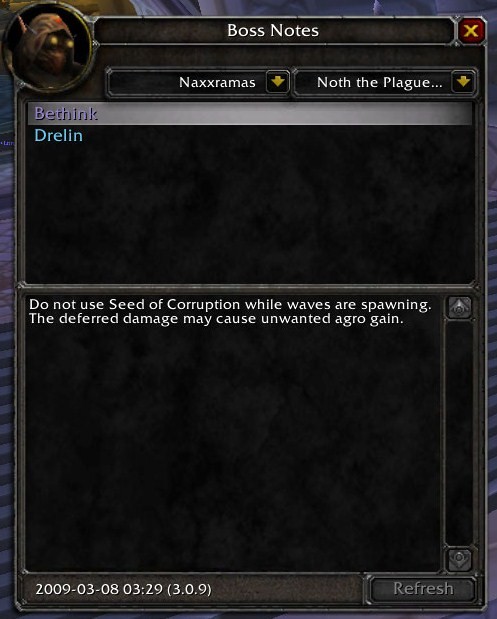
Boss Notes
About Boss Notes
Boss Notes provides shareable notes and other information for your guild, party and raid community. The add-on lets you take notes from your boss encounter learnings and share this information with other players. You can also use Boss Notes as a general, structured in-game notepad. In addition, Boss Notes records trash and boss abilities as well as boss emotes and provides a collection of short encounter tactics. With the powerful Rules module, you can extend your existing boss mod with additional encounter rules for custom notifications, timers, raid target icons and yells.
Boss Notes is based on a modular design. The standard distribution contains the Personal Notes, Abilities, Emotes, Tactics and Rules modules. Extension modules can provide additonal functionality.
Usage
If you have a Lightweight Data Broker (LDB) container add-on such as Titan Panel, Boss Notes shows in that container. Left-clicking the Boss Notes icon toggles the Boss Notes window; right-clicking the icon shows the options.
If you do not have an LDB container, type /bn toggle to show the Boss Notes window and /bn options to show the options.
Boss Notes provides a key binding to toggle the Boss Notes window. You may want to assign a key to that binding to gain quick access to Boss Notes.
Screenshots
The Boss Notes window lets you choose between the generic category and specific instances and encounters. The window then displays the information available on the selected category. Boss Notes automatically switches the category when a known mob is mouseovered or targeted in a dungeon or raid.

The Boss Notes tooltip provides quick access to the currently selected information.

All information can be sent to various types of chats.

Modules
Boss Notes functionality is provided by modules. The following sections describe the modules that are part of the Boss Notes standard distribution.
Personal Notes
The Personal Notes module provides shareable notes. Notes are by default shared with other players in your guild, party or raid. Other players can browse your notes and you can browse theirs. Sharing happens transparently in the background. If you want to limit the distribution of your notes, you can disable sharing for the guild, party or raid in the addon options under Syndication.
To edit a personal note, left-click on the content area in the lower half of the Boss Notes window. This opens the editor. The editor supports in-game links by shift-clicking. This allows you to link to items, abilities, tradeskills and other information in your notes.

For each category, there is a public default note. You can right-click a note to bring up a context menu that allows you to add to remove additional notes. Additional notes can be either public or private notes. Public notes are by default shared with other players in your guild, party or raid. To ensure that Boss Notes does not cause excessive network traffic, public notes are limited to 1'000 bytes per note. Boss Notes uses smart caching to further reduce network traffic. Private notes on the other hand are not shared with other players. Therefore, they have a much higher size limitation which is currently set at 10'000 bytes per note.

Player Name Colorizing
Player names can be colorized in personal notes. This is useful for raid leaders to quickly check and update encounter setup macros. To colorize a player name, enclose it in double curly braces, i.e. {{Player}}. Players with this markup are colorized as follows:
- Green if the player is in raid groups 1-5
- Red if the player is in raid groups 6-8
- Grey if the player is not in the raid
Abilities
The Abilities module lists the abilities of known trash mobs and bosses (NPCs) in dungeons and raids. The module differentiates between 10 player and 25 player difficulty as well as normal and heroic difficulty. Abilities are learned automatically as they are used by the NPCs.
Please note that only the boss abilities matching the current dungeon or raid size and difficulty are displayed and that abilities are learned seperately for each difficulty.

The encounter database is still work in progress. It is fairly complete for Cataclysm and Wrath of the Lich King, and less complete for older dungeons and raids. Please consult the Encounter Database Status page for more information.
Emotes
The Emotes module lists the emotes, whispers and yells of known trash mobs and bosses (NPCs) in dungeons and raids.

Tactics
The Tactics module provides short tactics for dungeon and raid encounters. The tactics are maintained by DrKazza. Please contact him directly if you have feedback on the content or want to contribute.

Customizing Tactics
You can right-click on a tactics entry in order to copy its content to the clipboard. From there, you can paste it in a personal note and customize it to fit your needs.
Rules
The Rules module allows the definition of custom encounter rules for notifications, timers, raid target icons and yells. In a nutshell, it supports a roll-your-own boss mod approach to encounters which is completely in-game and does not require programming. Instead, declarative rules are used. The rules module is not intended to replace your current boss mod. Rather, it provides bridges to common boss mods that integrate your custom rules with the regular display provided by your boss mod. As the Rules module is powerful and complex, its complete description is on a separate page.

Learning Mode
Learning mode is an advanced feature that is used by the Boss Notes development team in order to maintain the encounter database that is included with Boss Notes. When playing on live, you generally do not need to use this option. Especially, you do not need to use this option for Boss Notes to learn NPC abilities.
You may want to use the learning mode when playing new content on a beta or test realm where the encounter database is not yet up to date. Use the /bn learn command after entering the zone. This causes Boss Notes to begin associating unknown NPCs with the currently selected instance and encounter while you are in the zone. Learning can be stopped by typing the same command again. Learnings can be cleared by typing /bn clear. NPCs are always learned on the currently selected instance and encounter. Please note that this selection must be adjusted manually in many cases as there is no automatic switching for learned NPCs.
Reporting Bugs
Please use the Ticket System on WowAce when reporting bugs. This ensures that your error reports receive proper and timely processing. You can log in on WowAce with your Curse Network account. Posting error reports in the comments section on Curse.com is not recommended and most likely leads to the respective comment being deleted without consideration.
Extending Boss Notes
Boss Notes is based on a modular design. The add-on can be extended with additional modules. Please see the Boss Notes Provider Modules page for further information.
Comments


-

_ForgeUser1343643 Owner
-
_ForgeUser733470 Contributor
-

Everi7 Maintainer
-
View User Profile
-
Send Message
Posted Jun 24, 2021If you are looking for updated version for TBC-Classic and Retail visit BossNotes - Addons - World of Warcraft - CurseForge For recent updates to this addon
-
View User Profile
-
Send Message
Posted Dec 7, 2020Can't seem to find a replacement for this.
-
View User Profile
-
Send Message
Posted Oct 23, 2014love this addon as well hoping for an update and thanks for all your super amazing hard work!
-
View User Profile
-
Send Message
Posted Oct 16, 2014Any Chance In An Update For Patch 6.0.2? love this addon
-
View User Profile
-
Send Message
Posted Nov 26, 2013I found and fixed the error that ToeS and later raid critters are not recognised: the GUID critter ID has gotten wider. To edit it yourself, open data.lua and jump to the very end. Change the first '7' to '6', and reload your UI. Now those bosses and critters should be correctly recognised.
If you are still looking for someone to take over maintenance I would be happy to do it; I find the addon useful enough that I would like to keep it working. (Not radically dissimilar to what I do in my day job, either, which helps. :)
-
View User Profile
-
Send Message
Posted Nov 27, 2013Slippy that's awesome... one of those under the radar changes that don't get released in the patch notes.
I'll make the changes tonight and push a new release - glad someone's found it, it's been bugging me for a while.
I'm still lurking for general maintenance, but Iverie's taken on the mantle of updating tactics etc. Appreciate the offer though and many thanks for the fix
-
View User Profile
-
Send Message
Posted Nov 27, 2013Great; I have a handful of other improvements I have my eye on, so if they work out I will submit them to you. Is this the best place to put them up? (patch in a gist work for you? :)
-
View User Profile
-
Send Message
Posted Oct 15, 2013Iverie's done a great job of sending through new tactics, but after the last tacitcs have gone up for Garrosh then I'm going to look to duck out.
If anyone wants to take over the project - including updating new NPCs & tactics and any bugfixes when Lua code is changed please let me know
Kaz
-
View User Profile
-
Send Message
Posted Sep 8, 2013Great! I'll download the alpha from Wow Ace and let you know of any problems I have.
I always write my on strats for use with Boss Notes. So, I'll be happy to pass my write-ups on to you as I create them. I'll have the first four bosses done by Tuesday. How should I send them to you?
Thanks!
-
View User Profile
-
Send Message
Posted Sep 9, 2013(check P.M.)
-
View User Profile
-
Send Message
Posted Sep 4, 2013Update for 5.4 bosses?
-
View User Profile
-
Send Message
Posted Sep 5, 2013There's an alpha version I've uploaded to wowace (r373)
http://www.wowace.com/addons/boss-notes/files/
but i'm not on the PTR to test it nor have I had the chance to read the tactics. If anyone could be awesome enough to write tactics for the new 14 bosses and let me know that would be great
-
View User Profile
-
Send Message
Posted Sep 11, 2013il try to add those tactics when i get a chance to play some and ofc by other means , just got offered new job next week so i could be a little while sorry about that ......
-
View User Profile
-
Send Message
Posted May 19, 2013Also when you log off it doesn't save notes to other people. Could you make this into a guild lead tool or make another addon similar that you could transfer notes and they stay with the people that you transfer them to? This addon would be gold if if was tweeked a bit. and its almost eaxtly what I have been looking for since notes u need stopped being updated
-
View User Profile
-
Send Message
Posted May 20, 2013By far the easiest way to do this would be for you to go into:
interface/addons/BossNotes_Tactics/Tactics-enUS.lua
Scroll down to the bottom and edit the tactics yourself in notepad. Save the file and you're done. You'd then e-mail the file to the rest of the guild officers who would replace that file in their directory and voila. That's a 10 second fix but it requires your guild to coordinate the files.
The other functionality is possible... I'd need to work on a way to copy tactics to personal notes, and then edit it and then share the personal notes with other people who have the addon. It's all possible but requires time and testing and I'm a bit stuck at work at the moment. Anyone who can code who wants to take a look and see if they can do something along these lines would be very welcome to help out.
-
View User Profile
-
Send Message
Posted May 20, 2013I really didnt mean tactics I mean to use the addon as a note keeping addon for non boss related notes. For instance if i wanted to jot down who was in a particular raid group then I could just make a note for it and it would instantly transfer and save to another officers(or person in guild who had the addon) own notes and foward them to others as needed by the recieving parties. As it stands when I log off their notes from me vanish untill I log back in. The notes already show up from one toon to another (have to refresh sometimes...maybe make that auto) could the addon just save those as a new note on the 2nd parties end? Personal note exchange would be cool but not needed as they are personal notes. An edit function on their end would be nice so that they could also make changes as needed. and auto spam function would really be sick, so that when I want to spam a note in guild it could do it at certain intervals, in a certain channel and maybe do more than one message at a time. this could be used for different message of the day ads or even for recruiting though trade. I know there are addons for this so its not as important but I would really love to be able to use one addon for all of these needs. Whats your doing with this addon is fantastic and please dont lose your drive to update it. It has serious potential and If it had the right features could be one of the most downloaded addons yet but it needs a few more functions and needs to be marketed as a tool for officers and raid leads as well as for boss encounters. Keep up the good work and hey i'm full of sick ass addon ideas if you ever need someone for brainstorming.
-
View User Profile
-
Send Message
Posted May 24, 2013OK, So i've not used the "Personal Notes" module myself, but it seems that when Bethink wrote the addon he put most of this functionality in there.
The only thing that I think needs to be added is that when the person with the notes logs off then clearly all the notes disappear, so there needs to be a function to "Store Gorvine's Notes as my own" that way officers can store notes and edit them themselves.
-
View User Profile
-
Send Message
Posted May 19, 2013Any chance you could make it so that others can edit notes? This would be a sick tool for Gm's/Officers/Co-Gm's, etc. and maybe make so that notes that have been shared between one person to another can be auto shared though the 2nd person rather than have to have the original note maker log in? This would make sharing noted more efficent between the guild/players
-
View User Profile
-
Send Message
Posted Mar 25, 20133x BossNotes_Emotes-1.5.2.4\Emotes.lua:287: table index is nil
BossNotes_Emotes-1.5.2.4\Emotes.lua:287: in function "?"
libs\CallbackHandler-1.0\CallbackHandler-1.0-6.lua:147: in function <libs\CallbackHandler-1.0\CallbackHandler-1.0.lua:147>
<string>:"safecall Dispatcher[16]":4: in function <string>:"safecall Dispatcher[16]":4
<in C code>
<string>:"safecall Dispatcher[16]":13: in function "?"
libs\CallbackHandler-1.0\CallbackHandler-1.0-6.lua:92: in function "Fire"
AckisRecipeList-2.4.6\libs\AceEvent-3.0\AceEvent-3.0-3.lua:120: in function <AckisRecipeList\libs\AceEvent-3.0\AceEvent-3.0.lua:119>
Locals:
nil
-
View User Profile
-
Send Message
Posted Mar 22, 2013Throne of Thunder tactics uploaded - also fixed all those bugs with the previous release